
Important Safety Instructions
Please read and save these important safety instructions before using your KZF Humidifier. Failure to follow these instructions may result in electric shock, fire, or serious injury.
- Always place the humidifier on a firm, flat, waterproof surface at least 12 inches (30 cm) away from walls and appliances.
- Do not place the humidifier on carpet or rugs.
- Do not immerse the humidifier base in water or other liquids.
- Unplug the humidifier from the power outlet before filling, cleaning, or moving it.
- Do not operate the humidifier with a damaged cord or plug.
- Keep the humidifier out of reach of children and pets.
- Use only clean, cool tap water. Do not add essential oils directly into the water tank as this may damage the unit.
- Do not block the mist outlet.
- Ensure the water tank is securely placed on the base before operation.
Package Contents
Carefully unpack your humidifier and ensure all items are present. If any items are missing or damaged, please contact customer support.
- 1 x KZF 15L Humidifier Unit
- 1 x Remote Control (with 1 AAA battery included)
- 1 x User Manual (this document)
Product Overview
The KZF Humidifier Model ZG-563-A is an ultrasonic cool mist humidifier designed for large rooms. It features a 15-liter capacity, adjustable mist levels, precise humidity control, and remote operation.
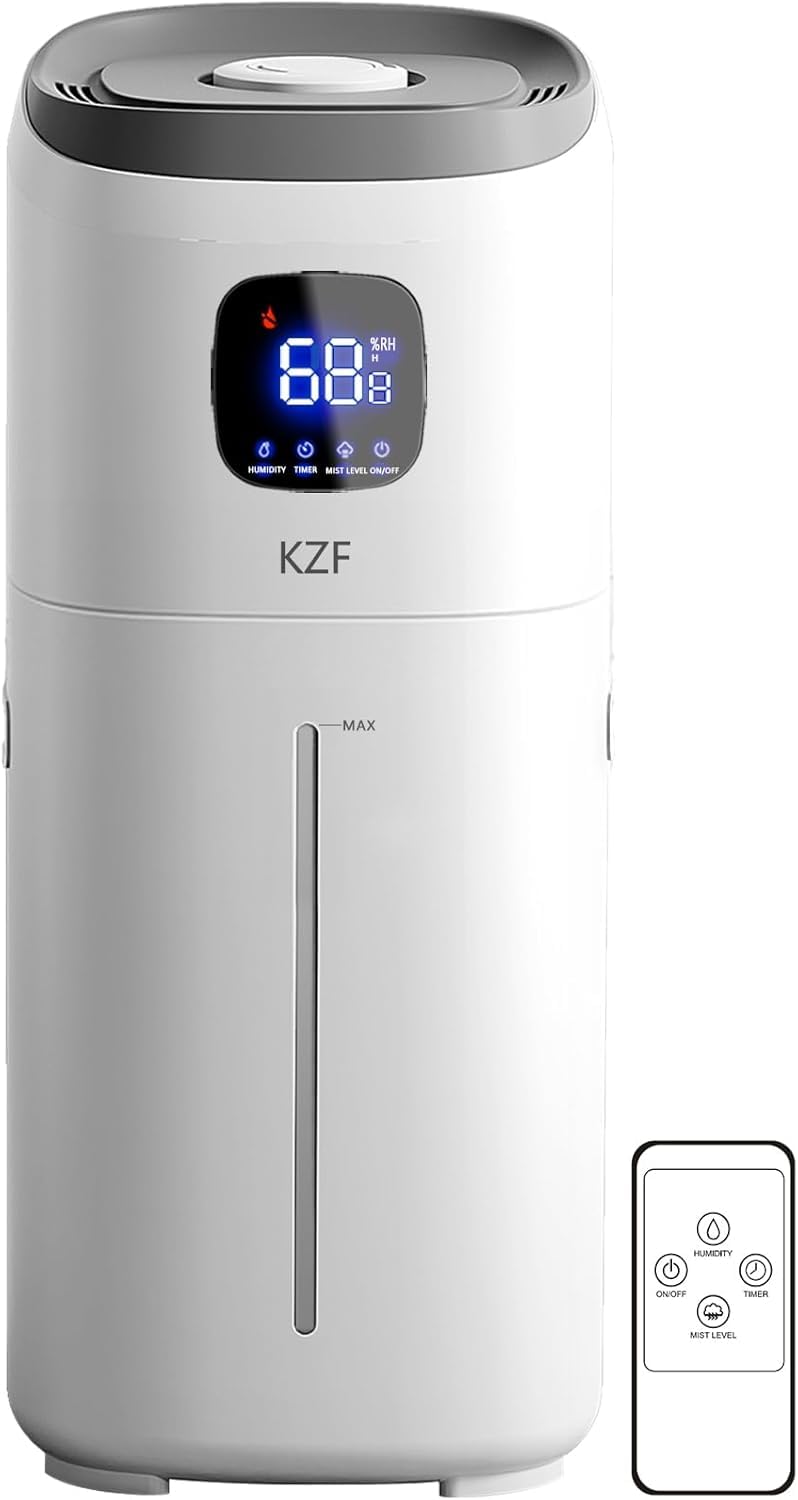
Image 1: KZF Humidifier Model ZG-563-A. This image shows the tall, cylindrical design of the humidifier with its top-fill opening and control panel.
Main Components:
- Water Tank: 15-liter capacity, detachable, top-fill design.
- Mist Outlet: 360° rotatable nozzle for directing mist.
- Control Panel: Touch controls for power, mist level, and humidity settings.
- Base Unit: Contains the ultrasonic transducer and fan.
- External Humidity Sensor: For accurate room humidity detection.
- Remote Control: For convenient operation from a distance.
Setup
1. Placement
- Place the humidifier on a flat, stable, and waterproof surface.
- Ensure it is at least 12 inches (30 cm) away from walls, furniture, and electronic devices.
- Avoid placing it directly on carpet or near heat sources.
- This humidifier is suitable for various room types including bedrooms, living rooms, offices, plant rooms, and yoga rooms.
2. Filling the Water Tank
- Ensure the humidifier is unplugged from the power outlet.
- Remove the top cover of the humidifier.
- Pour clean, cool tap water directly into the water tank opening. Do not exceed the maximum fill line.
- Alternatively, you can move the entire machine under a faucet to fill it directly.
- Replace the top cover securely.
3. Power Connection
- Plug the power cord into a standard 120V AC electrical outlet.
- The humidifier is now ready for operation.
Operating Instructions
1. Power On/Off
- Touch Control: Press the Power button on the control panel to turn the humidifier on or off.
- Remote Control: Press the Power button on the remote control to turn the humidifier on or off.
2. Adjusting Mist Volume
The humidifier offers 3 adjustable mist levels (Low, Medium, High).
- Touch Control: Press the Mist Level button repeatedly to cycle through Low, Medium, and High settings.
- Remote Control: Use the dedicated Mist Level buttons on the remote to select your desired mist output.
3. Setting Desired Humidity
The KZF Humidifier features an external humidity sensor for precise control. You can set your desired humidity level between 55% and 95% in 5% increments.
- Touch Control: Press the Humidity Set button to adjust the target humidity. The humidifier will automatically maintain this level.
- Remote Control: Use the Humidity Up/Down buttons on the remote to set the desired humidity.
- The humidifier will stop misting when the target humidity is reached and restart when the humidity drops below the set value.
4. Directing Mist
The mist nozzle can be rotated 360° to direct the mist flow in any desired direction.
- Gently rotate the top mist outlet to adjust the direction of the cool mist.
5. Safety Features
- Water Shortage Alarm: The humidifier will alert you when the water level is low.
- Dry Burning Prevention: The unit will automatically shut off if the water tank is empty to prevent damage.
- Automatic Shut-off: The humidifier will turn off automatically when the set humidity level is reached.
Maintenance
Regular cleaning is essential for optimal performance and hygiene of your humidifier. Always unplug the unit before cleaning.
Daily Maintenance:
- Empty any remaining water from the tank and base.
- Rinse the water tank with fresh water.
- Wipe the base unit with a clean, damp cloth.
- Refill with fresh water before each use.
Weekly Cleaning:
- Unplug the humidifier and empty all water.
- Remove the top cover and water tank.
- To clean the water tank: Fill the tank halfway with water and add 2 tablespoons of white vinegar. Shake vigorously and let it sit for 30 minutes. Rinse thoroughly with clean water until the vinegar smell is gone.
- To clean the base unit: Gently wipe the ultrasonic transducer (the small disc) and the surrounding area with a soft brush or cloth dipped in white vinegar. Do not scrub aggressively. Rinse the base with clean water, being careful not to get water into the air outlet.
- Wipe all surfaces dry before reassembling.
Note: Do not use harsh chemicals, abrasive cleaners, or detergents. Do not immerse the base unit in water.
Troubleshooting
If you encounter issues with your humidifier, please refer to the following common problems and solutions:
| Problem | Possible Cause | Solution |
|---|---|---|
| No mist or very little mist |
|
|
| Unusual odor from mist |
|
|
| Water leakage |
|
|
| Humidifier turns off unexpectedly |
|
|
If the problem persists after trying these solutions, please contact KZF customer support.
Specifications
| Brand | KZF |
| Model Name | ZG-563 |
| Operation Mode | Ultrasonic |
| Capacity | 15 Liters (3.8 Gallons) |
| Mist Output | Up to 550 ml/hour |
| Coverage Area | Up to 800 square feet |
| Humidity Control Range | 55% - 95% (in 5% increments) |
| Voltage | 120 Volts |
| Wattage | 25 Watts |
| Product Dimensions (D x W x H) | 7.51" x 7.36" x 23.07" |
| Item Weight | 5 Pounds |
| Special Features | Adjustable Humidity Control, Quiet Operation, Remote Control, Top-Fill Design, 360° Rotating Nozzle, Auto Shut-off |
Warranty and Support
KZF provides the following warranty for your humidifier:
- 120 Days Replacement: For any manufacturing defects or issues within 120 days of purchase.
- 12 Months Warranty: Covers defects in materials and workmanship for a period of 12 months from the date of purchase.
For warranty claims, technical support, or any questions regarding your KZF Humidifier, please contact our customer service team. You can typically find contact information through your order detail page or the KZF official website. Our support team aims to respond within 12 hours to assist you.