
Product Overview
The CACACOL Vidda C5 Boundless Master 4K Projector is a high-performance home cinema device designed to deliver stunning visual and audio experiences. It features advanced tri-color laser technology, native 4K UHD resolution, and smart connectivity options. This manual provides essential information for setup, operation, and maintenance to ensure optimal performance and longevity of your projector.
Key Features
- Pure Laser Power: Alpha Dual MCL RGB Laser Optical Engine delivers 8500 ISO Lumens (6800 CVIA lumen) with 56 industrial-grade laser chips for vibrant colors across DCI-P3 and 110% BT.2020 color spaces.
- Cinema-Grade Image Quality: Native 4K UHD resolution with Third-Generation SST Architecture DMD, ΔE<0.7 color accuracy, and support for Dolby Vision, IMAX Enhanced, HDR10+, HLG, and HDR Vivid. Features a native 8000:1 contrast ratio.
- Adaptive Optics: 17pcs Pure Optical Glass Elements with a Φ122mm Diameter Large Lens, 0.84–2.0:1 Super Lossless Optical Zoom, and ±130% Vertical & ±46% Horizontal Super Lossless Optical Shift for flexible 50~300" projection. Includes auto focus, obstacle avoidance, screen alignment, and human-eye protection sensors.
- Immersive Audio: Sound by J&L with Dual 8W Full Range and 15W Independent subwoofer Chamber, tuned with Dolby Digital+ and DTS:X support. HDMI 2.1 eARC outputs 7.1.4-channel surround audio. Integrated Liquid Cooling System ensures quiet operation.
- Smart Connectivity: Powered by MediaTek MT9681 Quad A73 processor with 8GB RAM + 1TB storage. Built-in Android Chinese OS with English support, AirPlay, Android Cast, Huawei Cast+, and Miracast. Compatible with KD3 Google TV Stick for Google & Netflix Licensed Android TV OS Global Version.
What's in the Box
- CACACOL Vidda C5 Boundless Master 4K Projector
- Power Adapter
- Remote Control
Product Components and Ports
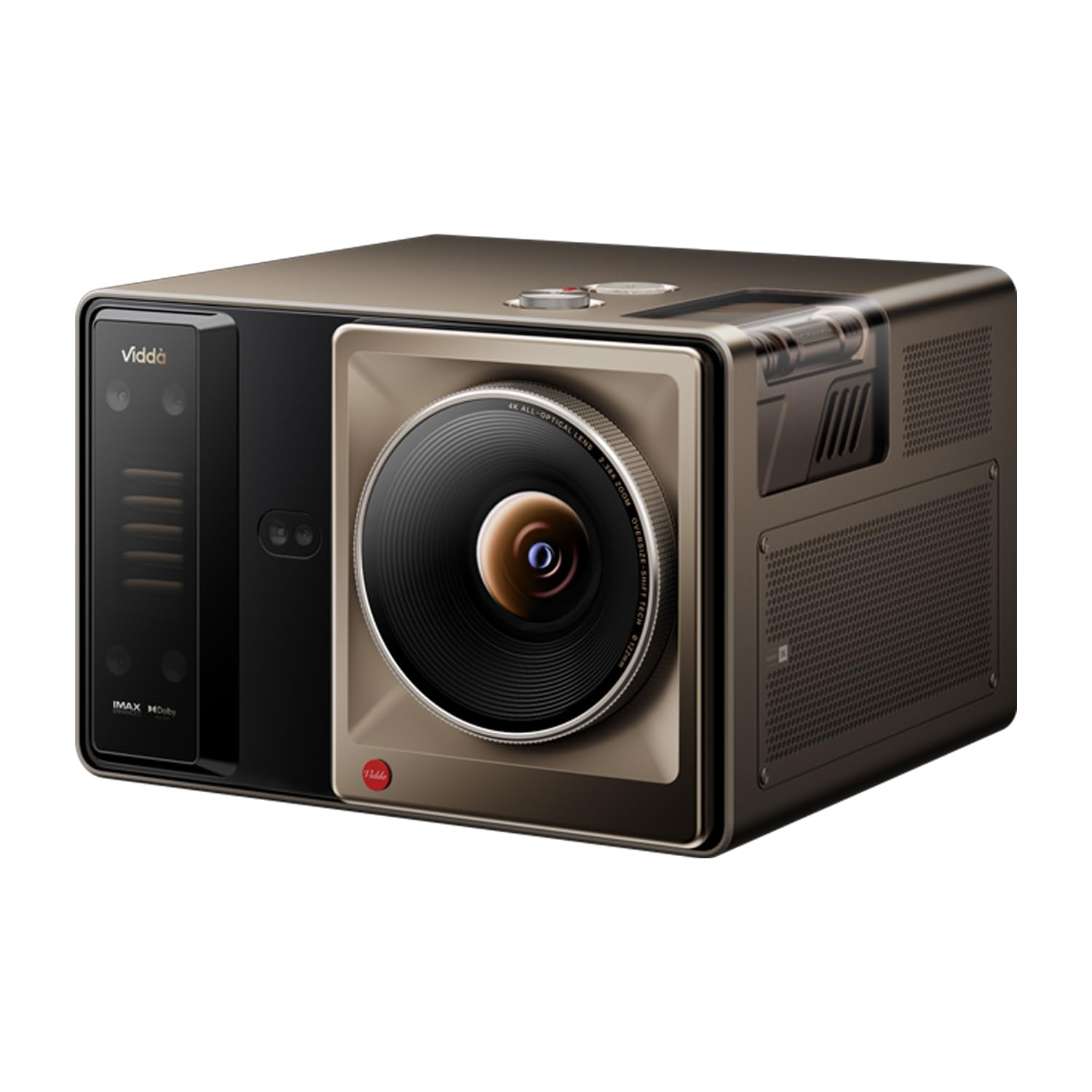
Image: Top and back view of the CACACOL Vidda C5 Projector, showcasing its sleek design and port layout. The top features the lens and ventilation, while the back panel houses various connectivity options.
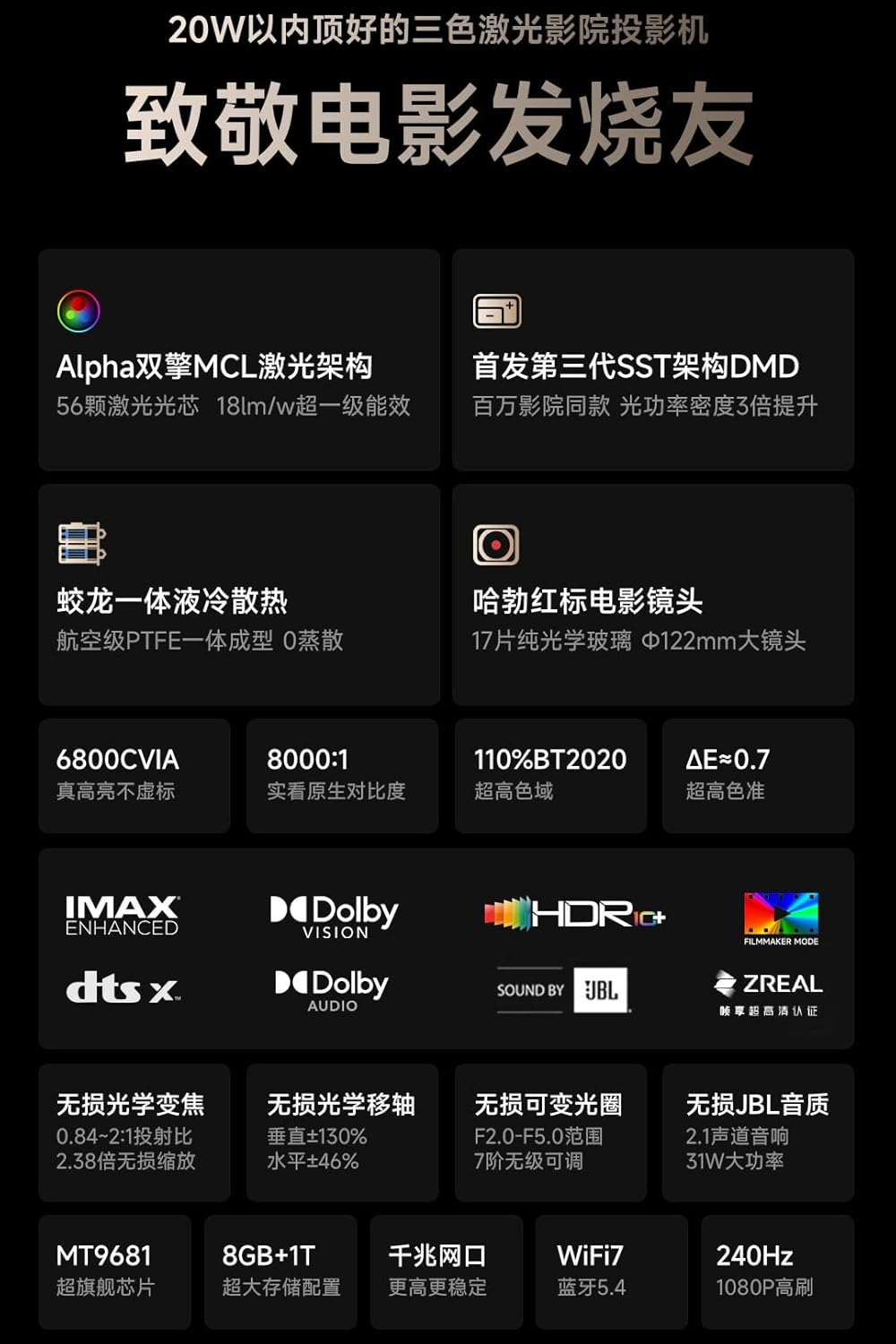
Image: Close-up view of the projector's rear panel, detailing the input and output ports. These include S/PDIF, Service USB, USB 1, LAN, AV IN, HDMI 2 (eARC), and HDMI 3, along with the power input.
Port Descriptions:
- S/PDIF: Digital audio output for connecting to external audio systems.
- Service USB: For firmware updates and service use.
- USB 1: For connecting USB storage devices or accessories.
- LAN: Ethernet port for wired network connection.
- AV IN: Analog audio/video input for older devices.
- HDMI 2 (eARC): HDMI input with enhanced Audio Return Channel for high-quality audio passthrough to compatible sound systems.
- HDMI 3: Standard HDMI input for connecting various media sources.
- Power Input: For connecting the power adapter.
Setup
Placement
Position the projector on a stable, flat surface. The ultra-short throw design allows for placement inches away from the projection surface. Consider the desired screen size (50-300 inches) and adjust the projector's distance accordingly. The projector features optical zoom and shift for fine-tuning the image position without moving the unit.
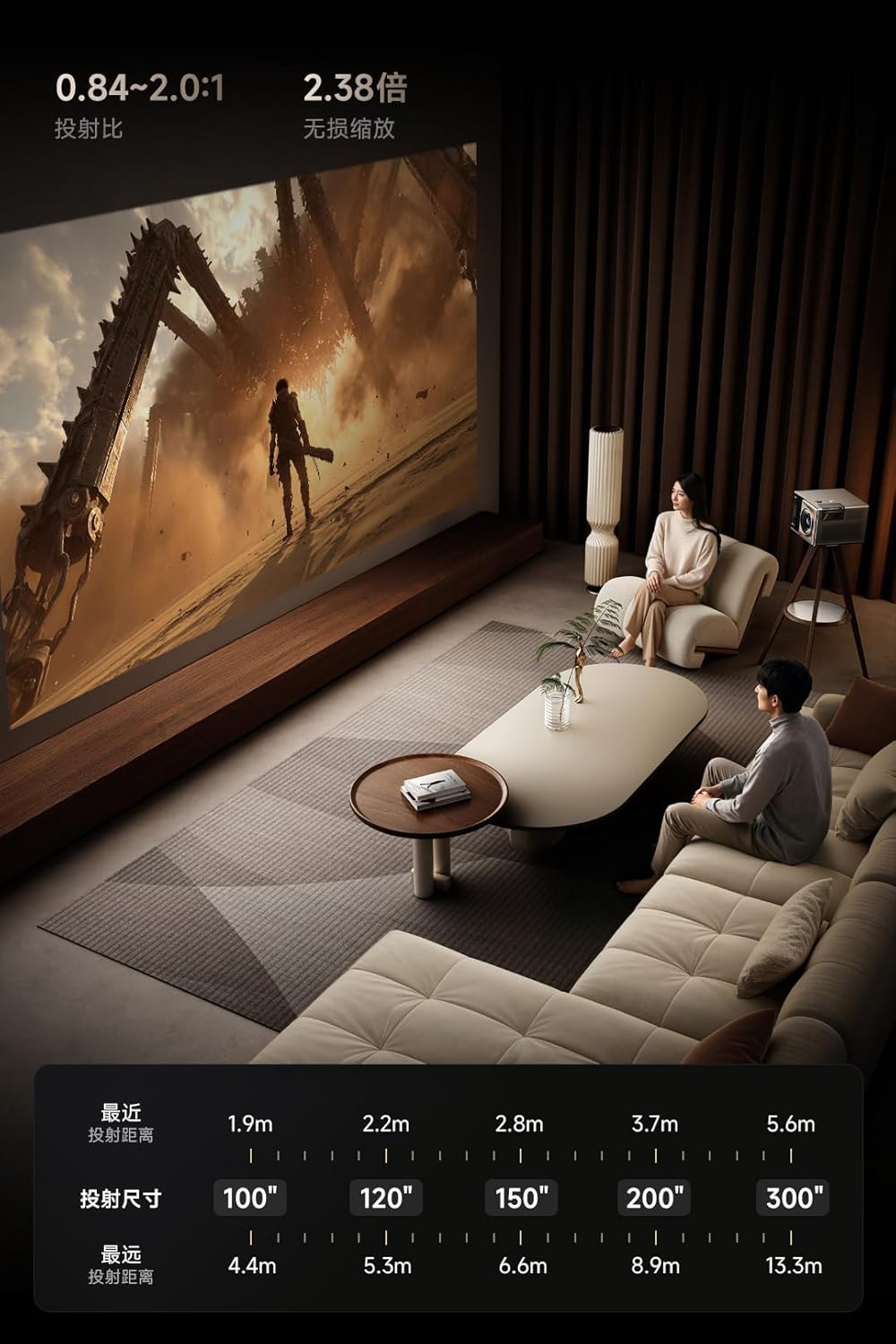
Image: An example of projector placement in a living room setting, demonstrating how the ultra-short throw allows for a large image from a short distance to the wall, integrating seamlessly into the home environment.

Image: A chart illustrating the relationship between projection distance and screen size, providing guidance on how far to place the projector from the wall to achieve various screen dimensions from 100 to 300 inches.
Initial Power-On and Automatic Adjustments
- Connect the power adapter to the projector and a power outlet.
- Press the power button on the projector or remote control.
- The projector will automatically perform autofocus, obstacle avoidance, and screen alignment to optimize the image for your environment.
Video: This video demonstrates how to use Spatial Adaptation and Spatial Recall features, which automatically adjust the projector's image to fit the screen and environment, and how to save these settings for future use in different spaces.
Operating Instructions
Smart OS and Streaming
The projector runs on an Android Chinese OS with English language support. You can navigate the interface using the provided remote control. For a full Google TV experience with licensed Netflix and other streaming services, connect the included KD3 Google TV Stick to an HDMI input.
Audio Experience
The integrated J&L audio system provides rich sound with dual 8W full-range speakers and a 15W independent subwoofer. It supports Dolby Digital+ and DTS:X. For external audio systems, use the HDMI 2.1 eARC port for 7.1.4-channel surround audio output.
Connectivity
The projector supports Wi-Fi 7 and Bluetooth 5.4 for seamless wireless connections. You can also use AirPlay, Android Cast, Huawei Cast+, and Miracast for screen mirroring from compatible devices.

Image: An overview of the projector's advanced features, including Alpha Dual MCL Laser, SST Architecture DMD, liquid cooling, Hubble Red Label Cinema Lens, 6800 CVIA lumens, 8000:1 contrast, 110% BT.2020 color gamut, and various HDR/audio supports.

Image: Detailed view of the projector's optical system, highlighting the 8000:1 native contrast, 0.84~2.0:1 projection ratio, Hubble Red Label Cinema Lens with 17 pure optical glass elements, and ±130% vertical & ±46% horizontal optical shift capabilities.
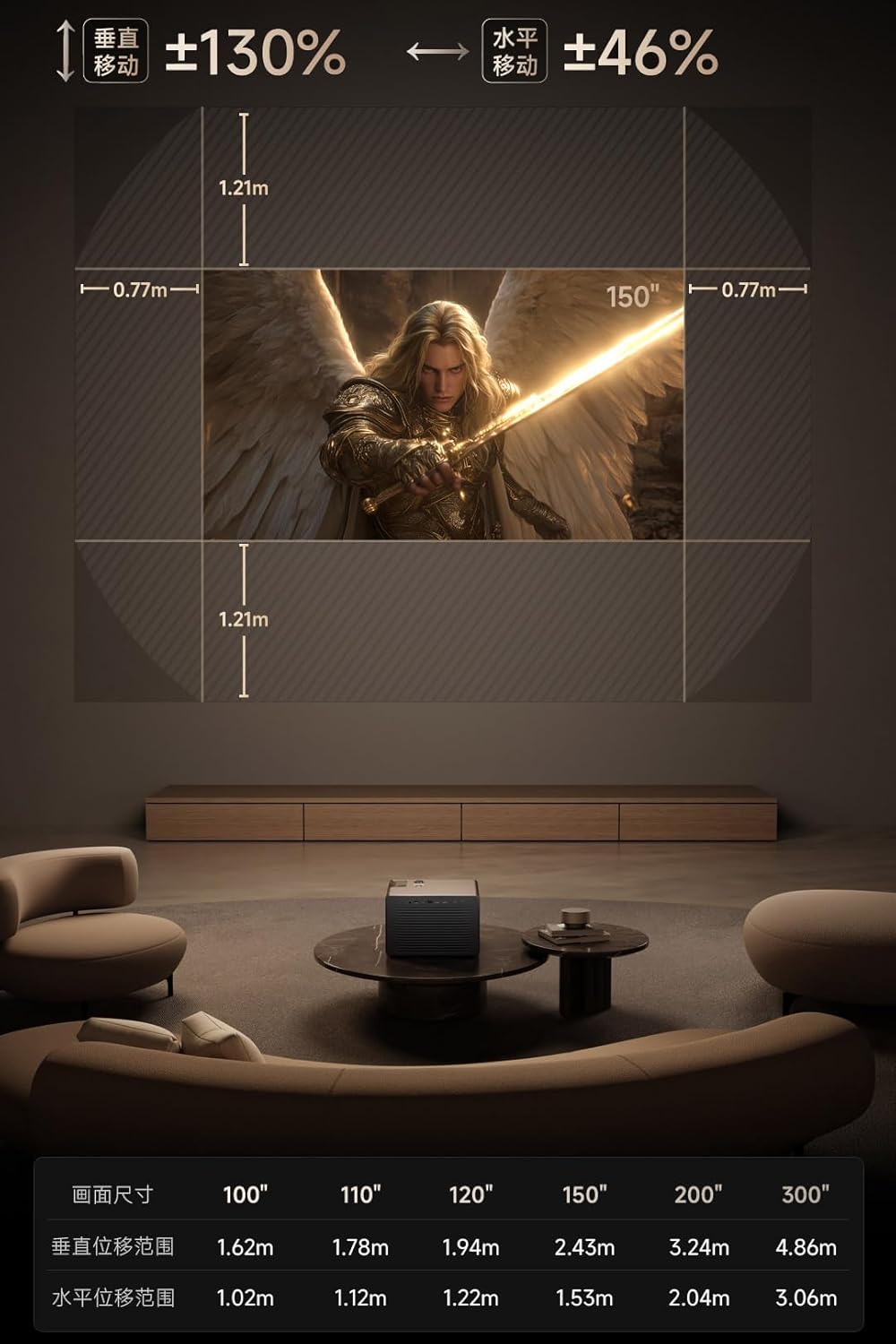
Image: Illustration of the projector's audio system, featuring J&L sound with 2x8W full-range speakers and a 15W independent subwoofer, along with details on the MT9681 flagship CPU, 8GB RAM + 1TB storage, WiFi 7, and Bluetooth 5.4 connectivity.
Maintenance
Cleaning
- Lens: Use a soft, lint-free cloth specifically designed for optical lenses to gently wipe the projector lens. Avoid abrasive materials or harsh chemicals.
- Sensors: Periodically clean the auto-focus and obstacle avoidance sensors with a dry microfiber cloth to ensure accurate performance.
- Exterior: Wipe the projector's exterior with a soft, dry cloth. Do not use liquid cleaners directly on the device.
Ventilation
The projector features an integrated liquid cooling system. Ensure that the ventilation grilles are not obstructed to allow for proper airflow and prevent overheating. Maintain adequate space around the projector for optimal heat dissipation.
Troubleshooting
Common Issues and Solutions
- No Picture: Ensure the power cable is securely connected and the projector is turned on. Check the input source selection (HDMI, etc.) matches your device.
- Blurry Image: Allow the automatic autofocus to complete. If still blurry, manually adjust focus via the settings menu. Ensure the projection surface is flat and clean.
- Image Not Aligned: The projector features automatic screen alignment. If the image is still skewed, check for any physical obstructions or manually adjust keystone correction in the settings.
- No Sound: Verify the volume is not muted or too low. Check audio output settings and ensure external audio devices are correctly connected via HDMI eARC or S/PDIF.
- Connectivity Issues (Wi-Fi/Bluetooth): Ensure the projector is within range of your Wi-Fi router or Bluetooth device. Restart the projector and your network equipment.
Specifications
| Feature | Specification |
|---|---|
| Brand | CACACOL |
| Model Number | C5-Boundless-Master |
| Display Resolution | 3840 x 2160 (4K UHD) |
| Brightness | 8500 ISO Lumens (6800 CVIA Lumen) |
| Contrast Ratio | Native 8000:1 |
| Color Accuracy | ΔE<0.7, DCI-P3, 110% BT.2020 |
| Light Source | Alpha Dual MCL RGB Laser Optical Engine |
| Processor | MediaTek MT9681 Quad A73 |
| RAM + Storage | 8GB RAM + 1TB Storage |
| Connectivity Technology | HDMI, USB, Wi-Fi 7, Bluetooth 5.4, LAN, AV IN, S/PDIF |
| Special Features | Auto Focus, Auto Obstacle Avoidance, Auto Screen Alignment, Built-In Speaker (J&L Audio), Digital Keystone Correction, Liquid Cooling System |
| Product Dimensions | 11.54 x 10.75 x 8.39 inches |
| Item Weight | 23.5 pounds |
Warranty and Support
This product is eligible for a 3-Year Protection Plan. For detailed warranty information and terms, please refer to the documentation included with your purchase or contact CACACOL customer support.
For technical assistance, troubleshooting, or any product-related inquiries, please visit the official CACACOL support website or contact their customer service team.