
1. Important Safety Information
Always prioritize safety when operating welding equipment. Failure to follow safety guidelines can result in serious injury or death. Read and understand all instructions before operating this machine.
- Eye Protection: Always wear a welding helmet with appropriate shade lenses to protect your eyes from arc flash.
- Body Protection: Wear flame-resistant clothing, welding gloves, and safety shoes to protect against sparks, heat, and electrical shock.
- Ventilation: Ensure adequate ventilation to remove welding fumes, which can be hazardous to your health.
- Electrical Safety: Do not operate the welder in wet conditions. Ensure proper grounding. Never touch live electrical parts.
- Fire Prevention: Keep a fire extinguisher nearby. Remove flammable materials from the welding area.
- Gas Cylinders: Handle gas cylinders with care. Secure them properly to prevent tipping.
2. Product Overview
The TOOLIOM 160A MIG Welder is a versatile 4-in-1 welding machine designed for various welding tasks. It integrates Gas MIG, Flux Core Gasless MIG, Stick (MMA), and Lift-TIG welding capabilities into a single compact unit. This machine is suitable for both hobbyists and professional welders, offering adaptability for thin sheet metal repairs to thick steel fabrication.
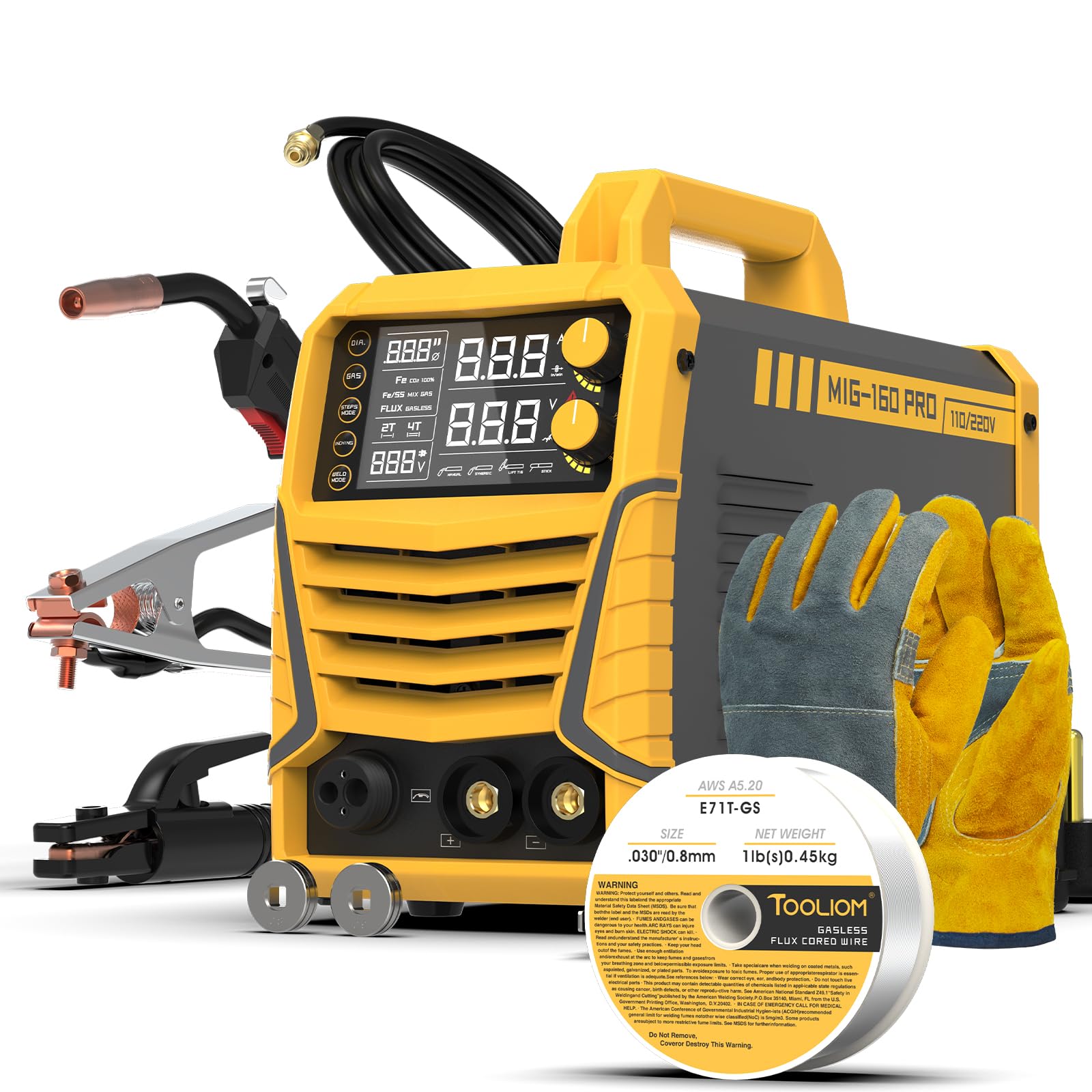
Image 2.1: The TOOLIOM 160A MIG Welder, showcasing its compact design.

Image 2.2: Visual representation of the welder's four primary functions: Gas MIG, Flux Core MIG, Stick, and Lift TIG.
3. Package Contents
Upon unboxing, verify that all components are present and undamaged. The standard package includes:
- TOOLIOM 160A MIG Welder Unit
- MIG Torch
- Electrode Holder (for Stick welding)
- Ground Clamp
- Gas Hose (for Gas MIG)
- Drive Rollers (quick-change)
- 1lb Welding Wire (starter spool)
- User Manual

Image 3.1: A visual display of the accessories included with the welding machine.
4. Machine Components
Familiarize yourself with the front panel controls and rear panel connections.
4.1 Front Panel

Image 4.1: The front panel featuring the LCD display, mode selection buttons, and adjustment knobs.
- LCD Display: Shows real-time welding parameters such as voltage, current, and wire feed speed.
- Mode Selection: Buttons to switch between Gas MIG, Flux Core MIG, Stick (MMA), and Lift TIG modes.
- Adjustment Knobs: For fine-tuning parameters like voltage, wire feed speed, inductance, Hot Start, and ARC Force depending on the selected mode.
- Output Terminals: Connections for MIG torch, electrode holder, and ground clamp.
4.2 Rear Panel
- Power Input: Dual voltage 110V/220V auto-recognition.
- Gas Inlet: Connection for shielding gas hose (for Gas MIG).
- Cooling Fan: Ensures continuous cooling during operation.
5. Setup
5.1 Power Connection
- Ensure the welder is switched off.
- Connect the power cord to a suitable 110V or 220V power outlet. The machine features auto-recognition for dual voltage.
- Verify the power source meets the welder's requirements.
5.2 Gas Connection (for Gas MIG)
- Securely attach the gas hose to the gas inlet on the rear panel of the welder.
- Connect the other end of the gas hose to your shielding gas regulator and cylinder.
- Ensure all connections are tight to prevent gas leaks.
5.3 Wire Spool Installation
- Open the wire spool compartment.
- Place the appropriate wire spool (e.g., 1lb solid wire or flux-cored wire) onto the spindle.
- Thread the wire through the drive rollers. Ensure the correct drive roller size is selected for your wire diameter (.023"/.030"/.035"). The machine includes quick-change drive rollers.
- Feed the wire into the MIG torch liner until it emerges from the contact tip.
5.4 Torch and Ground Clamp Connection
- Connect the MIG torch to the appropriate output terminal for MIG welding.
- Connect the ground clamp cable to the designated ground terminal.
- For Stick (MMA) welding, connect the electrode holder to the positive terminal and the ground clamp to the negative terminal (or vice-versa depending on electrode polarity).
6. Operating Modes
The TOOLIOM 160A offers four distinct welding processes. Select the desired mode using the front panel controls.
6.1 Synergic MIG Mode (for Novices)
This mode simplifies MIG welding by automatically synchronizing voltage with the wire feed speed. It is ideal for beginners.
- Auto-Sync: The machine intelligently adjusts voltage based on the selected wire feed speed (60~320 inch/min).
- Micro-Voltage Tuning: Allows minor adjustments to voltage to adapt to specific welding scenarios, ensuring stable arcs and clean weld beads.

Image 6.1: Illustration of the Synergic MIG mode, highlighting automatic parameter synchronization.
6.2 Manual MIG Mode (for Professionals)
For experienced welders, Manual MIG mode provides full control over welding parameters.
- Adjustable Parameters: Independently control wire feed speed, voltage, and inductance (-10~+10 range).
- Customization: Allows precise tuning for specific materials, joint types, and desired weld characteristics.
6.3 Stick (MMA) Mode
This mode is for welding with coated electrodes.
- Hot Start (0~10): Provides an initial surge of current to prevent the electrode from sticking at the start of the weld.
- ARC Force (0~10): Helps maintain a stable arc and prevents sticking by temporarily increasing current when the arc length shortens.
- VRD (Voltage Reduction Device) (ON/OFF): Reduces open-circuit voltage for increased safety when not welding.
- Anti-Stick (ON/OFF): Automatically reduces current if the electrode sticks, making it easier to detach.

Image 6.2: Controls for fine-tuning parameters in Manual MIG and Stick welding modes.
6.4 Lift TIG Mode
For precise TIG welding, requiring a separate TIG torch (not included).
- Lift Arc Ignition: Initiates the arc by briefly touching the tungsten electrode to the workpiece and then lifting it, minimizing contamination.
- Gas Flow: Requires external gas control for shielding gas.
7. Maintenance
Regular maintenance ensures the longevity and optimal performance of your welding machine.
7.1 General Cleaning
- Periodically clean the exterior of the machine with a dry cloth.
- Use compressed air to blow out dust and metal particles from inside the machine, especially around the cooling fan and circuit boards. Ensure the machine is unplugged before cleaning.
7.2 Drive Roller Replacement
The drive rollers are designed for quick changes. Ensure you use the correct groove size for your welding wire to prevent feeding issues.
7.3 Cooling System
The machine features a continuous cooling system and overheat/overcurrent/overload protection. If the machine stops during operation, allow it to cool down. Do not block the ventilation openings.

Image 7.1: Internal components and cooling fan, essential for maintaining operational temperature.
8. Troubleshooting
This section provides solutions to common issues you might encounter.
8.1 No Power
- Check the power cord connection and ensure it is securely plugged into a live outlet.
- Verify the power switch on the machine is in the 'ON' position.
- Check the circuit breaker or fuse for the power outlet.
8.2 Poor Weld Quality / Unstable Arc
- Incorrect Settings: Adjust voltage and wire feed speed according to the material thickness and welding process. Refer to recommended settings.
- Poor Ground Connection: Ensure the ground clamp is securely attached to a clean, bare metal surface on the workpiece.
- Contaminated Material: Clean the workpiece of rust, paint, or oil.
- Incorrect Gas Flow (Gas MIG): Check gas cylinder pressure and regulator settings. Ensure gas hose is not kinked or leaking.
- Worn Consumables: Replace worn contact tips, nozzles, or electrodes.
8.3 Wire Feeding Problems
- Incorrect Drive Roller: Ensure the drive roller groove matches the wire diameter.
- Tension Too Loose/Tight: Adjust the drive roller tension. Too loose will cause slipping; too tight can deform the wire.
- Kinked Liner: Check the MIG torch liner for kinks or blockages. Replace if necessary.
- Spool Tangled: Ensure the wire spool is not tangled.
9. Specifications
Detailed technical specifications for the TOOLIOM 160A MIG Welder.
| Feature | Specification |
|---|---|
| Manufacturer | TOOLIOM |
| Part Number | TL-HJ-MIG-160-PRO-KIT |
| Item Weight | 22.6 pounds |
| Package Dimensions | 17.28 x 13.78 x 7.64 inches |
| Item Model Number | TL-MIG-160 |
| Size | 160A MIG Welder |
| Style | 160A Mig Welder |
| Material | metal |
| Power Source | AC |
| Voltage | 220 Volts (Dual 110V/220V Auto-Recognition) |
| Wattage | 4224 watts |
| Item Package Quantity | 1 |
| Included Components | MIG Welder |
| Compatible Wire Sizes | .023"/.030"/.035" solid wires, .030"/.035" flux-cored wires |
| Duty Cycle | 60% at 160A |
10. Warranty Information
Warranty terms and conditions for the TOOLIOM 160A MIG Welder are typically provided with your purchase documentation. Please refer to the warranty card or contact the manufacturer/seller for specific details regarding coverage, duration, and claims procedures.
11. Customer Support
For technical assistance, troubleshooting beyond this manual, or inquiries regarding parts and service, please contact TOOLIOM customer support. Refer to the contact information provided in your product packaging or visit the official TOOLIOM website.


