
Introduction
Thank you for choosing the MACAP MI40 Luxe On-Demand Espresso Grinder. This manual provides essential information for the safe and efficient operation, maintenance, and care of your new grinder. Please read all instructions carefully before use and retain this manual for future reference.

The MACAP MI40 Luxe On-Demand Espresso Grinder, featuring a sleek black finish and integrated touchscreen display.
Safety Information
Always follow basic safety precautions when using electrical appliances to reduce the risk of fire, electric shock, and injury.
- Read all instructions before operating the grinder.
- Do not immerse the grinder, cord, or plug in water or other liquids.
- Unplug from the outlet when not in use, before assembling or disassembling parts, and before cleaning.
- Avoid contact with moving parts.
- Do not operate any appliance with a damaged cord or plug, or after the appliance malfunctions or has been damaged in any manner. Contact customer support for assistance.
- The use of attachments not recommended or sold by the manufacturer may cause fire, electric shock, or injury.
- Do not use outdoors.
- Do not let the cord hang over the edge of a table or counter, or touch hot surfaces.
- Ensure the hopper lid is securely in place before operating.
- Only grind whole roasted coffee beans. Do not grind other substances such as nuts, spices, or instant coffee.
Setup
1. Unpacking
- Carefully remove all components from the packaging.
- Inspect the grinder for any signs of damage. If damaged, do not operate and contact your retailer.
- Remove all protective films and packaging materials.
2. Component Identification
Familiarize yourself with the main parts of your MI40 Luxe grinder:
- Hopper: Holds whole coffee beans.
- Hopper Lid: Covers the hopper.
- Grind Adjustment Dial: Located below the hopper, used to set grind fineness.
- Touchscreen Display: For programming and selecting dosing options.
- Dosing Spout: Where ground coffee is dispensed.
- Portafilter Holder: Supports the portafilter during grinding.
- Power Switch: Located on the side of the grinder.
3. Initial Assembly
- Install the Hopper: Place the hopper onto the grinder body, ensuring it seats correctly. Rotate it slightly until it locks into position.
- Install the Hopper Lid: Place the lid securely on top of the hopper.
4. Placement
Place the grinder on a stable, flat, and dry surface. Ensure there is adequate ventilation around the unit.
5. Power Connection
Plug the power cord into a grounded electrical outlet. Ensure the voltage matches the specifications listed on the grinder's rating label.
Operating Instructions
1. Filling the Hopper
Lift the hopper lid and pour whole roasted coffee beans into the hopper. Do not overfill. Replace the lid securely.
2. Grind Adjustment (Nice Grind Control Dial)
The MI40 Luxe features a stepless grind adjustment dial for precise control. To adjust the grind fineness:
- Turn the grinder ON using the power switch.
- Rotate the grind adjustment dial. Turning it clockwise results in a finer grind, and counter-clockwise results in a coarser grind.
- For espresso, start with a fine setting and adjust incrementally based on extraction time and taste. It is recommended to adjust the grind while the burrs are running to prevent jamming.

Detailed view of the Nice Grind Control Dial for precise grind fineness adjustment.
3. Touchscreen Dosing
The touchscreen allows for programmable dosing for single and double shots.
- Power On: Ensure the grinder is powered on. The touchscreen will illuminate.
- Select Dose: On the main screen, you will see icons for single and double shot doses. Tap the desired dose icon.
- Adjust Dose Time (if needed): To program the dose time, press and hold the desired dose icon until it enters programming mode. Use the '+' and '-' buttons on the screen to adjust the grinding time in seconds. Tap the icon again to save.
- Place Portafilter: Position your portafilter securely in the portafilter holder beneath the dosing spout.
- Start Grinding: Tap the selected dose icon once to start grinding. The grinder will automatically stop after the programmed time.
- Manual Grinding: Some models may offer a manual grind option, typically by pressing a dedicated button or holding a dose icon briefly. Refer to the on-screen prompts.
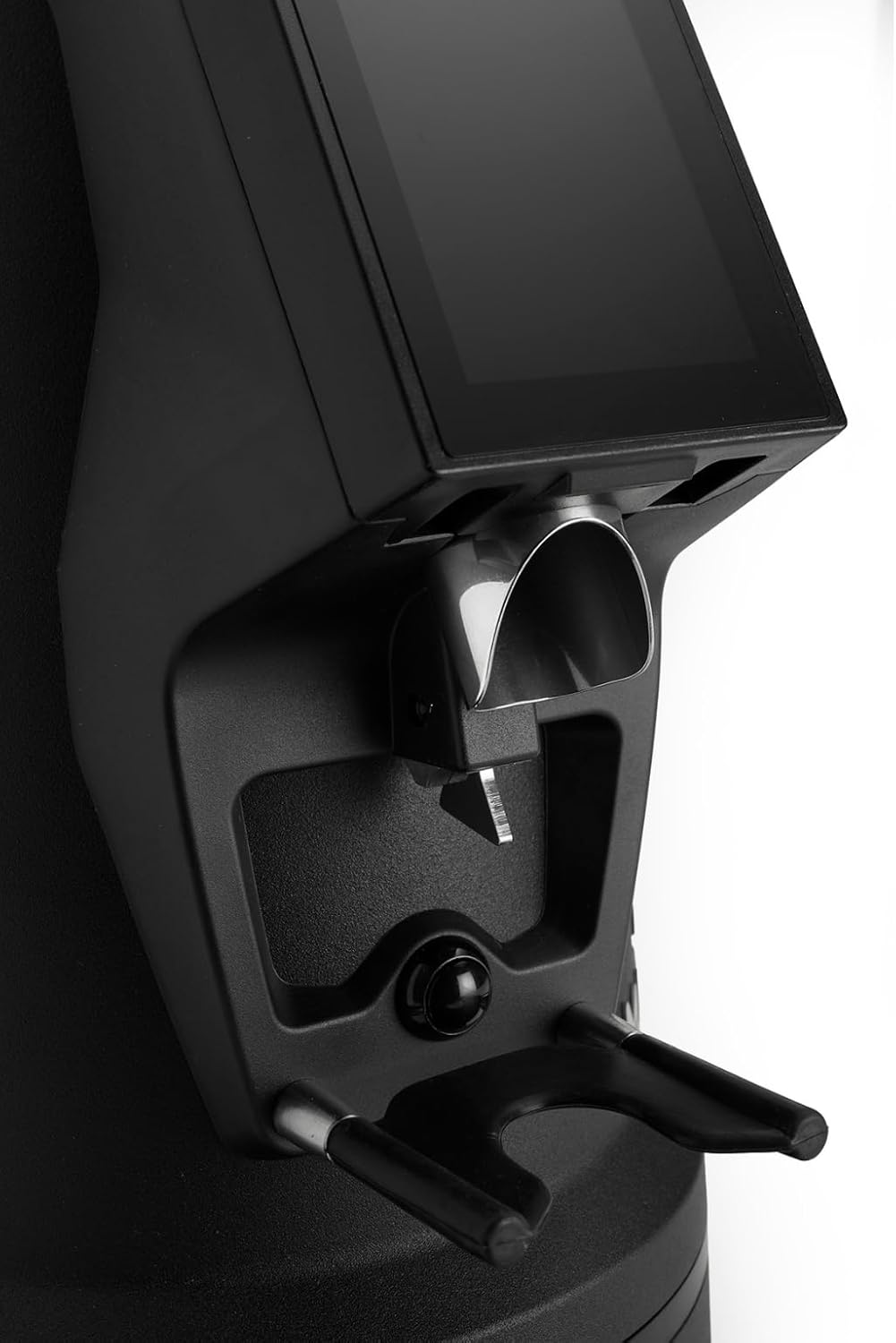
The dosing spout and portafilter holder, designed for efficient and clean coffee dispensing.
Maintenance
Regular cleaning and maintenance ensure optimal performance and longevity of your grinder.
1. Daily Cleaning
- Hopper: Empty any remaining beans and wipe the inside of the hopper with a dry cloth.
- Dosing Spout: Use a brush or vacuum cleaner to remove any residual coffee grounds from the dosing spout and portafilter holder area.
- Exterior: Wipe the exterior of the grinder with a damp cloth. Do not use abrasive cleaners or immerse the unit in water.
2. Burrs Cleaning (Weekly/Bi-weekly)
To maintain grind consistency, the burrs should be cleaned regularly.
- Unplug the Grinder: Always disconnect the power before cleaning the burrs.
- Remove Hopper: Empty the hopper and remove it from the grinder body.
- Access Burrs: Depending on the model, you may need to unscrew the top burr carrier. Refer to the specific instructions for your MI40 Luxe model.
- Clean Burrs: Use a stiff brush or a vacuum cleaner to remove all coffee grounds from both the stationary and rotating burrs. Do not use water.
- Reassemble: Carefully reassemble the burr carrier and hopper, ensuring all parts are securely in place.
3. General Care
- Store the grinder in a cool, dry place.
- Avoid exposing the grinder to direct sunlight or extreme temperatures.
Troubleshooting
If you encounter issues with your grinder, refer to the following common problems and solutions:
| Problem | Possible Cause | Solution |
|---|---|---|
| Grinder does not turn on | No power, power switch off, or safety interlock not engaged. | Check power cord connection, ensure power switch is ON, verify hopper is correctly seated. |
| No coffee grinding / Grinder jams | Beans not feeding, burrs clogged, or grind setting too fine. | Ensure hopper has beans. Unplug, remove hopper, clean burrs. Adjust to a coarser setting. |
| Inconsistent grind | Burrs are dirty or worn. | Clean burrs thoroughly. If problem persists, burrs may need replacement. |
| Grinder is noisy | Foreign object in burrs or loose components. | Unplug and inspect burrs for foreign objects. Ensure all parts are securely fastened. |
If the problem persists after attempting these solutions, please contact MACAP customer support or your retailer.
Specifications
| Feature | Detail |
|---|---|
| Model | MI40 Luxe |
| Brand | Macap |
| Burr Type | Flat Burrs |
| Burr Size | 65 mm |
| Grind Adjustment | Stepless (Nice Grind Control Dial) |
| Dosing | Touchscreen Programmable On-Demand |
| Hopper Capacity | 2.6 lbs (approx. 1.2 kg) |
| Material | Stainless Steel |
| Item Weight | 19.6 Pounds (approx. 8.9 kg) |
| Dimensions (L x W x H) | 12" x 7.6" x 22" (approx. 30.5cm x 19.3cm x 55.9cm) |
| Motor | High-Torque |
Warranty & Support
Your MACAP MI40 Luxe Grinder is covered by a manufacturer's warranty. For specific warranty terms and conditions, please refer to the warranty card included with your product or visit the official Macap website. For technical support, spare parts, or service inquiries, please contact your authorized Macap dealer or the customer support team.
Contact Information:
- Refer to your purchase documentation for retailer contact details.
- Visit the official Macap website for global support information.


