
1. Important Safety Information
Please read and understand all safety instructions before using this device. Failure to follow these instructions may result in laser radiation exposure, electric shock, fire, or serious injury.
- Laser Radiation: This device emits Class 2 laser radiation. Do not stare into the laser beam. Avoid direct eye exposure.
- Children: Keep the device out of reach of children.
- Operating Environment: Do not operate the device in explosive atmospheres, such as in the presence of flammable liquids, gases, or dust.
- Modifications: Do not attempt to modify or disassemble the device. Unauthorized modifications may result in hazardous radiation exposure.
- Battery Safety: Use only specified battery types. Ensure correct polarity when installing batteries. Remove batteries if the device will not be used for an extended period.
2. Product Overview
The YOUTHINK 60m High Accuracy Portable Distance Meter is a compact and durable tool designed for precise distance measurements in various applications, including engineering, construction, and woodworking. Its user-friendly design ensures efficient and accurate operation.

Image: The YOUTHINK 60m Distance Meter actively measuring a distance on a floor, with the red laser line clearly visible. The device's display shows measurement readings.
Key Features:
- Compact Design: Portable and easy to store, includes a lanyard for convenient carrying.
- Premium Quality: Durable plastic construction for reliable handheld use.
- Precise Alignment: Features two liquid levels for accurate vertical and horizontal alignment.
- Adjustable Reference Point: Measurements can be taken from the front or back of the tool.
- Simple Operation: Automatic device and switch for fast and easy accurate measurement.
- Wide Application: Suitable for indoor and outdoor construction projects with adjustable modes.
3. Package Contents
Verify that all items are present in the package:
- 1 x YOUTHINK Distance Meter (60m)
- 1 x Lanyard
- 1 x Instruction Manual
4. Specifications
| Feature | Specification |
|---|---|
| Item Type | Distance Meter |
| Material | Plastic |
| Product Size | Approx. 110 x 50 x 25mm / 4.3 x 2 x 1in |
| Gross Weight | Approx. 160g / 5.6oz |
| Battery (Not Included) | 2 x AAA |
| Wavelength | 620-690nm |
| Device Automatic Switch Off | 180 Seconds |
| Laser Automatic Switch Off | 30 Seconds |
| Scope of Application | Engineering, Construction, Woodworking |
| Operating Temperature | 0 to +40°C |
| Storage Temperature | -20 to +65°C |
5. Setup
5.1 Battery Installation
The device requires two AAA batteries (not included) for operation.
- Locate the battery compartment cover on the back of the device.
- Slide or lift the cover to open the compartment.
- Insert two AAA batteries, ensuring correct polarity (+/-) as indicated inside the compartment.
- Close the battery compartment cover securely.

Image: The back of the YOUTHINK Distance Meter with the battery compartment open, showing the slots for two AAA batteries.
5.2 Powering On/Off
To power on the device, long press the power button (usually marked with a triangle or power symbol). The display will illuminate. To power off, long press the power button again, or the device will automatically shut off after 180 seconds of inactivity (laser after 30 seconds).
6. Operating Instructions
The YOUTHINK Distance Meter is designed for straightforward operation. Familiarize yourself with the buttons and display before use.
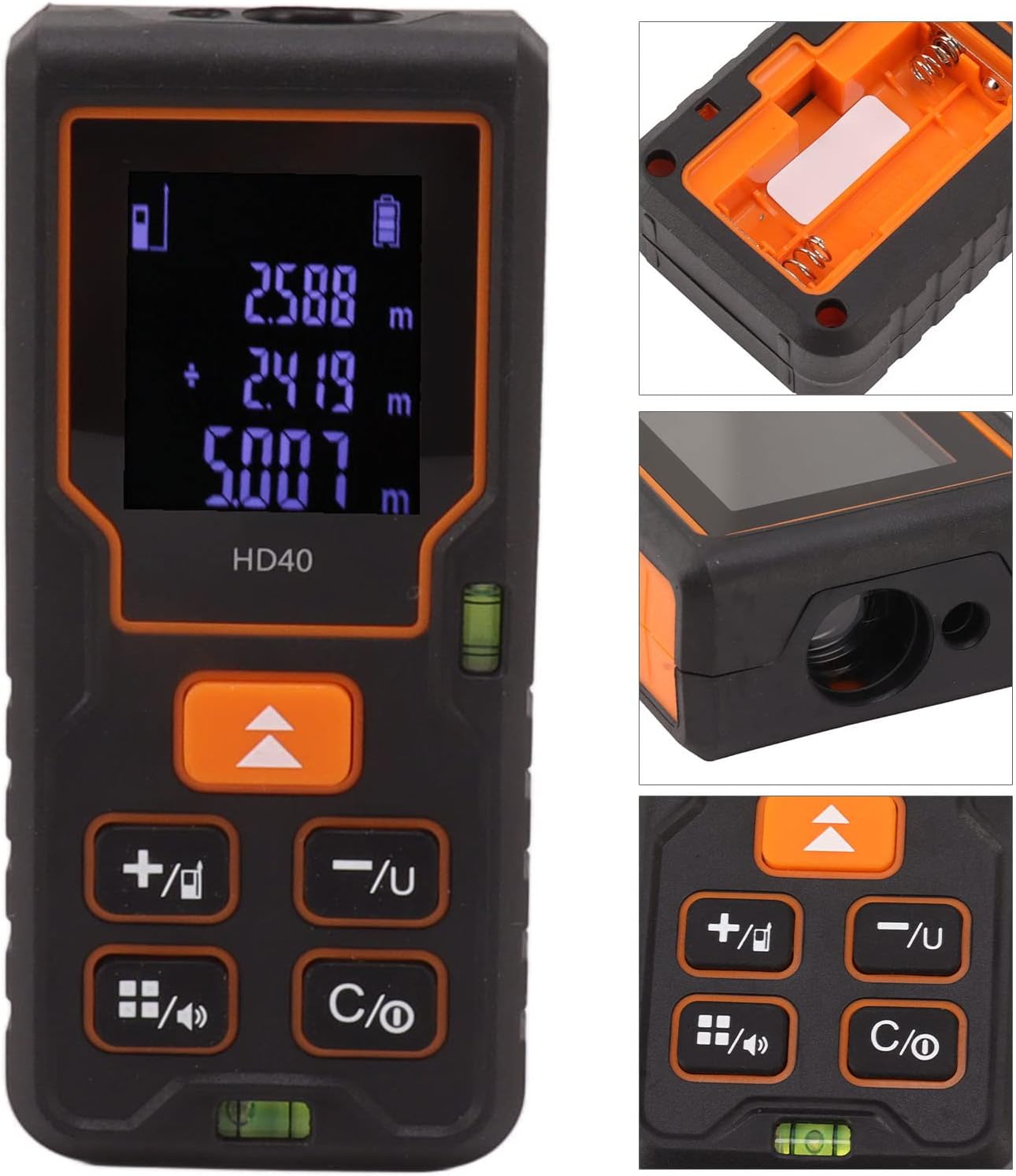
Image: A detailed view of the YOUTHINK Distance Meter's display, showing measurement readings, and its control buttons. Insets show the battery compartment and laser emitter.
6.1 Basic Distance Measurement
- Ensure the device is powered on.
- Point the laser emitter towards the target object.
- Press the measurement button (often the same as the power button or a dedicated 'MEAS' button). The laser will activate, and the measurement will appear on the display.
- The device will automatically hold the measurement on the screen.
6.2 Reference Point Adjustment
The device allows you to choose the measurement reference point:
- Front Reference: Measurements are taken from the front edge of the device.
- Rear Reference: Measurements are taken from the back edge of the device.
Use the dedicated reference point button (often indicated by an arrow pointing up or down) to toggle between these modes. The current reference point is usually indicated on the display.
6.3 Measurement Modes
The device supports various measurement functions. Use the mode button (often indicated by a square icon or 'FUNC') to cycle through available modes.

Image: The YOUTHINK Distance Meter alongside diagrams illustrating its capabilities for single distance, area, volume, and Pythagorean theorem measurements.
- Single Distance Measurement: Standard point-to-point measurement.
- Area Measurement: Measure two sides (length and width), and the device calculates the area.
- Volume Measurement: Measure three sides (length, width, and height), and the device calculates the volume.
- Pythagorean Measurement: Used for indirect measurements, such as height, by measuring two or three sides of a right-angled triangle. Follow the on-screen prompts for each step.
6.4 Unit Conversion
The device may support different units of measurement (e.g., meters, feet, inches). Use the unit button (often marked 'UNIT' or with a unit symbol) to switch between units.
7. Maintenance
Proper maintenance ensures the longevity and accuracy of your distance meter.
- Cleaning: Use a soft, damp cloth to clean the device. Do not use abrasive cleaners or solvents. Pay special attention to keeping the laser lens clean and free of dust.
- Storage: Store the device in a cool, dry place, away from direct sunlight and extreme temperatures. If storing for extended periods, remove the batteries to prevent leakage.
- Avoid Impact: Protect the device from drops and impacts, which can affect its accuracy and functionality.
8. Troubleshooting
If you encounter issues with your YOUTHINK Distance Meter, refer to the following common problems and solutions:
| Problem | Possible Cause | Solution |
|---|---|---|
| Device does not power on | Dead or incorrectly installed batteries | Check battery polarity, replace with fresh AAA batteries. |
| Inaccurate readings | Dirty laser lens, unstable surface, incorrect reference point | Clean the laser lens. Ensure the device is stable. Verify the correct reference point is selected. |
| Laser does not activate | Device error, low battery | Restart the device. Replace batteries. If problem persists, contact support. |
| Display is blank or flickering | Low battery, device malfunction | Replace batteries. If problem persists, contact support. |
9. Warranty and Support
Specific warranty information for this product is not provided in the available data. Please refer to the warranty card included with your purchase or contact the retailer/manufacturer directly for details regarding warranty coverage and support.
For technical assistance or inquiries, please contact YOUTHINK customer support through their official website or the contact information provided with your product documentation.

