
MSmask bunk bed twin over twin
Contents
MSmask Twin Over Twin Bunk Bed with Desk and Charging Station Instruction Manual
Model: bunk bed twin over twin
1. Safety Information
Please read and understand all instructions before assembly and use. Failure to follow these instructions may result in serious injury.
- Sharp Edges: Exercise caution around all edges during assembly and use to prevent injury.
- Assembly: Ensure all components are properly assembled and tightened according to the instructions to prevent instability.
- Upper Bunk Mattress: For optimal safety, use a mattress with a thickness of 4-6 inches on the upper bunk. The mattress top must be at least 5 inches below the top of the guardrail.
- Anti-Tipping Device: Securely fasten the anti-tipping device to the wall to enhance stability and prevent accidental toppling.
- Ground Clearance: Be aware of the 10.2-inch ground-to-item distance to prevent injury when moving around the bed.
- Weight Limit: The maximum weight recommendation for the bunk bed is 400 pounds. Do not exceed this limit.
- Guardrails: The upper bunk features a 13.4-inch full-length guardrail. Ensure it is always in place.
- Rounded Edges: All edges are rounded to minimize bumps and scrapes.


2. Setup and Assembly
The MSmask Bunk Bed is designed for straightforward assembly. All necessary tools and numbered parts are included in the package, along with detailed instructions.
2.1 Unpacking and Preparation
- Open the package carefully and lay out all components on a clean, soft surface to prevent scratches.
- Verify that all parts listed in the instruction manual are present.
- Keep children and pets away from the assembly area.
2.2 Assembly Steps
- Frame Assembly: Follow the numbered steps in the included manual to assemble the main metal frame components. The design features a "Plug-in Assembly" process for quick installation.
- Bed Slats: Install the metal slats for both the upper and lower bunks. Custom plastic buckles and mute clips are used to secure the slats, ensuring a noise-free structure.
- Guardrails: Attach the full-length safety guardrails to the upper bunk as instructed.
- Ladder: Secure the ladder to the bunk bed. The ladder is equipped with foam pads for comfortable and safe climbing.
- Desk and Storage: Assemble and attach the integrated study desk, storage drawers, and headboard storage boxes.
- Anti-Tipping Device: Crucially, attach the anti-tipping device to the wall using the provided hardware to prevent the bed from toppling.
- Mattress Placement: Place twin-sized mattresses on both bunks. For the upper bunk, ensure the mattress is 4-6 inches thick and its top surface is at least 5 inches below the top of the guardrail.


3. Operating Instructions
3.1 Integrated Study Desk and Charging Station
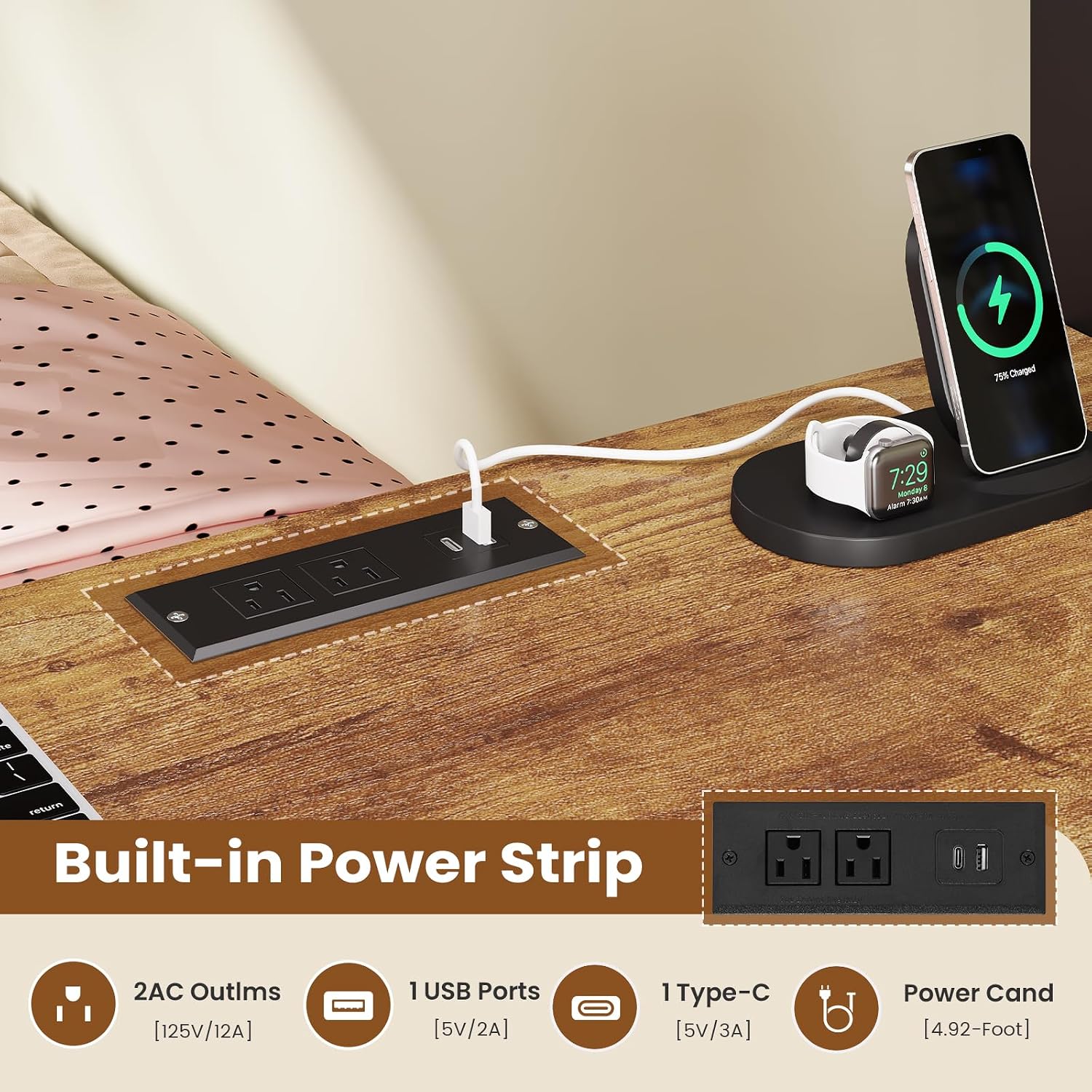
The bunk bed features an integrated study desk with a built-in power station.
- Power Outlets: The power station includes two AC outlets (125V/12A), one USB port (5V/2A), and one fast-charging Type-C port (5V/3A).
- Usage: Connect your electronic devices such as phones, tablets, laptops, or gaming devices to the appropriate ports for charging.
- Power Cord: The power station is equipped with a 4.92-foot power cord. Ensure it is plugged into a suitable wall outlet.
3.2 Multi-Functional Storage
Utilize the various storage options to keep your space organized.
- Lower Bunk Shelf: A convenient shelf is located on the lower bunk for books, decorative items, or toys.
- Upper Bunk Headboard Storage: Two dedicated storage boxes are integrated into the upper bunk's headboard, suitable for pillows, stuffed animals, phones, or tablets.
- Storage Drawers: The desk unit includes three fabric storage drawers for additional organization.
- Hanging Hooks: Six S-shaped hooks are provided on the metal mesh panel below the upper bunk for hanging headphones, keys, or other small items.


3.3 RGB LED Lighting
The bunk bed features integrated RGB LED lights for customizable ambiance.
- Control: The LED lights can be controlled via a remote control or a dedicated mobile application.
- Functions: Easily switch between over 80,000 colors, adjust brightness, and select various flashing effects.
- Music Mode: The lights can pulse and change rhythmically with music.
- Timing Function: Set timers for the lights to turn on or off.
- Nightlight: The soft glow of the LEDs can serve as a nightlight.
- Power On/Off: Long press the button on the remote or app to turn the RGB light off.


4. Maintenance
Regular maintenance will help prolong the life and appearance of your MSmask Bunk Bed.
- Cleaning: Wipe down metal and engineered wood surfaces with a soft, damp cloth. Avoid harsh chemicals or abrasive cleaners that could damage the finish.
- Fasteners: Periodically check all bolts, screws, and connections to ensure they remain tight. Re-tighten if necessary to maintain stability.
- LED Lights: If the LED lights become dusty, gently wipe them with a dry, soft cloth. Avoid direct contact with liquids.
- Charging Station: Keep the charging ports free of dust and debris. Do not force plugs into the ports.
- Guardrails and Ladder: Inspect guardrails and ladder regularly for any signs of wear or damage. Ensure they are securely attached.
5. Troubleshooting
If you encounter any issues with your bunk bed, refer to the following common solutions.
- Bed Squeaks or Rattles:
- Check all assembly bolts and screws and tighten them securely.
- Ensure the plastic buckles and mute clips on the bed slats are properly engaged.
- LED Lights Not Working:
- Verify that the power cord for the LED lights is securely plugged into a working outlet.
- Check the remote control or app for battery issues or connectivity problems.
- Ensure no wires are pinched or damaged.
- Charging Station Not Functioning:
- Confirm the power cord for the charging station is fully inserted into a live wall outlet.
- Test the outlet with another device to ensure it is working.
- Ensure your device's charging cable is properly connected to the charging station.
- Bed Feels Unstable:
- Re-check all connections and ensure they are tightened.
- Confirm the anti-tipping device is correctly installed and secured to the wall.
- Ensure the bed is placed on a flat, level surface.
6. Specifications
| Feature | Detail |
|---|---|
| Model Number | bunk bed twin over twin |
| Brand | MSmask |
| Size | Twin Over Twin |
| Material | Engineered Wood, Metal |
| Product Dimensions (L x W x H) | 89.6"L x 42.1"W x 63.2"H |
| Item Weight | 116 Pounds |
| Maximum Weight Recommendation | 400 Pounds |
| Compatible Mattress Size | Twin (75"x38") |
| Recommended Mattress Thickness (Upper Bunk) | 4-6 inches |
| Ground To Item Distance | 10.2 Inches |
| Charging Station | 2 AC Outlets (125V/12A), 1 USB Port (5V/2A), 1 Type-C Port (5V/3A), 4.92-Foot Power Cord |
| LED Lighting | RGB, Over 80,000 Colors, Brightness Adjustable, Music Mode, Timing Function, Remote/App Control |
| Storage Options | Shelf, Storage Boxes, 3 Fabric Drawers, 6 Hanging Hooks |
| Assembly Required | Yes (Instructions Included) |
7. Product Overview Video
Watch this video for a visual overview of the MSmask Bunk Bed's features and functionality.
Video: Bunk Bed Twin Over Twin with Desk. This video provides a dynamic demonstration of the bunk bed's features, including under-bed storage, bedside storage boxes, decorative metal mesh with hooks, and overall design.
8. Warranty Information
Specific warranty details for the MSmask Bunk Bed are not provided in this manual. For information regarding warranty coverage, terms, and conditions, please refer to the product packaging, the seller's website, or contact MSmask customer support directly.
9. Customer Support
If you require further assistance with assembly, operation, or have any questions about your MSmask Bunk Bed, please contact MSmask customer support.
- Manufacturer: MSmask
- Seller: yesmonkey
- Refer to your purchase documentation or the MSmask official website for contact details.
Ask a question about this manual
Ask about setup, troubleshooting, compatibility, parts, safety, or missing instructions. Manuals+ will review the question and use this page’s manual context to help answer it.