
1. Important Safety Instructions
To ensure safe operation, always follow these basic precautions:
- Do not disassemble, repair, or modify the unit. Incorrect reassembly may cause fire or injury.
- Do not expose the unit to fire or high temperatures (above 60°C/140°F).
- Do not use or store the unit in direct sunlight, near heat sources, or in high humidity environments.
- Keep the unit away from water and other liquids.
- Ensure proper ventilation during use to prevent overheating.
- Do not insert foreign objects into the ports or openings.
- Keep out of reach of children and pets.
- Use only original or certified cables and accessories.
- In case of fire, use a dry powder fire extinguisher.
2. Package Contents
Verify that all items are included in your package:
- 1x OUPES Guardian 6000 Power Station (Model HP6000)
- AC Charging Cable
- User Manual
3. Product Overview
The OUPES Guardian 6000 is a versatile portable power station designed for various applications, from home backup to off-grid adventures. It features a 4608Wh LiFePO4 battery, 6000W continuous output (7200W boost), and dual 120V/240V voltage capability.

Image: The OUPES Guardian 6000 Portable Power Station, showcasing its compact design.
Key Features:
- Dual Voltage Output: Provides both 120V and 240V power for a wide range of appliances and tools.
- Expandable Capacity: Base capacity of 4608Wh, expandable up to 41,472Wh with optional G5 Extra Battery packs.
- Rapid Recharge: Fully recharges in approximately 90 minutes using combined 240V AC and solar inputs.
- LiFePO4 Battery: Military-grade cells rated for over 4000 cycles, ensuring long lifespan and safety.
- Smart Connectivity: Monitor and control the power station remotely via the OUPES mobile app.
- Home Integration Ready: Connects directly to standard transfer switches or inlet boxes for home backup.
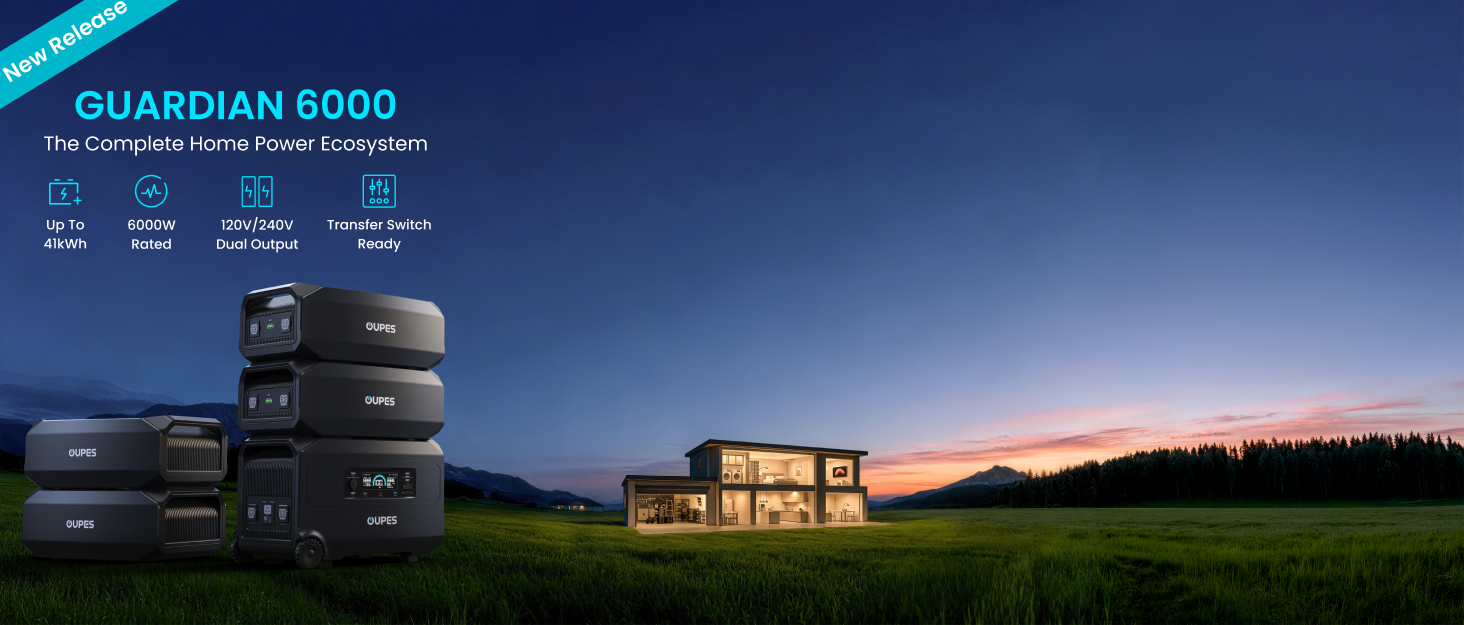
Image: The OUPES Guardian 6000 demonstrating its expandable power ecosystem with multiple G5 extra batteries, providing comprehensive home power.
Ports and Display:
The Guardian 6000 features a comprehensive array of output ports and an intuitive display for monitoring.

Image: A detailed diagram illustrating the various input and output ports on the OUPES Guardian 6000, including AC outlets, USB ports, and XT90.

Image: A close-up of the OUPES Guardian 6000's output ports, including NEMA 14-50R, TT-30R, L14-30E, 6-20R, and 5-20R AC outlets.

Image: An internal view of the OUPES Guardian 6000, highlighting its LiFePO4 battery cells, which provide a long cycle life and enhanced safety.
Video: An overview of the OUPES Guardian 6000 Power Station, demonstrating its features and capabilities.
4. Setup
Initial Charging:
Before first use, fully charge your OUPES Guardian 6000. Connect the provided AC charging cable to the unit's AC input port and then to a wall outlet. The display will indicate the charging status. A full charge is recommended to optimize battery performance.
5. Operating Instructions
Charging the Power Station:
The Guardian 6000 supports multiple charging methods:
- AC Wall Outlet: Connect the AC charging cable to a standard wall outlet. The unit supports 120V and 240V AC input for rapid charging.
- Solar Panels: Connect compatible solar panels (12-140V wide range, up to 2100W input) to the solar input port. Ensure correct polarity.
- Car Charger: Use a compatible car charger to charge the unit from your vehicle's 12V outlet.

Image: A visual representation of the different charging methods available for the OUPES Guardian 6000, including gas generators, solar panels, grid power, and a combination of grid and solar.

Image: A graphic detailing the rapid recharge times for the OUPES Guardian 6000, showing approximate durations for 120V AC, 240V AC, Solar, and combined AC+Solar inputs.
Discharging the Power Station:
Connect your devices to the appropriate output ports (AC, USB-C, USB-A, 12V car port, XT90). Press the corresponding power button for the output type you wish to use. The display will show the current output wattage.

Image: The OUPES Guardian 6000 providing power to a range of household appliances, demonstrating its capability to handle both 120V and 240V loads.
Smart App Control:
Download the OUPES app from your smartphone's app store. Connect the Guardian 6000 to your Wi-Fi network to enable remote monitoring and control. The app allows you to track energy usage, adjust settings, and manage charging/discharging schedules.

Image: A smartphone screen showing the OUPES app, which allows users to monitor and control their Guardian 6000 power station remotely.
Home Integration:
The Guardian 6000 can be integrated into your home's electrical system via a standard transfer switch or inlet box. This allows the power station to provide backup power to your entire home during outages without requiring an electrician for initial setup.

Image: The OUPES Guardian 6000 connected to a home's transfer switch, illustrating its seamless integration for whole-house backup power.
6. Maintenance
Proper maintenance ensures the longevity and optimal performance of your power station:
- Storage: Store the unit in a cool, dry place away from direct sunlight and extreme temperatures. For long-term storage, charge the battery to 50-80% every 3-6 months.
- Cleaning: Use a dry, soft cloth to clean the exterior of the unit. Do not use abrasive cleaners or solvents.
- Battery Care: Avoid fully discharging the battery frequently. Regular partial discharges and recharges are beneficial for LiFePO4 batteries.
- Ventilation: Ensure the ventilation openings are clear of dust and debris to prevent overheating.
7. Troubleshooting
If you encounter issues, refer to the table below for common problems and solutions.
| Problem | Possible Cause | Solution |
|---|---|---|
| Unit does not turn on | Battery is completely discharged | Connect to an AC outlet for charging. |
| AC output not working | AC output not enabled / Overload protection triggered | Press the AC power button. Reduce the load on the AC outlets. |
| Slow charging via solar | Insufficient sunlight / Incorrect panel connection / Shading | Ensure panels are in direct sunlight. Check connections and polarity. Remove any shading. |
| App connectivity issues | Wi-Fi signal weak / Incorrect setup | Ensure the unit is within Wi-Fi range. Follow app instructions for setup. Restart the unit and app. |
| Unit is overheating | Poor ventilation / Excessive load | Ensure vents are clear. Reduce connected load. Move to a cooler environment. |
If the problem persists, contact OUPES customer support.
8. Specifications
Detailed technical specifications for the OUPES Guardian 6000 (Model HP6000):
| Feature | Detail |
|---|---|
| Model Name | HP6000 |
| Battery Capacity | 4608Wh LiFePO4 |
| Output Wattage (Running) | 6000 Watts |
| Output Wattage (Starting/Surge) | 9000 Watts |
| Voltage | 120V/240V Dual Voltage |
| Total Power Outlets | 5 AC outlets (NEMA 14-50R, TT-30R, L14-30E, 6-20R, 5-20R), USB-C PD (140W), USB-A QC3.0, 12V car port, XT90 |
| Solar Input Capacity | 2100W (12-140V wide range) |
| Recharge Time (0-100%) | Approx. 90 minutes (combined 240V AC + Solar) |
| Item Weight | 111 Pounds |
| Product Dimensions | 24.9"L x 16.2"W x 16.8"H |
| Special Features | 120V/240V dual voltage, 12V/24V XT90 output, Expandable to 41kWh, Fast 90-Min charging, Home transfer switch ready |
9. Warranty and Support
The OUPES Guardian 6000 Portable Power Station comes with a 5-year warranty. For technical assistance, warranty claims, or any product-related inquiries, please contact our dedicated US-based support team. Refer to the warranty card included in your package for detailed terms and conditions.
Contact Information: Please visit the official OUPES website or refer to your product packaging for the most current support contact details.