
1. Important Safety Information
Please read all instructions carefully before assembly and use. Retain this manual for future reference.
- Two-Person Assembly: For safety and ease of assembly, it is highly recommended that two people assemble this cabinet.
- Anti-Tip Kit: Always secure the cabinet to the wall using the included anti-tip kit to prevent accidental tipping. This is crucial for safety, especially in households with children or pets.
- Weight Limits: Do not exceed the load limit of 17.6 lbs (8 kg) per shelf. The total maximum distributed weight for all shelves should not exceed 44 lbs (20 kg). Overloading can cause instability and damage.
- Clearance: Keep the area around the cabinet clear of obstructions to prevent accidents.
- Tempered Glass: This cabinet is constructed with 4mm thick tempered safety glass, designed for enhanced strength and clarity. While tempered glass is more resistant to breakage than ordinary glass, handle all glass panels with care to avoid damage or injury.
- Battery Safety: Ensure correct battery polarity when installing batteries for the LED lights and remote control. Do not mix old and new batteries or different types of batteries. Dispose of used batteries responsibly.
2. Package Contents
Before beginning assembly, verify that all parts and hardware are present and undamaged. If any parts are missing or damaged, please contact customer support.
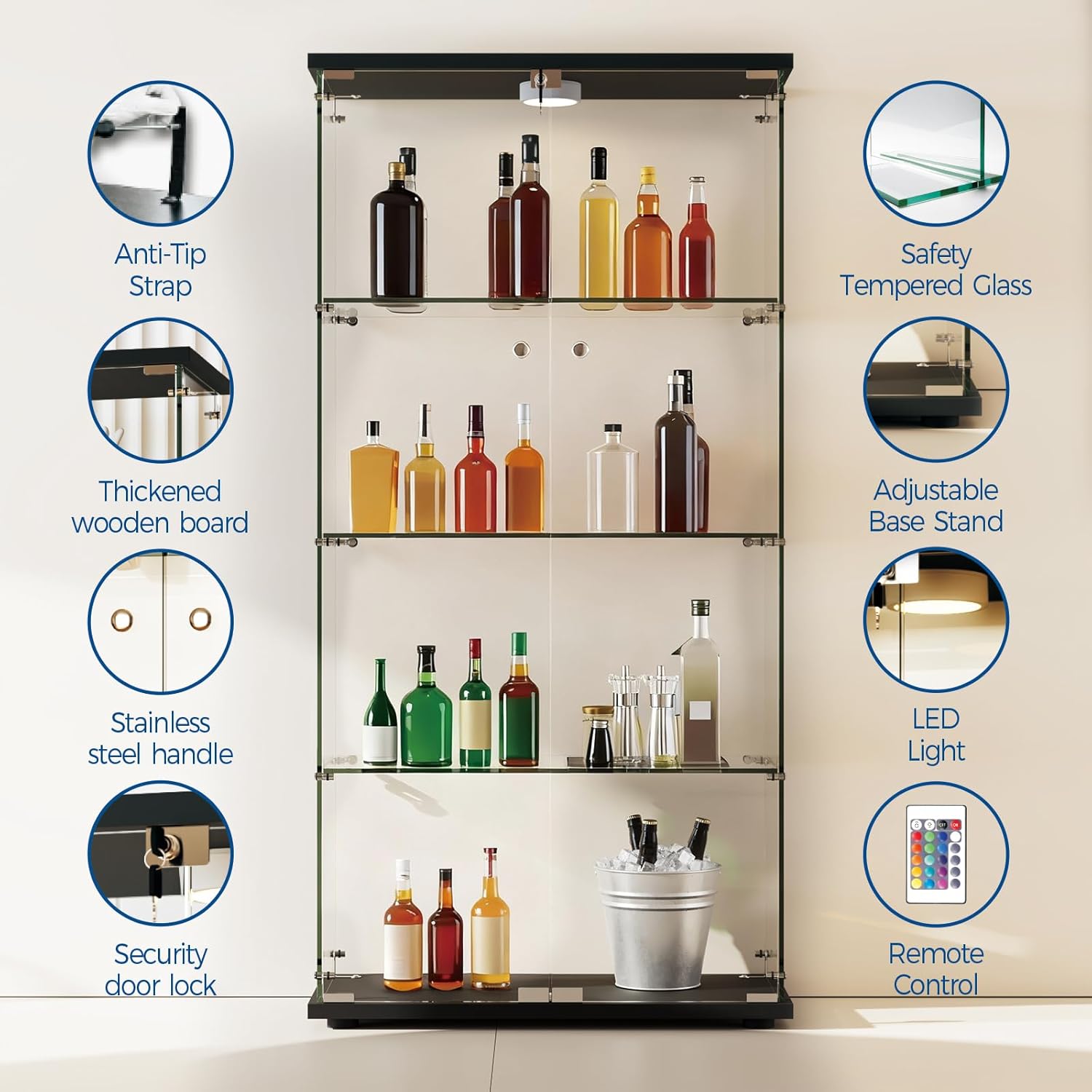
Figure 2.1: Key Features and Included Components. This image illustrates various components and features of the Garvee Glass Display Cabinet, such as the anti-tip strap, safety tempered glass, LED light, remote control, security door lock, thickened wooden board, adjustable base stand, and stainless steel handle. All necessary accessories for assembly and operation are included.
- Tempered Glass Panels (Sides, Back, Shelves)
- Top and Bottom Wooden Panels
- LED Lighting System (Lights, Remote Control)
- Lock and Keys
- Stainless Steel Handles
- Anti-Tip Kit
- Assembly Hardware (screws, hinges, connectors, adjustable base stands)
- Assembly Instructions
3. Setup and Assembly
Assembly typically takes approximately 30 minutes with two people. Follow the detailed instructions provided in the included assembly manual for step-by-step guidance.
3.1 Preparation
- Choose a clean, flat, and spacious area for assembly.
- Unpack all components and lay them out, verifying against the parts list.
- Keep children and pets away from the assembly area.
- Gather necessary tools (e.g., screwdriver, if not included).
3.2 Assembly Steps (General Overview)
- Assemble the Base: Attach the adjustable base stands to the bottom wooden panel.
- Install Side and Back Glass Panels: Carefully insert the side and back tempered glass panels into the grooves of the bottom panel.
- Attach Top Panel: Secure the top wooden panel to the assembled glass structure.
- Insert Shelves: Place the four tempered glass shelves at desired heights. Ensure they are securely seated.
- Attach Doors: Install the double doors, ensuring smooth operation. Attach the stainless steel handles.
- Install Lock: Integrate the security door lock mechanism.
- Install LED Lights: Affix the LED lights to the interior top panel or designated areas. Insert 3x AAA batteries into each light (not included).
- Secure with Anti-Tip Kit: Position the cabinet in its final location. Securely attach the anti-tip strap to the cabinet and to a wall stud using appropriate hardware.

Figure 3.1: Assembled Cabinet with Dimensions. This image displays the fully assembled Garvee Glass Display Cabinet, highlighting its overall dimensions (64.6" H x 31.7" W x 14.3" D) and key features such as 13 color light adjustment, 17.6 lbs capacity per shelf, and an estimated 30-minute installation time.
4. Operating Instructions
4.1 LED Lighting System
The cabinet features a built-in multi-color LED system with remote control.
- Powering the Lights: Each LED light requires 3x AAA batteries (not included). Ensure batteries are installed correctly.
- Remote Control: The remote control requires a CR2025 coin cell battery (not included). Point the remote at the LED lights to operate.
- Color Selection: Use the remote to choose from 13 customizable colors.
- Brightness Adjustment: Adjust the brightness levels wirelessly using the remote.
- Timer Function: Set 30-minute or 60-minute timers for automatic light shut-off.

Figure 4.1: RGB LED Lights and Remote Control. This image details the RGB LED lighting system, including the remote control for color and brightness adjustment, and specifies the battery requirements (3x AAA for each light, CR2025 for the remote). It also highlights the 13 available colors and the 30/60 minute automatic lights-out function.
4.2 Security Door Lock
The double doors are equipped with a built-in lock for securing your valuables.
- Locking: Insert the key into the lock and turn to secure the doors.
- Unlocking: Insert the key and turn in the opposite direction to unlock.
- Magnetic Closures: Even when unlocked, magnetic closures help keep the doors gently shut.
5. Maintenance
- Cleaning Glass: Use a soft, lint-free cloth and a non-abrasive glass cleaner. Spray cleaner onto the cloth, not directly onto the glass, to avoid streaks or damage to other components.
- Cleaning Frame: Wipe wooden and metal parts with a soft, damp cloth. Avoid harsh chemicals or abrasive cleaners.
- Hardware Check: Periodically check all screws and connections to ensure they remain tight. Retighten if necessary.
- Shelf Adjustment: When adjusting shelf heights, ensure the shelves are properly seated and level before placing items on them.
- Battery Replacement: Replace LED light and remote control batteries as needed to maintain functionality.
6. Troubleshooting
- LED Lights Not Working:
- Check if batteries (3x AAA per light, CR2025 for remote) are correctly installed and not depleted.
- Ensure the remote control is pointed directly at the lights.
- Doors Do Not Align or Close Properly:
- Verify that the cabinet is assembled squarely and is on a level surface. Use the adjustable base stands to level the cabinet.
- Inspect hinges and door attachments for any loose connections or incorrect installation.
- Some minor adjustments may be possible by slightly loosening and re-tightening hinge screws, but significant alignment issues may indicate incorrect initial assembly.
- Cabinet Feels Unstable:
- Ensure the anti-tip kit is securely installed to both the cabinet and a wall stud.
- Verify that the cabinet is on a level surface.
- Check that weight on shelves is evenly distributed and does not exceed the maximum load limit per shelf.
7. Specifications
| Brand | Garvee |
| Model Number | GV-LJH-PTG_339ACLD6-a7B |
| Dimensions (D x W x H) | 14.57" x 32.28" x 64.37" (37cm x 82cm x 163.5cm) |
| Material | Tempered Glass, Wood |
| Number of Shelves | 4 |
| Shelf Weight Limit | 17.6 lbs (8 kg) per shelf |
| Item Weight | 130.7 lbs (59.28 kg) |
| Special Features | Lockable, Multi-color LED Lighting (13 colors, remote control, 30/60 min timer), Anti-tip kit included |
| Mounting Type | Freestanding (Floor Mount with wall anchor) |
| Assembly Required | Yes |
8. Warranty and Support
For warranty information, please refer to the documentation included with your product or visit the official Garvee website. If you require assistance with assembly, parts, or troubleshooting, please contact Garvee customer support.
You can visit the Garvee Store for more information: Garvee Official Store