
Introduction
Welcome to the Lgnitek Smartwatch ECG Monitor A2 user manual. This guide provides comprehensive instructions to help you set up, operate, and maintain your new smartwatch. Please read this manual carefully before using the device to ensure proper functionality and to maximize your user experience. This smartwatch is designed to assist with general wellness and fitness purposes and is not intended to be a medical device.
What's in the Box
Upon opening the package, verify that all components are present and in good condition.
- 1 x Lgnitek Smartwatch A2
- 1 x Silicone Strap
- 1 x User Manual
- 1 x Charging Cable

Image: Smartwatch A2, silicone strap, user manual, and charging cable.
Setup
1. Charging the Smartwatch
Before initial use, fully charge your smartwatch. Connect the magnetic charging cable to the charging contacts on the back of the watch and plug the USB end into a standard USB power adapter (not included). A full charge typically takes 1-2 hours.
2. App Installation and Pairing
To unlock the full potential of your Lgnitek Smartwatch A2, you need to install the companion app on your smartphone.
- Enable Bluetooth: Ensure Bluetooth is enabled on your smartphone.
- Download the App: Scan the QR code provided in the manual or search for the designated app (e.g., "H Band" or similar, as indicated in the product information) on the Google Play Store (for Android) or Apple App Store (for iOS).
- Open the App: Launch the installed app on your smartphone.
- Add Device: Within the app, navigate to the "Add device" or "Pair device" section.
- Select Your Smartwatch: The app will search for nearby devices. Select "A2" from the list to initiate pairing.
- Confirm Pairing: Follow any on-screen prompts on both your phone and smartwatch to confirm the pairing.

Image: Steps for connecting the smartwatch via Bluetooth and the companion app.
Operating the Smartwatch
1. Basic Navigation
The Lgnitek Smartwatch A2 features a 2.2-inch curved HD touch screen for intuitive navigation. Swipe left, right, up, or down to access different functions and menus. Press the side button to return to the home screen or activate specific features.
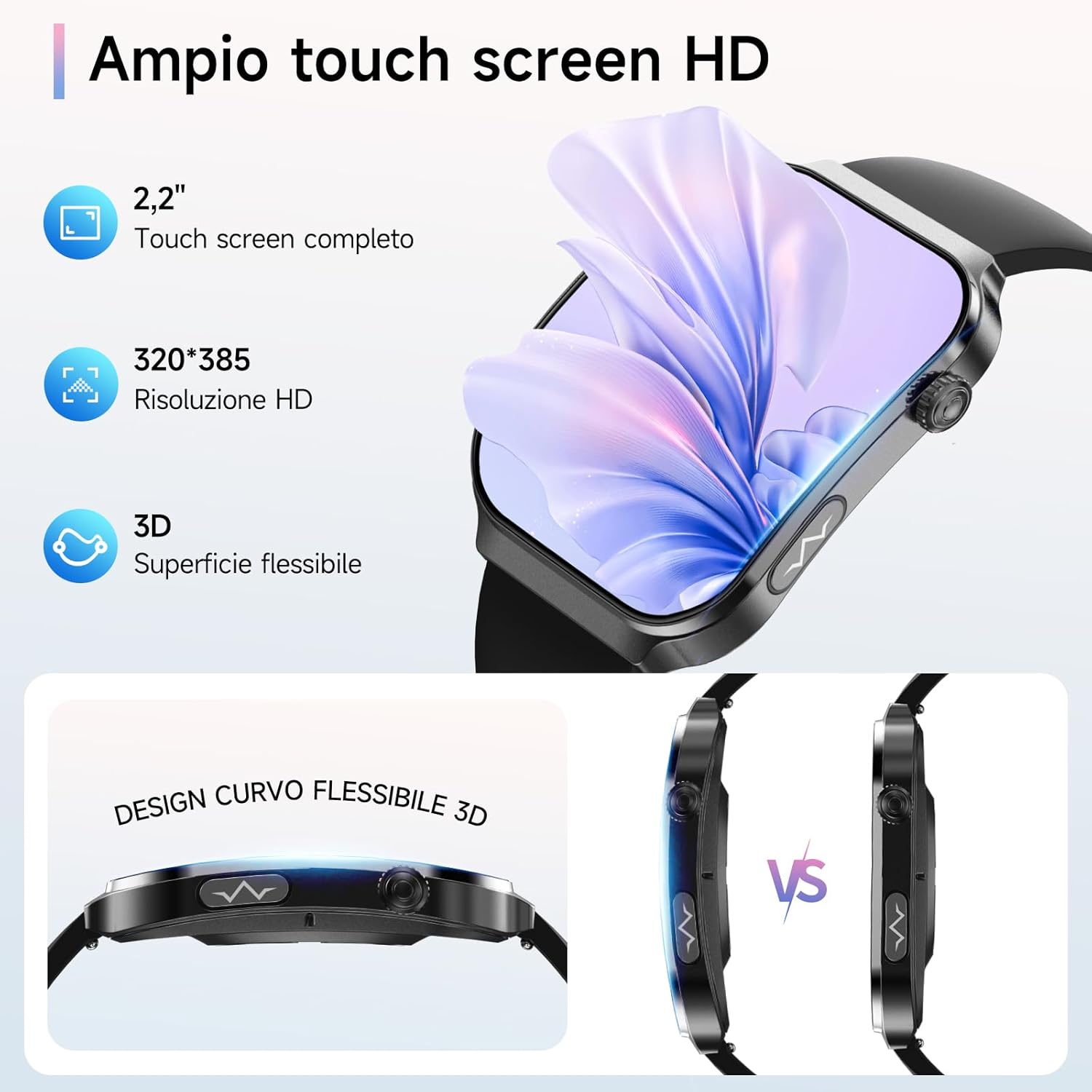
Image: The smartwatch's wide HD touch screen with details on resolution and curved design.
2. Bluetooth Call Functionality
Once paired with your smartphone, the smartwatch allows you to make and receive calls directly from your wrist.
- Activate Call Function: Ensure the call function is enabled in the smartwatch settings or the companion app.
- Making Calls: Access the dial pad or contacts list on the smartwatch to initiate a call.
- Receiving Calls: When a call comes in, you can answer or reject it directly from the smartwatch screen.

Image: Smartwatch interface for making and answering calls.
3. AI Voice Assistant
The integrated AI voice assistant allows for hands-free control. Activate your phone's voice assistant (e.g., Siri) and use the smartwatch to perform tasks like making calls or playing music.

Image: Smartwatch AI Voice Assistant interface.
4. SOS Emergency Call
In an emergency, the smartwatch's SOS function allows you to quickly call a pre-set emergency contact with a single click. Configure emergency contacts within the companion app.

Image: SOS emergency call feature on the smartwatch.
5. Customizing Watch Faces
Personalize your smartwatch by choosing from over 200 online watch faces or by uploading your favorite photos through the companion app.

Image: Customized watch dial options.
Health Monitoring Features
The Lgnitek Smartwatch A2 offers comprehensive 24/7 health monitoring capabilities. Note: This product is not a medical device. The results are for reference only and should not be used for medical diagnosis or treatment.
1. ECG + PPG Monitoring
Utilizing advanced dual PPG+ECG technology, the smartwatch can quickly measure your pulse in 30 seconds and generate a detailed analysis report with over 32 data points. This provides insights into your heart health.
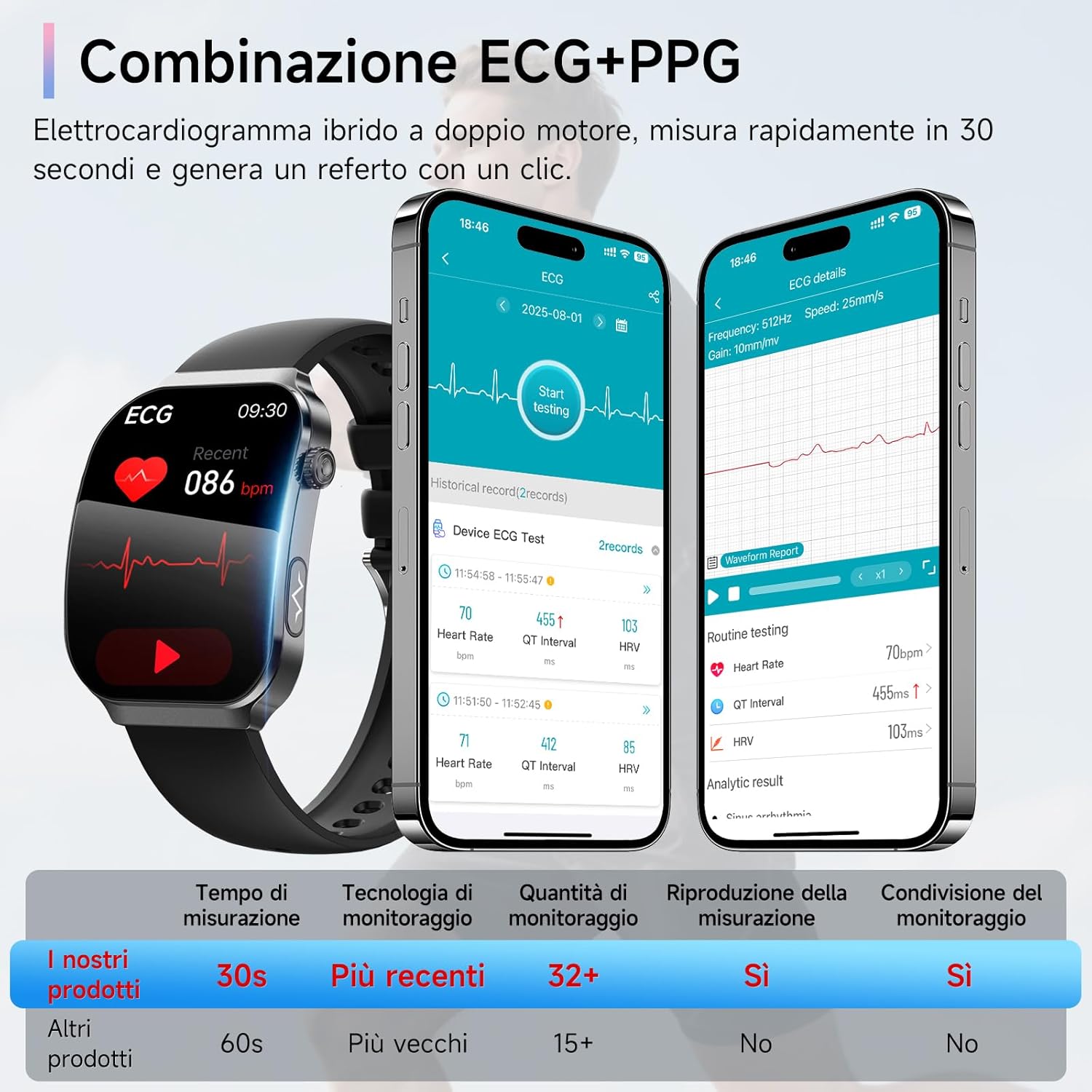
Image: ECG+PPG combination monitoring with detailed data in the app.
2. Heart Rate Variability (HRV)
Real-time analysis of heart rate variability helps assess stress levels and overall heart health, promoting balance between body and mind.

Image: Heart Rate Variability monitoring.
3. Body Composition Analysis
Intelligent analysis of body composition helps you better understand fat, muscle, and general physical conditions.

Image: Body composition analysis feature.
4. Micro Health Checkup
Complete a mini health checkup in 30 seconds, monitoring heart rate, SpO2, and more in one simple step.

Image: Micro Health Checkup feature.
5. Blood Component Monitoring
Advanced sensor technology conveniently monitors key health indicators such as uric acid and lipids, supporting daily diet and metabolism management.

Image: Blood component monitoring for uric acid and lipids.
6. Heart Rate Monitoring
The smartwatch provides 24/7 automatic heart rate monitoring with immediate alerts for abnormal values, helping you keep track of your heart health.

Image: Heart rate monitoring interface.
7. Sleep Monitoring
Comprehensive sleep analysis tracks deep sleep, light sleep, and REM phases to improve sleep quality.

Image: Sleep monitoring interface.
8. SpO2 Monitoring
Quickly measure blood oxygen saturation (SpO2) to better understand your breathing and overall well-being.

Image: SpO2 monitoring interface.
9. Blood Pressure Monitoring
Conveniently measure blood pressure from your wrist at any time, supporting daily awareness of your health.

Image: Blood pressure monitoring interface.
10. Stress and Body Temperature Monitoring
The smartwatch continuously monitors your stress levels and body temperature, providing insights into your overall well-being.

Image: Stress and body temperature monitoring displays.
11. MET Monitoring, Breathing Training, and Female Health
Further advanced health features include Metabolic Equivalent of Task (MET) monitoring, guided breathing training, and dedicated female health tracking.

Image: Advanced health monitoring features including MET, breathing training, and female health.
Fitness Tracking
1. Sports Modes
The smartwatch supports over 120 sports modes, allowing you to track various activities with specific metrics. Select your desired sport from the watch's menu to begin tracking.

Image: All-in-one sports companion features, including MET monitoring and over 120 sports modes.
2. All-Day Activity Tracking
Track your daily steps, distance, calories burned, and active minutes. When connected to the companion app, the app's built-in GPS function can enhance your workout experience by mapping your routes (the smartwatch itself does not have built-in GPS).

Image: All-day activity monitoring with app-based GPS tracking.
3. Water Resistance (IP67)
The smartwatch is IP67 water-resistant, meaning it can withstand splashes, rain, and hand washing. It is not suitable for swimming, hot baths, saunas, or high-temperature environments like hot springs.

Image: Smartwatch IP67 water resistance features.
Smart Features
The Lgnitek Smartwatch A2 integrates various smart features to enhance your daily life.
1. Notifications
Receive notifications for emails, SMS, text messages, and app alerts directly on your wrist, keeping you connected at all times. Note: The watch cannot reply to messages.
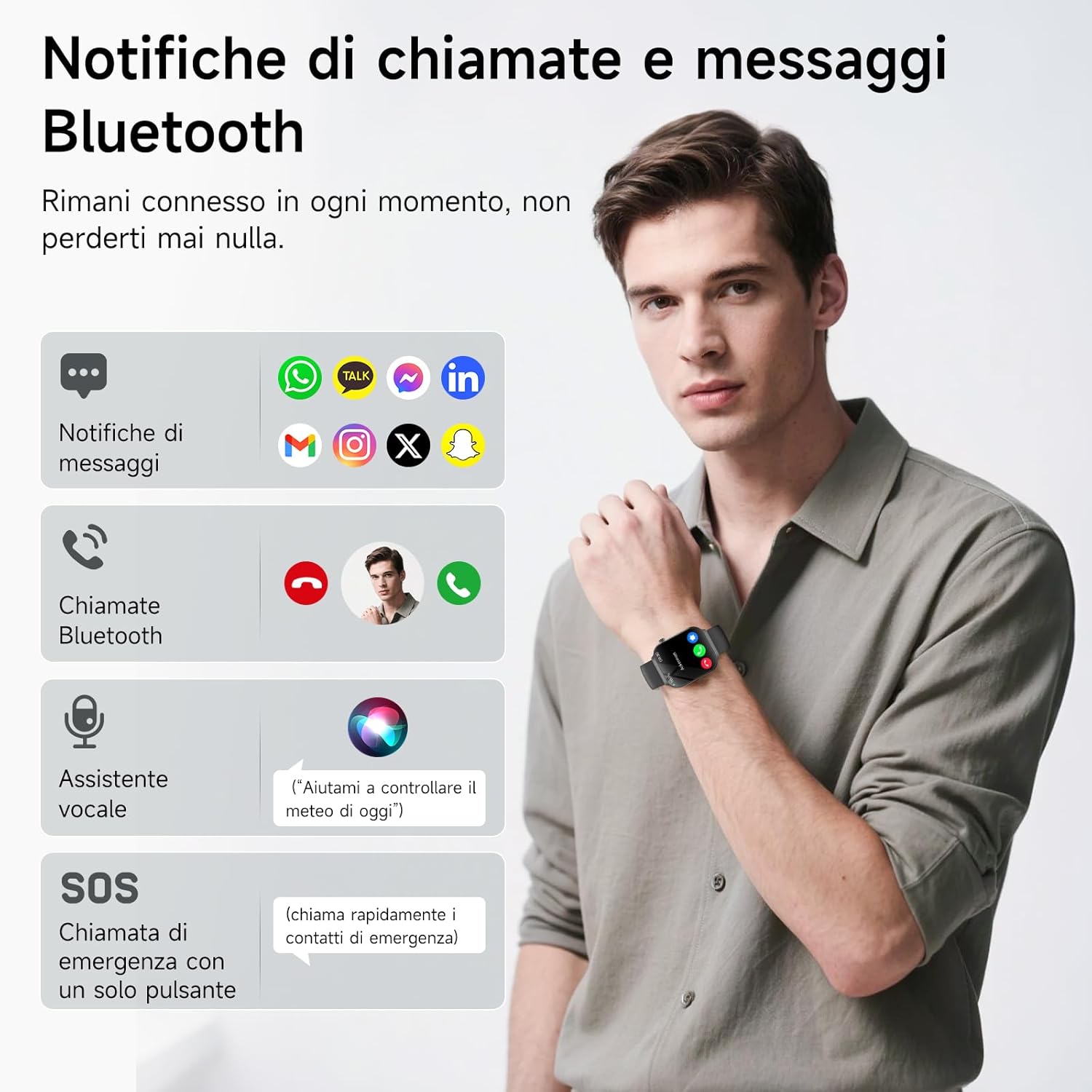
Image: Bluetooth call and message notifications.
2. Daily Reminders
- Sedentary Reminder: Get alerts to move after periods of inactivity.
- Hydration Reminder: Receive prompts to drink water throughout the day.
3. Utility Features
- Music Control: Control music playback on your smartphone.
- Camera Remote: Use your smartwatch as a remote shutter for your phone's camera.
- Weather: View current weather conditions and forecasts.
- Stopwatch, Timer, Alarm: Essential timekeeping functions.
- Find Phone: Locate your misplaced smartphone by making it ring.
- Calculator: A basic calculator for quick computations.
- Games: Enjoy simple games on your wrist.
- World Clock: Keep track of time in different time zones.
- Raise to Wake: Lift your wrist to automatically wake the screen.

Image: Overview of smart features and battery life.
Battery Life
The Lgnitek Smartwatch A2 is equipped with a 330 mAh battery, offering extended usage times.
- Charging Time: 1-2 hours
- Daily Use: 3-5 days
- Standby Time: 7-15 days

Image: Battery life details and charging information.
Maintenance
1. Cleaning
Regularly clean your smartwatch and strap to prevent skin irritation and maintain device hygiene. Use a soft, damp cloth to wipe the screen and strap. Avoid harsh chemicals or abrasive materials.
2. Water Resistance Guidelines
While the smartwatch is IP67 water-resistant, it is important to adhere to the following guidelines:
- Do not submerge the watch in water for extended periods.
- Avoid exposure to hot water, steam, or high-pressure water jets.
- Dry the watch thoroughly after it gets wet to prevent damage.
Troubleshooting
If you encounter issues with your Lgnitek Smartwatch A2, refer to the following common troubleshooting steps:
- Device Not Turning On: Ensure the watch is fully charged. Connect it to the charger for at least 30 minutes.
- Pairing Issues: Make sure Bluetooth is enabled on your phone and the watch is within range. Restart both the phone and the watch, then try pairing again.
- Inaccurate Health Readings: Ensure the watch is worn snugly on your wrist, not too tight or too loose. Clean the sensors on the back of the watch. Remember that readings are for reference only.
- Notifications Not Appearing: Check app permissions on your phone to ensure the companion app has access to notifications. Verify that notifications are enabled in both the app and the smartwatch settings.
- Short Battery Life: Reduce screen brightness, disable unnecessary features, and limit frequent health monitoring if not needed.
- Screen Unresponsive: Try restarting the smartwatch. If the issue persists, contact customer support.
Specifications
| Feature | Specification |
|---|---|
| Model Number | A2 |
| Display Size | 2.2 Inches |
| Screen Type | 3D Curved Screen |
| Resolution | 390 x 390 |
| Battery Capacity | 330 mAh |
| Connectivity | Bluetooth |
| Memory Capacity | 128 MB |
| Water Resistance | IP67 (1 Meter depth) |
| Compatible Systems | iOS, Android |
| Strap Material | Silicone |
| Special Features | ECG, Blood Pressure, Heart Rate, Sleep, SpO2, HRV, Uric Acid, Lipids, Body Temperature Monitoring |
Warranty and Support
Lgnitek products are designed for reliability and performance. For warranty information or technical support, please refer to the contact details provided with your purchase documentation or visit the official Lgnitek website. Keep your purchase receipt as proof of purchase for warranty claims.

