
Introduction
Thank you for choosing the AHB Double Tilt Out Trash Can Cabinet. This manual provides essential information for the safe assembly, operation, and maintenance of your new cabinet. Please read these instructions carefully before beginning assembly and retain them for future reference.
Safety Information
- Ensure all parts are present and undamaged before assembly. Do not use if any parts are missing or broken.
- Assemble the cabinet on a soft, clean surface to prevent scratches.
- Keep small parts away from children during assembly.
- Do not overtighten screws, as this may damage the material.
- For stability, place the cabinet on a flat, level surface.
- This cabinet is designed for indoor use only.
- The cabinet features an anti-tipping mechanism. Ensure it is properly installed to prevent accidental tipping, especially in households with children or pets.
Package Contents
Please verify that all components listed in the included assembly instructions are present. The package includes all necessary hardware for assembly. Note: Trash cans are not included with this cabinet.
Setup and Assembly
Assembly of the AHB Double Tilt Out Trash Can Cabinet is required. Detailed step-by-step instructions are provided in the assembly manual included in your package. Please follow these instructions carefully.
- Unpack all components and lay them out on a protected surface.
- Identify each part using the provided diagrams in the assembly manual.
- Follow the sequential steps for attaching panels, installing drawers, and securing the tilt-out mechanisms.
- Ensure all screws and fasteners are tightened securely, but do not overtighten.
- Install the anti-tipping hardware as directed to secure the cabinet to a wall, if desired, for enhanced safety.

Figure 1: Product Dimensions and Recommended Trash Can Size.

Figure 2: Multifunctional design and key features of the cabinet.
Operating Instructions
The AHB Double Tilt Out Trash Can Cabinet is designed for ease of use and to keep your space tidy.
- Tilt-Out Doors: To access the trash cans, gently pull the metal handle on the front of each door. The door will tilt forward, allowing you to place or remove a 13-gallon trash can (not included). Push the door back into place until it is flush with the cabinet front.
- Storage Drawers: The two top drawers provide additional storage for small items. Pull the knob to open and push to close.
- Top Surface: The sturdy tabletop can be used to place decorations, small appliances, or daily supplies.
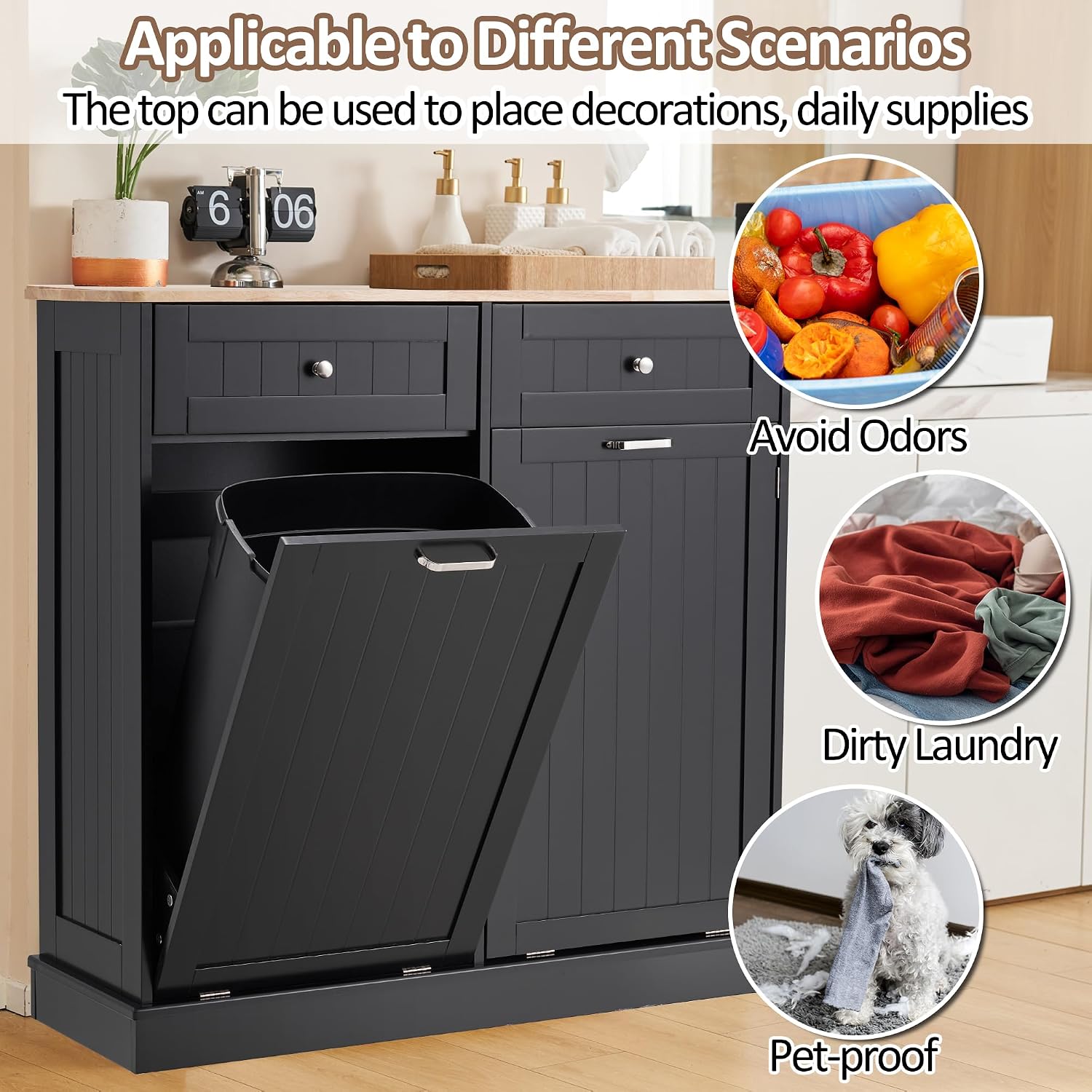
Figure 3: Cabinet in use, demonstrating pet-proof and odor-containing design.

Figure 4: Example of drawer storage for small items.
Maintenance
Proper care will ensure the longevity and appearance of your AHB cabinet.
- Cleaning: Wipe the cabinet surfaces with a damp cloth. Avoid harsh chemicals or abrasive cleaners, as these can damage the engineered wood finish.
- Spills: Clean up spills immediately to prevent moisture damage or staining.
- Hardware: Periodically check all screws and fasteners to ensure they remain tight. Retighten if necessary.
- Hinges: The upgraded hinges are designed for durability. If the tilt-out mechanism becomes stiff, a small amount of silicone lubricant can be applied to the hinge points.

Figure 5: Key components including the sturdy tabletop, drawers, hinges, and handles.
Troubleshooting
| Problem | Possible Cause | Solution |
|---|---|---|
| Tilt-out door does not close smoothly. | Obstruction in the compartment; hinges need lubrication; uneven assembly. | Check for items blocking the door. Apply silicone lubricant to hinges. Verify assembly is correct and all screws are tight. |
| Drawers are stiff or difficult to open/close. | Overloaded drawer; debris in drawer slides; uneven assembly. | Reduce contents in the drawer. Clean drawer slides. Ensure the cabinet is on a level surface and assembled correctly. |
| Cabinet wobbles or is unstable. | Uneven floor; loose fasteners; anti-tipping kit not installed. | Adjust cabinet position on a level surface. Tighten all assembly screws. Install the anti-tipping kit as per instructions. |
Specifications
| Feature | Detail |
|---|---|
| Brand | AHB |
| Model Number | 072/122 |
| Color | Black |
| Material | Engineered Wood |
| Product Dimensions (D x W x H) | 14"D x 39.37"W x 38.3"H |
| Item Weight | 68 pounds |
| Capacity | Fits 2x13-gallon trash cans (not included) |
| Number of Drawers | 2 |
| Additional Features | Anti-Tipping, Hidden Design |
| Assembly Required | Yes (Instructions Included) |
Warranty and Support
For information regarding product warranty, please refer to the documentation provided at the time of purchase or contact AHB customer service. AHB is committed to providing functional and stylish furniture. For any questions, missing parts, or assistance with assembly, please contact AHB customer support through the retailer where the product was purchased or visit the official AHB store page.
Visit the AHB Store on Amazon for more information.