
Introduction
Thank you for choosing the Reobiux K3 1080P WiFi Surveillance Camera. This manual provides detailed instructions for the installation, operation, and maintenance of your camera. Please read this manual carefully before use to ensure proper functionality and safety. This camera is designed for both indoor and outdoor surveillance, offering advanced features for comprehensive security monitoring.
Package Contents
Please check the package contents upon opening. If any items are missing or damaged, contact customer support.
- 1 x Reobiux K3 WiFi Surveillance Camera
- 1 x User Manual
- 1 x Installation Kit (includes mounting screws and support)
- 1 x Power Adapter
- 1 x Power Cord (2 meters)
Product Overview
The Reobiux K3 camera is equipped with a 2MP sensor for clear 1080P HD video. It features advanced surveillance capabilities for enhanced security.
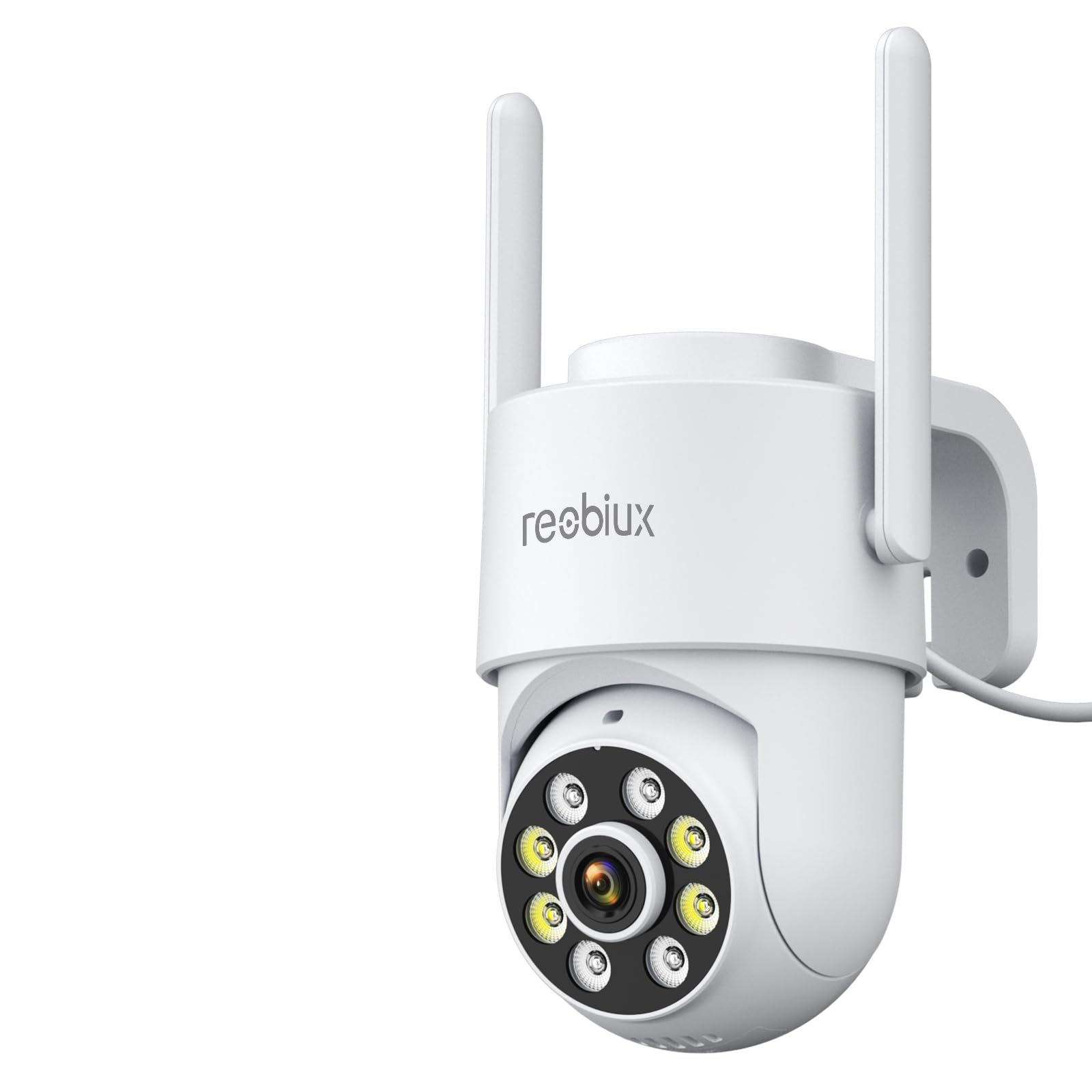
Image: Front view of the Reobiux K3 1080P WiFi Surveillance Camera, showing its dome shape and lens.
Key Features:
- 1080P HD Resolution: Captures sharp and clear images with a 2MP sensor.
- Color Night Vision: Equipped with 8 white LEDs for color night vision up to 30 meters. Supports infrared, color, smart, and off night vision modes.
- Dual-band WiFi: Compatible with both 2.4 GHz and 5 GHz WiFi networks.
- PTZ Functionality: Pan (355°) and Tilt (90°) for wide area coverage.
- AI Human Detection & Active Protection: Features a siren and flashing LEDs to deter intruders upon motion detection, sending real-time notifications to your phone.
- Two-Way Audio: Built-in microphone and speaker for communication.
- IP66 Weatherproof: Designed for outdoor use, resistant to rain, fog, and snow. Can also be used indoors.
- Flexible Storage: Supports Micro SD card (up to 128GB, not included) for 24/7 continuous recording and optional cloud storage.
Setup
1. App Installation
The Reobiux K3 camera uses the O-Kam Pro mobile application. Download it from your device's app store.

Image: Screenshots of the O-Kam Pro app interface, showing compatibility with Google Play, App Store, and multi-platform support.
2. Power Connection
- Connect the power cord to the camera's power input port.
- Plug the power adapter into a standard electrical outlet (100-240V AC).
- The camera will power on and initiate its startup sequence.
3. Mounting the Camera
The Reobiux K3 camera is designed for wall mounting. Choose a suitable location that provides the desired viewing angle and is within range of your WiFi network and a power source.
- Use the provided installation kit to mark and drill holes on the wall.
- Secure the mounting bracket to the wall using the screws.
- Attach the camera to the mounting bracket, ensuring it is firmly in place.
4. Network Connection
The camera supports both 2.4/5G WiFi and wired Ethernet connections.
- Open the O-Kam Pro app and follow the on-screen instructions to add your camera.
- Select your preferred connection method (WiFi or wired).
- For WiFi connection, ensure your router is broadcasting a 2.4GHz or 5GHz network and enter the correct password.
- For wired connection, connect an Ethernet cable from your router to the camera's Ethernet port.
- Follow the app prompts to complete the pairing process.
Operation
Live View and PTZ Control
- Open the O-Kam Pro app and select your camera to view the live feed.
- Use the on-screen controls to pan the camera horizontally (355°) and tilt it vertically (90°) to adjust the viewing angle.
Night Vision Modes
The camera offers four night vision modes:
- Infrared Night Vision: Standard black and white night vision using IR LEDs.
- Color Night Mode: Utilizes white LEDs to provide full-color video in low-light conditions.
- Smart Mode: Automatically switches between infrared and color night vision based on detected motion or light conditions.
- Off: Disables night vision.
You can switch between these modes within the O-Kam Pro app settings.
Two-Way Audio
To use the two-way audio feature:
- While in live view, tap the microphone icon in the O-Kam Pro app.
- Speak into your phone's microphone to transmit audio through the camera's speaker.
- Release the microphone icon to listen through the camera's microphone.
Alarm Functions and Human Detection
The camera features AI-powered human detection and active protection:
- When human motion is detected, the camera can activate a siren and flash its white LEDs to deter intruders.
- You will receive real-time notifications on your phone via the O-Kam Pro app.
- Alarm modes (white light/sound alarm) can be configured in the app settings.
Recording and Storage
The camera supports continuous 24/7 recording and offers two storage options:
- Micro SD Card: Insert a Micro SD card (up to 128GB, not included) into the camera's designated slot. The camera will automatically record footage to the card.
- Cloud Storage: Optional cloud storage is available. Refer to the O-Kam Pro app for subscription details and activation.
Sharing Access
You can share camera access with family members or trusted individuals through the O-Kam Pro app, allowing multiple users to monitor the same camera simultaneously.
Maintenance
Cleaning
To maintain optimal performance, regularly clean the camera lens and housing. Use a soft, dry cloth. For stubborn dirt, slightly dampen the cloth with water. Do not use harsh chemicals or abrasive cleaners.
Environmental Considerations
The camera is IP66 rated, making it suitable for outdoor use in various weather conditions. However, avoid direct exposure to extreme temperatures outside its operating range (-10°C to 55°C) for prolonged periods to ensure longevity.
Troubleshooting
If you encounter issues with your Reobiux K3 camera, refer to the following common solutions:
- Camera Not Powering On:
- Check if the power adapter is securely connected to both the camera and the power outlet.
- Ensure the power outlet is functional.
- Unable to Connect to WiFi:
- Verify that your WiFi network is 2.4GHz or 5GHz.
- Ensure the WiFi password entered in the app is correct.
- Move the camera closer to the WiFi router to improve signal strength.
- Restart your router and the camera.
- Poor Video Quality:
- Check your internet connection speed.
- Clean the camera lens.
- Ensure there are no obstructions in front of the lens.
- No Notifications:
- Check the notification settings in the O-Kam Pro app.
- Ensure app notifications are enabled in your phone's system settings.
- Two-Way Audio Not Working:
- Ensure microphone and speaker permissions are granted to the O-Kam Pro app on your phone.
- Check the volume settings on your phone and within the app.
For further assistance, please contact Reobiux customer support.
Specifications
| Feature | Specification |
|---|---|
| Model Name | K3 |
| Resolution | 1080P HD (2 MP) |
| Connectivity Technology | 2.4/5G WiFi, Wired Ethernet |
| Night Vision Range | Up to 30 meters |
| Night Vision Type | Color Night, Infrared, Smart |
| Pan/Tilt Angle | Pan 355°, Tilt 90° |
| Two-Way Audio | Supported |
| Human Detection | AI-powered |
| Alarm Method | App Notification, Siren, White Light |
| Waterproof Rating | IP66 |
| Storage Options | Micro SD (up to 128GB), Cloud Storage |
| Operating Temperature | -10°C to 55°C |
| Power Input | 100-240V AC |
| DC Voltage | 12V / 0.5A |
| Power Consumption | 6W |
| Material | ABS Plastic |
| Compatible Devices | Smartphones (Android/iOS), Tablets, Computers |
| Video Encoding | H.265/25 fps |
| Dimensions | 29 x 29 x 75 mm |
Warranty and Support
Reobiux provides a 2-year availability period for spare parts within the EU. For any product-related inquiries, technical support, or warranty claims, please contact Reobiux customer service. You can find contact information on the official Reobiux website or through the O-Kam Pro app.

Image: Illustration of a customer service representative, symbolizing available support.


