
1. Introduction
This manual provides essential information for the safe operation and maintenance of your HYTOBP H867 Drone. Please read this manual thoroughly before operating the drone to ensure proper usage and to prevent damage or injury. Keep this manual for future reference.
2. Safety Guidelines
- Operate the drone in open areas, away from people, animals, buildings, and obstacles.
- Maintain a safe distance from the drone during flight.
- Do not fly near airports or restricted airspace.
- Avoid flying in strong winds, rain, or other adverse weather conditions.
- Ensure batteries are fully charged and properly installed before each flight.
- Regularly inspect the drone for any damage to propellers, motors, or the body.
- Adult supervision is recommended for younger operators.
3. Package Contents
Verify that all items are present in your package:
- HYTOBP H867 Drone
- Remote Controller
- Lithium Polymer Batteries (2 included)
- USB Charging Cable
- Spare Propellers
- Screwdriver
- User Manual
4. Component Identification
4.1 Drone Components

Figure 4.1: HYTOBP H867 Drone featuring its 4K HD camera with 120-degree field of view and 90-degree adjustable angle.
- 4K HD Camera: Records high-resolution video and photos. Features a 120° FOV and 90° adjustable angle.
- Propellers: Provide lift and thrust for flight.
- Brushless Motors: Efficient motors for high speed and longer lifespan.
- Optical Flow Sensor: Assists with stable hovering and precise positioning.
- Battery Compartment: Houses the drone's flight battery.
- LED Indicators: Display drone status and orientation.
4.2 Remote Controller Components
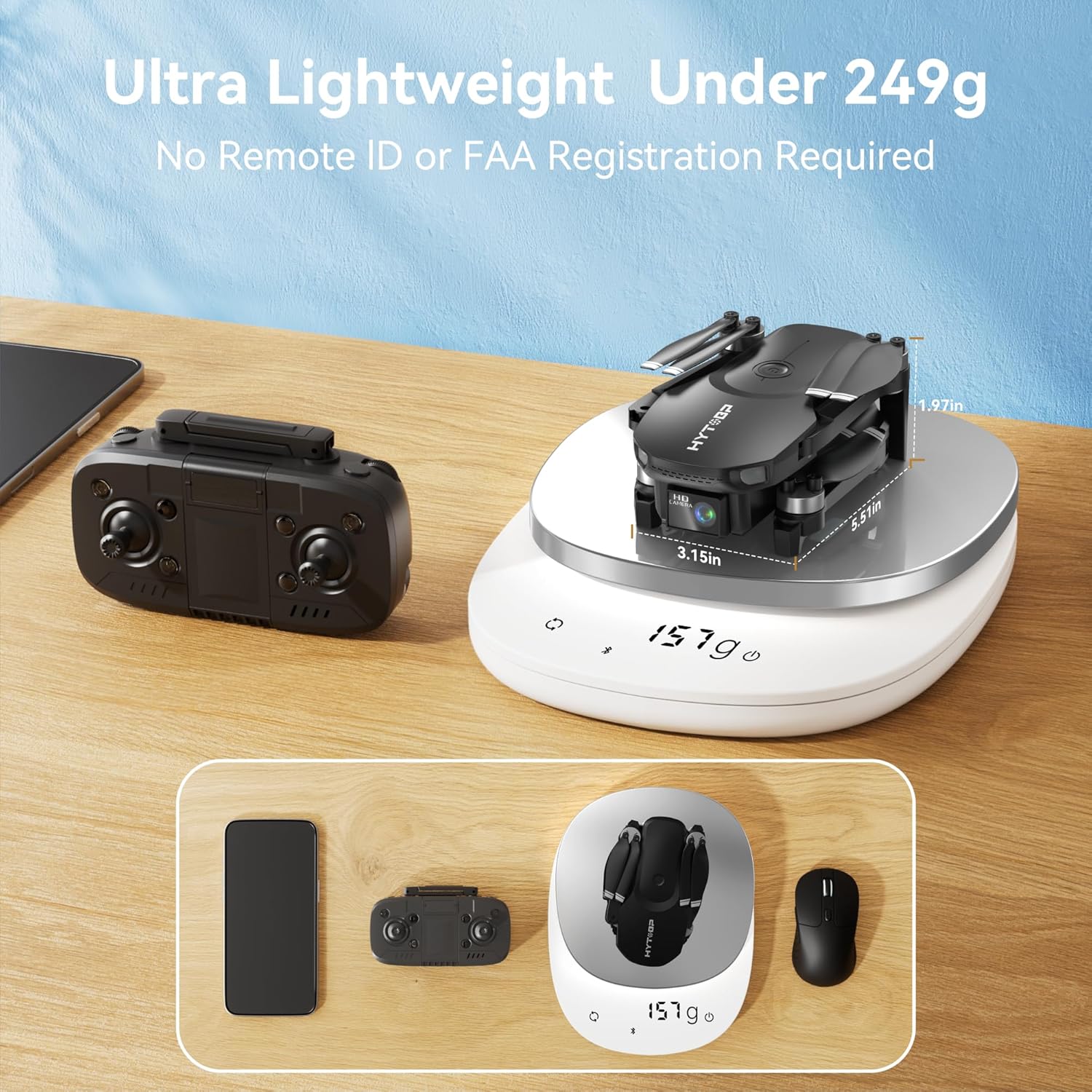
Figure 4.2: The HYTOBP H867 Drone and its remote controller, demonstrating the drone's lightweight design at 157g.
- Left Joystick: Controls altitude (throttle) and yaw (rotation).
- Right Joystick: Controls forward/backward and left/right movement.
- One-Key Take-off/Landing Button: Initiates automatic take-off or landing.
- Speed Mode Button: Toggles between Low, Medium, and High speed settings.
- Headless Mode Button: Activates headless flight mode.
- Photo/Video Button: Captures photos or starts/stops video recording.
- Power Button: Turns the remote controller on/off.
5. Setup
5.1 Battery Installation and Charging
- Drone Battery: Insert the fully charged Lithium Polymer battery into the drone's battery compartment until it clicks into place. Ensure the battery is securely fastened.
- Remote Controller Batteries: Open the battery cover on the back of the remote controller and insert the required batteries (typically AA, refer to remote for specific type) with correct polarity. Close the cover.
- Charging: Use the provided USB charging cable to charge the drone batteries. Connect the cable to a USB power adapter (not included) and the battery. The indicator light will show charging status.

Figure 5.1: The HYTOBP H867 Drone includes two batteries, each providing approximately 18 minutes of flight time.
5.2 Propeller Installation
If propellers are not pre-installed or need replacement:
- Identify the 'A' and 'B' marked propellers and match them to the corresponding motor arms (usually marked 'A' or 'B' near the motor).
- Place the propeller onto the motor shaft and secure it with the provided screws using the screwdriver. Ensure propellers are firmly attached but not overtightened.
5.3 Pairing the Drone and Remote Controller
- Place the drone on a flat, level surface.
- Turn on the drone's power switch. The drone's LED lights will flash.
- Turn on the remote controller. The remote's indicator light will flash.
- Push the left joystick (throttle) fully up, then fully down. The drone and remote indicator lights will become solid, indicating successful pairing.
5.4 Pre-Flight Calibration
After pairing, perform gyroscope calibration:
- Place the drone on a flat surface.
- Push both joysticks down and to the right simultaneously for a few seconds. The drone's lights will flash rapidly and then become solid, indicating calibration is complete.
6. Operating Instructions
6.1 Take-off and Landing
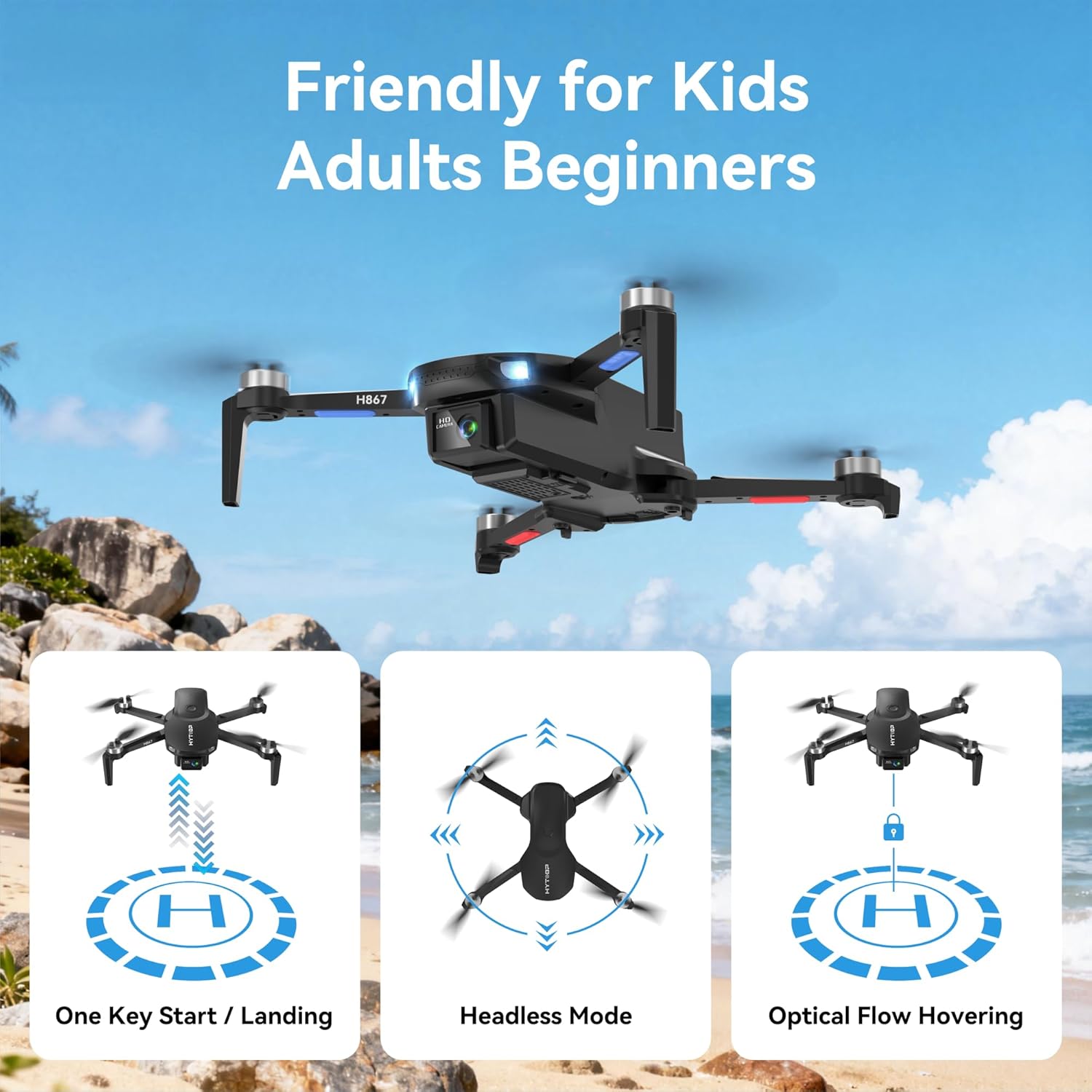
Figure 6.1: The HYTOBP H867 Drone offers user-friendly features like One Key Start/Landing, Headless Mode, and Optical Flow Hovering.
- One-Key Take-off: Press the One-Key Take-off/Landing button. The drone will automatically ascend to a stable hovering altitude.
- Manual Take-off: After calibration, push both joysticks down and outwards to unlock the motors. Slowly push the left joystick (throttle) up to ascend.
- One-Key Landing: Press the One-Key Take-off/Landing button again. The drone will automatically descend and land.
- Emergency Stop: In an emergency, press and hold the One-Key Take-off/Landing button for a few seconds to stop the motors.
6.2 Flight Controls
- Left Joystick (Throttle/Yaw):
- Push up/down: Ascend/Descend.
- Push left/right: Rotate left/right (Yaw).
- Right Joystick (Forward/Backward/Sideways):
- Push up/down: Fly forward/backward.
- Push left/right: Fly left/right (Strafe).
6.3 Speed Modes

Figure 6.2: The HYTOBP H867 Drone features three adjustable speed modes: Low, Medium, and High, for varied flight experiences.
Press the Speed Mode button on the remote controller to cycle through Low, Medium, and High speed settings. Low speed is recommended for beginners, while High speed offers more agile flight for experienced pilots.
6.4 Headless Mode
Activate Headless Mode by pressing its dedicated button. In this mode, the drone's orientation is relative to the pilot, regardless of the drone's front direction. This simplifies control for beginners.
6.5 Optical Flow Hovering

Figure 6.3: The HYTOBP H867 Drone utilizes upgraded optical flow technology for stable hovering and user-friendly control, alongside One-key Start/Land and Gesture Selfie functions.
The drone uses an optical flow sensor to maintain a stable hover at a fixed altitude and position, especially useful for indoor flight or when GPS signal is weak.
6.6 Special Flight Features
- 360° Flips: While flying, press the 360° Flip button (if available on remote) and then push the right joystick in the desired direction to perform a flip. Ensure sufficient altitude.
- Gesture Selfie: The drone supports gesture recognition for taking photos or videos. Refer to the specific gestures in the quick start guide or app instructions.
- Orbit Flight: The drone can orbit around a designated point or subject. This feature is typically controlled via the companion mobile application.

Figure 6.4: The HYTOBP H867 Drone is capable of performing an 'Orbit Around the Flight' function, circling a point of interest.
6.7 Camera Operation
The HYTOBP H867 is equipped with a 4K HD camera. Connect your smartphone to the drone's Wi-Fi network and use the dedicated app to view live footage, capture photos, and record videos. The camera angle can be adjusted by 90 degrees for optimal shots.
7. Maintenance
- Cleaning: Use a soft, dry cloth to clean the drone body and camera lens. Avoid using harsh chemicals.
- Propeller Replacement: If propellers are damaged, replace them immediately with new ones, ensuring correct 'A' and 'B' propeller placement.
- Battery Care: Store batteries in a cool, dry place. Do not overcharge or over-discharge. If storing for extended periods, charge to approximately 50% capacity.
- Storage: Store the drone and remote controller in a safe place, away from direct sunlight and extreme temperatures.
8. Troubleshooting
| Problem | Possible Cause | Solution |
|---|---|---|
| Drone does not respond to remote. | Not paired; low battery; out of range. | Re-pair drone and remote; charge batteries; fly within range. |
| Drone drifts during flight. | Not calibrated; uneven surface at take-off; strong wind. | Perform gyroscope calibration; take off from a flat surface; avoid flying in strong winds. |
| Propellers do not spin. | Motors locked; low battery; damaged motor/propeller. | Unlock motors (joysticks down and out); charge battery; inspect and replace damaged parts. |
| Camera not working. | Not connected to Wi-Fi; app issue. | Ensure phone is connected to drone's Wi-Fi; restart app and drone. |
9. Specifications
- Model: H867
- Brand: HYTOBP
- Dimensions: 20 x 12.5 x 15.5 cm
- Weight: 157 Grams
- Camera Resolution: 4K HD (8.29 MP effective still image resolution)
- Field of View (FOV): 120°
- Camera Adjustment: 90° (manual/app controlled)
- Motors: Brushless
- Flight Modes: 3 Speed Modes (Low, Medium, High), Headless Mode, Optical Flow Hovering, Orbit Flight
- Battery Type: Lithium Polymer (2 included)
- Remote Control: Included

Figure 9.1: The HYTOBP H867 Drone is equipped with upgraded brushless motors for enhanced performance and durability.
10. Warranty and Support
For warranty information and technical support, please refer to the contact details provided on the product packaging or the official HYTOBP website. Keep your purchase receipt as proof of purchase for any warranty claims.