
Introduction
This manual provides detailed instructions for the setup, operation, and maintenance of your new XINFUTE 0010406609E replacement remote control. This remote is designed to be compatible with Haier air conditioner models YR-HE2 and AS50PDHHRA-NR.
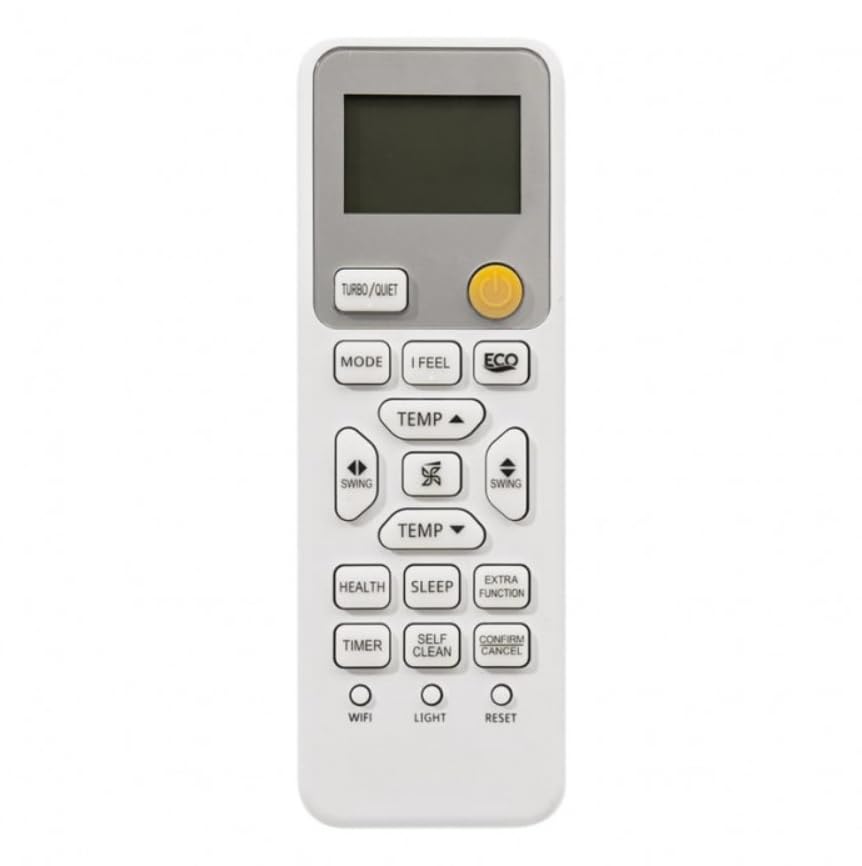
Figure 1: XINFUTE 0010406609E Remote Control Overview
1. Setup
1.1 Battery Installation
The remote control requires two (2) AAA batteries (not included). Follow these steps to install the batteries:
- Locate the battery compartment cover on the back of the remote control.
- Slide the cover downwards to open the compartment.
- Insert two AAA batteries, ensuring the positive (+) and negative (-) terminals match the diagrams inside the compartment.
- Slide the battery compartment cover back into place until it clicks securely.

Figure 2: Battery Compartment with AAA Batteries
Note: Always replace both batteries at the same time with new ones. Do not mix old and new batteries, or different types of batteries.
2. Operating Instructions
Familiarize yourself with the buttons on your remote control. A visual guide is provided below:

Figure 3: Remote Control Button Layout
2.1 Basic Functions
- Power Button (●): Press to turn the air conditioner ON or OFF.
- MODE: Cycles through operating modes (e.g., Cool, Heat, Fan, Dry, Auto).
- TEMP ▲ / TEMP ▼: Adjusts the desired temperature setting.
- Fan Speed Button (✈): Adjusts the fan speed (e.g., Auto, Low, Medium, High).
- SWING: Controls the horizontal or vertical louver movement for air distribution.
2.2 Advanced Functions
- TURBO/QUIET: Activates Turbo mode for rapid cooling/heating or Quiet mode for reduced noise.
- I FEEL: Activates the "I Feel" function, which senses the temperature at the remote's location for more precise control.
- ECO: Engages energy-saving mode.
- HEALTH: Activates air purification or health-related functions (if available on your AC unit).
- SLEEP: Adjusts temperature and fan speed for comfortable sleep.
- EXTRA FUNCTION: Accesses additional features or settings.
- TIMER: Sets a timer for the air conditioner to turn ON or OFF automatically.
- SELF CLEAN: Initiates the self-cleaning function of the indoor unit.
- CONFIRM/CANCEL: Confirms settings or cancels an operation.
- WIFI: Activates or deactivates the Wi-Fi function for smart control (if available).
- LIGHT: Controls the display light on the air conditioner unit.
- RESET: Resets the remote control settings to default. Use a pointed object to press this button.
3. Maintenance
3.1 Battery Replacement
When the remote control's display dims or its response becomes sluggish, it is time to replace the batteries. Refer to Section 1.1 for detailed battery installation instructions.
3.2 Cleaning the Remote Control
To clean the remote control, wipe it gently with a soft, dry cloth. Do not use liquid cleaners, abrasive materials, or chemical solvents, as these may damage the remote's surface or internal components.
4. Troubleshooting
- Remote control is not responding:
- Ensure the batteries are correctly installed with the correct polarity.
- Replace old batteries with new AAA batteries.
- Check for any obstructions between the remote control and the air conditioner's receiver.
- Ensure you are within the effective operating range of the air conditioner.
- Display on remote control is dim or blank:
- Replace the batteries with new AAA batteries.
5. Specifications
| Model Number: | 0010406609E |
| Material: | ABS |
| Power Supply: | 2 x AAA Batteries (not included) |
| Product Dimensions: | 10.16 x 7.62 x 2.54 cm (4 x 3 x 1 inches) |
| Weight: | 80 g (2.82 oz) |
| Compatible AC Models: | Haier YR-HE2, AS50PDHHRA-NR |
6. Warranty and Support
6.1 Warranty Information
This product comes with a one-year warranty from the date of purchase. Please retain your proof of purchase for warranty claims.
6.2 Customer Support
All items are inspected before shipment. If you encounter any issues or are not satisfied with your purchase, please contact the seller directly within 24 hours of receiving the product for assistance.