
1. Product Overview
The Ecoviva Mate 3 is a countertop reverse osmosis water filtration system designed for convenient access to purified water. It features an 8-stage filtration process and smart functionalities for ease of use and maintenance.

Image: Ecoviva Mate 3 system with its glass pitcher and PCR composite filter.
2. Setup
The Ecoviva Mate 3 is a plug-and-play system requiring no complex installation. Follow these steps for initial setup:
- Unpack Components: Carefully remove all items from the packaging. Ensure all included components are present: the main unit, 1.2L glass pitcher, mineralization filter media, PCR filter cartridge, and user manual.
- Clean Components: Wash the water tank and glass carafe thoroughly with clean water before first use.
- Insert Filter Cartridge: Open the filter compartment on top of the unit and insert the PCR composite filter cartridge.
- Fill Water Tank: Fill the removable 5L water tank with municipal tap water up to the MAX line. Secure the tank cover and insert the tank back into the machine.
- Connect Power: Plug the machine into a power outlet. The machine will automatically power on.
- Initial Flushing Cycle: Insert the glass carafe as directed by the carafe cap (only one direction) onto the drip tray. The machine will automatically dispense water. Repeat this process 2-4 times until the "EMPTY" light stops flashing red, indicating the end of the initial flushing cycle. Discard the water from the tank and carafe after each cycle. This activates the filter cartridge.

Image: Included components for the Ecoviva Mate 3 system.
3. Operating Instructions
The Ecoviva Mate 3 offers both automatic and manual water dispensing options.
Automatic Dispensing (with Smart Pitcher)
- Ensure the 1.2L glass carafe is placed on the drip tray with its lid attached.
- The machine will automatically detect the carafe and begin filling it with purified water up to 44oz.
- The dispensing process will stop automatically once the carafe is full.
Manual Dispensing (without Smart Pitcher)
- Place a cup or glass carafe (without its lid) on the drip tray.
- On the smart display, press the 'VOLUME' button to select the desired water volume (10, 20, 30, or 40oz).
- Short press the water making button (droplet icon) to start dispensing.
- Press the water making button again to stop dispensing if needed.
Smart Display and Features
- Real-time TDS Monitoring: The smart display shows the Total Dissolved Solids (TDS) levels of both raw and purified water, allowing you to monitor water quality.
- Filter Life Indicator: The display also shows the remaining filter life, prompting you when a replacement is needed.
- "EMPTY" Alarm: An indicator light will flash when the water tank needs refilling.
- Self-Cleaning Cycle: The water purifier performs a self-cleaning cycle every 12 hours to maintain optimal performance and extend filter life.

Image: Ecoviva Mate 3 with dimensions and real-time TDS detection on the smart display.

Image: Explanation of the smart display indicators and buttons.
Mineralization Feature
The system includes a mineralization filter media that can be added to the carafe cap. This re-introduces essential minerals into the purified water for an enhanced taste profile.

Image: The mineralization feature adds essential minerals back into the water.
4. Maintenance
Filter Replacement
The PCR composite filter cartridge has a service life of up to 12 months or 530 gallons, depending on water quality and usage. A wrench tool is included for easy replacement.
- The smart display will indicate when the filter needs replacement.
- To replace, remove the old filter using the provided wrench tool and insert a new one.
- After replacement, perform an initial flushing cycle as described in the Setup section.

Image: Annual filter replacement process using the included tool.
Cleaning
- The machine performs an automatic self-cleaning cycle every 12 hours.
- Regular cleaning of the water tank and glass carafe is recommended.
- The magnetic drip tray is removable for easy cleaning.

Image: The system features an advanced auto-clean cycle every 12 hours.
5. Troubleshooting
- "EMPTY" Light Flashing: This indicates the water tank needs to be refilled.
- Slow Dispensing/No Water: Ensure the water tank is properly seated and filled. Check if the filter cartridge is correctly installed and not expired.
- Unusual Noise During Operation: Some motor noise is normal during the filtration process. If the noise is excessive or unusual, ensure all components are correctly assembled.
- Water Leakage: Check all connections and ensure the water tank and carafe are properly seated.
- High TDS Reading After Filtration: Ensure the filter cartridge is not expired and is correctly installed. Perform an initial flushing cycle if recently replaced.
6. Specifications
| Feature | Detail |
|---|---|
| Product Dimensions | 9.06"L x 9.06"W x 14.69"H |
| Item Model Number | EV-WP-RO-MATE3-US-BK |
| Material | Plastic |
| Capacity | 5 Liters (Water Tank) |
| Purification Method | Reverse Osmosis (8-Stage Filtration) |
| Pure-to-Waste Ratio | 3:1 |
| Filter Life | Up to 12 Months / 530 Gallons |
| Special Feature | Reduce TDS, Smart Auto-Filling, Self-Cleaning |
| Included Components | 1.2L kettle, mineralization filter media, PCR filter cartridge, user manual |
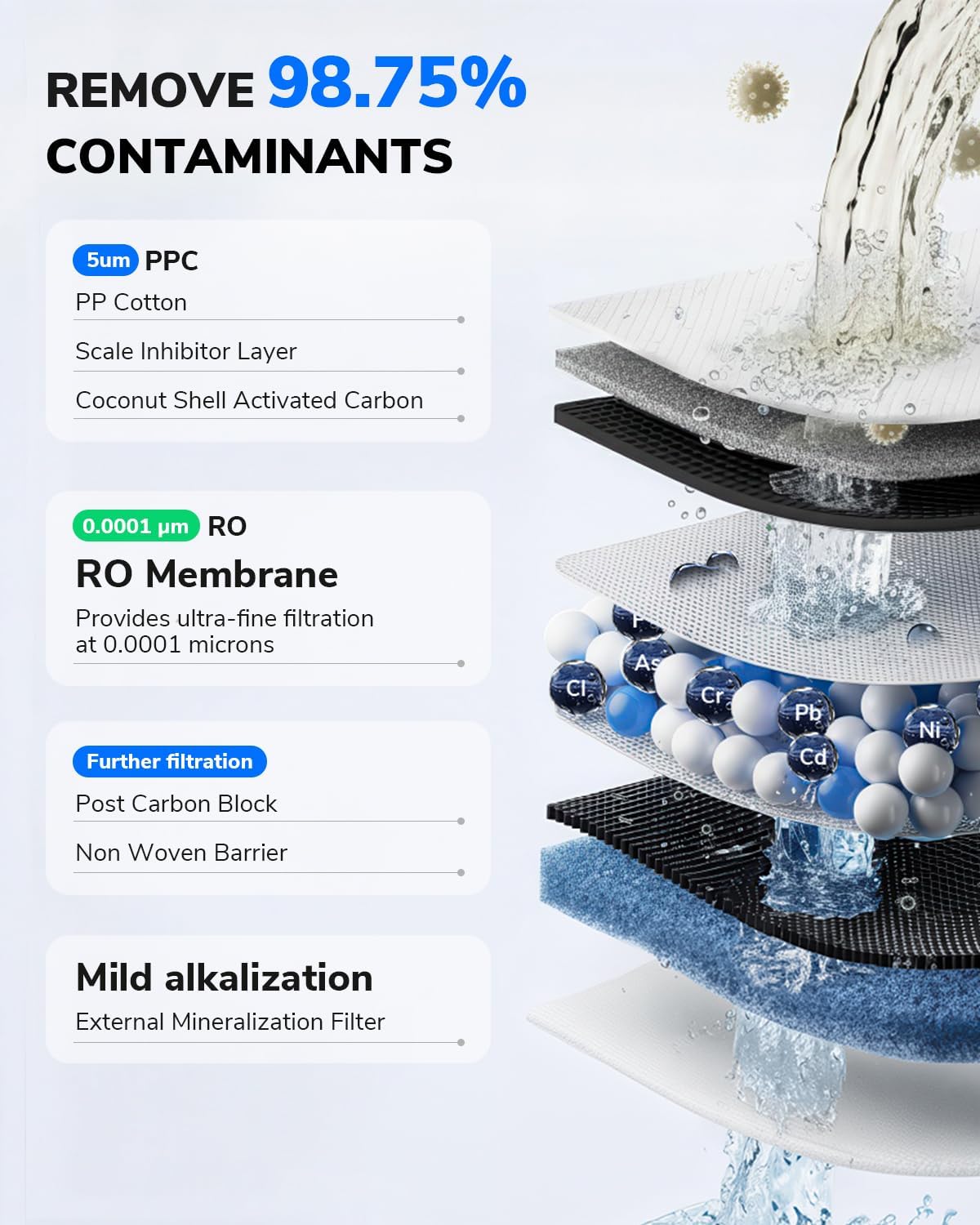
Image: Detailed illustration of the 8-stage RO filtration system.

Image: Filtration effectiveness of the 0.0001 µm RO membrane.
7. Warranty and Support
The Ecoviva Mate 3 Countertop Reverse Osmosis Water Filter comes with a 2-year warranty (excluding the filter and mineralization media). For any product problems or inquiries, please contact Ecoviva customer support.
- Online Support: Visit the official Ecoviva website for FAQs, manuals, and usage videos: purahome.ecovivafilters.com
- Email Support: Contact support@ecovivafilters.com for assistance.
- Online Chat: Available weekdays 09:00-18:00 hrs EST.

Image: Ecoviva customer support options including email and online chat.