
1. Introduction
Product Overview
Thank you for choosing the WLIVE 65-inch TV Stand. This entertainment center is designed to accommodate most TVs up to 75 inches, providing a spacious tabletop and sturdy support for your home entertainment setup. It features a farmhouse design with ample storage, including two drawers, two side cabinets, and open shelving with adjustable shelves. Integrated power outlets and cable management cutouts are included for convenience.

Image 1.1: The WLIVE 65-inch TV Stand in Gray Oak, showcasing its farmhouse design and storage capabilities.
Important Safety Information
Please read all safety instructions before assembly and use. Failure to follow these instructions may result in injury or damage to the product.
- Always secure the TV stand to the wall using the anti-tip kit provided. This prevents accidental tipping, which can cause serious injury.
- Ensure all parts are tightly assembled using the provided tools. Periodically check and retighten all connections.
- Be cautious when adjusting the shelves to prevent them from tipping over or falling. Ensure they are securely seated on the shelf pins.
- Do not overload the TV stand or its shelves. Refer to the 'Specifications' section for maximum weight capacities.
- Keep small parts and packaging materials away from children.
2. Package Contents
Before beginning assembly, please verify that all parts and hardware are present. If any items are missing or damaged, please contact WLIVE customer support.
Expected Components:
- Various engineered wood panels (labeled A, B, C, etc.)
- Hardware pack (screws, cam locks, dowels, handles, drawer slides, shelf pins, anti-tip kit)
- Power outlet strip with power cord
- Assembly instruction manual (this document)
Note: A detailed list of parts with corresponding labels can be found in the included paper assembly guide or by referring to the assembly video.
3. Setup and Assembly
Before You Begin
- Clear a spacious area for assembly.
- It is recommended that two people assemble this TV stand for efficiency and safety.
- Gather necessary tools: a Phillips head screwdriver (not included) may be helpful in addition to any provided tools.
Assembly Steps
Follow the step-by-step instructions provided in the paper manual included with your product. For visual guidance, please refer to the official product installation video below.
Video 3.1: Official WLIVE Product Installation Video. This video provides a detailed, step-by-step visual guide for assembling your TV stand.
- Identify each panel and hardware piece by its corresponding label.
- Assemble the main frame first, ensuring all cam locks and screws are securely tightened.
- Install drawer slides and cabinet hinges according to the diagrams.
- Attach the power outlet strip to its designated location.
- Once fully assembled, ensure the stand is stable and all connections are firm.
- Important: Install the anti-tip kit to a wall stud using appropriate hardware to prevent tipping.

Image 3.1: Detailed view of the TV stand's storage compartments, including adjustable dividers, cable management holes, metal door handles, and ample drawer storage.
4. Operating Instructions
Power Outlet Usage
Your WLIVE TV stand includes a built-in power strip with 4 AC outlets (125V/12A) and a 4.9-foot power cord. This allows for convenient connection of your TV, soundbar, gaming consoles, and other devices directly to the stand.
- Plug the TV stand's power cord into a grounded wall outlet.
- Connect your electronic devices to the outlets on the power strip.
- Do not exceed the maximum electrical rating of 125V/12A.
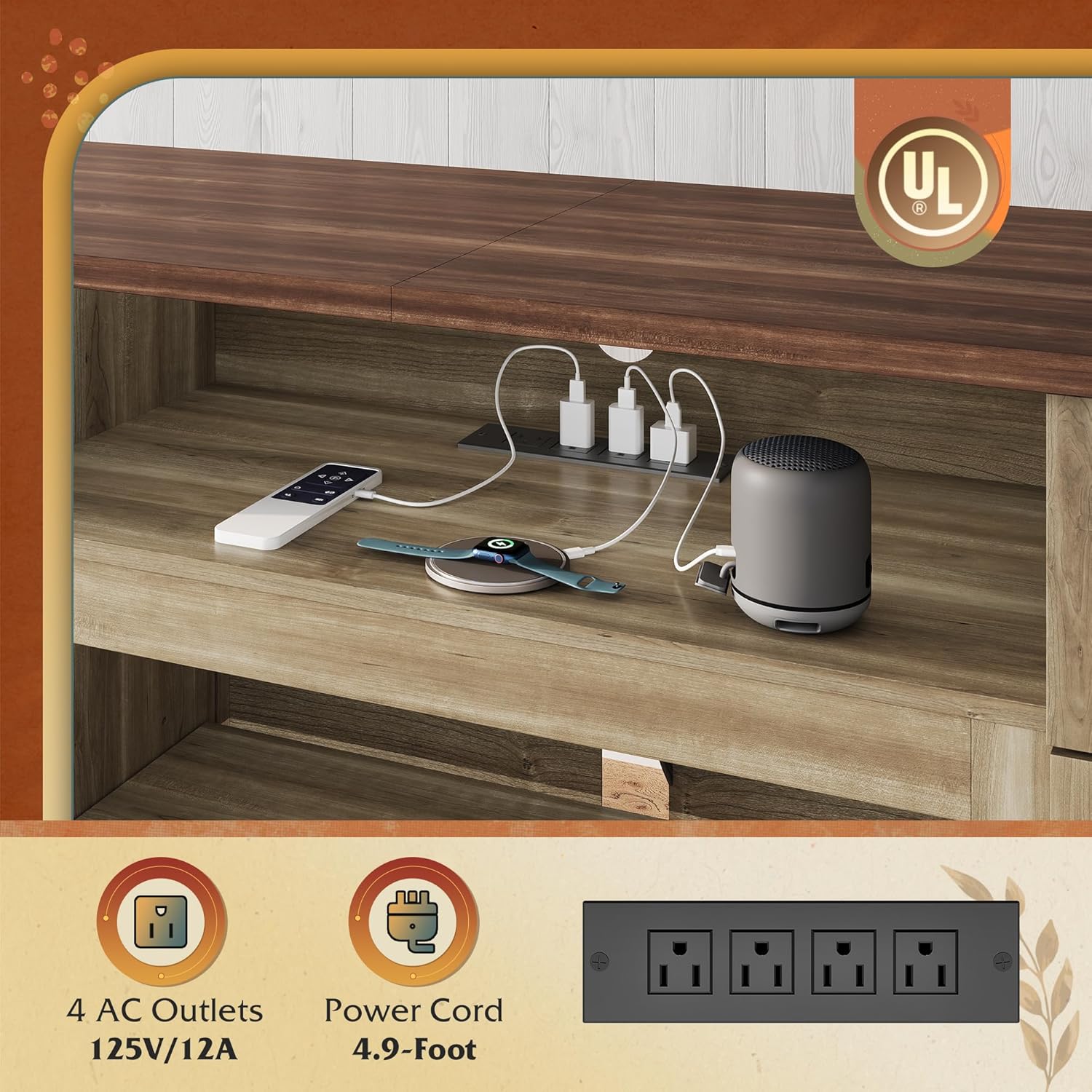
Image 4.1: Close-up view of the integrated power outlets and cable management within the TV stand's open shelving area.
Adjustable Shelves
The side cabinets and central open shelving feature adjustable shelves, allowing you to customize storage space for items of various sizes.
- To adjust a shelf, carefully remove any items from it.
- Lift the shelf slightly and remove the four shelf pins supporting it.
- Insert the shelf pins into the desired holes at the new height. Ensure all four pins are at the same level.
- Place the shelf back onto the pins, ensuring it is stable and level before placing items on it.
Drawer and Cabinet Use
The two drawers and two side cabinets provide enclosed storage for your media accessories, books, and other items.
- Drawers operate on smooth glides for easy opening and closing.
- Cabinet doors feature sturdy hinges and magnetic catches to keep them securely closed.
Cable Management
Rear cable cutouts are provided in the open shelving areas to help organize and conceal wires from your electronic devices, maintaining a tidy appearance.
- Route power cords and signal cables through the designated holes.
- Use cable ties (not included) to bundle cables for a cleaner look.
5. Maintenance and Care
- Cleaning: Wipe surfaces with a soft, damp cloth. Avoid using harsh chemicals, abrasive cleaners, or furniture polish that may damage the finish.
- Spills: Promptly wipe up any spills to prevent moisture damage.
- Inspection: Periodically check all screws and connections to ensure they remain tight. Retighten as necessary.
- Placement: Avoid placing the TV stand in direct sunlight or near heat sources, as this can cause fading or warping.
6. Troubleshooting
Stand is Wobbly
- Ensure all cam locks and screws are fully tightened.
- Check that the stand is on a level surface. If not, use furniture glides or shims to stabilize.
Drawers Do Not Align or Close Properly
- Verify that the drawer slides are correctly installed on both the drawer box and the TV stand frame.
- Ensure all screws securing the drawer slides are tight.
- Check for any obstructions in the drawer glides.
Cabinet Doors Are Misaligned
- Adjust the screws on the hinges to align the doors. Most hinges allow for vertical, horizontal, and depth adjustments.
- Ensure the hinges are securely attached to both the door and the cabinet frame.
7. Specifications
| Feature | Detail |
|---|---|
| Model Number | B0G2XKT9WN |
| Color | Gray Oak |
| Overall Dimensions (L x W x H) | 64.96 x 15.35 x 29.37 inches |
| Item Weight | 81.3 pounds |
| Material | Engineered Wood |
| Max TV Size Accommodated | Up to 75 inches |
| Max Weight Capacity (Top Surface) | 110 lbs |
| Number of Drawers | 2 |
| Number of Shelves | 3 (adjustable) |
| Power Outlets | 4 AC Outlets (125V/12A) |
| Power Cord Length | 4.9 feet |
| Additional Features | Adjustable Shelves, Drawers, Cable Management |

Image 7.1: Diagram illustrating the dimensions and maximum weight capacities for various sections of the WLIVE TV Stand.
8. Warranty and Support
WLIVE is committed to providing high-quality products and customer satisfaction. While specific warranty details are not provided in this manual, please retain your proof of purchase for any warranty claims.
For product support, missing parts, damaged components, or any questions regarding your WLIVE TV stand, please contact WLIVE customer service through the retailer's platform or the official WLIVE website. Our support team will be happy to assist you.
Thank you for choosing WLIVE.


