
1. Introduction
Thank you for choosing the HAXIAOER MIG160 4-in-1 Welding Machine. This versatile unit is designed for various welding tasks, offering Gas MIG, Gasless Flux Core MIG, Lift TIG, and Stick (MMA) welding modes. It features a 160A output, synergic control, and is suitable for both beginners and experienced welders. Please read this manual thoroughly before operation to ensure safe and efficient use of the machine.

Image: The HAXIAOER MIG160 welding machine, showcasing its compact design and included accessories like welding cables and torch.
2. Safety Precautions
Welding can be dangerous. Always follow safety guidelines to prevent injury or damage. This section outlines general safety practices; refer to local regulations for additional requirements.
2.1 Personal Protective Equipment (PPE)
- Always wear a welding helmet with appropriate shade filter to protect eyes and face from arc rays and sparks.
- Wear flame-resistant clothing, heavy-duty welding gloves, and safety shoes.
- Use ear protection to guard against noise.
2.2 Work Area Safety
- Ensure the work area is well-ventilated to remove welding fumes.
- Keep the work area clean and free of flammable materials.
- Have a fire extinguisher readily available.
- Do not weld near combustible liquids, gases, or dust.
2.3 Electrical Safety
- Ensure the welding machine is properly grounded.
- Do not operate the machine in wet conditions or with wet hands.
- Inspect cables and connections for damage before each use. Replace damaged parts immediately.
- Disconnect power before performing any maintenance or changing accessories.
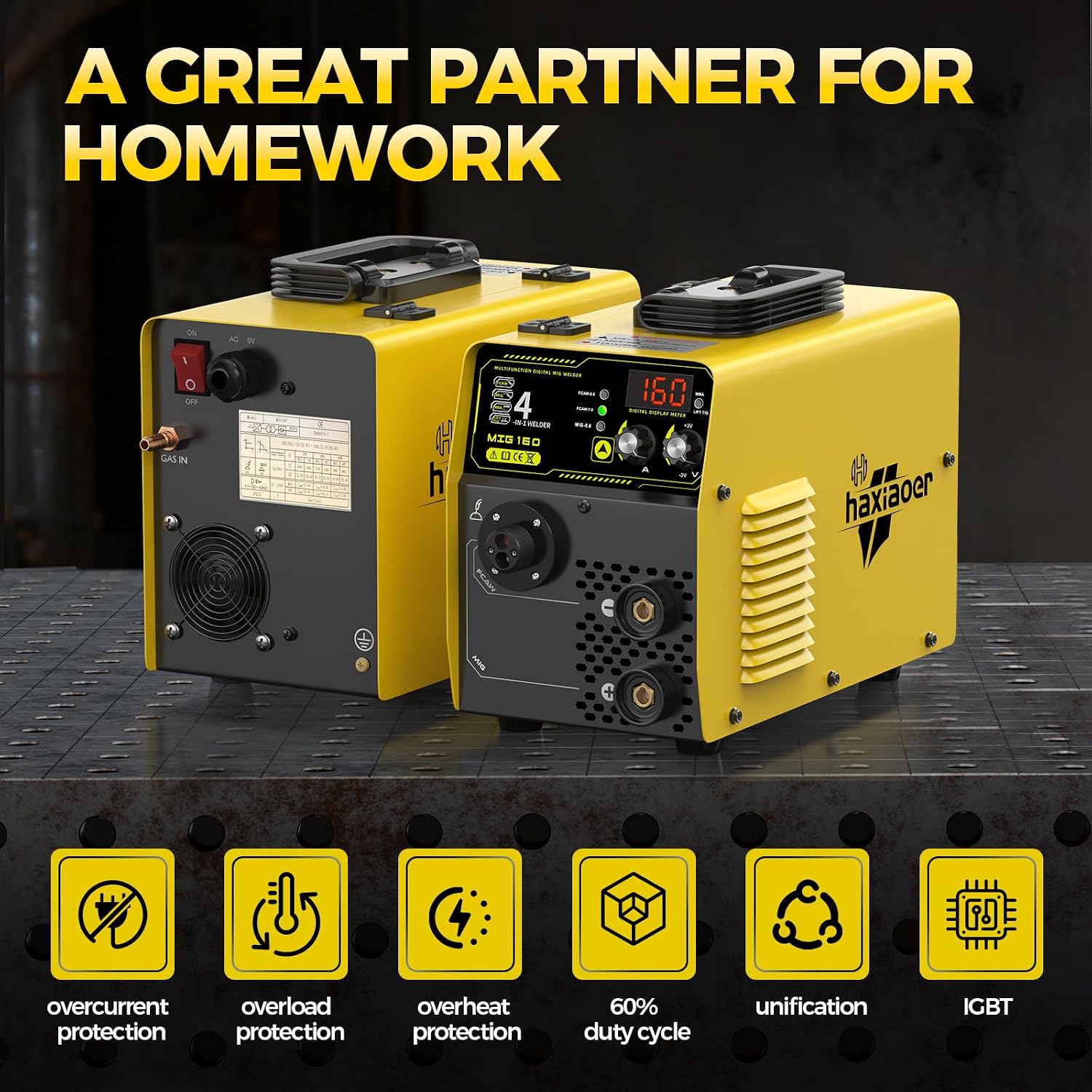
Image: The HAXIAOER MIG160 machine highlighting its built-in safety features including overcurrent, overload, and overheat protection.
3. Package Contents
Verify that all items listed below are included in your package. If any items are missing or damaged, contact your seller immediately.
- 1 x HAXIAOER 160A MIG Welder Machine
- 1 x 0.8/0.9K type wire feeder wheel (pre-installed)
- 1 x 0.8/1.0V type wire feeder wheel (additional)
- 1 x 0.5KG/0.8mm flux-cored wire
- 1 x 0.5KG/0.8mm solid wire
- 1 x 2m Earth Clamp (10-25 Plug)
- 1 x 2m Welding Handle Clamp (10-25 Plug)
- 1 x Gas Shielded Welding Torch/15AK 3m/5kg Gas Shielded Welding (with 0.8mm Conductive Nozzle)
- 1 x Conductive Nozzle 0.8mm (additional)
- 2 x Conductive Nozzle 0.9mm
- 2 x Conductive Nozzle 1.0mm
- 5 x Electrode φ2.0mm
- 1 x Slag hammer
- 1 x 2m air hose
- 1 x English manual

Image: A comprehensive view of the HAXIAOER MIG160 welding machine and all its included accessories, such as wires, electrodes, clamps, and nozzles.
4. Product Overview and Controls
The HAXIAOER MIG160 is a multi-process welding machine featuring advanced IGBT inverter technology and MCU chip for precise control.
4.1 Key Features
- 4-in-1 Welding Modes: Gas MIG, Flux Core MIG, Lift TIG, and Stick (MMA).
- Synergic Control: Automatically adjusts voltage and wire feed speed based on wire diameter (0.6-1.0 mm) for simplified setup. Manual control is also available.
- Spatter Reduction System: Optimized inductance control and precision contact tip reduce spatter.
- High Duty Cycle: 60% duty cycle at 160A for extended welding time.
- Safety Protections: Includes overcurrent, overload, and overheat protection.
4.2 Control Panel

Image: A close-up view of the HAXIAOER MIG160 control panel, indicating the digital display, welding mode selector, wire settings, mode switch button, current adjust knob, and voltage balance knob.
- Screen Display: Shows current welding parameters (Amperage, Voltage).
- Welding Mode Indicator: Lights indicate selected mode (FCAW, MIG, MMA, Lift TIG).
- Wire Settings: Indicators for wire diameter (FCAW-0.8, FCAW-1.0, MIG-0.8).
- Mode Switch Button: Press to cycle through welding modes.
- Current Adjust Knob (A): Adjusts welding current (Amperage).
- Voltage Balance Knob (V): Adjusts welding voltage. In synergic mode, this acts as a fine-tune adjustment.
5. Setup Guide
Proper setup is essential for safe and effective welding. Follow these steps carefully.
5.1 Power Connection
- Ensure the machine is switched OFF.
- Connect the power cord to a grounded 110V AC power outlet. Ensure the circuit can handle the machine's maximum current draw.
5.2 Ground Clamp Connection
- Connect the earth clamp cable (10-25 Plug) to the negative (-) terminal on the front panel.
- Securely attach the ground clamp to the workpiece or a clean, bare metal part of the welding table. A good ground connection is critical for arc stability and safety.
5.3 Welding Torch/Handle Connection
- For MIG Welding: Connect the MIG torch to the designated MIG torch connector on the front panel. Ensure it is securely fastened.
- For Stick (MMA) Welding: Connect the welding handle clamp cable (10-25 Plug) to the positive (+) terminal on the front panel.
- For Lift TIG Welding: Connect the TIG torch (not included in standard kit) to the negative (-) terminal.

Image: The HAXIAOER MIG160 machine illustrating the multiple connection points for MIG, Gasless MIG, Stick, and Lift TIG welding setups.
5.4 Wire Installation (MIG/Flux Core)
- Open the wire feed compartment.
- Select the appropriate wire feed wheel (K-type for flux-cored, V-type for solid wire) matching your wire diameter. Install it if necessary.
- Place the wire spool onto the spindle, ensuring it rotates freely.
- Feed the wire through the guide tube and into the wire feed rollers. Close the rollers and adjust tension.
- Press the trigger on the MIG torch to feed the wire through the liner and out of the contact tip. Ensure the contact tip is removed during this step to prevent blockages.
5.5 Gas Connection (for Gas MIG)
- Connect the provided air hose to the gas inlet on the rear of the machine.
- Connect the other end of the air hose to your shielding gas regulator (e.g., Argon/CO2 mix for MIG).
- Ensure all connections are tight to prevent gas leaks.
6. Operating Instructions
This section provides guidance on operating the HAXIAOER MIG160 in its various welding modes.
6.1 Selecting Welding Mode
- Turn on the machine using the power switch.
- Press the Mode Switch Button on the control panel to cycle through the available welding modes: Gas MIG, Flux Core MIG (FCAW), Lift TIG, and Stick (MMA). The corresponding indicator light will illuminate.
- For MIG/Flux Core, also select the correct wire diameter using the wire settings indicators.
6.2 Adjusting Parameters
- Synergic Control (MIG/FCAW): When synergic mode is active, the machine automatically sets optimal voltage and wire feed speed based on the selected wire diameter and current. Use the Current Adjust Knob (A) to set the desired amperage. The Voltage Balance Knob (V) can be used for fine-tuning the arc characteristics.
- Manual Control (Lift TIG/Stick): For Lift TIG and Stick welding, use the Current Adjust Knob (A) to set the welding current. Voltage is typically determined by arc length in these modes.
6.3 Welding Techniques (General)
- MIG/Flux Core: Maintain a consistent stick-out (distance from contact tip to workpiece). Use a push or pull technique depending on the desired bead profile.
- Lift TIG: Touch the tungsten electrode to the workpiece, then lift slightly to initiate the arc. Maintain a short arc length.
- Stick (MMA): Strike the electrode against the workpiece to initiate the arc, then maintain a consistent arc length and travel speed.

Image: The HAXIAOER MIG160 machine demonstrating its capability to weld a wide range of metals, including stainless steel, carbon steel, and cast iron.
7. Maintenance
Regular maintenance ensures the longevity and optimal performance of your welding machine.
7.1 Daily Maintenance
- Inspect all cables and connections for wear or damage.
- Clean the welding torch nozzle and contact tip. Replace if worn.
- Check the ground clamp for a secure connection and clean contact points.
7.2 Weekly/Monthly Maintenance
- Clean the wire feed rollers and guide tubes to prevent wire feeding issues.
- Use compressed air to blow dust and debris out of the machine's cooling vents. Ensure the machine is unplugged before doing this.
- Check the gas hose for leaks (if using Gas MIG).
8. Troubleshooting
This section addresses common issues you might encounter. For problems not listed here, contact customer support.
| Problem | Possible Cause | Solution |
|---|---|---|
| No power to machine | Power cord unplugged, circuit breaker tripped, machine switch off | Check power connection, reset breaker, turn machine ON |
| No arc / Weak arc | Poor ground connection, incorrect settings, worn consumables, wrong welding mode | Ensure good ground, adjust current/voltage, replace contact tip/electrode, select correct mode |
| Wire feeding issues (MIG/FCAW) | Incorrect wire tension, clogged liner, wrong wire feed wheel, tangled wire spool | Adjust tension, clean/replace liner, use correct wheel, untangle wire |
| Excessive spatter | Incorrect voltage/wire speed, dirty workpiece, wrong gas mix (MIG) | Adjust settings, clean workpiece, verify gas type and flow rate |
| Overheat indicator on | Exceeded duty cycle, blocked cooling vents | Allow machine to cool down, clear vents, reduce welding time |
9. Technical Specifications
Below are the technical specifications for the HAXIAOER MIG160 welding machine.
| Feature | Specification |
|---|---|
| Model | MIG160 |
| Input Voltage | 110 Volts AC |
| Welding Modes | Gas MIG, Flux Core MIG, Lift TIG, Stick (MMA) |
| Output Current Range | 20-160A |
| Duty Cycle | 60% at 160A |
| Wire Diameter (MIG/FCAW) | 0.6mm - 1.0mm |
| Material | Metal |
| Item Weight | 14.3 pounds |
| Package Dimensions | 17 x 12 x 6.3 inches |
| Manufacturer | haxiaoer |
10. Warranty and Customer Support
For warranty information, please refer to the documentation provided with your purchase or contact the seller directly. If you encounter any issues or require technical assistance, please reach out to HAXIAOER customer support through your purchase platform or the official brand website.