
Introduction
This manual provides detailed instructions for the safe and effective use of your Godox IT32 TTL Camera Flash and X5F Flash Trigger. Please read this manual thoroughly before operation to ensure proper functionality and to prevent damage to the unit or your camera equipment. The Godox IT32 is a versatile camera flash designed for Fujifilm cameras, featuring a magnetic hotshoe, a 2-in-1 trigger, a colorful touch screen, a rotatable flash head, TTL and HSS capabilities, and an LED modeling light.
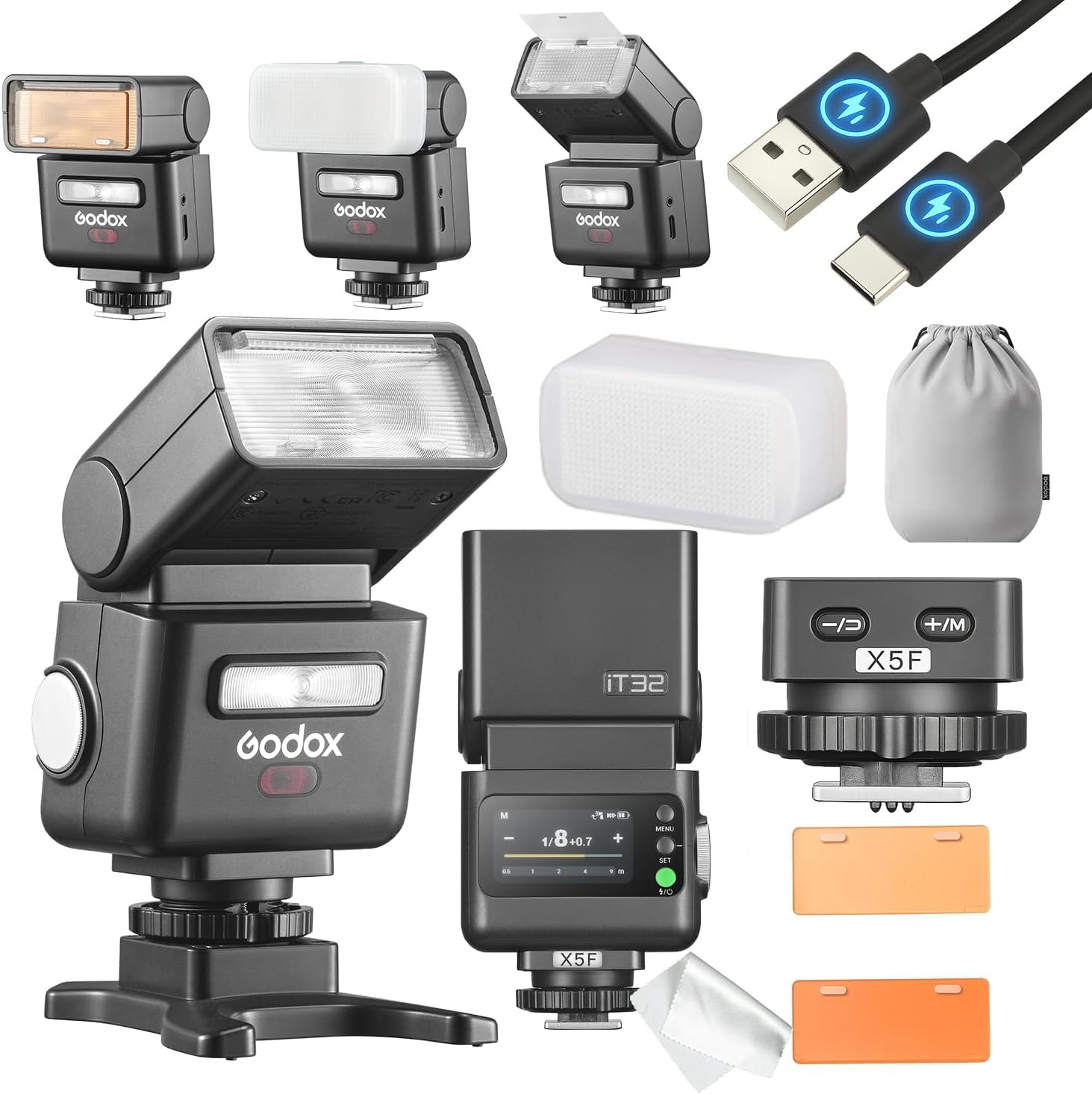
Image: The Godox IT32 flash unit with the X5F trigger mounted on a Fujifilm camera, showcasing its compact design.
Package Contents
Verify that all items are present in your package:
- Godox IT32 Flash Unit
- Godox X5F Flash Trigger (for Fujifilm)
- Mini Bag
- USB Cable (Type-C)
- Cleaning Brush
- Diffuser
- Magnetic Base
- 1/2 CTO and 1/1 CTO Color Gels

Image: An overview of the Godox IT32 flash, X5F trigger, and included accessories such as the USB-C cable, mini bag, and color gels.
Setup
1. Charging the Unit
The Godox IT32 flash unit and the X5 trigger module both contain internal batteries. The X5 module does not have a separate charging port. To charge the X5, it must be magnetically docked to the IT32 flash body. Connect the provided USB-C cable to the IT32's USB-C port and to a suitable USB power source. The IT32's screen will display charging status for both units.

Image: The IT32 flash unit connected for USB-C charging, with battery icons on the display indicating the charging status of both the IT32 and the docked X5 trigger.
2. Attaching the X5F Trigger to the IT32 Flash
The X5F trigger module attaches magnetically to the base of the IT32 flash unit. Align the X5F with the magnetic contacts on the IT32 and allow it to snap into place. This connection is secure and allows for rapid attachment and detachment.

Image: A visual representation of the IT32 flash and X5 trigger, illustrating how the X5 module serves as both a hotshoe mount and a wireless transmitter, attaching magnetically to the flash.
3. Mounting on Camera
With the X5F trigger attached to the IT32 flash, slide the combined unit onto your Fujifilm camera's hotshoe. Ensure it is fully seated. The X5F features a knurled locking ring for additional security; rotate it clockwise to tighten the connection.
4. Powering On/Off
Press and hold the power button on the IT32 flash unit to turn it on or off. The X5 trigger module relies on the IT32 for power when docked.
Operating Instructions
1. Touchscreen Control
The IT32 features a colorful touchscreen for intuitive control over settings. Tap and swipe to navigate menus and adjust parameters such as flash mode, power output, and group settings. The unit automatically identifies the attached X5 version and displays relevant status information.

Image: A close-up of the IT32's touchscreen interface, demonstrating how users can adjust flash settings with a finger touch.
2. Flash Modes (TTL, HSS, Manual, S1/S2)
- TTL (Through-The-Lens) Mode: The flash automatically adjusts its output based on the camera's metering system for correct exposure.
- HSS (High-Speed Sync) Mode: Allows the flash to synchronize with shutter speeds faster than the camera's native flash sync speed, useful for overpowering ambient light.
- Manual Mode: Provides full control over flash power output, adjustable from 1/1 to 1/256.
- S1/S2 Optical Slave Modes: The flash can be triggered by another flash unit. S1 mode triggers on the first flash, while S2 mode ignores the pre-flash of a TTL system.
3. Rotatable Flash Head
The flash head can be rotated horizontally up to 270 degrees and tilted vertically up to 90 degrees. This allows for bouncing flash off ceilings or walls to create softer, more natural lighting.

Image: The IT32 flash head tilting upwards by 90 degrees for bounce flash.

Image: The IT32 flash head rotating horizontally by 270 degrees for flexible lighting angles.
4. LED Modeling Light
The integrated LED modeling light assists in pre-visualizing lighting effects and can also be used as a continuous light source for video or low-light focusing.
5. Built-in Diffuser and Reflector
Pull out the built-in wide-angle diffuser panel and reflector card from the flash head to soften light or create catchlights in eyes.
6. Wireless Operation (X5 as Transmitter)
When the X5F module is detached from the IT32 flash and mounted on your camera's hotshoe, it functions as a wireless transmitter. It can control other IT32 units in the same group, allowing for simultaneous power and mode adjustments. When paired with other Godox 2.4GHz X System strobes (non-IT32), the X5F acts as a synchronization trigger only and does not support remote power adjustments for those units.

Image: A visual explanation of the Godox 2.4G wireless system, showing an X5 trigger on a camera wirelessly firing multiple off-camera flashes, with notes on compatibility and control limitations.
Maintenance
1. Cleaning
Use the provided cleaning brush or a soft, dry cloth to gently remove dust and debris from the flash unit, trigger, and contacts. Do not use liquid cleaners or solvents.
2. Battery Care
To prolong battery life, fully charge the unit before extended storage. If storing for long periods, charge the batteries every three months to approximately 50% capacity.
3. Firmware Updates
Periodically check the official Godox website for firmware updates. Firmware can be updated via the IT32's USB-C port using the provided cable and a computer.
Troubleshooting
| Problem | Possible Cause | Solution |
|---|---|---|
| Flash not firing | Low battery; incorrect camera/flash settings; loose hotshoe connection; trigger not paired (wireless). | Charge batteries; verify flash mode (TTL/Manual) and camera settings; ensure secure hotshoe connection; re-pair wireless trigger if applicable. |
| X5 trigger not charging | X5 not properly docked to IT32; IT32 not connected to power. | Ensure X5 is securely attached to IT32; connect IT32 to a USB-C power source. |
| Wireless control issues with non-IT32 flashes | X5 only provides synchronization, not power control, for non-IT32 Godox X System flashes. | This is expected behavior. Adjust power manually on non-IT32 flashes or use a compatible Godox X-series transmitter with full control. |
| Flash output inconsistent | TTL metering issues; flash head position; ambient light changes. | Check camera's exposure compensation; adjust flash head angle; consider manual mode for consistent output in controlled environments. |
Specifications
| Feature | Detail |
|---|---|
| Model | IT32+X5F |
| Brand | GODOX |
| Compatible Mountings | Fujifilm (with X5F trigger), Canon, Nikon, Sony (with respective X5 triggers) |
| Camera Flash Type | External Shoe Mount Flash |
| Flash Sync Speed | Up to 1/250s (standard), HSS supported |
| Guide Number | 18 |
| Connectivity Technology | Wired (hotshoe), Wireless (2.4GHz) |
| Wireless Communication | 2.4GHz Godox X System |
| Exposure Control | TTL, HSS |
| Shooting Modes | TTL, HSS, Manual, S1/S2 |
| Batteries | Internal Nonstandard Battery (included) |
| Charging Port | USB-C (for IT32 and docked X5) |
| Parcel Dimensions | 13.9 x 11 x 7.6 cm |
| Weight | 370 g |
| Country of Origin | China |
Warranty Information
The Godox IT32 TTL Camera Flash and X5F Trigger come with a 1-year warranty from the date of purchase. This warranty covers manufacturing defects and malfunctions under normal use. Please retain your proof of purchase for warranty claims. The warranty does not cover damage caused by misuse, accidents, unauthorized repairs, or normal wear and tear.
Support
For technical support, service, or further inquiries, please contact the manufacturer:
- Manufacturer: GODOX Manufacturer
- Online Store: Visit the GODOX Store on Amazon
Please have your product model number (IT32+X5F) and purchase information ready when contacting support.


