
1. Introduction
This manual provides essential information for the proper installation, operation, and maintenance of your PARKVISION Solar Wireless Reversing Camera. This camera is designed to be used as a replacement or additional camera for the PARKVISION PJ-5SM1080 wireless solar rear view camera set (ASIN: B0FPR3PVKT).
The camera features a built-in 5000 mAh battery and solar charging capabilities, offering a wireless solution for enhanced visibility when reversing.
2. Product Overview
The PARKVISION Solar Wireless Reversing Camera is a standalone camera unit intended to expand the functionality of your existing PARKVISION PJ-5SM1080 system. It transmits video wirelessly to a compatible 5-inch monitor (not included with this camera, but part of the PJ-5SM1080 set) that supports dual camera inputs.

Figure 2.1: System Compatibility Overview. This image illustrates how the camera (CAM2) integrates with a monitor that supports up to two cameras, reducing blind spots for safer driving. CAM1 is part of the main PJ-5SM1080 kit and is not included with this product.
This camera is specifically designed to pair with the PARKVISION PJ-5SM1080 monitor. Ensure your monitor supports two camera inputs for optimal use.
3. Setup and Installation
3.1 Initial Charging
Before first use, fully charge the camera's built-in 5000 mAh battery using the provided USB cable. While the camera features solar charging, USB charging is the primary method for a full charge. Solar energy serves as an auxiliary charging function to maintain battery life.
3.2 Mounting the Camera
The camera is designed for surface mounting. Choose a location on your vehicle (e.g., rear of a trailer, RV, or car) that provides a clear view and allows the solar panel to receive adequate sunlight.
- Ensure the mounting surface is clean and dry.
- Securely attach the camera using appropriate mounting hardware (not specified, assume standard surface mount).
- Angle the camera to achieve the desired viewing area for reversing.
3.3 Pairing with Monitor
Refer to your PARKVISION PJ-5SM1080 monitor's manual for specific instructions on pairing a second wireless camera. Generally, this involves activating a pairing mode on the monitor and then on the camera to establish a wireless connection.
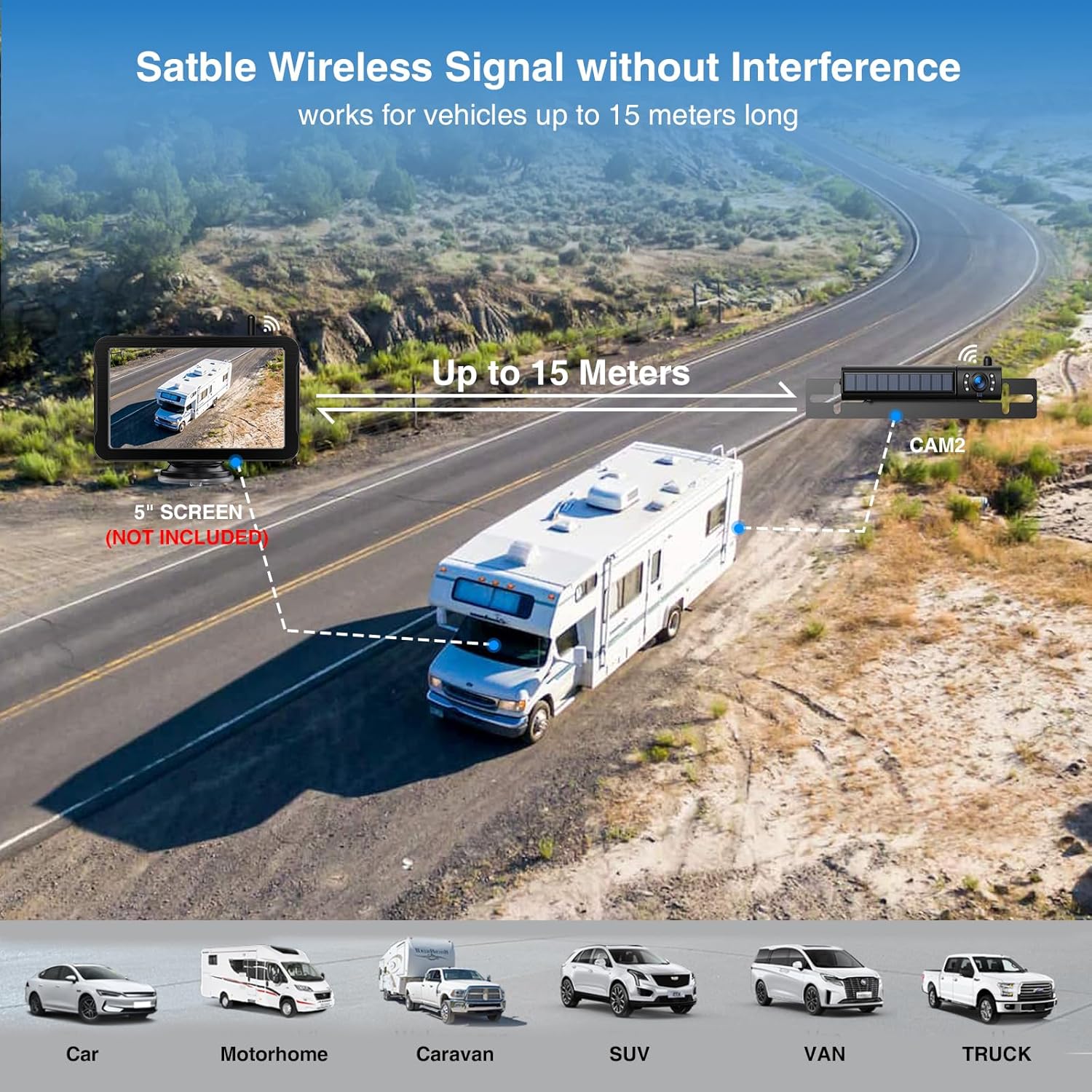
Figure 3.1: Wireless Signal Range. The camera provides a stable wireless signal, effective for vehicles up to 15 meters long, suitable for cars, motorhomes, caravans, SUVs, vans, and trucks.
4. Operating Instructions
4.1 Powering On/Off
The camera typically powers on automatically when the vehicle's reverse gear is engaged (if wired to the reverse light circuit) or manually via a power button if available. Consult your main PJ-5SM1080 system manual for specific power control details.
4.2 Viewing on Monitor
Once paired, the camera's feed will appear on your PARKVISION PJ-5SM1080 monitor. If your monitor supports two inputs, you can switch between cameras or view them in a split-screen mode, depending on your monitor's capabilities.
4.3 Battery Life
A fully charged camera battery provides approximately 8 to 10 hours of operating time. The integrated solar panel helps extend this duration by providing supplemental charging during daylight hours.
5. Maintenance and Safety
5.1 Cleaning
Regularly clean the camera lens and solar panel to ensure optimal performance. Use a soft, damp cloth. Avoid abrasive cleaners or solvents that could damage the surface.
5.2 Environmental Considerations
- Temperature: Do not place or operate the product in areas with excessively high temperatures.
- Children: Keep the product out of reach of children.

Figure 5.1: Safety Warnings. Important safety information regarding temperature, cleaning, and child safety is provided in multiple languages.
6. Troubleshooting
- No Image on Monitor:
- Ensure the camera is fully charged.
- Verify the camera is powered on.
- Check the wireless connection and pairing status with the monitor.
- Ensure the monitor is set to the correct camera input.
- Poor Image Quality:
- Clean the camera lens.
- Check for obstructions between the camera and the monitor.
- Ensure the camera is within the effective wireless range (up to 15 meters).
- Battery Not Holding Charge:
- Ensure the USB charging cable is properly connected and the power source is active.
- Verify the solar panel is clean and receiving direct sunlight.
- If issues persist, contact customer support.
7. Specifications
| Feature | Specification |
|---|---|
| Brand | PARKVISION |
| Model | PJ-5SM1080 (Compatible Camera) |
| Compatible Devices | PARKVISION PJ-5SM1080 Monitor (ASIN: B0FPR3PVKT) |
| Power Source | Built-in 5000 mAh Battery, Solar Panel, USB Charging |
| Operating Time (Full Charge) | 8 to 10 hours |
| Wireless Range | Up to 15 meters |
| Mounting Type | Surface Mount |
| Voltage | 12 Volts |
| Product Dimensions | 23 x 3 x 3.8 cm (Length x Width x Height) |
| Shipping Dimensions | 25 x 4 x 4 cm |
| Weight | 600 grams |
| UPC | 726597469357 |
8. Warranty Information
PARKVISION products are manufactured to high-quality standards. For specific warranty terms and conditions, please refer to the warranty card included with your original PARKVISION PJ-5SM1080 system or visit the official PARKVISION website. Keep your purchase receipt as proof of purchase for any warranty claims.
9. Customer Support
If you have any questions, require assistance, or encounter issues not covered in this manual, please contact PARKVISION customer support. The contact email address is typically provided on the first page of the main product manual or on the official PARKVISION website. Please have your product model (PJ-5SM1080) and ASIN (B0G2QMM6N3) ready when contacting support.

