
1. Introduction
The KITPLUS F700 Plus GPS Wireless Dog Fence and Remote Training Collar is a versatile 2-in-1 system designed to provide both automatic pet containment and remote training capabilities. This device utilizes an upgraded ultra-precise GPS chip to establish a virtual boundary, eliminating the need for buried wires. It also functions as a remote trainer, offering beep, vibration, and static correction modes to reinforce obedience and manage your dog's behavior.
The system is suitable for dogs weighing 15 to 120 lbs, with an adjustable collar fitting neck sizes from 10 to 26 inches. Its IPX7 waterproof rating ensures durability in various weather conditions, and the long-lasting rechargeable battery provides extended use.
2. Safety Information
- Read all instructions before using this product.
- This device is intended for use with healthy dogs. Consult a veterinarian if your dog has health issues or is pregnant.
- Do not use this product on aggressive dogs.
- Avoid prolonged or overly tight collar wear to prevent skin irritation. Ensure the collar is not worn for more than 12 hours daily.
- Regularly check your dog's neck for signs of irritation or sores. If found, discontinue use until the skin heals.
- When using static correction, ensure the contact points are properly positioned and check for neck irritation every 1 to 2 hours.
- Do not attach a leash to the training collar, as this can cause excessive pressure on the contact points.
- Keep the device out of reach of children.
- Use only the provided charging cable and adapter to prevent damage or fire hazards.
3. Package Contents
Please check the package contents to ensure all items are present:
- GPS Dog Wireless Fence & Receiver Collar
- Remote Transmitter
- Set of Long & Short Contact Points
- Test Light
- Boundary Flags (10 pieces)
- Type-C Charging Cable
- Product Manual
4. Product Overview
The KITPLUS F700 Plus system consists of a handheld remote transmitter and a collar receiver worn by your dog. Both components are designed for durability and ease of use.
4.1. Remote Transmitter
The remote transmitter features a clear display, control buttons for various functions, and an adjustment knob. It allows you to set the GPS fence radius, select training modes (beep, vibration, static), and activate the night locating light.
4.2. Collar Receiver
The collar receiver is worn around your dog's neck and contains the GPS module, battery, and correction mechanisms. It is IPX7 waterproof and designed for comfort and reliability.
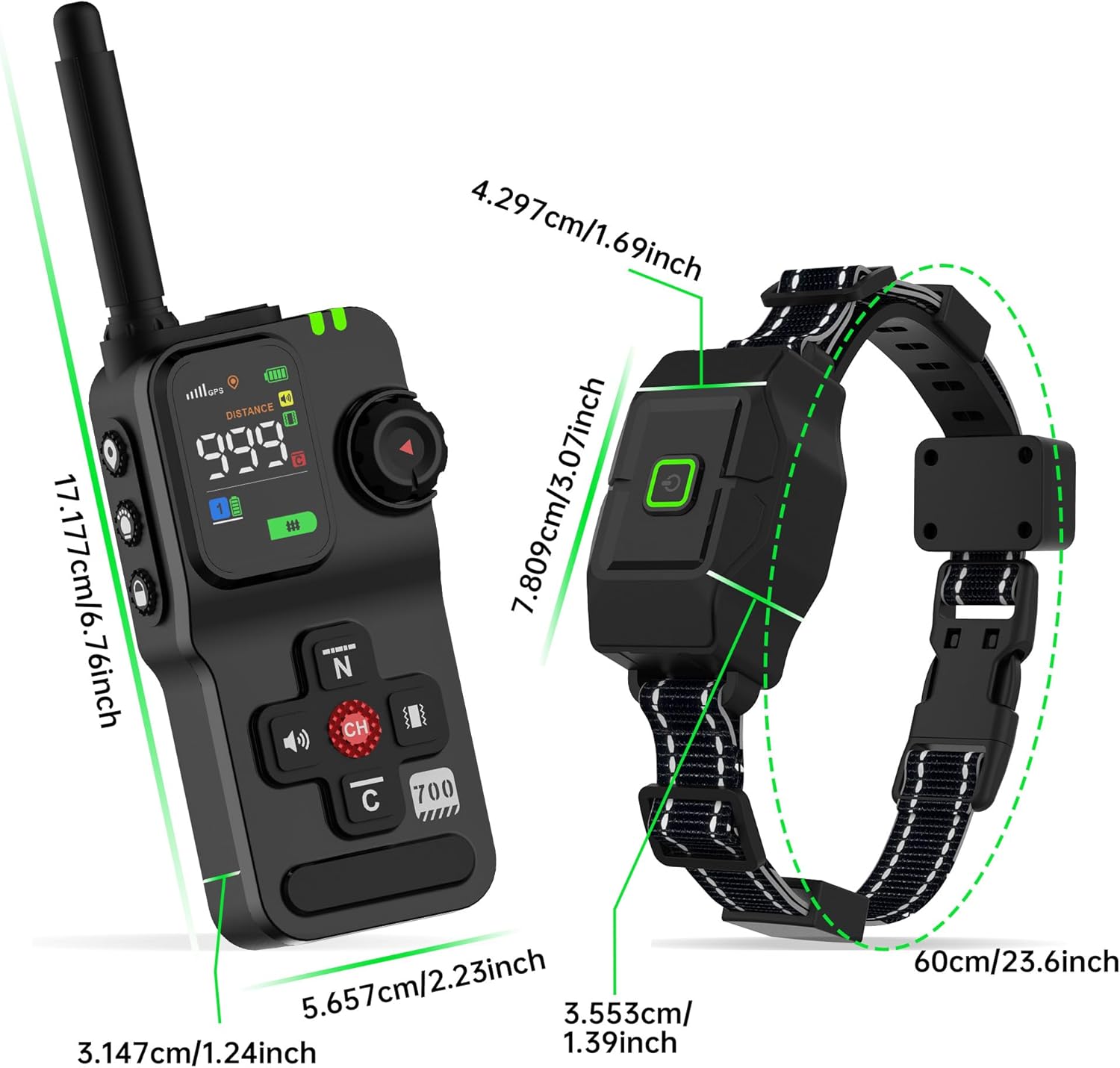
Figure 1: Remote Transmitter and Collar Receiver Dimensions

Figure 2: Key Features of KITPLUS System
5. Setup
5.1. Charging the Devices
Before first use, fully charge both the remote transmitter and the collar receiver. Use the provided Type-C charging cable. A full charge takes approximately 2.5 hours. The battery indicator on the display will show charging status.

Figure 3: Battery Life and Charging Information
5.2. Attaching the Collar Strap
Follow these steps to attach the neck strap to the receiver:
- Thread the neck strap through the receiver's mounting hole.
- Pass the neck strap through the sliding buckle and adjust to the desired length.
- Thread any excess neck strap through the silicone buckle to secure it.

Figure 4: Collar Strap Attachment Guide
5.3. Fitting the Collar
Proper collar fit is crucial for effectiveness and your dog's comfort:
- Turn off the receiver and ensure your dog is standing comfortably while wearing the collar.
- Position the receiver at the center of your dog's neck, aligning the contact points with the throat area.
- Ensure you can easily insert one finger between the collar and your dog's neck. The fit should be snug but not overly tight.
- Mark the desired collar length with a pen and remove any excess material if necessary.

Figure 5: Proper Collar Fitting

Figure 6: Collar Fit for Various Dog Sizes
5.4. Powering On/Off
- To power on the remote transmitter, press and hold the power button until the screen illuminates.
- To power on the collar receiver, press and hold the power button on the collar until the indicator light flashes.
- To power off, press and hold the power button on each device until the display or indicator light turns off.
6. Operating Instructions
6.1. GPS Auto-Fence Mode
The GPS Auto-Fence mode creates a circular virtual boundary around a set center point. This mode is ideal for containing your dog in a specific area without physical fences.
- Establish Center Point: Take the remote transmitter to the desired center of your dog's safe zone. Ensure you have a clear view of the sky for optimal GPS signal reception.
- Activate Fence Mode: On the remote, select the 'Fence' mode. The GPS signal strength will be displayed. A five-bar GPS signal is recommended for optimal performance.
- Adjust Radius: Short press the position button to enter radius adjustment mode. The distance icon will flash. Rotate the adjustment knob to increase or decrease the radius of the safe zone (adjustable from 75 to 5600 feet).
- Warning and Correction Zones: The system will issue a warning (beep/vibration) if your dog approaches the boundary. If the dog proceeds further, a safe static correction will be applied to encourage them to return to the safe zone.

Figure 7: GPS Wireless Fence Boundary Example
Video 1: Demonstrating the setup and operation of the KITPLUS GPS Wireless Dog Fence System, including setting boundaries and using training modes.
6.2. Remote Training Mode
The remote training mode allows you to communicate with your dog from up to 3000 feet away using various correction types.
- Select Training Mode: Switch the remote to 'Training' mode.
- Choose Correction Type: The remote offers three distinct warning modes:
- Beep: An audible tone to get your dog's attention.
- Vibration: A gentle vibration on the collar.
- Static Correction: A safe static pulse. The intensity level (1-24) can be adjusted using the remote's knob.
- Apply Correction: Press the corresponding button on the remote to deliver the chosen correction. Use these modes to reinforce commands or correct unwanted behaviors.
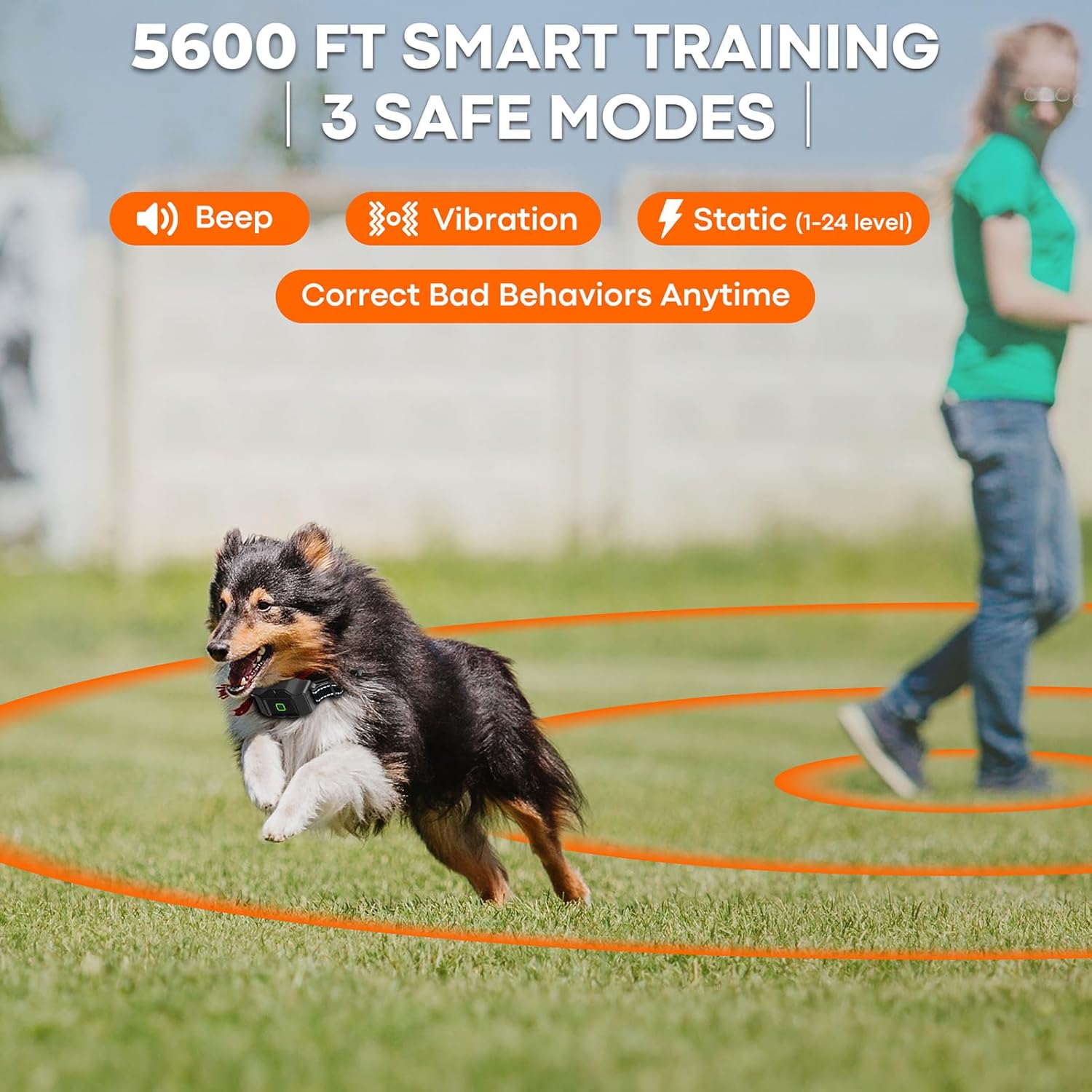
Figure 8: Remote Training Modes in Action
6.3. Night Locating Feature
The remote transmitter includes a built-in flashlight to help locate your dog in low-light conditions.
- Press the light button once for a constant light.
- Press the light button twice for a flashing light.
- Press the light button three times to turn the light off.

Figure 9: Night Locating Feature
7. Maintenance
Proper maintenance ensures the longevity and effectiveness of your KITPLUS system:
- Cleaning: Regularly clean your dog's neck and the receiver contact area with a damp cloth to prevent skin irritation and ensure proper contact.
- Collar Inspection: Periodically check the collar for wear and tear, especially the strap and contact points. Replace if damaged.
- Battery Care: Recharge the devices when the battery indicator is low. Avoid fully draining the battery frequently to prolong its lifespan.
- Storage: When not in use for extended periods, store the devices in a cool, dry place.

Figure 10: GPS Wireless Dog Fence Usage Guidelines (including cleaning)
8. Troubleshooting
If you encounter issues with your KITPLUS F700 Plus system, refer to the following common problems and solutions:
| Problem | Possible Cause | Solution |
|---|---|---|
| Collar not responding to remote. | Low battery; Out of range; Not paired; Interference. | Charge both devices; Ensure within 3000ft range; Re-pair devices (refer to pairing instructions in full manual); Move away from strong electronic signals. |
| GPS fence mode not working or inaccurate. | Poor GPS signal; Incorrect center point set; Environmental factors. | Ensure clear sky view (open outdoor area); Re-establish center point; Avoid dense tree cover, tall buildings, or heavy cloud cover. A five-bar GPS signal is recommended. |
| Dog not responding to corrections. | Improper collar fit; Contact points too short; Correction level too low. | Adjust collar for snug fit; Use longer contact points for thick-coated dogs; Increase correction level gradually. |
| Skin irritation on dog's neck. | Collar worn too long/tight; Poor hygiene. | Loosen collar; Limit wear to 12 hours daily; Clean neck and contact points regularly; Discontinue use until irritation heals. |
| Device not charging. | Faulty cable/adapter; Charging port issue. | Try a different Type-C cable and adapter; Contact customer support if issue persists. |
9. Specifications
| Feature | Detail |
|---|---|
| Model Number | F700 Plus GPS |
| Product Dimensions | 26 x 9 x 0.1 inches (Collar); 1.5 pounds (Item Weight) |
| Brand | KITPLUS |
| Material | Plastic |
| Color | Black |
| Battery Type | 1 Lithium Ion battery (included) |
| Charging Time | Approx. 2.5 hours (Type-C fast charging) |
| Usage Time | Up to 30 hours |
| Standby Time | Up to 60 days (185 days mentioned in image, use 60 days from feature bullets for consistency) |
| Waterproofing | IPX7 (Collar) |
| GPS Fence Range | Adjustable from 75 to 5600 feet |
| Remote Training Range | Up to 3000 feet |
| Correction Modes | Beep, Vibration, Static (1-24 levels) |
| Collar Fit | Neck sizes 10 to 26 inches |
| Dog Weight Range | 15 to 120 lbs |
10. Warranty & Support
The KITPLUS F700 Plus GPS Wireless Dog Fence & Remote Training Collar comes with a 1-year manufacturer's warranty. This warranty covers defects in materials and workmanship under normal use.
For warranty claims, technical support, or any questions regarding the product, please contact KITPLUS customer service through the retailer where the product was purchased or refer to the contact information provided in the product packaging.