
1. Introduction
Thank you for choosing the Ensenior 126cm Silent Ceiling Fan with Light. This manual provides essential information for the safe installation, operation, and maintenance of your new ceiling fan. Please read it thoroughly before installation and keep it for future reference.
This ceiling fan features a highly efficient DC motor, offering powerful airflow with minimal noise. It includes an integrated LED light with three color temperatures and a memory function. The reversible motor allows for year-round comfort, circulating air efficiently in both summer and winter. Its ultra-thin design is suitable for rooms with low ceilings.

Image 1.1: Ensenior ceiling fan installed in a modern kitchen setting, demonstrating its aesthetic integration.
2. Safety Instructions
WARNING: To reduce the risk of fire, electric shock, or personal injury, always follow these basic precautions:
- Read all instructions carefully before installing and operating the fan.
- Ensure the installation site can support the fan's weight (minimum 15 kg).
- All electrical connections must be performed by a qualified electrician and comply with local codes and regulations.
- Disconnect power at the main circuit breaker before installation or servicing.
- Do not operate the fan with damaged wiring or if any parts are missing or damaged.
- Keep hands, clothing, and other objects away from the fan blades when the fan is operating.
- This fan is designed for indoor use only in dry environments. Do not install in damp or wet locations.
- Ensure the fan blades are at least 2.3 meters (7.5 feet) above the floor.
- Do not attempt to repair or modify the fan yourself. Contact qualified service personnel.
3. Package Contents
Before beginning installation, verify that all components listed below are present and undamaged:
- Ceiling Fan Motor Housing (pre-assembled)
- Fan Blades (3x, ABS wood effect)
- LED Light Kit
- Remote Control (batteries not included)
- Mounting Bracket
- Hardware Pack (screws, wire nuts, etc.)
- Instruction Manual
4. Setup and Installation
This ceiling fan is designed for flush mount installation only. It is not suitable for sloped ceilings.

Image 4.1: Illustration of the fan's flush mount design, indicating suitability for flat ceilings only and unsuitability for sloped ceilings.
4.1. Tools Required
- Phillips screwdriver
- Flathead screwdriver
- Adjustable wrench
- Wire strippers
- Electrical tape
- Step ladder
4.2. Mounting the Fan
- Turn off power: Ensure the power supply to the installation area is completely disconnected at the circuit breaker.
- Install mounting bracket: Secure the mounting bracket to the ceiling junction box using the provided screws. Ensure the bracket is firmly attached and can support the fan's weight.
- Wire connections: Connect the fan's electrical wires to the household wiring according to local electrical codes. Typically, this involves connecting live to live, neutral to neutral, and ground to ground. Use wire nuts to secure connections.
- Attach fan housing: Carefully lift the fan motor housing and attach it to the mounting bracket. Ensure all connections are secure and wires are tucked safely inside the canopy.
- Install fan blades: Attach the three ABS wood effect blades to the motor housing using the provided screws. Ensure they are securely fastened. The blades are pre-balanced to reduce installation effort.
- Install LED light kit: Connect the LED light kit wiring and secure the light kit to the bottom of the fan housing.
- Restore power: Once installation is complete and all connections are checked, restore power at the circuit breaker.
Note: The recommended installation height is 230 cm (7.5 ft) from the floor to the fan blades.

Image 4.2: Product dimensions including fan diameter (126.5 cm), height (26.8 cm), and recommended installation height (230 cm).
5. Operating Instructions
Your Ensenior ceiling fan is controlled by the included remote control. Ensure batteries are inserted correctly into the remote control (batteries not included).

Image 5.1: Overview of fan features controlled by the remote, including 6 speeds, 3 color temperatures, memory function, silent operation, beep control, timer, and reversible motor.
5.1. Fan Speed Control
The fan offers 6 adjustable speeds:
- Levels 1-2: Gentle breeze for quiet relaxation.
- Levels 3-4: Natural wind for comfortable air circulation.
- Levels 5-6: Strong wind for maximum cooling effect.

Image 5.2: Visual representation of the 6 adjustable fan speeds, categorized into gentle, natural, and strong wind settings.
5.2. Light Control
The integrated LED light offers three color temperatures:
- Warm White (3000K): For a cozy and relaxing atmosphere.
- Neutral White (4000K): For general illumination and daily activities.
- Cool White (6500K): For bright, focused lighting.
The light features a smart memory function that automatically restores your last chosen color temperature after being off for at least 10 seconds. The LED light provides stable, high-quality illumination with a fixed brightness; it is not dimmable.

Image 5.3: Comparison of the three available light color temperatures: 3000K Warm White, 4000K Neutral White, and 6500K Cool White.
5.3. Reversible Motor Function
The fan's DC motor has a reversible function, allowing for year-round use:
- Summer Mode (Downward Airflow): Creates a cooling breeze by pushing air downwards.
- Winter Mode (Upward Airflow): Circulates warm air accumulated near the ceiling, distributing it efficiently throughout the room.
Switch between modes using the remote control.

Image 5.4: Illustration of the reversible motor function, demonstrating downward airflow for cooling in summer and upward airflow for heat distribution in winter.
5.4. Timer Function
Set the fan to turn off automatically after a specified period using the timer function on the remote control. Available settings are 1 hour, 2 hours, and 4 hours.
5.5. Ultra-Silent Operation and Beep Control
The fan operates at a minimal noise level (less than 35dB), ensuring a quiet environment. The remote control also allows you to activate or deactivate the beep sound for button presses.

Image 5.5: Visual explanation of the fan's ultra-silent operation, indicating noise levels below 30dB, and the remote control's mute function for disabling button beeps.
6. Maintenance
Regular maintenance ensures optimal performance and extends the lifespan of your ceiling fan.
- Cleaning: Dust the fan blades and motor housing regularly with a soft, damp cloth. Do not use abrasive cleaners or solvents, as they may damage the finish.
- Blade Inspection: Periodically check the fan blades for any signs of damage or warping. The ABS blades are resistant to moisture and deformation.
- Tighten Screws: Over time, screws may loosen. Periodically check and tighten all screws on the fan housing and blades to ensure safe operation.
- No Lubrication Required: The DC motor is permanently lubricated and does not require additional oiling.
- Light Source: The LED light source is integrated. If it malfunctions, contact customer support for assistance. Do not attempt to replace it yourself.
Always disconnect power to the fan at the circuit breaker before performing any cleaning or maintenance.
7. Troubleshooting
If you experience issues with your ceiling fan, refer to the following common problems and solutions:
| Problem | Possible Cause | Solution |
|---|---|---|
| Fan does not start | No power supply; Loose wire connections; Remote control batteries dead. | Check circuit breaker; Verify all wire connections are secure; Replace remote control batteries. |
| Light does not work | Loose wire connection to light kit; LED light kit malfunction. | Check light kit wiring; Contact customer support if LED is faulty. |
| Fan wobbles excessively | Loose fan blades; Loose mounting bracket; Unbalanced blades. | Ensure all blade screws are tight; Verify mounting bracket is secure; Contact customer support if blades are unbalanced despite being pre-balanced. |
| Remote control not responding | Dead batteries; Remote not paired (if applicable); Obstruction between remote and receiver. | Replace batteries; Refer to remote pairing instructions (if provided separately); Ensure clear line of sight. |
| Fan makes unusual noise | Loose screws; Internal motor issue. | Check and tighten all screws; If noise persists, contact customer support. |
8. Specifications
| Feature | Detail |
|---|---|
| Brand | Ensenior |
| Model | FS-52I-3CCT-WO-3Y |
| Color | Wood Color |
| Material | Acrylonitrile Butadiene Styrene (ABS) |
| Style | Scandinavian |
| Fixture Form | Ceiling |
| Room Type | Kitchen, Dining Room, Bedroom, Living Room |
| Product Dimensions (L x W x H) | 126 cm x 126 cm x 26.5 cm (49.8 in x 49.8 in x 10.5 in) |
| Indoor/Outdoor Use | Indoor |
| Power Source | Corded Electric |
| Installation Type | Flush Mount |
| Motor Type | DC Motor (33W) |
| Noise Level | <35dB |
| Light Color Temperatures | 3000K (Warm White), 4000K (Neutral White), 6500K (Cool White) |
| Energy Consumption (Light) | 13 kWh/1000h |
| Energy Efficiency Class | D (for light source) |
For detailed energy information, please refer to the EU EPREL database:
https://eprel.ec.europa.eu/qr/2581722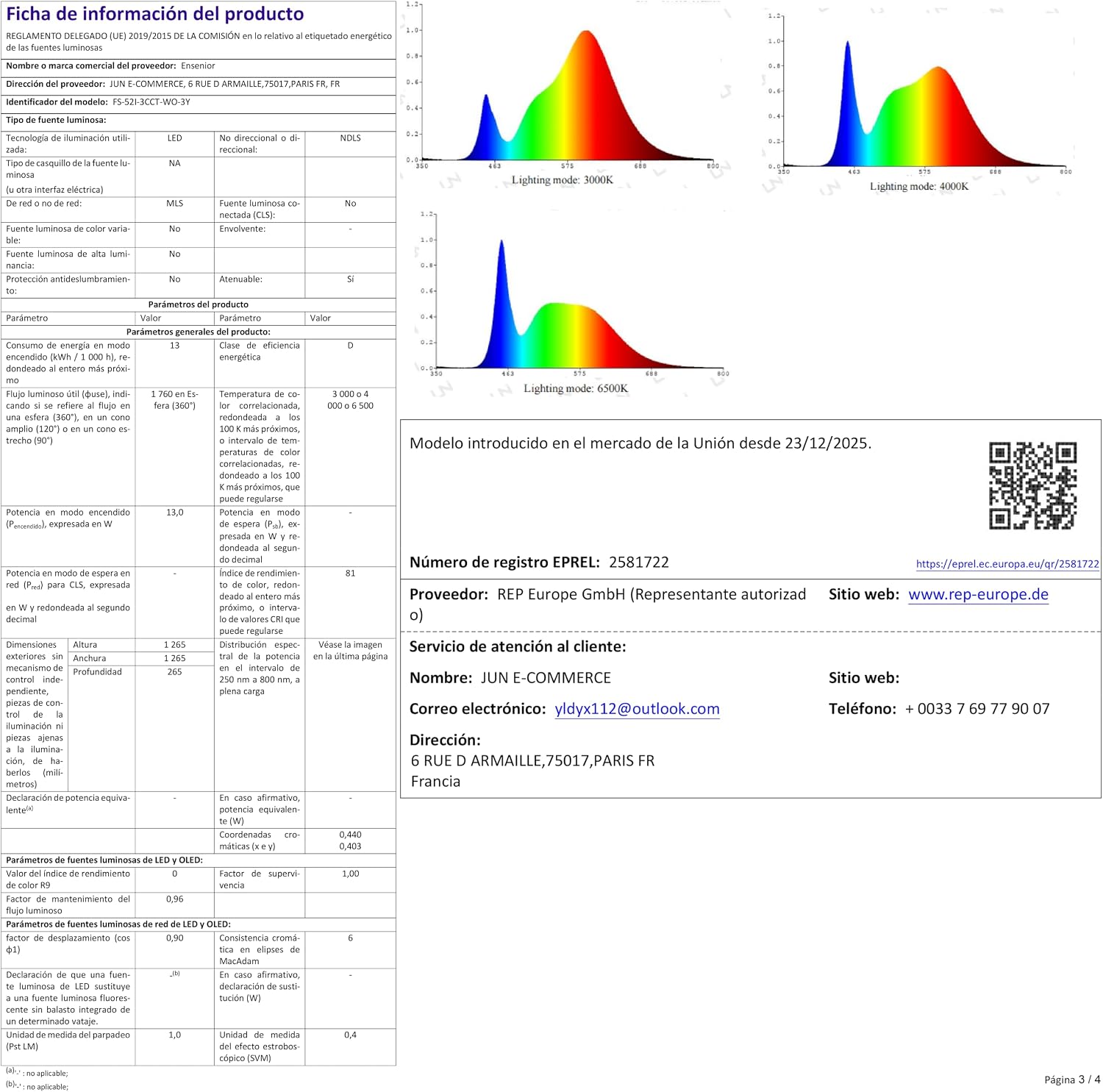
Image 8.1: Energy label and detailed product information sheet, including energy consumption and efficiency class.
9. Warranty and Support
Ensenior provides a 3-year warranty on the motor of this ceiling fan. We also offer 24-hour online technical support for your peace of mind.
If you encounter any issues or require assistance, please contact our customer support team:
- Email: ydyx112@outlook.com
- Phone: +0033 7 69 77 90 07
- Supplier: REP Europe GmbH
- Address: 6 RUE D ARMAILLE, 75017 PARIS FR, FRANCE
Please have your product model number (FS-52I-3CCT-WO-3Y) and purchase details ready when contacting support.


