
1. Introduction
Thank you for choosing the MERACH T12B2 Foldable Treadmill. This manual provides essential information for the safe assembly, operation, and maintenance of your treadmill. Please read this manual thoroughly before using the product to ensure proper function and to prevent injury. Keep this manual for future reference.
2. Important Safety Instructions
To reduce the risk of serious injury, read all instructions before using this treadmill. The manufacturer assumes no responsibility for personal injury or property damage sustained by or through the use of this product.
- Always place the treadmill on a level surface.
- Keep children and pets away from the treadmill during operation.
- Ensure adequate clearance (at least 2 meters behind and 0.6 meters on each side) around the treadmill.
- Wear appropriate athletic footwear and clothing.
- Use the safety key at all times. Attach the clip to your clothing before starting your workout.
- Do not operate the treadmill if it has a damaged cord or plug, or if it is not working properly.
- Consult a physician before starting any exercise program.
- Do not exceed the maximum user weight of 300 lbs (136 kg).
- Unplug the treadmill from the power outlet when not in use or before cleaning/maintenance.
3. Setup and Assembly
The MERACH T12B2 treadmill is designed for quick and easy setup, arriving 90% pre-assembled.
3.1 Unpacking
Carefully remove all components from the packaging. Ensure all parts are present before proceeding with assembly. Refer to the included parts list in your package.

3.2 Unfolding the Treadmill
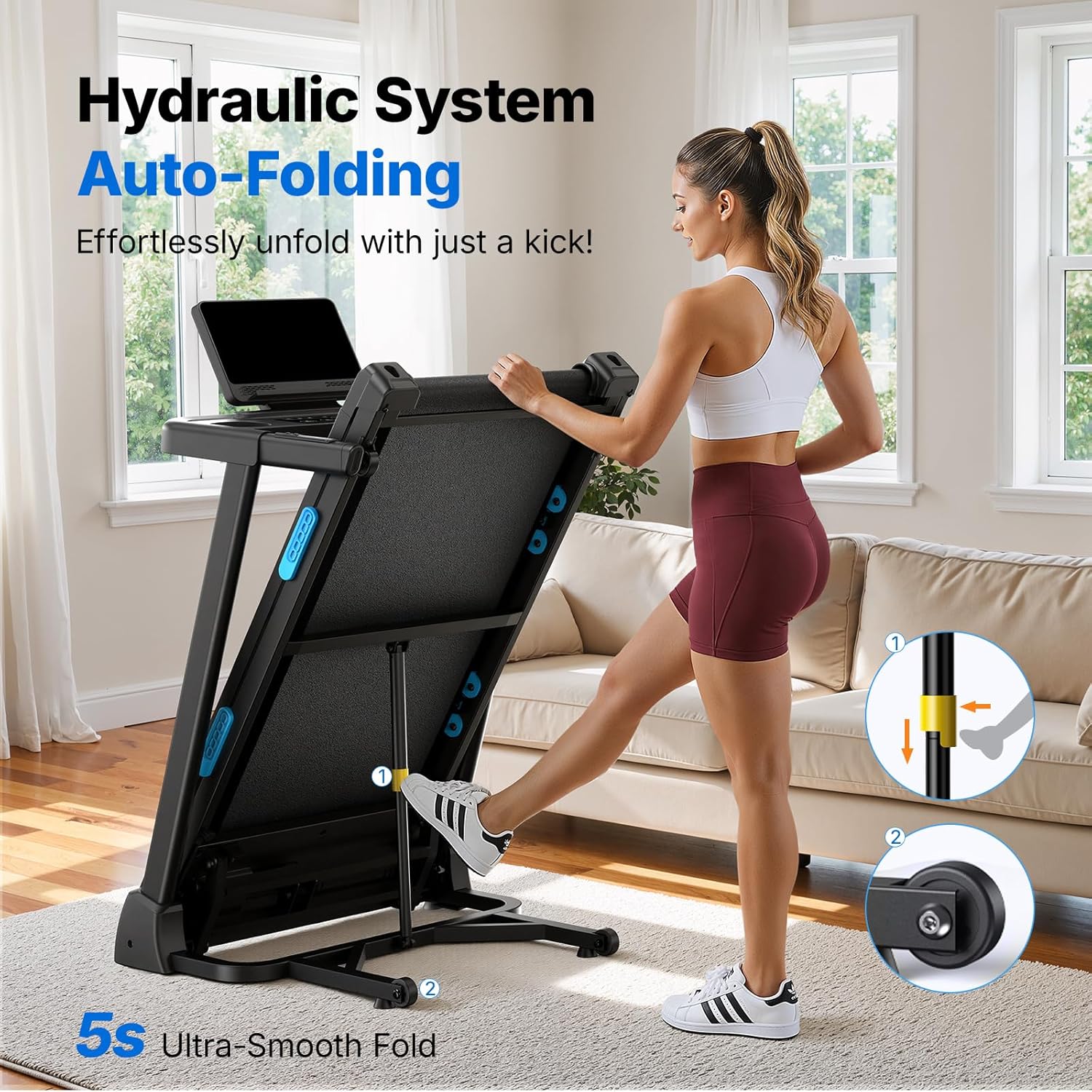
The treadmill features a hydraulic folding system for effortless unfolding.
- Gently kick the hydraulic release mechanism at the base of the treadmill.
- Allow the running deck to slowly lower to the floor. Ensure it locks securely into the flat position before use.
3.3 Positioning and Moving
The treadmill is equipped with transport wheels for easy relocation.
- Fold the treadmill into its upright position.
- Tilt the treadmill slightly and use the integrated wheels to move it to your desired location.

4. Operating Instructions
Familiarize yourself with the control panel and features before beginning your workout.
4.1 Control Panel Overview
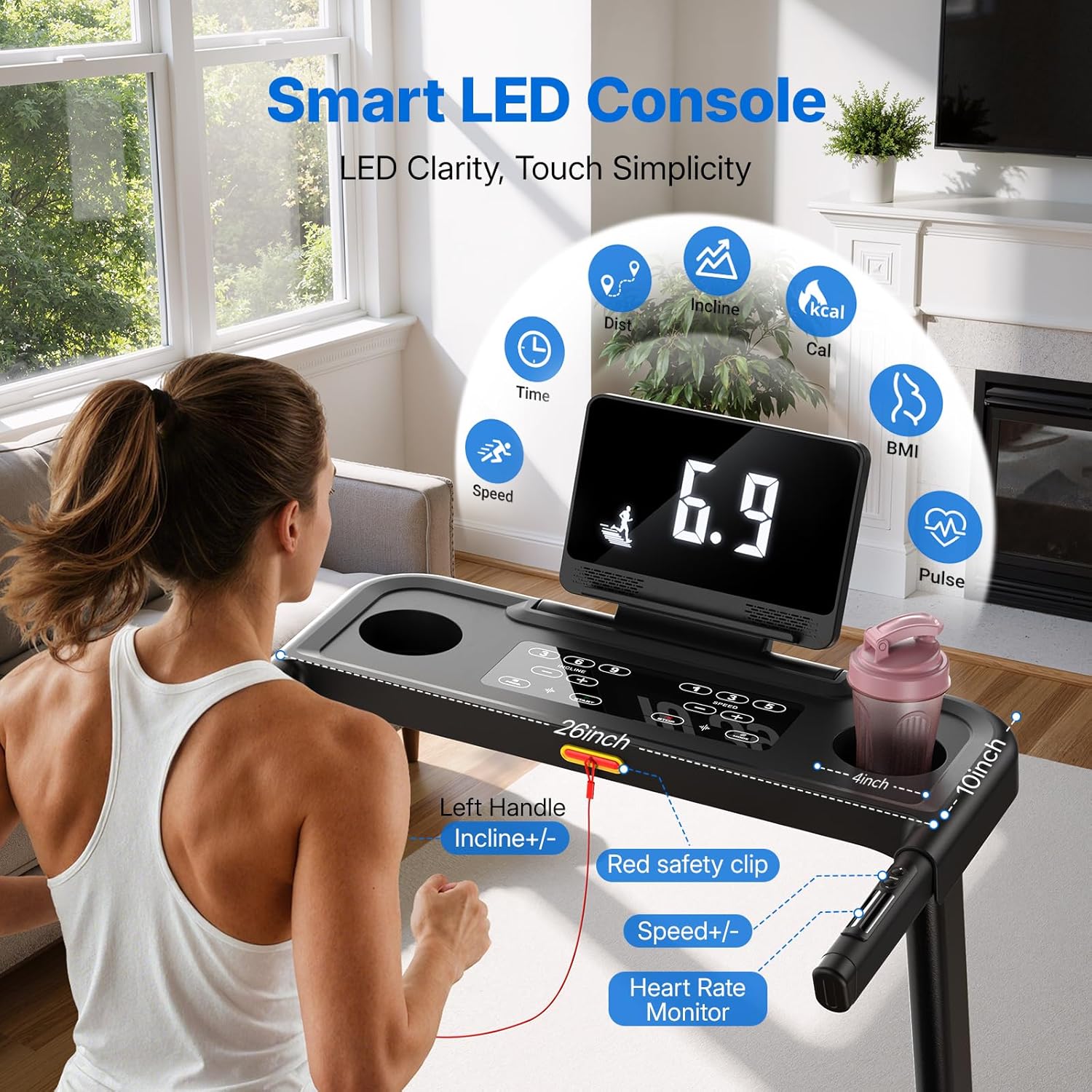
The treadmill features a smart LED console that displays key workout metrics.
Key Features:
- LCD Display: Tracks Time, Speed, Distance, Calories, BMI, and Pulse.
- Speed Controls: Adjust speed from 0.5 to 7.5 MPH using the +/- buttons on the console or left handle.
- Incline Controls: Adjust auto incline from 0% to 15% using the +/- buttons on the console or left handle.
- Safety Key: A red safety clip must be attached to your clothing and inserted into the console for the treadmill to operate. Removing it will stop the treadmill.
- Heart Rate Monitor: Integrated sensors in the handles provide heart rate readings.
- Adjustable Screen: The console screen can be adjusted for optimal viewing.
- Accessory Holders: Includes a cup holder and a stand for tablets/phones.
4.2 Starting a Workout
- Plug the treadmill into a grounded electrical outlet.
- Attach the safety key clip to your clothing and insert the safety key into its designated slot on the console.
- Step onto the side rails of the treadmill.
- Press the START button on the console. The belt will begin to move at a low speed.
- Gradually increase speed and incline to your desired levels using the +/- buttons.
4.3 Adjusting Incline
The treadmill offers 15 levels of automatic incline to simulate various terrains.

Use the incline +/- buttons on the console or left handle to adjust the incline during your workout. The display will show the current incline level.
4.4 Using the MERACH App
Enhance your workout experience by connecting your treadmill to the MERACH app.

- Download the MERACH app from your device's app store.
- Follow the in-app instructions to pair your treadmill via Bluetooth.
- Access personalized coaching plans, track your progress, and explore various workout modes.
4.5 Stopping a Workout
To stop the treadmill, press the STOP button on the console. For emergency stops, pull the safety key from the console.
5. Maintenance
Regular maintenance ensures the longevity and optimal performance of your treadmill.
5.1 Cleaning
- Wipe down the console and other surfaces with a damp cloth after each use. Avoid abrasive cleaners.
- Vacuum underneath the treadmill regularly to prevent dust and debris buildup.
5.2 Running Belt Lubrication
The running belt requires periodic lubrication to reduce friction and wear. Refer to your specific lubrication instructions provided with the treadmill or contact customer support for guidance.
5.3 Running Belt Adjustment
If the running belt becomes off-center or slips, it may require adjustment. Consult the detailed instructions in the separate assembly guide or contact customer support.
6. Troubleshooting
This section addresses common issues you might encounter.
| Problem | Possible Cause | Solution |
|---|---|---|
| Treadmill does not power on. | Power cord not plugged in; circuit breaker tripped; safety key not inserted. | Ensure power cord is securely plugged in. Check household circuit breaker. Insert safety key fully. |
| Running belt stops unexpectedly. | Safety key dislodged. | Re-insert the safety key. Ensure it is securely attached to your clothing during use. |
| Running belt slips or is off-center. | Belt tension or alignment issue. | Refer to the belt adjustment instructions in the assembly guide or contact customer support. |
| Unusual noise during operation. | Loose components; lack of lubrication; foreign object. | Inspect for loose bolts and tighten. Lubricate the belt if needed. Check for any objects under the belt. If noise persists, contact support. |
If you encounter issues not listed here or if solutions do not resolve the problem, please contact MERACH customer support.
7. Product Specifications
Detailed specifications for the MERACH T12B2 Foldable Treadmill.

| Feature | Specification |
|---|---|
| Model Number | T12B2 |
| Brand | MERACH |
| Product Dimensions (Unfolded) | 136.5D x 71W x 21.5H Centimetres |
| Product Dimensions (Folded) | 49.2" H x 25.6" W x 27.6" D (approx.) |
| Item Weight | 48 Kilograms |
| Material | High Carbon Steel |
| Maximum Speed | 7.5 Miles per Hour |
| Minimum Speed | 0.5 Miles per Hour |
| Maximum Incline Percentage | 15% (Auto Incline) |
| Running Belt Dimensions | 16.5" W x 42.5" L |
| Maximum Weight Recommendation | 300 Pounds |
| Maximum Horsepower | 2.5 Horsepower |
| Display Type | LED |
| Special Features | Auto Incline, Foldable, Heavy Duty, APP Connectivity |
8. Warranty and Support
8.1 Warranty Information
The MERACH T12B2 Treadmill comes with a 2-year warranty. This warranty covers manufacturing defects and ensures the product meets quality standards. Please retain your proof of purchase for warranty claims.
8.2 Customer Support
For any questions, technical assistance, or warranty claims, please contact MERACH customer service. Our responsive 24/7 customer service team is available to assist you.
Contact information can typically be found on the MERACH official website or through your purchase platform.


