
1. Introduction
The MHLRUUL Sunshine DT-17N is an auto-ranging digital multimeter designed for accurate measurement of various electrical parameters. This instrument is suitable for professional, educational, and hobbyist use in electrical testing and troubleshooting. It features a large LCD display, True RMS measurement, and a range of functions including voltage, current, resistance, capacitance, frequency, duty cycle, diode, continuity, and Non-Contact Voltage (NCV) detection.
2. Safety Information
To ensure safe operation and service of the multimeter, please read and understand all instructions and warnings in this manual before use. Failure to observe these safety precautions may result in electric shock, injury, or damage to the meter or equipment under test.
- Always ensure the test leads are in good condition, free from cracks or damage.
- Do not apply voltage or current that exceeds the maximum specified limits for the selected range.
- Use extreme caution when working with voltages above 30V AC RMS, 42V peak, or 60V DC. These voltages pose a shock hazard.
- Before measuring current, ensure the meter is connected in series with the load and the circuit is de-energized.
- Before measuring resistance, continuity, or diode, ensure the circuit is de-energized and all capacitors are discharged.
- Replace the battery immediately when the low battery indicator appears to ensure accurate readings.
- Do not operate the meter if it appears damaged or if the case is open.
- Always use the correct function and range for measurements.
3. Product Overview
Familiarize yourself with the components of your Sunshine DT-17N Digital Multimeter.
3.1 Front Panel and Display
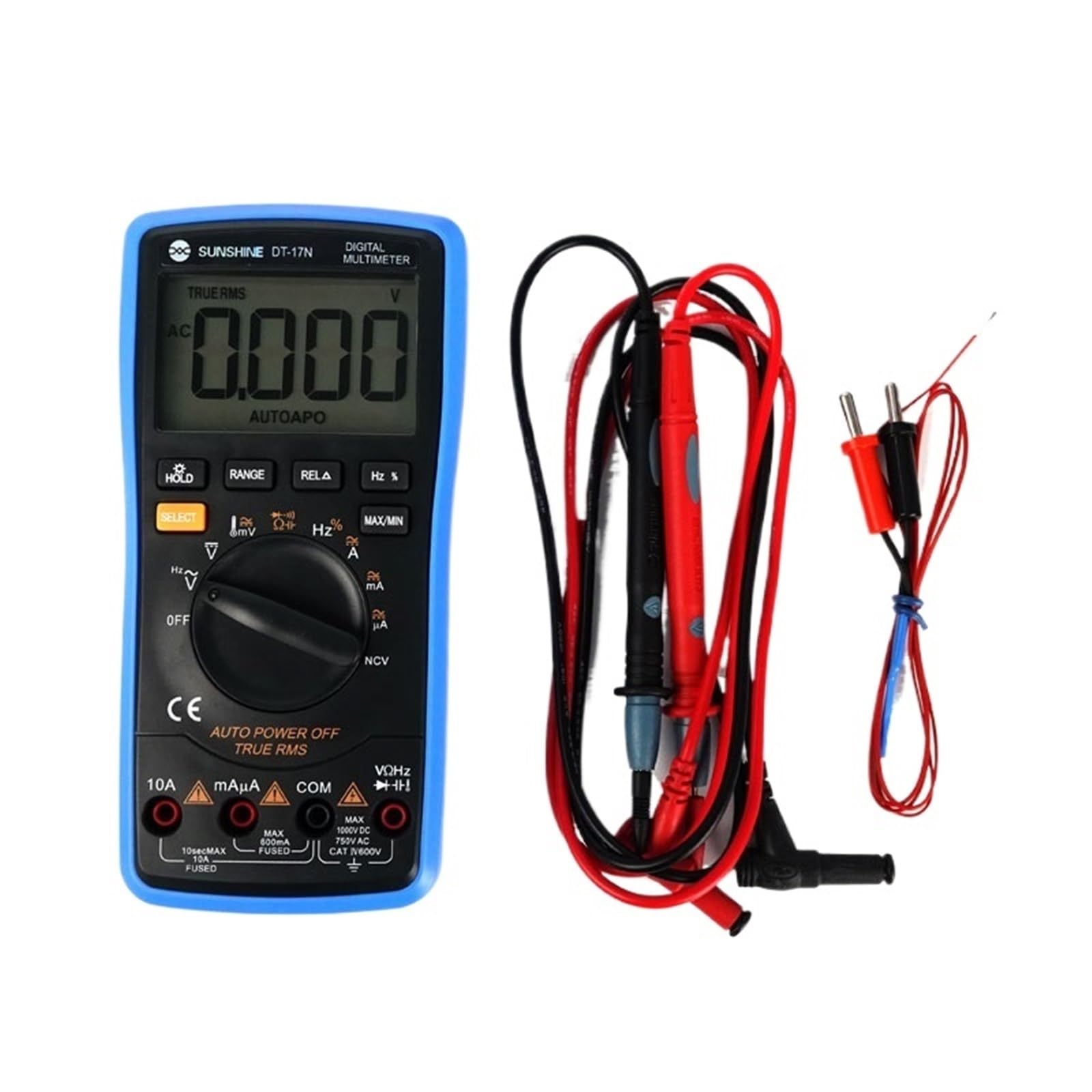
Figure 1: Front view of the Sunshine DT-17N Digital Multimeter.
This image displays the front of the multimeter, highlighting its large LCD screen for reading measurements, the central rotary switch for selecting functions, and the various push buttons for additional features like HOLD, RANGE, RELA, Hz%, SELECT, and MAX/MIN. The input jacks for test leads are visible at the bottom.
3.2 Angled View with Kickstand

Figure 2: Angled view of the multimeter with kickstand.
This view shows the multimeter from an angle, with its integrated kickstand extended. The kickstand allows the meter to stand upright on a workbench for easier viewing during measurements.
3.3 Back Panel

Figure 3: Back view of the multimeter.
The back of the multimeter features the battery compartment cover and a hanging slot, which can be used to hang the meter for hands-free operation.
3.4 Package Contents

Figure 4: Multimeter with packaging and accessories.
This image displays the Sunshine DT-17N multimeter alongside its retail packaging, test leads (red and black), and the included user manual. This illustrates what is typically included in the product box.
4. Setup
4.1 Battery Installation
- Ensure the multimeter is turned OFF.
- Locate the battery compartment on the back of the meter (refer to Figure 3).
- Unscrew the retaining screw(s) and remove the battery cover.
- Insert the required battery type (e.g., 9V battery) observing the correct polarity.
- Replace the battery cover and secure it with the screw(s).
4.2 Connecting Test Leads
Always connect the black test lead to the 'COM' (Common) jack. Connect the red test lead to the appropriate input jack based on the measurement type:
- VΩHz: For voltage, resistance, frequency, capacitance, and diode measurements.
- mAµA: For milliampere and microampere current measurements.
- 10A: For ampere current measurements (high current).
5. Operating Instructions
The Sunshine DT-17N features an auto-ranging function, simplifying operation by automatically selecting the correct measurement range. Use the rotary switch to select the desired function.
5.1 Measuring DC Voltage (V)
- Set the rotary switch to the 'V' position (DC Voltage).
- Connect the black test lead to the 'COM' jack and the red test lead to the 'VΩHz' jack.
- Connect the test probes across the component or circuit to be measured.
- Read the voltage value on the LCD display.
5.2 Measuring AC Voltage (V~)
- Set the rotary switch to the 'V~' position (AC Voltage).
- Connect the black test lead to the 'COM' jack and the red test lead to the 'VΩHz' jack.
- Connect the test probes across the AC voltage source.
- Read the voltage value on the LCD display.
5.3 Measuring Resistance (Ω)
- Ensure the circuit is de-energized and all capacitors are discharged.
- Set the rotary switch to the 'Ω' position.
- Connect the black test lead to the 'COM' jack and the red test lead to the 'VΩHz' jack.
- Connect the test probes across the component to be measured.
- Read the resistance value on the LCD display.
5.4 Measuring Current (A, mA, µA)
CAUTION: Never connect the meter in parallel with a voltage source when measuring current. This can blow the fuse or damage the meter.
- De-energize the circuit.
- Set the rotary switch to the appropriate current range (e.g., '10A' or 'mAµA'). Use the 'SELECT' button to switch between AC/DC if applicable.
- Connect the black test lead to the 'COM' jack.
- Connect the red test lead to the '10A' jack for high current or 'mAµA' jack for low current.
- Break the circuit and connect the meter in series with the load.
- Re-energize the circuit and read the current value.
5.5 Continuity Test
- Ensure the circuit is de-energized.
- Set the rotary switch to the 'Ω' position and press 'SELECT' until the continuity symbol (speaker icon) appears.
- Connect the black test lead to 'COM' and the red test lead to 'VΩHz'.
- Touch the probes to the two points of the circuit to be tested.
- A continuous beep indicates a good connection (low resistance).
5.6 Non-Contact Voltage (NCV) Detection
- Set the rotary switch to the 'NCV' position.
- Move the top end of the multimeter near a live conductor.
- The meter will emit an audible beep and the NCV indicator light will flash if AC voltage is detected.
5.7 Function Buttons
- HOLD: Freezes the current reading on the display. Press again to release.
- RANGE: Manually selects the measurement range (disables auto-ranging). Press and hold to re-enable auto-ranging.
- RELA (Relative Mode): Stores the current reading as a reference and displays subsequent measurements as a deviation from this reference.
- Hz % (Frequency/Duty Cycle): Switches between frequency and duty cycle measurement in relevant modes.
- SELECT: Toggles between different functions within a single rotary switch position (e.g., AC/DC voltage, resistance/continuity/diode/capacitance).
- MAX/MIN: Displays the maximum or minimum reading recorded during a measurement session.
6. Maintenance
6.1 Cleaning
Wipe the meter with a damp cloth and a mild detergent. Do not use abrasives or solvents. Ensure the meter is completely dry before use.
6.2 Battery Replacement
When the low battery indicator appears on the display, replace the battery as described in Section 4.1. Using a meter with a low battery may result in inaccurate readings.
6.3 Fuse Replacement
If the current measurement function stops working, the fuse may be blown. To replace the fuse:
- Ensure the meter is turned OFF and test leads are disconnected.
- Open the battery compartment (refer to Section 4.1).
- Carefully remove the old fuse.
- Replace with a fuse of the exact same type and rating (e.g., F10A/600V for 10A input, F600mA/600V for mA/µA input).
- Securely close the battery compartment.
7. Troubleshooting
- No display or faint display: Check battery installation and charge. Replace battery if low.
- Incorrect readings: Ensure correct function and range are selected. Check test lead connections. Verify battery charge.
- Current measurement not working: Check the fuse as described in Section 6.3. Ensure test leads are connected to the correct current jacks.
- 'OL' (Overload) displayed: The measured value exceeds the selected range. If in auto-range, it exceeds the meter's maximum capability for that function. Disconnect immediately to prevent damage.
8. Specifications
| Feature | Specification |
|---|---|
| Brand | MHLRUUL |
| Model | DT-17N |
| Color | One Color |
| Number of Items | 1 |
| Manufacturer | MHLRUUL |
| Part Number | MHLRUUL |
| ASIN | B0G2KQBHL7 |
Note: Detailed electrical specifications (e.g., voltage ranges, accuracy) are typically found in the full product datasheet or on the device itself. Always refer to the markings on the device for maximum input ratings.
9. Warranty and Support
For warranty information and technical support, please refer to the documentation included with your purchase or contact the retailer/manufacturer directly. Keep your proof of purchase for any warranty claims.