
VEVOR Body Sculpting Machine3-1
Contents
VEVOR Body Sculpting Machine: 3-in-1 Electric Cellulite Massager User Manual
Model: Body Sculpting Machine3-1
1. Product Overview
The VEVOR Body Sculpting Machine is a versatile 3-in-1 electric cellulite massager designed to assist in reducing fat deposits, tightening skin, and defining muscle lines. It integrates vacuum suction, EMS muscle stimulation, and red light therapy to provide a comprehensive at-home self-care solution. This device is cordless, offering up to 60 minutes of wireless operation on a single charge, making it convenient for use in various locations.
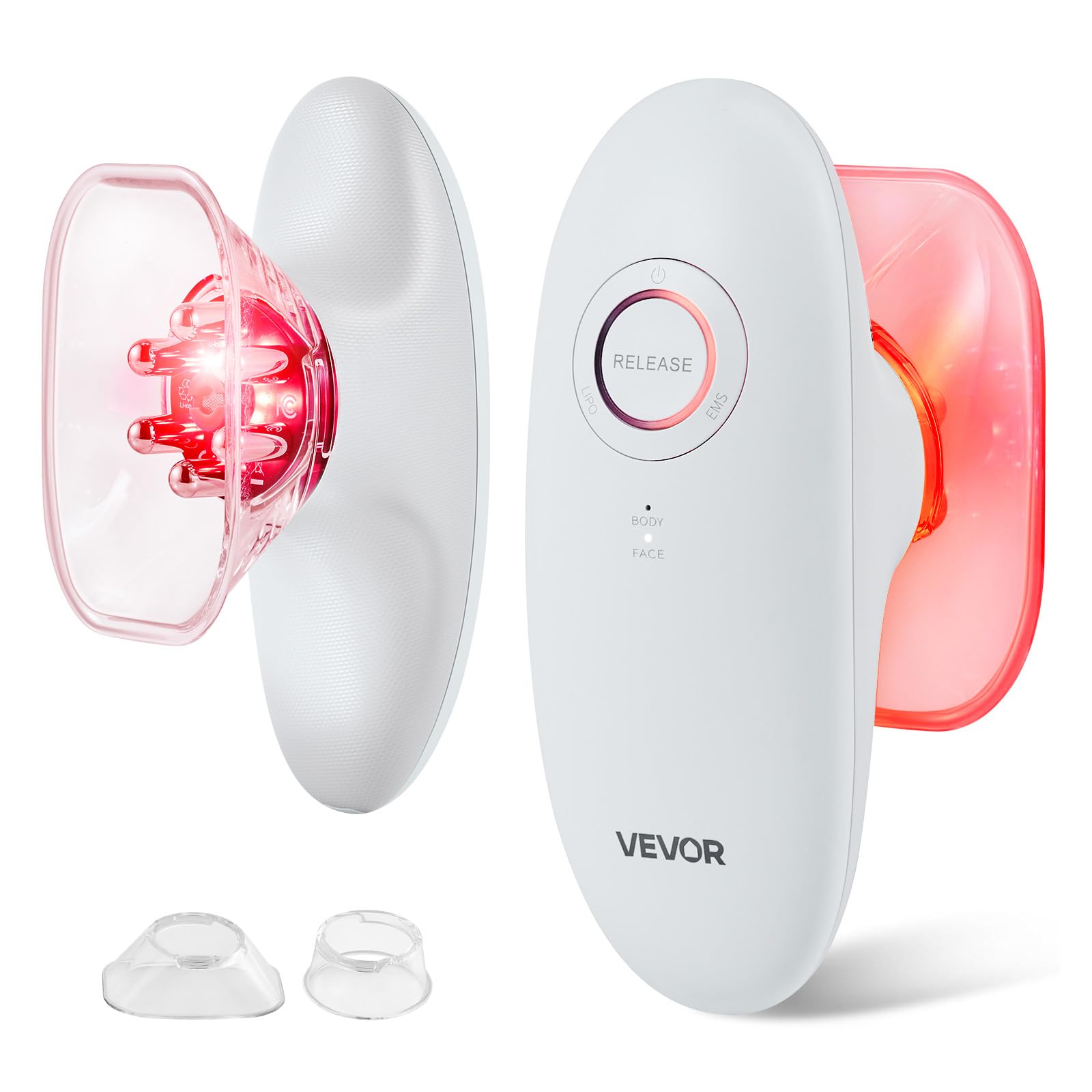
Image 1.1: VEVOR Body Sculpting Machine in use on the abdomen, highlighting its compact design and red light therapy.
2. Package Contents
Before first use, please verify that all components are present in the package:
- 1x VEVOR Body Sculpting Machine
- 1x Data Cable (USB-C)
- 2x Suction Cups (one large, one small)
- 1x Filter Cotton Set (10 pieces)
- 1x User Manual

Image 2.1: All included accessories for the VEVOR Body Sculpting Machine.
3. Setup and Charging
- Initial Charge: Charge the device for 3 hours before its first use. Connect the provided USB-C data cable to the device and a suitable power adapter (not included). The charging indicator lights will provide status.
- Attaching Suction Cups: The device comes with two interchangeable suction cups: a large cup for wider areas (e.g., abdomen, thighs, hips) and a small cup for smaller zones (e.g., arms, calves). To attach, align the cup with the device's head and twist gently until secure. Ensure the filter cotton is placed inside the cup before attachment.
- Preparation for Use: For optimal performance and to ensure gentle application, it is recommended to apply lotion, massage oil, or maternity oil (not included) to the target area before using the device. This helps the device glide smoothly over the skin and prevents irritation.

Image 3.1: The device charging via USB-C, illustrating its wireless capability and battery life.

Image 3.2: Applying lotion to the device for gentle use on sensitive skin.
4. Operating Instructions
The VEVOR Body Sculpting Machine features a multi-functional one-touch control for easy operation. It has three functional modes and three adjustable intensity levels.
4.1 Power On/Off and Mode Selection
- Power On: Press and hold the power button (usually indicated by a circle with a vertical line) for 2 seconds to turn the device on.
- Mode Selection: Once powered on, short press the mode button to cycle through the three available modes: Body, Face, and Lipo. Indicator lights will show the currently selected mode.
- Intensity Adjustment: Each mode has three adjustable levels (Low, Medium, High). Short press the intensity button to adjust the level within the selected mode.
- Power Off: Press and hold the power button for 2 seconds to turn the device off. The device also features a 10-minute auto shut-off for safety.
4.2 Application Steps
- Prepare Skin: Apply lotion, massage oil, or maternity oil to the target area. This ensures smooth gliding and prevents skin discomfort.
- Select Cup: Choose the appropriate suction cup (large for wide areas like abdomen, thighs, hips; small for arms, calves, and smaller zones). For face mode, do not use a suction cup.
- Glide Device: Gently glide the device over the target area. Each area typically requires 5-10 minutes of treatment. When using the suction feature, slightly tilting the device can help break the seal for easier repositioning.

Image 4.1: Step-by-step guide for using the VEVOR Body Sculpting Machine.
5. Modes and Functions
The device combines three core technologies and offers three distinct modes for targeted application:
5.1 Core Technologies
- Vacuum Suction: Enhances circulation and metabolism, aiding in the reduction of fat deposits.
- EMS Muscle Stimulation: Activates muscle contractions to firm and tone muscles.
- Red Light Therapy: Promotes collagen production and revitalizes skin.

Image 5.1: Explanation of the 3-in-1 sculpting technology.
5.2 Functional Modes
- Body Mode: Combines EMS, Vacuum Suction, and Red Light Therapy. Ideal for general body areas like legs, thighs, and arms to achieve smooth lines.
- Face Mode: Utilizes EMS and Red Light Therapy. Designed for gentle lifting and sculpting of facial contours. No suction cup is used in this mode.
- Lipo Mode: Primarily uses Vacuum Suction. Focuses on stubborn fat areas such as the waist and abdomen.

Image 5.2: Visual guide to the full-body sculpting solutions offered by each mode.
6. Maintenance
- Cleaning: After each use, gently wipe the device head and suction cups with a soft, damp cloth. Ensure no oil or lotion residue remains. Do not immerse the device in water.
- Filter Replacement: Regularly check the filter cotton inside the suction cups. Replace it when it appears dirty or clogged to maintain optimal suction performance.
- Storage: Store the device in a cool, dry place away from direct sunlight and extreme temperatures. Keep it out of reach of children.
- Charging: Recharge the device after each use to ensure it is ready for the next session. Avoid overcharging by disconnecting once fully charged.
7. Troubleshooting
If you encounter any issues with your VEVOR Body Sculpting Machine, please refer to the following common troubleshooting steps:
| Problem | Possible Cause | Solution |
|---|---|---|
| Device does not power on. | Low battery or device not charged. | Charge the device for at least 3 hours. Ensure the charging cable is properly connected. |
| Weak or no suction. | Suction cup not properly attached, filter clogged, or insufficient lotion/oil. | Ensure the suction cup is securely twisted onto the device. Check and replace the filter cotton if dirty. Apply more lotion or massage oil to the skin. |
| Skin irritation or discomfort. | Insufficient lubrication, too high intensity, or prolonged use in one area. | Apply more lotion/oil. Reduce the intensity level. Avoid using on broken skin or areas with inflammation. Do not use for more than 10 minutes per area. |
| Red light not visible. | Device not powered on or in a mode that does not include red light therapy. | Ensure the device is powered on and in Body Mode or Face Mode, which include red light therapy. |
If the problem persists after attempting these solutions, please contact VEVOR customer support.
8. Specifications
| Feature | Detail |
|---|---|
| Model Number | Body Sculpting Machine3-1 |
| Brand | VEVOR |
| Product Dimensions (L x W x H) | 6.02" x 2.36" x 2.72" (153 x 60 x 69 mm) |
| Item Weight | 10.56 ounces (0.3 kg) |
| Material Type | Acrylonitrile Butadiene Styrene, Stainless Steel |
| Power Source | Battery Powered |
| Battery Capacity | 1400mAh Lithium Ion (included) |
| Wireless Runtime | ≥60 minutes |
| Input Voltage | DC 5V |
| Special Features | Heat, Vacuum Suction, EMS, Red Light Therapy |
| Target Use Body Part | Body, Face, Legs, Arms, Waist, Belly, Hips |

Image 8.1: Detailed product dimensions and specifications.
9. Warranty and Support
For warranty information, product support, or to purchase replacement parts, please visit the official VEVOR website or contact their customer service department. Keep your purchase receipt for warranty claims.
VEVOR Support Center: www.vevor.com/support
Documents and downloads
Ask a question about this manual
Ask about setup, troubleshooting, compatibility, parts, safety, or missing instructions. Manuals+ will review the question and use this page’s manual context to help answer it.