
1. Introduction
The Staalguard ST50 is a versatile 2-in-1 device designed to assist with dog training and control excessive barking. It functions as both an automatic anti-bark collar and a manual training collar with a remote control. This device utilizes gentle stimulations such as sound (beep), vibration, and progressive intelligent vibration, ensuring a safe and humane training experience without the use of electric shock.
This manual provides detailed instructions on how to set up, operate, and maintain your ST50 collar to achieve effective and positive results with your dog.

Image: Staalguard ST50 collar display. The display shows icons for sound mode (green), vibration mode (blue), progressive vibration mode (magenta), sensitivity level (center), and battery status (top right). This collar offers multiple modes for effective training.
2. Safety Guidelines
- This device is intended for dog training purposes only.
- Keep out of reach of children.
- Do not use the collar on puppies younger than 6 months old or dogs weighing less than 3.5 kg.
- Ensure the collar fits properly; it should be snug but not too tight, allowing two fingers to fit between the collar and your dog's neck.
- Avoid leaving the collar on your dog for more than 12 consecutive hours to prevent skin irritation.
- Regularly check your dog's neck for any signs of irritation or discomfort. If irritation occurs, discontinue use and consult a veterinarian.
- The ST50 collar uses sound and vibration only; it does not use electric shock.
3. Package Contents
Please check the package to ensure all items are present:
- 1x Staalguard ST50 2-in-1 Dog Training and Anti-Bark Collar
- 1x Remote Control (Remote Tag)
- 1x Magnetic USB Charging Cable
- 1x Wrist Strap for Remote Control
- 1x User Manual (this document)
4. Setup
4.1 Charging the Collar and Remote
Before first use, fully charge both the collar and the remote control.
- Connect the magnetic USB charging cable to the charging port on the collar.
- Connect the other end of the USB cable to a standard USB power adapter (not included) or a computer's USB port.
- The collar's display will indicate charging status. A full charge typically takes approximately 2 hours.
- For the remote control, use the provided magnetic USB cable to charge it. The indicator light will show charging status.
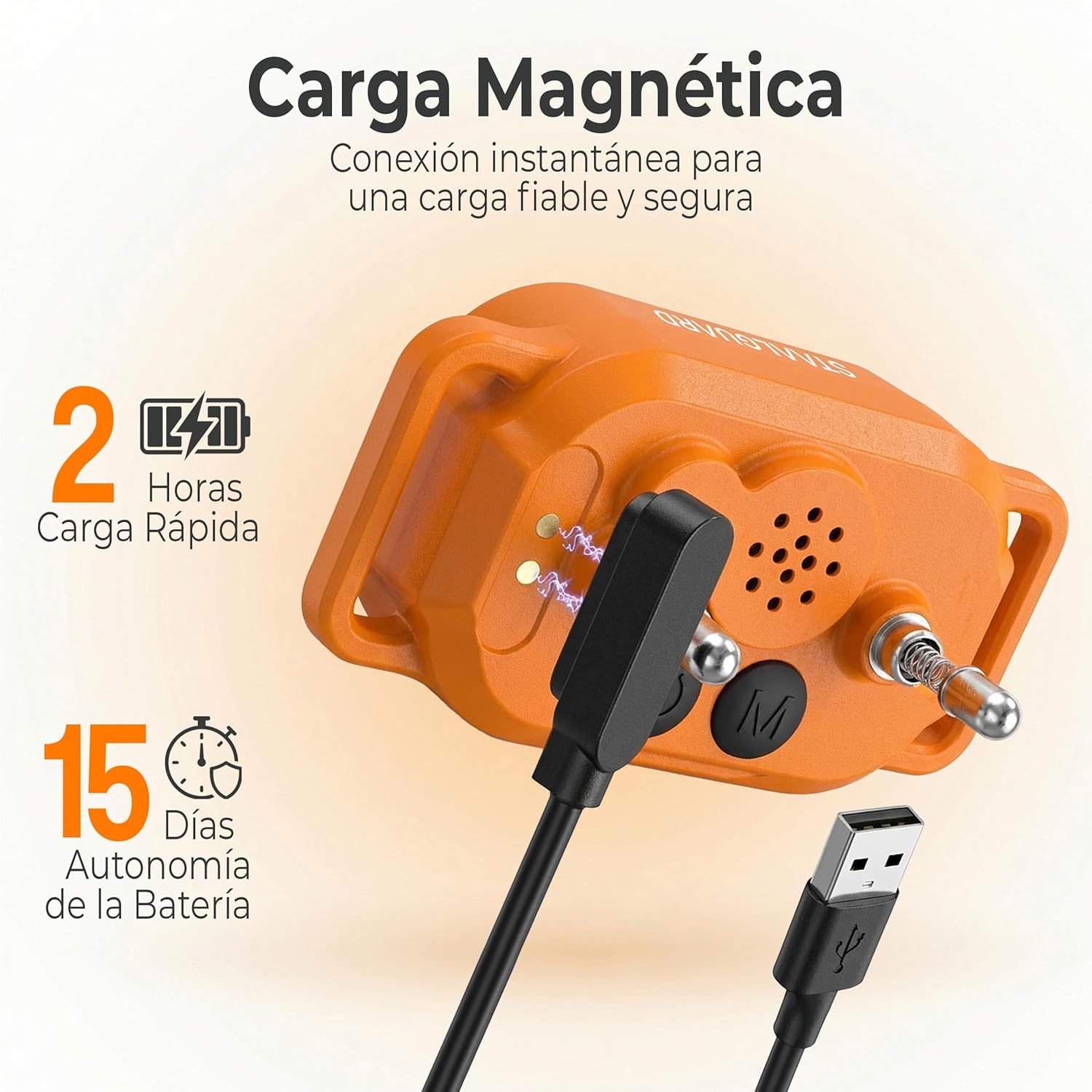
Image: Magnetic charging connection for the Staalguard ST50 collar. The image highlights the magnetic charging port and cable, indicating quick charging and long battery life.
4.2 Attaching the Collar
Proper fit is crucial for the collar's effectiveness and your dog's comfort.
- Ensure your dog is calm and relaxed.
- Place the collar around your dog's neck, positioning the device centrally on the underside of the neck.
- Adjust the strap so it is snug but not tight. You should be able to fit two fingers comfortably between the collar and your dog's neck.
- Trim any excess strap length if necessary, ensuring the end is secured.

Image: Close-up view of the Staalguard ST50 collar module attached to its adjustable strap. This shows the device's design and how it connects to the collar band.

Image: Visual representation of the collar's features: compact and lightweight (40g), comfortable with soft contact points, and suitable for all dog sizes from 3.5 kg to 60+ kg.
5. Operating the Collar
5.1 Powering On/Off
- Collar: Press and hold the power button (usually marked with a power symbol) on the collar until the display lights up. To turn off, press and hold the power button again until the display turns off.
- Remote Control: Use the ON/OFF switch located on the side of the remote control.

Image: Underside of the Staalguard ST50 collar, showing the power button (left) and mode button (right) along with the contact points and speaker grille.
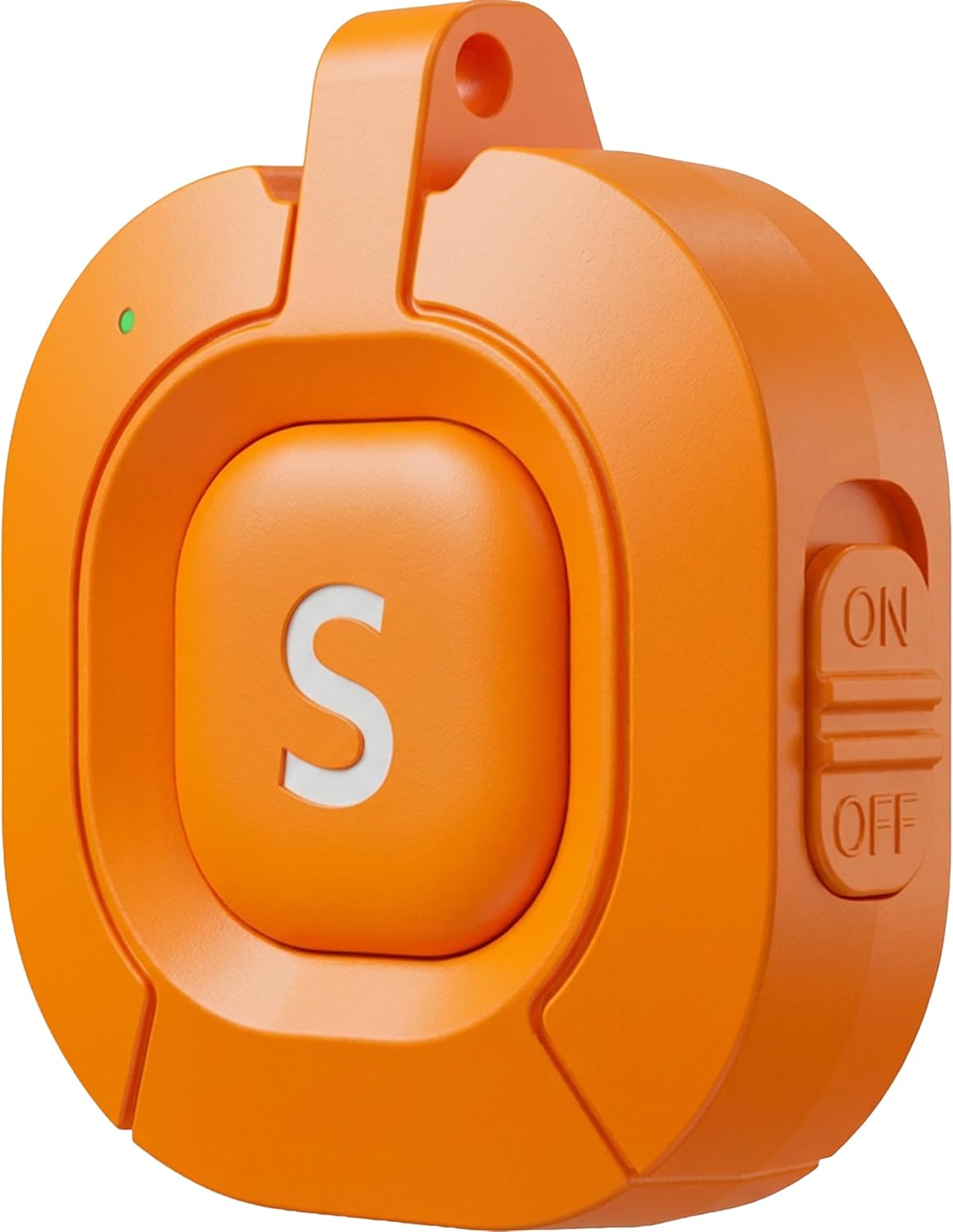
Image: Side view of the remote control, clearly showing the ON/OFF slide switch for easy operation.
5.2 Operating Modes
The ST50 collar offers two primary operating modes: Automatic Anti-Bark Mode and Manual Training Mode with Remote Control.
5.2.1 Automatic Anti-Bark Mode
In this mode, the collar automatically detects and responds to your dog's barking.
- Activating: Ensure the collar is powered on. The collar will automatically enter anti-bark mode if the remote is not actively used.
- Bark Detection: The collar uses advanced recognition technology to detect barking.
- Stimulation Sequence:
- First bark: A short beep sound.
- Subsequent barks (within a short period): Progressive vibration, increasing in intensity or duration to gently deter barking.
- Sensitivity Adjustment: You can adjust the sensitivity level of the bark detection on the collar's display. Press the 'M' (Mode) button on the collar to cycle through sensitivity levels (1-5). A higher number means higher sensitivity.
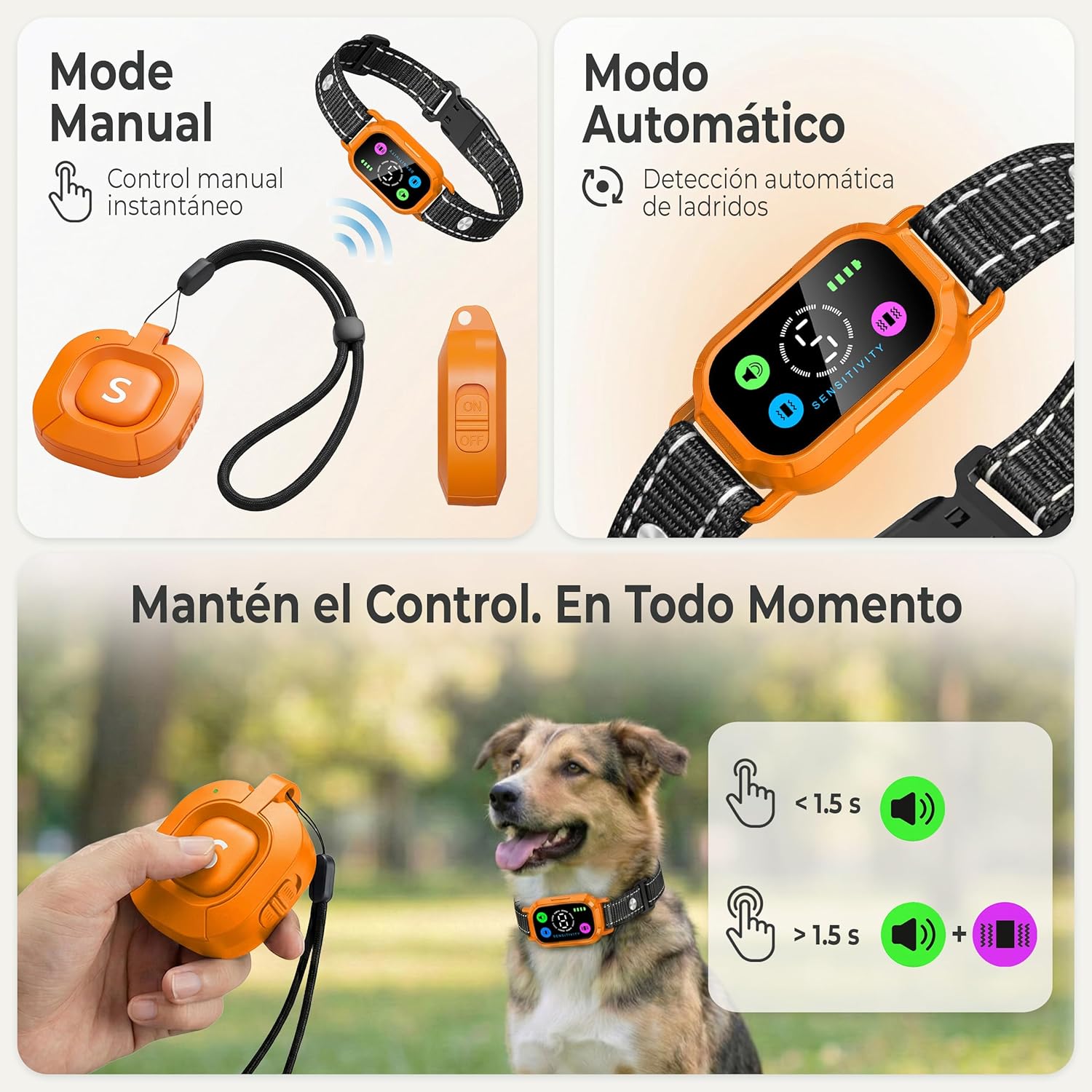
Image: Illustration contrasting Manual Mode (with remote control for instant correction) and Automatic Mode (for automatic bark detection). The image also shows a dog wearing the collar and an owner using the remote.
5.2.2 Manual Training Mode with Remote Control
Use the remote control to manually correct specific behaviors during walks, training sessions, or at home.
- Pairing (if necessary): The collar and remote are usually pre-paired. If not, refer to the pairing instructions in the troubleshooting section.
- Remote Buttons:
- 'S' Button (Sound/Vibration): Press the large 'S' button on the remote to activate the collar's stimulation. The type of stimulation (sound, vibration, or progressive vibration) depends on the mode selected on the collar.
- Mode Selection on Collar: Use the 'M' button on the collar to cycle through the available manual stimulation modes:
- Sound Mode (Green Icon): Emits an audible beep.
- Vibration Mode (Blue Icon): Delivers a gentle vibration.
- Progressive Vibration Mode (Magenta Icon): Delivers a vibration that increases in intensity.
- Applying Correction: When your dog exhibits an undesirable behavior, press the 'S' button on the remote. Use consistent timing for effective training.

Image: The Staalguard remote control, featuring the large 'S' button for activation and an attached wrist strap for convenience.
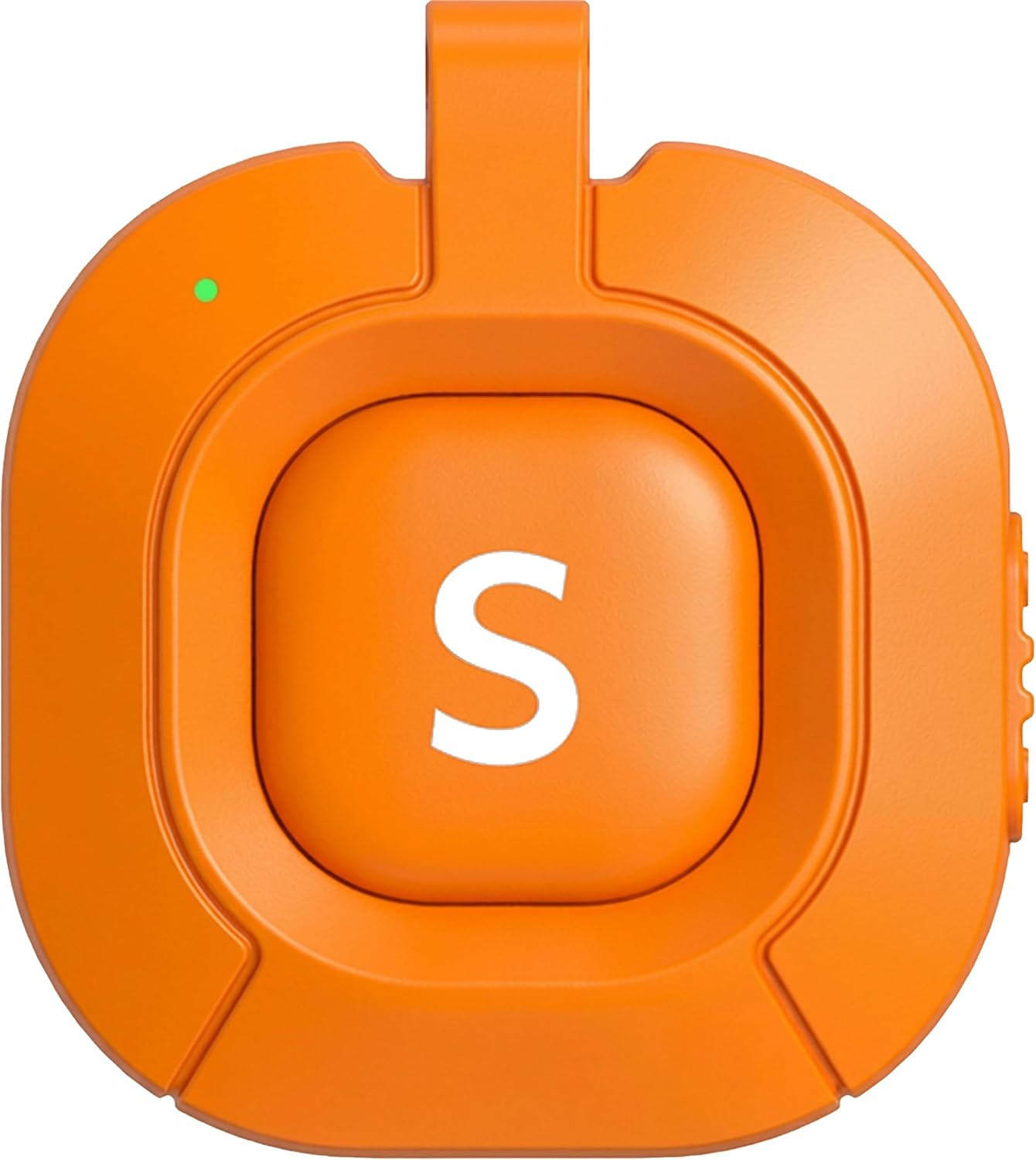
Image: Front view of the remote control, highlighting the prominent 'S' button used to send commands to the collar.

Image: Detailed view of the collar's display, showing the current sensitivity level (center) and the active mode icons (sound, vibration, progressive vibration) along with the battery indicator.
6. Maintenance
6.1 Cleaning the Collar
The ST50 collar is IP67 waterproof, meaning it is resistant to rain, splashes, and short periods of immersion in water.
- Wipe the collar and contact points with a damp cloth regularly to remove dirt and debris.
- Ensure the collar is completely dry before charging or storing.
- Do not use harsh chemicals or abrasive cleaners.

Image: The Staalguard ST50 collar shown under splashing water, illustrating its IP67 waterproof capability, making it suitable for outdoor use.
6.2 Battery Life and Charging
The collar features a high-capacity battery that can last up to 30 days on a single charge, depending on usage.
- Charge the collar when the battery indicator on the display shows low power.
- Always use the provided magnetic USB charging cable.
- Avoid overcharging the battery.
7. Troubleshooting
7.1 Collar Not Responding to Barking
- Check Fit: Ensure the collar is snug against your dog's neck, with the contact points making proper contact.
- Adjust Sensitivity: Increase the sensitivity level on the collar (levels 1-5) using the 'M' button.
- Battery Level: Ensure the collar is sufficiently charged.
- Obstructions: Check for thick fur between the contact points and your dog's skin. You may need to trim the fur slightly.
7.2 Remote Control Not Working
- Power: Ensure the remote control is turned ON.
- Battery Level: Charge the remote control.
- Range: Ensure you are within the effective range of the collar.
- Re-pairing: If the remote and collar lose connection, you may need to re-pair them.
- Turn off both the collar and the remote.
- Turn on the collar.
- Press and hold the 'M' button on the collar until the display shows a pairing indicator (e.g., flashing icon).
- Within 10 seconds, turn on the remote control and press the 'S' button. The collar should vibrate or beep to confirm successful pairing.
7.3 Dog Shows Discomfort
- Check Fit: The collar might be too tight. Loosen it slightly.
- Skin Irritation: Remove the collar and check your dog's neck for redness or sores. Discontinue use if irritation is present and consult a veterinarian.
- Sensitivity/Intensity: Reduce the sensitivity level in automatic mode or select a milder stimulation mode (e.g., sound instead of vibration) in manual mode.
8. Specifications
| Model Number | ST50 |
| Brand | Staalguard |
| Color | Pulse Orange |
| Dimensions (Collar Module) | Approx. 16 x 8.2 x 3.8 cm (Package dimensions, actual module smaller) |
| Weight (Collar Module) | Approx. 40 g |
| Waterproof Rating | IP67 |
| Battery Type | Rechargeable (2 non-standard batteries included) |
| Charging Time | Approx. 2 hours |
| Battery Life | Up to 30 days (depending on usage) |
| Stimulation Modes | Sound (Beep), Vibration, Progressive Vibration |
| Bark Sensitivity Levels | 5 levels |
| Recommended Dog Size | Small, Medium, Large (3.5 kg to 60+ kg) |
| Closure Type | Buckle |
9. Warranty and Support
For warranty information or technical support, please refer to the contact details provided with your purchase or visit the official Staalguard website. Keep your proof of purchase for warranty claims.


