
1. Introduction
The AXIS W102 Body Worn Camera is designed for professional use, offering reliable hands-free video recording in various environments. This device captures high-definition video and clear audio, making it suitable for law enforcement and security personnel. This manual provides essential information for the proper setup, operation, and maintenance of your W102 camera.
2. Safety Information
- Read all instructions carefully before using the device.
- Do not expose the camera to extreme temperatures or direct sunlight for prolonged periods.
- Ensure the device is securely mounted to prevent accidental drops. The camera is drop tested from heights up to 6.5 feet, but excessive force should be avoided.
- The camera is IP67 rated for protection against dust and water. Do not submerge the device beyond its rated depth or duration.
- Use only approved charging accessories.
- Do not attempt to disassemble or repair the camera yourself. Refer to qualified service personnel.
- Dispose of the device and its battery according to local regulations.
3. Product Overview and Components
Familiarize yourself with the key components of your AXIS W102 Body Worn Camera.
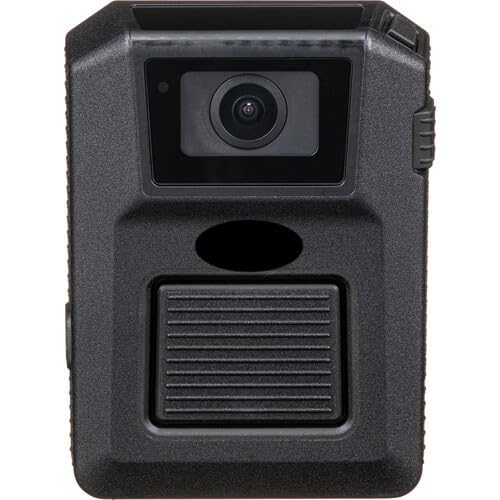
Figure 3.1: Front and side view of the AXIS W102 Body Worn Camera, showing the main lens, record button, and textured grip.
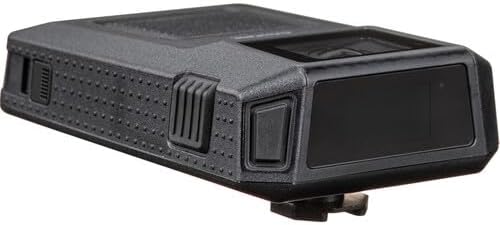
Figure 3.2: Top-front view of the AXIS W102, highlighting the camera lens, top-mounted buttons, and display area.

Figure 3.3: Rear view of the AXIS W102, displaying the mounting point, model number, serial number, and various regulatory certifications.

Figure 3.4: Bottom view of the AXIS W102, showing the multi-pin charging/docking contacts and a USB port for connectivity.
Key Features:
- Video Resolution: 1080p at 30 fps
- Lens: 2.3mm fixed lens, 137° horizontal angle of view
- Storage: 64GB internal storage (up to 30 hours of footage)
- Audio: Dual built-in microphones with voice enhancer and noise cancellation
- Battery: 3600mAh lithium-ion, up to 14.1 hours (720p) / 14 hours (1080p) operation
- Durability: IP67 rated, drop tested up to 6.5 feet
- Display: 0.96" color IPS TFT
- Connectivity: Dual-band Wi-Fi (802.11a/b/g/n/ac) and Bluetooth Low Energy 5.1
- Sensors: 3-axis gyro/accelerometer and compass
- Security: AES-256 encryption and Axis Edge Vault cybersecurity platform
4. Setup
4.1 Charging the Camera
Before initial use, fully charge the AXIS W102 camera. Connect the camera to a power source using the provided USB cable or a compatible docking station. The status indicator will show charging progress. A full charge typically takes several hours.
4.2 Powering On/Off
- To Power On: Press and hold the Power button until the display illuminates.
- To Power Off: Press and hold the Power button until a power-off prompt appears on the display, then confirm.
4.3 Connecting to the AXIS Body-Worn Assistant App
The AXIS W102 can be managed and configured using the AXIS Body-Worn Assistant app, available for Android and iOS devices.
- Download and install the "AXIS Body-Worn Assistant" app from your device's app store.
- Ensure Bluetooth is enabled on your mobile device.
- Open the app and follow the on-screen instructions to pair with your W102 camera via Bluetooth Low Energy 5.1.
- Once paired, you can configure settings, view status, and manage recordings through the app.
4.4 Mounting the Camera
The AXIS W102 is compatible with the optional Klick Fast System for secure body-worn camera mounts. Attach the camera to a compatible Klick Fast mount on your uniform or gear, ensuring it is firmly locked in place to prevent accidental detachment during activity.
5. Operation
5.1 Recording Video
- Start Recording: Press the dedicated record button once. The camera will provide voice and/or vibration feedback, and a status indicator will confirm recording has started.
- Stop Recording: Press the record button again. The camera will provide feedback, and the status indicator will change.
- The camera records video at 1080p resolution at 30 frames per second (fps). Electronic image stabilization is available for 720p recordings.
- The 0.96" color IPS TFT display provides real-time status information.
5.2 Audio Recording
The W102 features dual built-in microphones with voice enhancer and noise cancellation technology to capture clear audio even in challenging environments.
5.3 Storage and Data Management
The camera includes 64GB of internal storage, capable of storing up to 30 hours of captured footage. Data is compressed using H.264 video compression and optimized with Axis Zipstream technology to lower bandwidth and storage requirements. For secure data transfer and management, connect the camera to a computer or compatible docking station.
All data is protected with AES-256 encryption and the Axis Edge Vault cybersecurity platform.
5.4 Connectivity
The camera supports dual-band Wi-Fi (802.11a/b/g/n/ac) and Bluetooth Low Energy 5.1 for wireless connectivity, enabling integration with other systems and the mobile app.
6. Maintenance
6.1 Cleaning the Camera
- Wipe the camera body with a soft, damp cloth. Do not use harsh chemicals or abrasive cleaners.
- For the lens, use a specialized lens cleaning cloth and solution to avoid scratches.
- Ensure all ports and covers are clean and free of debris to maintain the IP67 rating.
6.2 Battery Care
The built-in 3600mAh lithium-ion battery provides extended operation. To maximize battery life:
- Avoid fully discharging the battery frequently.
- Store the camera in a cool, dry place when not in use.
- Charge the camera regularly, even if not used daily, to maintain battery health.
6.3 Firmware Updates
Periodically check for firmware updates through the AXIS Body-Worn Assistant app or the official AXIS website. Firmware updates can improve performance, add features, and enhance security.
7. Troubleshooting
If you encounter issues with your AXIS W102 camera, refer to the following common troubleshooting steps:
- Camera not powering on:
- Ensure the battery is charged. Connect the camera to a charger and wait a few minutes before attempting to power on again.
- Verify the power button is pressed and held correctly.
- Recording issues (e.g., not recording, poor quality):
- Check available storage space. If full, transfer data and delete old footage.
- Ensure the lens is clean and free from obstructions.
- Verify that the recording indicator is active when attempting to record.
- App connectivity problems:
- Ensure Bluetooth is enabled on your mobile device and the camera is within range.
- Restart both the camera and your mobile device.
- Re-pair the camera with the app if necessary.
- Check if the app is updated to the latest version.
- Short battery life:
- Ensure the camera is fully charged before use.
- Operating in extreme temperatures can affect battery performance.
- Frequent Wi-Fi or Bluetooth usage can consume more power.
- No audio or poor audio quality:
- Ensure the microphone ports are not blocked or dirty.
- Check settings in the AXIS Body-Worn Assistant app to ensure audio recording is enabled.
If the issue persists, contact AXIS support for further assistance.
8. Specifications
| Feature | Detail |
|---|---|
| Model | W102 |
| Video Resolution | 1080p @ 30 fps |
| Lens | 2.3mm fixed lens, 137° horizontal angle of view |
| Internal Storage | 64GB (up to 30 hours of footage) |
| Audio | Dual microphones with voice enhancer and noise cancellation |
| Battery | 3600mAh Lithium-ion (up to 14.1 hrs @ 720p, 14 hrs @ 1080p) |
| Durability Rating | IP67 (dust and water protection), Drop tested up to 6.5 ft |
| Display | 0.96" color IPS TFT |
| Wireless Connectivity | Dual-band Wi-Fi (802.11a/b/g/n/ac), Bluetooth Low Energy 5.1 |
| Sensors | 3-axis gyro/accelerometer, compass |
| Video Compression | H.264, Axis Zipstream technology |
| Security | AES-256 encryption, Axis Edge Vault cybersecurity platform |
| Environmental Compliance | PVC and BFR/CFR free |
| Recommended Use | Outdoor Security |
9. Warranty and Support
9.1 Warranty Information
Specific warranty terms and conditions for the AXIS W102 Body Worn Camera are provided at the time of purchase or can be found on the official AXIS Communications website. Please retain your proof of purchase for warranty claims.
9.2 Technical Support
For technical assistance, product inquiries, or to report issues not covered in this manual, please contact AXIS Communications customer support. Visit the official AXIS website for contact details, FAQs, and additional resources.
Online Resources: www.axis.com


