
1. Introduction
The SmartElex 30D is a powerful and intelligent dual-channel motor driver designed for demanding robotics and automation applications. It delivers 30A continuous and up to 85A peak current per channel, offering impressive performance and versatility. This motor driver supports multiple input modes including RC, analog, PWM, and TTL serial communication, allowing seamless integration into various control systems. It also features mixed and independent operating modes, making it suitable for applications such as differential drive robots, motorized vehicles, and mechatronic systems.
A key feature of the SmartElex 30D is its smart control and protection capabilities. An onboard microcontroller actively monitors temperature and current to prevent damage. If the board temperature exceeds 80°C, motor speed is automatically reduced until it cools down, ensuring safe and consistent operation. Its MOSFETs operate at a 16kHz switching frequency for quiet and efficient performance. This Raspberry Pi-powered driver is built for durability, flexibility, and ease of use, making it an excellent choice for reliable, high-power robotic systems.
2. What's in the Box
Upon opening your package, please verify that all the following components are included:
- 1x SmartElex 30D Motor Driver
- 1x Interfacing Cable
- 1x Set of Nuts, Bolts, and Spacers
- 1x DC Fan
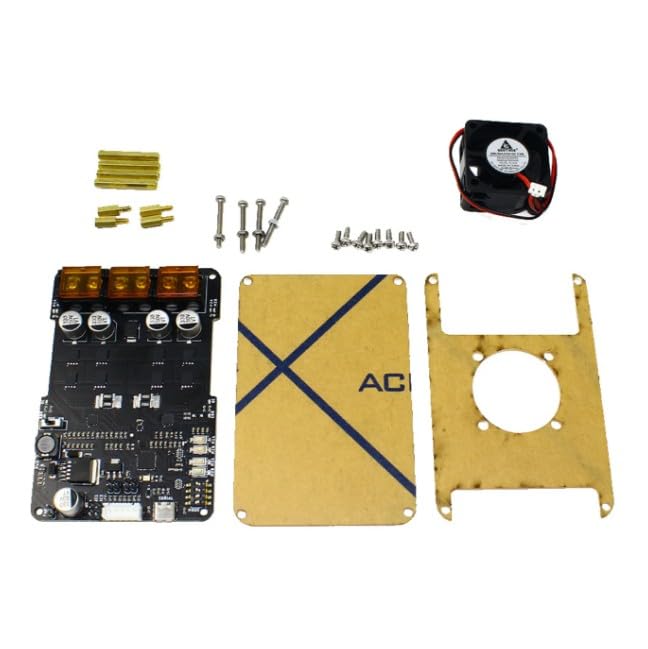
Image: SmartElex 30D Motor Driver with interfacing cable, nuts, bolts, spacers, and DC fan.
3. Setup Instructions
Follow these steps to properly set up your SmartElex 30D Motor Driver:
- Mounting the Driver: Securely mount the SmartElex 30D to your robot chassis or project enclosure using the provided nuts, bolts, and spacers. Ensure adequate airflow around the board for cooling.
- Connecting the DC Fan: Attach the included DC fan to the designated fan header on the motor driver board. Position the fan to direct airflow over the heatsinks for optimal thermal management.
- Motor Connections: Connect your DC motors to the M1A/M1B and M2A/M2B terminals. Ensure correct polarity for desired motor direction. The SmartElex 30D supports two independent motors.
- Power Supply Connection: Connect your motor power supply (7V to 28V DC) to the B+ and B- terminals. Observe correct polarity. A robust power supply capable of delivering the required current for your motors is essential.
- Control Signal Connection: Connect your control source (e.g., Raspberry Pi, RC receiver, microcontroller) to the appropriate input pins on the SmartElex 30D. Refer to the operating modes section for specific pin assignments for RC, Analog, PWM, or Serial communication.
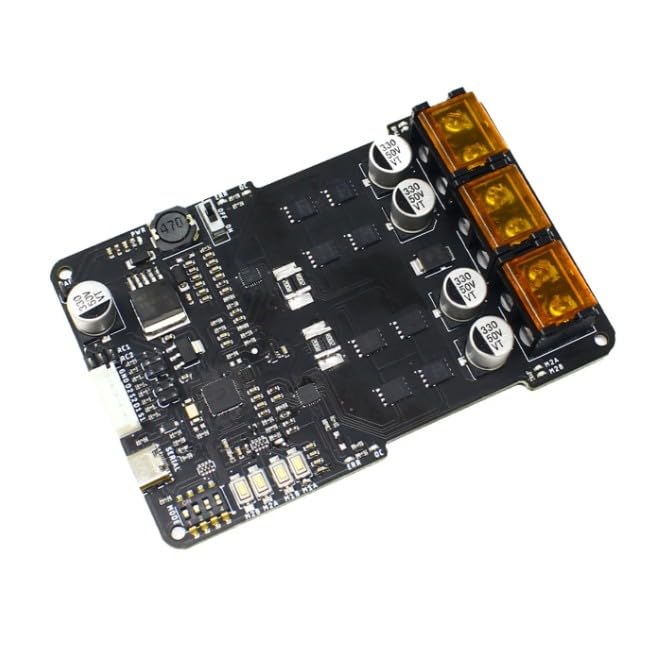
Image: Top view of the SmartElex 30D board, showing component layout and connection points.
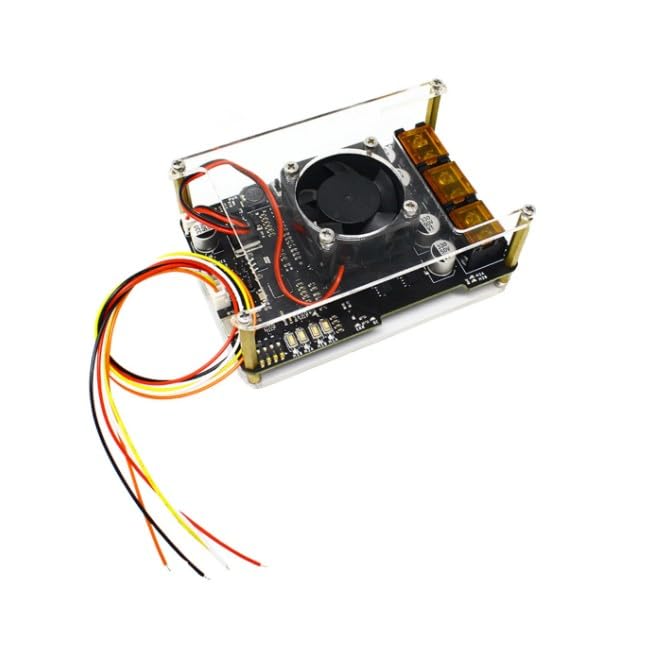
Image: SmartElex 30D Motor Driver board, illustrating the layout of motor and power terminals.
4. Operating Instructions
The SmartElex 30D offers versatile control options and intelligent protection features.
4.1. Input Modes
The driver supports the following input modes:
- RC (Radio Control): Connect directly to an RC receiver for remote control applications.
- Analog: Control motor speed and direction using analog voltage signals.
- PWM (Pulse Width Modulation): Utilize PWM signals from a microcontroller for precise motor control.
- Serial Packetized Control (TTL): Communicate with the driver via TTL serial for advanced control and feedback. This mode is particularly useful when interfacing with a Raspberry Pi or other microcontrollers for complex robotic behaviors.
4.2. Manual Operation
Onboard push buttons are provided for basic testing and manual control of the motors. This allows for quick verification of motor functionality without requiring an external control signal.
4.3. Smart Control and Protection
The integrated microcontroller provides several protective features:
- Thermal Protection: The driver actively monitors its temperature. If the board temperature reaches 80°C, motor speed is automatically reduced. Normal operation resumes when the temperature drops to 70°C. A critical shutdown occurs at 100°C to prevent permanent damage.
- Overcurrent Protection: The system prevents damage during high-load conditions by monitoring current draw and taking corrective action.
- Quiet Operation: The 16kHz MOSFET switching frequency ensures that motor operation is quiet and efficient, minimizing audible noise.
5. Maintenance
To ensure the longevity and optimal performance of your SmartElex 30D Motor Driver, follow these maintenance guidelines:
- Keep Clean: Regularly inspect the board for dust, debris, or foreign objects. Use a soft brush or compressed air to gently clean the components.
- Ensure Airflow: Verify that the cooling fan is operating correctly and that there are no obstructions blocking airflow to the heatsinks.
- Check Connections: Periodically inspect all wiring connections (motor, power, control) to ensure they are secure and free from corrosion or damage. Loose connections can lead to intermittent operation or component stress.
- Avoid Extreme Conditions: Operate the driver within its specified temperature and voltage ranges. Avoid exposure to moisture, excessive humidity, or corrosive environments.
6. Troubleshooting
If you encounter issues with your SmartElex 30D Motor Driver, refer to the following common problems and solutions:
- Motor Not Responding:
- Check all power connections (B+, B-) to ensure they are secure and providing the correct voltage (7V-28V).
- Verify motor connections (M1A/M1B, M2A/M2B) are correct and motors are not stalled.
- Confirm that the control signals (RC, Analog, PWM, Serial) are correctly connected and being sent from your control source.
- Use the onboard push buttons to test motor functionality independently of your control source.
- Motor Runs Intermittently or at Reduced Speed:
- This could indicate thermal protection activation. Check if the board is overheating. Ensure the DC fan is working and airflow is unobstructed.
- Verify that the power supply can deliver sufficient current for the motors under load.
- Inspect for loose or corroded connections.
- Driver Board is Hot:
- Ensure the DC fan is properly connected and operational.
- Check for excessive load on the motors, which can cause high current draw and heat generation.
- Verify that the input voltage is within the specified range (7V-28V).
- No Power Indicator Light:
- Check the main power supply connection and ensure it is providing power.
- Inspect for any short circuits in the wiring.
7. Specifications
| Feature | Detail |
|---|---|
| Model Number | TIFMC0277 |
| Brand | Robocraze |
| Power Output (Continuous) | 30A per channel |
| Power Output (Peak) | Up to 85A per channel (2 seconds) |
| Motor Voltage Range | 7V to 28V |
| Input Modes | RC, Analog, PWM, Serial Packetized control |
| MOSFET Switching Frequency | 16kHz |
| Thermal Protection (Speed Reduction) | 80°C |
| Thermal Protection (Normal Operation Resume) | 70°C |
| Thermal Protection (Shutdown) | 100°C |
| Item Weight | 235 g |
| Product Dimensions (LxWxH) | 18 x 15 x 3 cm |
| Country of Origin | China |
8. Warranty and Support
For warranty information, technical support, or any inquiries regarding your SmartElex 30D Motor Driver, please contact Robocraze customer service. Refer to the official Robocraze website or your purchase documentation for contact details.
Manufacturer Contact: Robocraze, Ground Floor, 912/10 Survey no. 104 4th G street, Chelekare, Kalyan Nagar, Bengaluru - 560043, India. Phone: 8123057137