
Introduction
Thank you for choosing the FUDONI V7 Native 1080P WiFi Bluetooth Projector. This portable projector is designed to deliver a full HD viewing experience with native 1920x1080 resolution, 18000 lumen brightness, and an 18000:1 contrast ratio. It features 5.1 Bluetooth and dual-band 5G+2.4G WiFi for seamless connectivity, along with a built-in high-fidelity stereo speaker. This manual provides detailed instructions for setting up, operating, and maintaining your projector to ensure optimal performance and longevity.
What's in the Box
Upon unboxing your FUDONI V7 Projector, please ensure all the following items are present:
- Projector x 1
- HDMI Cable x 1
- AV Cable x 1
- Power Cable x 1
- Remote Control x 1
- Lens Cap x 1
- User Manual x 1
- Simple Projection Screen (100-inch) x 1

Video: An unboxing video demonstrating the contents of the FUDONI V7 Projector package, including the projector, cables, remote, and projection screen.
Product Overview
The FUDONI V7 projector is designed for versatility and ease of use, offering multiple connectivity options and intuitive controls.
Key Features:
- Native 1080P Full HD Resolution: Delivers crisp, clear images (4K decoding supported).
- High Brightness & Contrast: 18000 lumens and 18000:1 contrast ratio for vivid visuals.
- Dual-band WiFi (5G+2.4G): Ensures smoother and faster wireless screen mirroring.
- 5.1 Bluetooth Technology: Easily connect to external headphones, speakers, and other audio devices.
- Built-in High-Fidelity Stereo Speaker: Provides rich and clear sound without external audio.
- Max 300" Display & Zoom Function: Adjustable screen size from 100% to 50% without moving the projector.
- Eye Protection: Utilizes a high-refraction 6-layer glass lens and diffuse reflection light source.
- Multiple Connectivity: HDMI, USB, TF, VGA, AV, 3.5mm Audio Out.
- Flexible Mounting Options: Supports table, tripod, and ceiling installations.

Image: The FUDONI V7 projector highlighting its key features including 4K decoding, 25000 Lux brightness, 5.1 Bluetooth, HiFi speakers, 1080P Native resolution, 5G+2.4G WiFi, and 300" Max Display.
Setup Guide
1. Initial Placement & Power Connection
- Choose a Location: Place the projector on a stable surface (table, tripod, or ceiling mount) at an appropriate distance from your projection surface. The projector can project from 3.6 feet to 29.6 feet for a screen size of 32 to 300 inches.
- Adjust Height: Use the screw adjustment on the bottom of the projector to fine-tune the projection angle if needed.
- Connect Power: Plug the power cable into the projector's AC input and then into a power outlet.
- Remove Lens Cap: Carefully remove the lens cap from the projector lens.
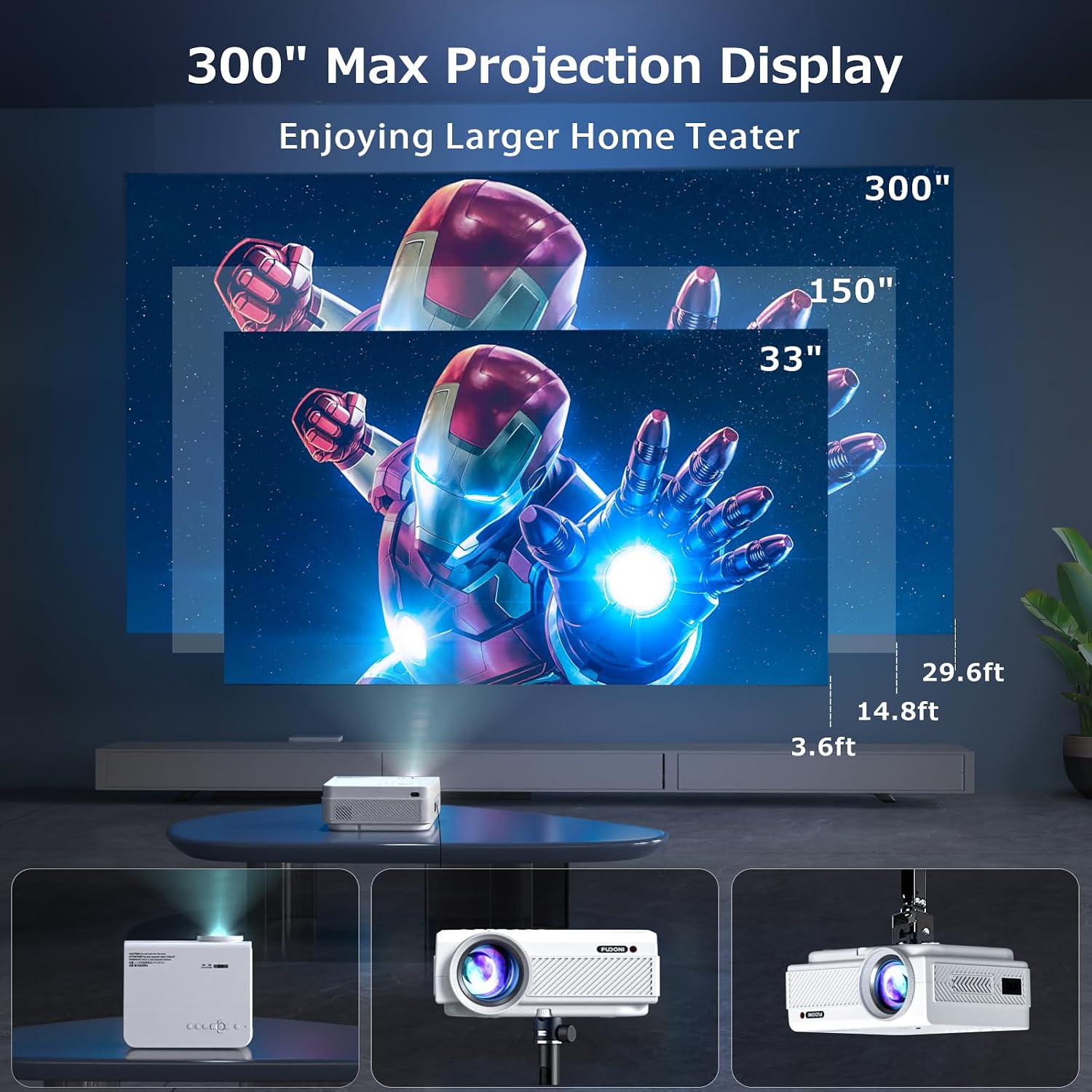
Image: Demonstrates various projection distances and corresponding screen sizes (33", 150", 300") for the FUDONI V7 projector, along with different placement options like table, tripod, and ceiling mount.
2. Remote Control Setup
The remote control requires two AAA batteries (not included). Open the battery compartment on the back of the remote and insert the batteries, ensuring correct polarity. Close the compartment securely.
3. Projection Screen (Optional)
If using the included 100-inch simple projection screen, attach it to a flat surface using the provided adhesive clips or other suitable mounting hardware. Ensure the screen is taut and wrinkle-free for the best image quality.
Operating Instructions
1. Power On/Off
Press the power button on the projector or the remote control to turn the unit on or off.
2. Focus and Keystone Adjustment
- Focus: Rotate the focus ring on the front of the projector lens until the image appears sharp and clear.
- Keystone: Use the keystone adjustment slider on the top of the projector to correct any trapezoidal distortion, ensuring a rectangular image.
3. Input Source Selection
From the home screen, select your desired input source using the remote or the projector's control panel:
- HDMI: Connect devices like laptops, gaming consoles, or TV boxes via an HDMI cable.
- AV: Connect older devices using the provided AV cable.
- VGA: Connect computers with a VGA output.
- USB & TF: Insert a USB disk or TF card to play multimedia files directly.

Image: The FUDONI V7 projector displaying its various input ports (USB, AV, HDMI, VGA, 3.5mm Audio) and compatible devices such as USB drives, TV sticks, TV boxes, PS5, TF/SD cards, laptops, mobile phones, DVDs, speakers, and earphones.
4. Screen Mirroring (Wireless Connection)
The projector supports both Android and iOS screen mirroring via its dual-band 5G+2.4G WiFi.
- Select 'Screen Mirroring' from the home screen.
- Follow the on-screen instructions for your specific device (Android or iOS) to connect. Ensure your device's WLAN is turned on.

Image: Illustrates the FUDONI V7 projector's 5G+2.4G dual wireless mirroring capability, showing a laptop, projector, smartphone, and tablet connected wirelessly, supporting Windows, Android, and iOS devices.
5. Bluetooth Connection (for External Speakers)
Connect external Bluetooth speakers or headphones for an enhanced audio experience.
- Select 'Bluetooth' from the home screen.
- Enable Bluetooth on your external audio device and put it in pairing mode.
- Select your device from the list on the projector screen to connect.

Image: The FUDONI V7 projector demonstrating its 5.1 Bluetooth connection, showing various audio devices like headphones, earbuds, and external speakers connected wirelessly for an ultimate sound experience.
6. Zoom Function
To adjust the screen size without moving the projector, use the zoom function in the settings menu. You can reduce the display size from 100% to 50%.

Image: Highlights the FUDONI V7 projector's zoom function (100% to 50%), sleep timer, low noise operation (<30dB), and eye protection features, showing a clear, vibrant projection.
Maintenance
1. Lens Cleaning
To maintain optimal image clarity, regularly clean the projector lens. Use the provided lens wipe or a soft, lint-free cloth. For stubborn smudges, use a lens cleaning solution specifically designed for optical surfaces. Avoid abrasive materials or harsh chemicals.
2. General Care
- Keep the projector in a cool, dry, and dust-free environment.
- Ensure proper ventilation by not blocking the air vents.
- Avoid dropping or subjecting the projector to strong impacts.
- When not in use, replace the lens cap to protect the lens from dust and scratches.
Troubleshooting
No Image / Blurry Image
- Check power connection and ensure the projector is turned on.
- Verify the input source is correctly selected (HDMI, AV, USB, etc.).
- Adjust the focus ring until the image is sharp.
- Correct keystone distortion using the keystone slider.
- Ensure the projection distance is within the recommended range (3.6 to 29.6 feet).
No Sound
- Increase the volume on both the projector and the connected device.
- Check if the projector is muted.
- If using external Bluetooth speakers, ensure they are properly paired and connected.
- Verify audio cables (AV, 3.5mm audio out) are securely connected.
Screen Mirroring Issues
- Ensure your mobile device and projector are connected to the same Wi-Fi network (if required by your device for mirroring).
- Check your device's screen mirroring function (e.g., Smart View, Cast, Wireless Display).
- Some streaming services (Amazon Prime, Disney, Hulu) may not support direct screen mirroring due to copyright protection. Use a TV stick (not included) for these services.
Video: An overview of the FUDONI V7 Projector, demonstrating its features and basic operation, which can be helpful for troubleshooting common issues.
Specifications
| Feature | Specification |
|---|---|
| Brand | FUDONI |
| Model Name | V7 |
| Display Resolution | Native 1920 x 1080 (4K Supported) |
| Brightness | 18000 Lumen |
| Contrast Ratio | 18000:1 |
| Connectivity Technology | WiFi (5G+2.4G), Bluetooth (5.1), HDMI, USB, TF, VGA, AV, 3.5mm Audio |
| Maximum Image Size | 300 Inches |
| Minimum Image Size | 32 Inches |
| Maximum Throw Distance | 29.6 Feet |
| Minimum Throw Distance | 3.6 Feet |
| Zoom Function | 100%-50% |
| Built-in Speaker | Yes |
| Mounting Type | Table, Tripod, Ceiling |
| Item Weight | 1.66 Kilograms |
Warranty & Support
Warranty Information
The FUDONI V7 Projector comes with a 1-year warranty. Please refer to the warranty card included in your package for specific terms and conditions.
Customer Support
For any questions, technical assistance, or warranty claims, please contact FUDONI Official customer support:
- Email: support@fudoni.com
- Phone: 1-888-285-2024
- Website: www.fudoni.com


