
Moman MP-TPMS-XCY-BK
Moman Motorcycle TPMS User Manual
Model: MP-TPMS-XCY-BK
Introduction
The Moman Motorcycle Tire Pressure Monitoring System (TPMS) is designed to provide real-time tire pressure and temperature data, enhancing riding safety. This manual offers detailed instructions for the proper installation, operation, and maintenance of your TPMS.

Image: Moman TPMS sensors and the accompanying smartphone application interface, showing real-time tire pressure and temperature readings.
Safety Information
WARNING: KEEP OUT OF REACH OF CHILDREN. This product contains button batteries which can be fatal if swallowed. Keep new and used batteries away from children. If swallowed, seek immediate medical attention.
Always ensure proper installation of the sensors to prevent air leakage. Regularly check tire pressure manually to verify readings, as signal transmission can be affected by environmental factors such as weather and temperature.
Package Contents
Verify that all items are present in the package:
- Sensor x2
- Screw x2
- User's Manual (QR code for app download) x1
- Wrench x1
- Box x1

Image: Visual representation of the Moman TPMS package contents, showing two sensors, two screws, a wrench, and a QR code for the app download.
Setup and Installation
1. App Installation
Download the "TIRE-KING" application from the App Store (iOS) or Google Play Store (Android). You can scan the QR code provided in the package or on the sensor itself for direct access.

Image: Screenshot showing the TIRE-KING app download QR code and initial app screens for sensor binding.
Video: Moman TPMS APP Installation Guide
Video: This video demonstrates the step-by-step process of installing the Moman TPMS application on your smartphone and initial setup procedures.
2. Sensor Installation
- Install the anti-theft washer: Place the anti-theft washer onto the tire valve stem first.
- Tighten the sensor: Screw the sensor onto the valve stem.
- Secure with wrench: Use the provided wrench to tighten the anti-theft washer counter-clockwise against the sensor to secure it and prevent theft.
Important: Ensure that the installation is correct and the valve on the wheel hub is not misaligned. Check for any signs of air leakage before proceeding with pairing.

Image: Step-by-step guide illustrating the installation of the external TPMS sensor, including placing the anti-theft washer, screwing on the sensor, and tightening with the wrench.
3. Syncing Sensors with the App
- Enable Bluetooth: Open the TIRE-KING app. If Bluetooth is not enabled, the app will prompt you to turn it on and allow necessary permissions.
- Add Vehicle: In the app, select "My Vehicles" and add a new vehicle, choosing the appropriate type (e.g., Motorcycle).
- Bind Sensors: Manually input the sensor ID (found on the sensor) or use the app's QR code scanning feature to bind each sensor to its corresponding tire position (Front Left, Front Right, Rear Left, Rear Right, depending on vehicle type).
- Adjust Settings: Customize alarm thresholds for high/low pressure and temperature within the app's settings.
Video: Moman Tire Pressure Monitoring System Overview and Setup
Video: This video provides an overview of the Moman TPMS and demonstrates the process of setting up and binding sensors within the application.
Operating Instructions
Motion-Activated Monitoring
- Riding Mode: When the vehicle is in motion, the sensors transmit data every 3 minutes. If the vehicle has been stationary for an extended period, drive for at least 3 minutes to activate data transmission before checking tire pressure.
- Parked Mode (Sleep Mode): When the vehicle is parked and no motion (centrifugal force) is detected, the tire pressure monitor enters a low-power sleep mode to conserve battery life. It will not transmit signals in this state.

Image: Illustration detailing the motion-activated monitoring feature, distinguishing between active data transmission during riding and power-saving sleep mode when parked.
App Features and Alarms
The TIRE-KING app provides comprehensive monitoring and alert functions:
- Real-time Monitoring: View live tire pressure and temperature data for all connected tires.
- High/Low Pressure Alarm: Receive instant alerts if tire pressure falls below or exceeds your set thresholds.
- High/Low Temperature Alarm: Be notified if tire temperature deviates from safe operating ranges.
- Voltage Alarm: Alerts for low sensor battery voltage.
- Wireless Transmission: Data is transmitted wirelessly to your smartphone.
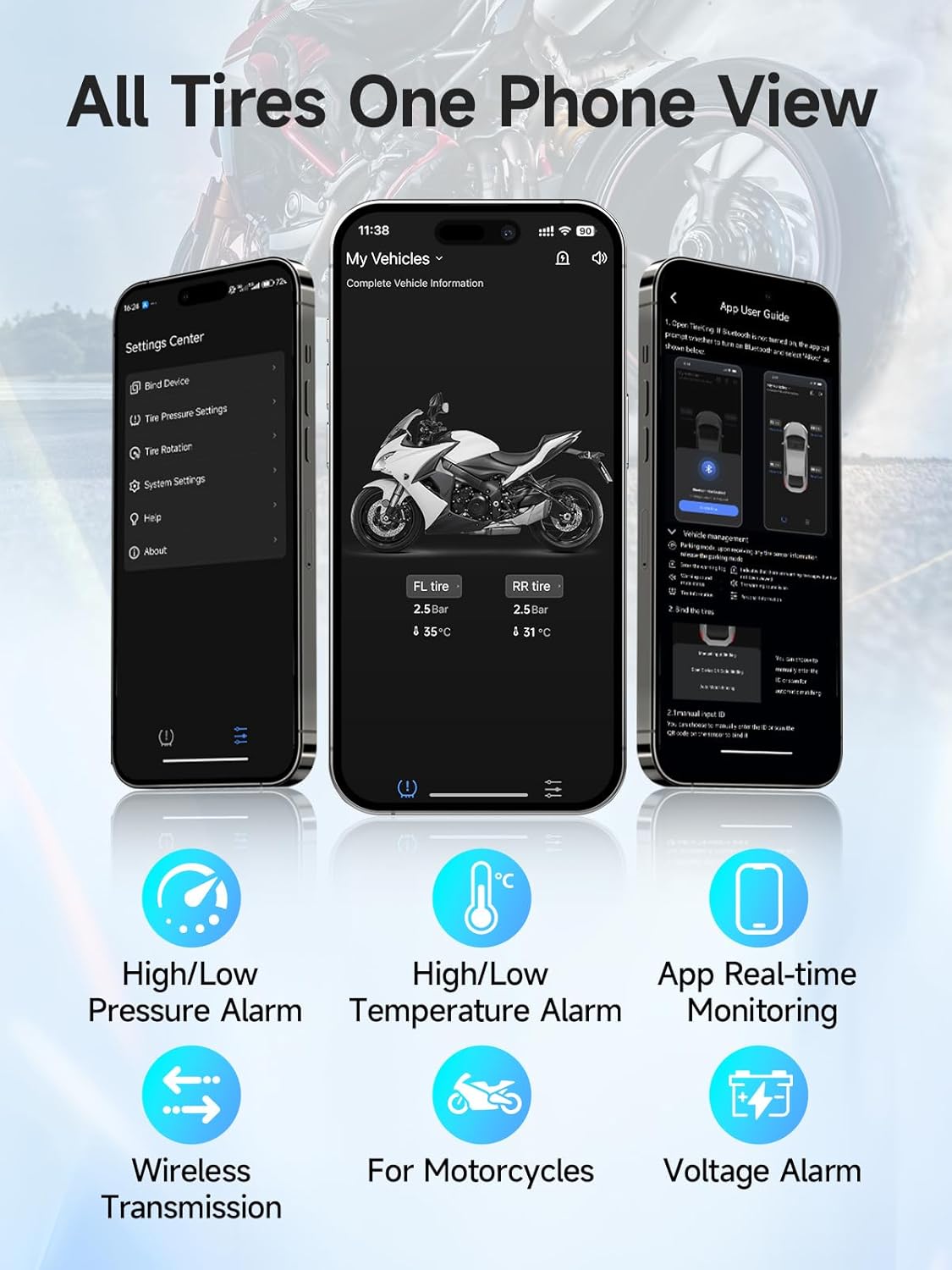
Image: Screenshots of the TIRE-KING app displaying real-time tire pressure and temperature, along with icons representing various alarm types and features.
Maintenance
Sensor Battery Replacement
The sensor batteries typically last 1-2 years and are replaceable. Follow these steps:
- Open the sensor: Use the provided wrench to carefully open the sensor casing.
- Replace battery: Remove the old button battery and insert a new one, ensuring correct polarity.
- Tighten the sensor: Use the wrench to securely close and tighten the sensor casing.

Image: Visual guide demonstrating the three steps for replacing the sensor battery: opening the sensor with a wrench, inserting a new battery, and tightening the sensor casing.
Troubleshooting
- No Signal/Incorrect Readings:
- Ensure sensors are correctly installed and tightened to prevent air leakage.
- Verify Bluetooth is enabled on your smartphone and the app has necessary permissions.
- Drive the vehicle for a few minutes to activate sensors from sleep mode.
- Check sensor battery levels in the app.
- App Not Connecting:
- Restart the app and your phone's Bluetooth.
- Ensure your phone's operating system is compatible (iOS & Android supported).
- General Note: Real-time data is for reference only. Signal transmission can be affected by various factors such as weather, temperature, and electromagnetic interference. Always perform regular manual tire pressure checks to ensure safety.
- Compatibility Note: This system is not required for motorcycles with factory-installed TPMS or Huawei Porsche joint brand vehicles.
For further assistance, refer to the "HELP" section within the TIRE-KING application.
Specifications
| Brand | Moman |
| Model | MP-TPMS-XCY-BK |
| Part Number | TPMS |
| Operation Temperature | -40°F - 220°F (-40°C - 104°C) |
| Waterproof Level | IP54 |
| Maximum PSI | 230 PSI |
| Effective Transmission Range | 20 meters |
| Working Voltage | 2.1V - 3.6V |
| Included Components | TPMS Sensors, Screws, Wrench |

Image: Diagram illustrating the compact size of the Moman TPMS sensor and listing key technical specifications such as operating temperature, waterproof level, maximum PSI, transmission range, and working voltage.
Warranty and Support
Warranty Information
For detailed warranty information, please refer to the official Moman website or the documentation included with your purchase. Keep your proof of purchase for warranty claims.
Customer Support
If you encounter any issues or have questions not covered in this manual, please contact Moman customer support through their official website or the support section within the TIRE-KING application. You can also visit the Moman Store on Amazon for additional product information.
Related documentsMP-TPMS-XCY-BK

Ask a question about this manual
Ask about setup, troubleshooting, compatibility, parts, safety, or missing instructions. Manuals+ will review the question and use this page’s manual context to help answer it.