
1. Introduction
Thank you for choosing the Havells Studio Breathe AP310 Air Purifier. This device is designed to improve your indoor air quality by effectively removing pollutants, allergens, and odors. Featuring 360° purification, SpaceTech filtration, and a HEPA H13 filter combined with an activated carbon filter, the AP310 provides a cleaner and healthier environment for your home or office.
This manual provides important information regarding the installation, operation, maintenance, and troubleshooting of your air purifier. Please read it thoroughly before using the appliance and keep it for future reference.

Figure 1.1: Havells Breathe Air Purifier highlighting features like triple layer filtration, real-time PM2.5 value, 5 fan speeds, silent BLDC motor, mode selection, dust filter with life indicator, and 360° purification with touch controls.
2. Safety Instructions
To reduce the risk of fire, electric shock, or injury, please observe the following safety precautions:
- Read all instructions before operating the appliance.
- Do not operate the air purifier with a damaged cord or plug.
- Do not use the appliance in wet or damp environments.
- Keep the air inlet and outlet clear of obstructions.
- Unplug the air purifier before cleaning or performing any maintenance.
- This appliance is not intended for use by persons with reduced physical, sensory, or mental capabilities unless supervised.
- Only use original Havells replacement filters.
3. Product Overview
3.1. Components
- Air Purifier Unit
- Power Adapter
- Pre-filter
- Activated Carbon Filter
- HEPA H13 Filter
- User Manual
3.2. Control Panel
The Havells Studio Breathe AP310 features an intuitive touch control panel for easy operation.
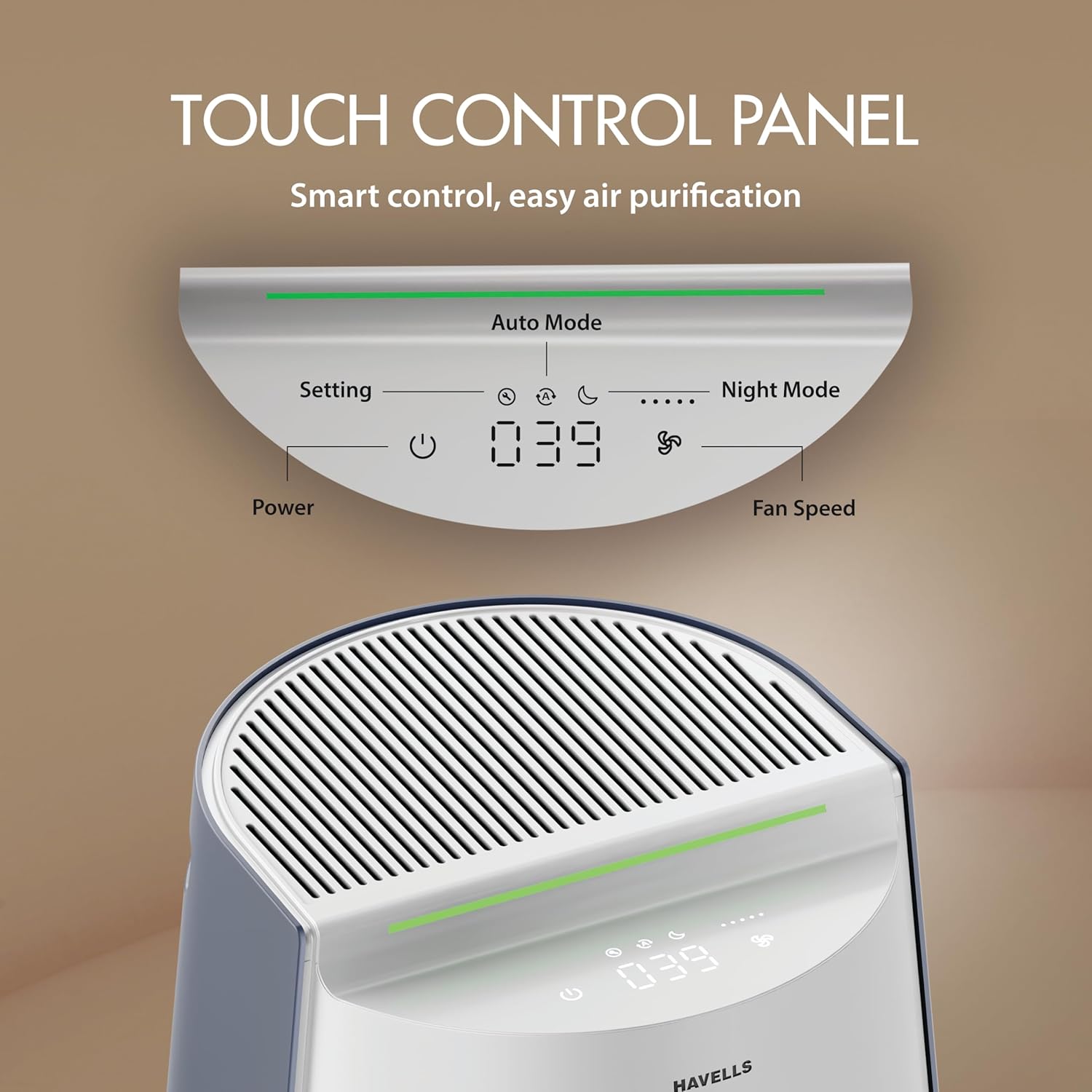
Figure 3.1: Detailed view of the touch control panel, indicating Power, Setting, Auto Mode, Night Mode, Fan Speed, and the digital AQI display.
- Power Button: Turns the unit on or off.
- Setting Button: Cycles through various settings or modes.
- Auto Mode Indicator: Lights up when Auto Mode is active.
- Night Mode Indicator: Lights up when Night Mode is active.
- Fan Speed Indicator: Displays the current fan speed level.
- AQI Display: Shows the real-time Air Quality Index (PM2.5 concentration).
4. Setup & Filter Installation
4.1. Unpacking
- Carefully remove the air purifier from its packaging.
- Remove all plastic bags and protective materials.
- Ensure all components listed in Section 3.1 are present.
4.2. Filter Installation
The Havells Studio Breathe AP310 uses a triple-layer filtration system. Ensure filters are installed correctly before first use.
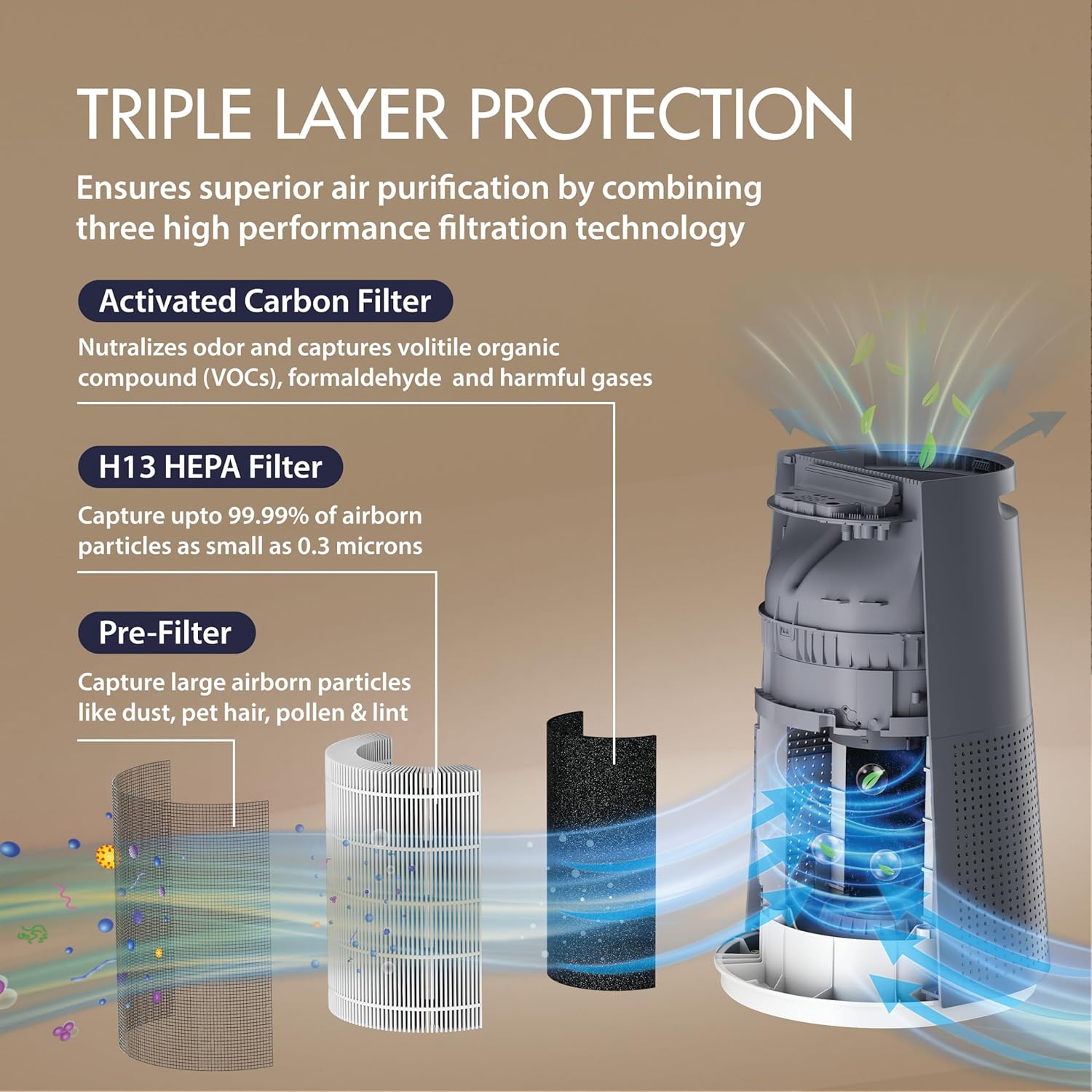
Figure 4.1: Illustration of the triple layer protection system, detailing the Pre-Filter for large particles, Activated Carbon Filter for odors and VOCs, and H13 HEPA Filter for 99.99% of airborne particles.
- Turn the air purifier upside down and twist the base counter-clockwise to unlock and remove it.
- Remove the plastic packaging from all filters (Pre-filter, Activated Carbon Filter, HEPA H13 Filter).
- Insert the HEPA H13 filter first, followed by the Activated Carbon filter, and then the Pre-filter. Ensure they are seated correctly.
- Replace the base and twist clockwise to lock it securely.
4.3. Placement
Place the air purifier on a flat, stable surface. For optimal performance, ensure there is at least 20 cm (8 inches) of clear space around the air inlet and outlet for proper air circulation.
4.4. Power Connection
Connect the power adapter to the air purifier and then plug it into a suitable electrical outlet (AC 220-240V, 50Hz).
5. Operation
5.1. Power On/Off
Press the Power Button on the touch control panel to turn the air purifier on or off.
5.2. Modes
The air purifier offers different operating modes for various needs:
- Auto Mode: In Auto Mode, the air purifier automatically adjusts the fan speed based on the real-time air quality detected by its PM2.5 sensor. This ensures optimal performance with minimal user intervention.

Figure 5.1: Auto Mode operation, illustrating the dust sensor, real-time air quality monitoring, dynamic fan speed adjustment, and visual AQI indicator.
- Night Mode: Designed for quiet operation during sleep. In Night Mode, the fan speed is reduced, and display lights are dimmed or turned off to ensure an uninterrupted sleeping environment.

Figure 5.2: Intelligent Night Mode, designed for uninterrupted sleep and low-light environments.
5.3. Fan Speed Adjustment
Press the Setting Button repeatedly to cycle through the 5 available fan speed levels. The current fan speed will be indicated on the control panel.
5.4. Real-Time PM2.5 Monitoring
The air purifier features an in-built PM2.5 sensor that provides real-time air quality readings on the digital display. The display shows the PM2.5 concentration in µg/m³ and may include a color indicator for quick status checks.

Figure 5.3: Real-time PM2.5 monitoring with numeric digital air quality display and color indicators for different concentration ranges.
5.5. 360° Purification
The Havells Studio Breathe AP310 is designed with a 360° air intake and purification system, ensuring uniform air cleaning and optimized air circulation throughout the room.

Figure 5.4: Innovative 360° air intake and purification system for maximum efficiency and uniform air cleaning.
6. Maintenance
Regular maintenance ensures optimal performance and extends the lifespan of your air purifier.
6.1. Filter Replacement
The air purifier is equipped with a filter life indicator. When the indicator signals that a filter needs replacement, follow these steps:
- Unplug the air purifier from the power outlet.
- Turn the unit upside down and unlock the base.
- Remove the old filters. Dispose of them responsibly.
- Install new Havells original replacement filters (Pre-filter, Activated Carbon Filter, HEPA H13 Filter) in the correct order.
- Replace and lock the base.
- Plug in the air purifier and reset the filter life indicator according to the instructions in the full user manual (if applicable).
6.2. Cleaning the Unit
- Wipe the exterior of the air purifier with a soft, dry cloth.
- Do not use abrasive cleaners or solvents.
- The Pre-filter can be gently cleaned with a soft brush or vacuum cleaner to remove large dust particles. Do not wash the HEPA or Activated Carbon filters.
7. Troubleshooting
If you encounter issues with your air purifier, refer to the table below for common problems and solutions.
| Problem | Possible Cause | Solution |
|---|---|---|
| Unit does not turn on | No power supply; Power adapter not connected; Unit not plugged in. | Check power cord connection; Ensure outlet is functional; Verify adapter is securely connected. |
| Poor air purification performance | Filters are dirty or clogged; Filters not installed correctly; Room size exceeds capacity. | Replace filters; Reinstall filters correctly; Ensure unit is placed optimally for room size. |
| Unusual noise during operation | Foreign object in fan; Filters not seated properly. | Unplug and check for obstructions; Reinstall filters. |
| Filter replacement indicator remains on after changing filters | Indicator not reset. | Refer to the full user manual for specific filter reset instructions. |
8. Specifications
| Feature | Detail |
|---|---|
| Brand | Havells |
| Model Number | GHRAPERW048 |
| Colour | Blue & White |
| Product Dimensions (D x W x H) | 33.2D x 34.5W x 52.8H Centimeters |
| Item Weight | 6000 Grams |
| Power Source | Corded Electric |
| Wattage | 48 Watts |
| Control Method | Touch |
| Filter Type | HEPA, Activated Carbon |
| Contaminant Filtration Capability | HEPA H13 |
| Special Features | Portable |
| Manufacture Year | 2025 |
9. Warranty & Customer Support
9.1. Warranty Information
The Havells Studio Breathe AP310 Air Purifier comes with a 2 Year Manufacturer Warranty from the date of purchase. Please retain your purchase receipt for warranty claims. The warranty covers manufacturing defects and malfunctions under normal use conditions. It does not cover damage caused by misuse, accidents, unauthorized repairs, or consumable parts like filters.
9.2. Customer Support
For any queries, technical assistance, or warranty claims, please contact Havells customer support:
- Manufacturer: Havells India Limited
- Address: Plot No. 2 & 2A, Sector-12, IIE, Sidcul, Industrial Area, Haridwar, Uttrakhand-249403
- Please refer to the official Havells website or your purchase documentation for the most current contact details (phone number, email).