
1. Introduction
This manual provides comprehensive instructions for the safe and effective use of your UMAY Fitness Treadmill Model L20. Please read this manual thoroughly before assembly, operation, or maintenance to ensure proper function and to prevent injury. Keep this manual for future reference.

Image 1.1: UMAY Fitness Treadmill L20 in operation, highlighting its design and incline feature.
2. Important Safety Information
WARNING: To reduce the risk of serious injury, read all instructions and warnings before using this treadmill.
- Consult a physician before beginning any exercise program.
- Keep children and pets away from the treadmill at all times.
- Place the treadmill on a solid, level surface with at least 6 feet of clear space behind it and 2 feet on each side.
- Wear appropriate exercise clothing and athletic shoes.
- Do not operate the treadmill if it has a damaged cord or plug, or if it is not working properly.
- Always use the safety key. Attach the clip to your clothing before starting the treadmill.
- Do not step on or off the treadmill while the belt is moving.
- Do not attempt to adjust the treadmill while in use.
- Maximum user weight capacity is 400 lbs.
- Unplug the treadmill from the power outlet when not in use and before cleaning or maintenance.
3. Package Contents
Verify that all components are present and undamaged. If any parts are missing or damaged, contact UMAY customer support.
- UMAY Fitness Treadmill L20 (Main Unit)
- Power Cord
- Safety Key
- Remote Control (with batteries)
- User Manual (this document)
- Assembly Tools (if required for minor assembly)

Image 3.1: The UMAY L20 treadmill in its 90% pre-assembled state, alongside its accessories.
4. Setup and Assembly
The UMAY Fitness Treadmill L20 is designed for quick setup, arriving 90% pre-assembled.
- Unpacking: Carefully remove the treadmill from its packaging. It is recommended to have two people for this step due to the weight.
- Placement: Position the treadmill on a flat, stable surface. Ensure adequate clearance around the unit as specified in the safety information.
- Unfolding (if applicable): If the treadmill is in its folded state, gently lift the running deck until it locks into the upright position. Ensure the screen is flipped to the operational position (90-degree rotation).
- Power Connection: Plug the power cord into a grounded electrical outlet.
- Safety Key: Locate the safety key and attach the clip to your clothing. Insert the magnetic end into the designated slot on the console. The treadmill will not operate without the safety key properly inserted.

Image 4.1: The folding process of the UMAY L20 treadmill, demonstrating its space-saving design.
5. Operating Instructions
5.1 Console Overview
The UMAY L20 features an LCD touchscreen console and handlebar controls for easy operation.

Image 5.1: Detailed view of the UMAY L20 console and multi-function handrail controls.
- Touchscreen Display: Shows time, speed, distance, calories, and heart rate.
- Quick Speed Buttons: (e.g., 3 MPH, 5 MPH, 7 MPH) for instant speed changes.
- Start/Stop Buttons: To begin or end your workout.
- Speed +/- Buttons: Adjust speed incrementally.
- Incline +/- Buttons: Adjust manual incline levels (on handlebar).
- Heart Rate Monitor: Integrated into handlebars.
- Safety Key Slot: Essential for operation.
- Cup Holders: For beverages.
5.2 Starting a Workout
- Ensure the treadmill is plugged in and the safety key is inserted.
- Stand on the side rails of the treadmill, not on the running belt.
- Attach the safety key clip to your clothing.
- Press the "Start" button on the console or remote. The belt will begin moving at a low speed.
- Carefully step onto the moving belt and begin walking.
- Adjust speed using the "Speed +" or "Speed -" buttons, or the quick speed buttons.
5.3 Adjusting Manual Incline
The UMAY L20 features a 3-level manual incline system (2%, 16%, 20%).
- Stop the Treadmill: For safety, always stop the treadmill before adjusting the incline.
- Locate Incline Adjustment Points: These are typically at the rear base of the treadmill.
- Lift and Adjust: Carefully lift the rear of the treadmill deck and adjust the support mechanism to the desired incline level (2%, 16%, or 20%). Ensure it is securely locked in place before resuming your workout.
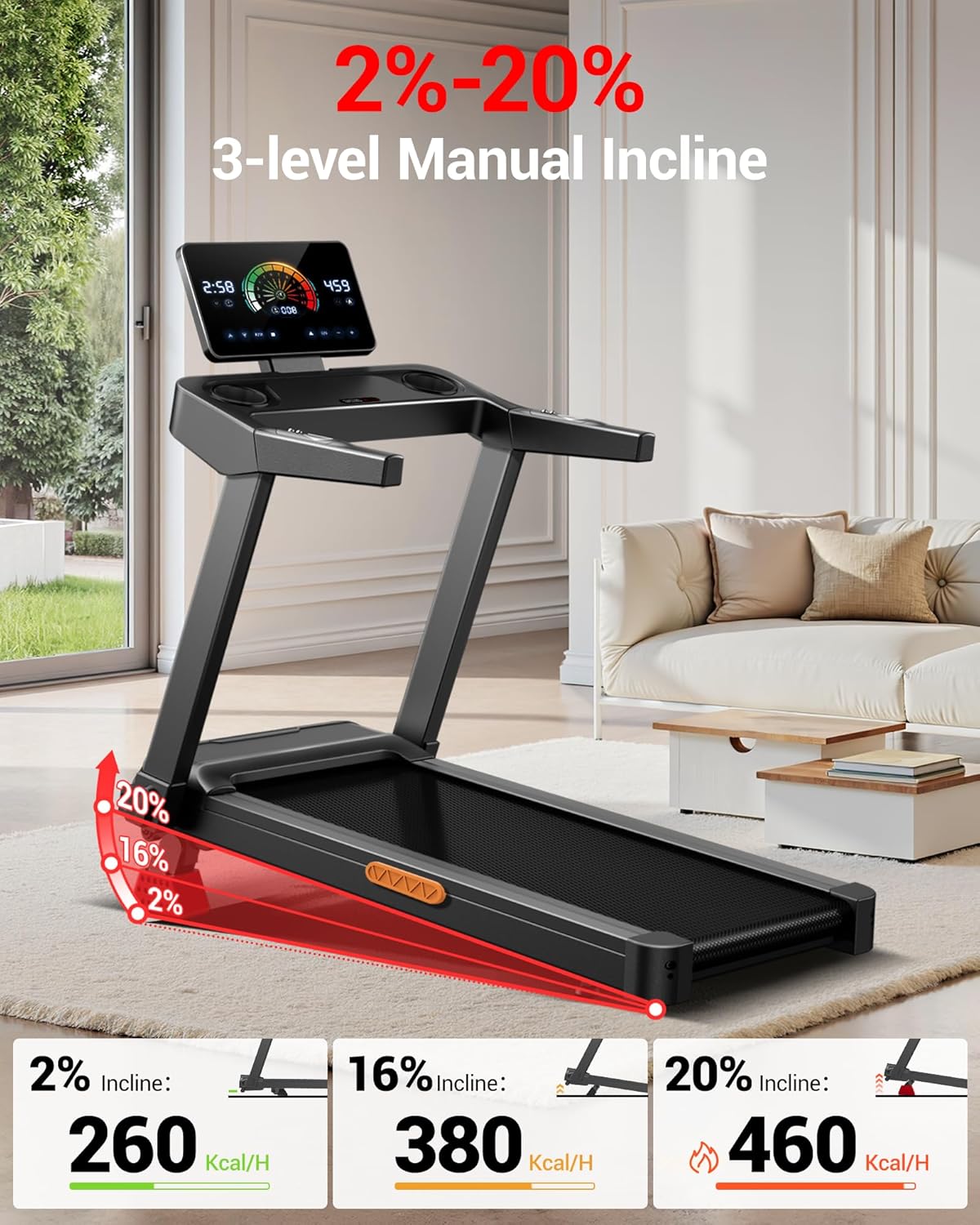
Image 5.2: Visual representation of the 3-level manual incline feature.
5.4 Ending a Workout
- Press the "Stop" button. The belt will gradually slow down and stop.
- Once the belt has completely stopped, step off the treadmill.
- Remove the safety key.
5.5 Folding and Storage
The treadmill features a foldable design for convenient storage.
- Ensure the treadmill is turned off and unplugged.
- Gently lift the running deck from the rear until it locks into the vertical folded position.
- The screen can be flipped 90 degrees for a more compact profile.
- Utilize the built-in transport wheels to move the treadmill to your desired storage location.
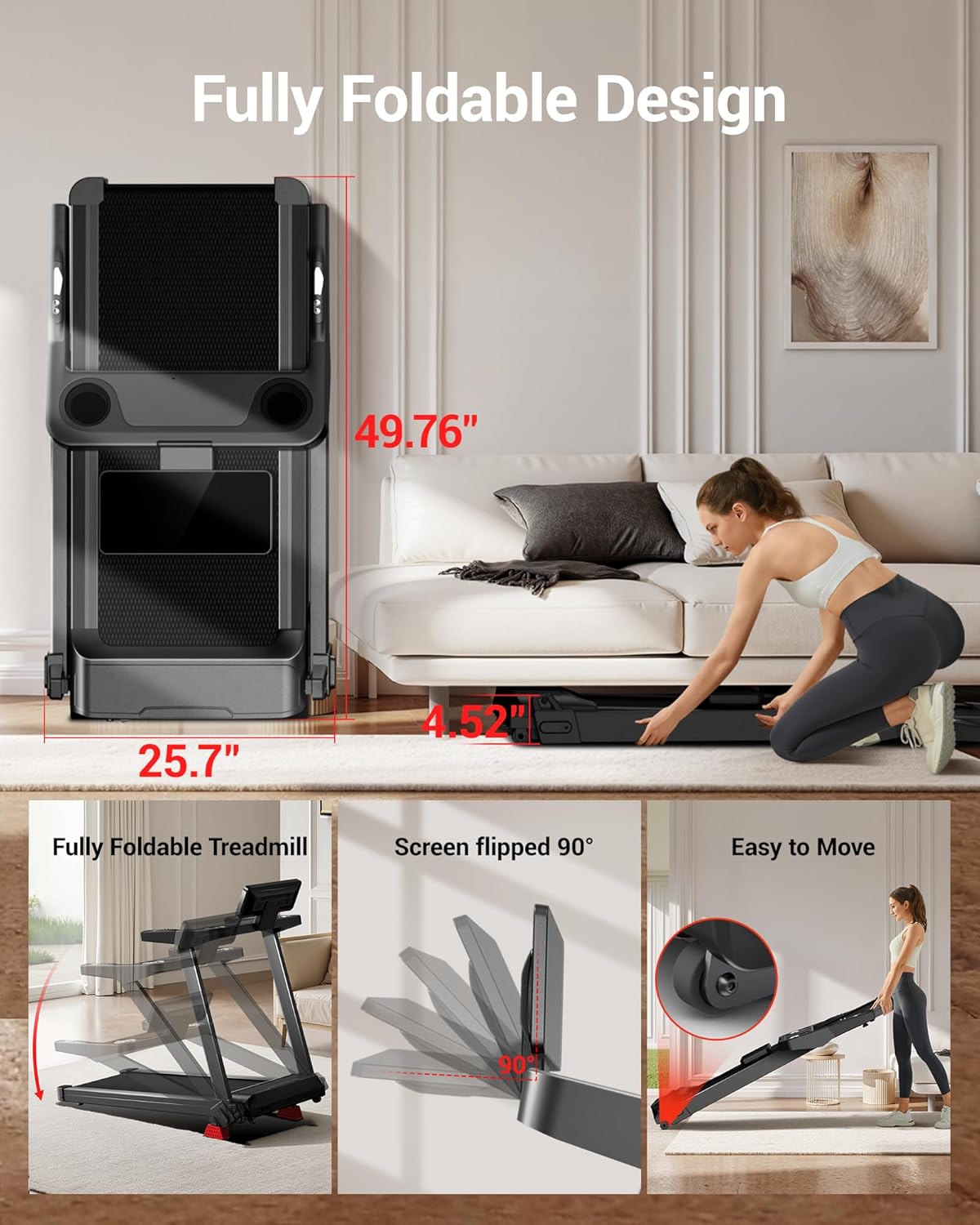
Image 5.3: The UMAY L20 treadmill in its fully folded state, illustrating its space-saving storage capability.
6. Maintenance
Regular maintenance ensures the longevity and optimal performance of your treadmill. Always unplug the treadmill before performing any maintenance.
- Cleaning: Wipe down the console and exterior surfaces with a damp cloth after each use. Avoid abrasive cleaners or solvents.
- Running Belt Lubrication: The running belt requires periodic lubrication to reduce friction. Refer to the specific instructions provided with your lubrication kit (if included) or contact UMAY support for recommendations.
- Running Belt Adjustment: If the running belt becomes off-center or slips, it may need adjustment. Consult the detailed instructions in the full user manual or contact customer support.
- Motor Cover Cleaning: Periodically remove the motor cover and vacuum any dust or debris that may have accumulated.
7. Troubleshooting
If you encounter issues with your UMAY Fitness Treadmill L20, refer to the following common problems and solutions.
| Problem | Possible Cause | Solution |
|---|---|---|
| Treadmill does not start. | Power cord not plugged in; Safety key not inserted; Power switch off. | Ensure power cord is securely plugged in; Insert safety key fully; Turn on power switch. |
| Running belt slips or hesitates. | Belt too loose; Belt requires lubrication. | Adjust belt tension (refer to full manual); Lubricate the running belt. |
| Unusual noise during operation. | Loose components; Motor issue; Belt friction. | Check for loose screws and tighten; Lubricate belt; If noise persists, contact customer support. |
| Console display not working. | Loose connection; Power issue. | Check all cable connections; Ensure power is supplied to the unit. |
For issues not listed here or if solutions do not resolve the problem, please contact UMAY customer support.
8. Specifications
| Feature | Detail |
|---|---|
| Brand | UMAY |
| Model Name | L20 |
| Product Dimensions (Unfolded) | Approximately 50"L x 25"W x 47"H |
| Product Dimensions (Folded) | 49"D x 24.3"W x 4.52"H |
| Running Area | 42.5" x 16.1" |
| Material | Acrylonitrile Butadiene Styrene (ABS) |
| Motor Horsepower | 3.5 HP (Brushless) |
| Speed Range | 0.6 - 8.7 MPH |
| Incline Percentage | 2%, 16%, 20% (Manual Adjustment) |
| Maximum Weight Recommendation | 400 Pounds |
| Noise Level | <45dB |
| UPC | 850081109525 |
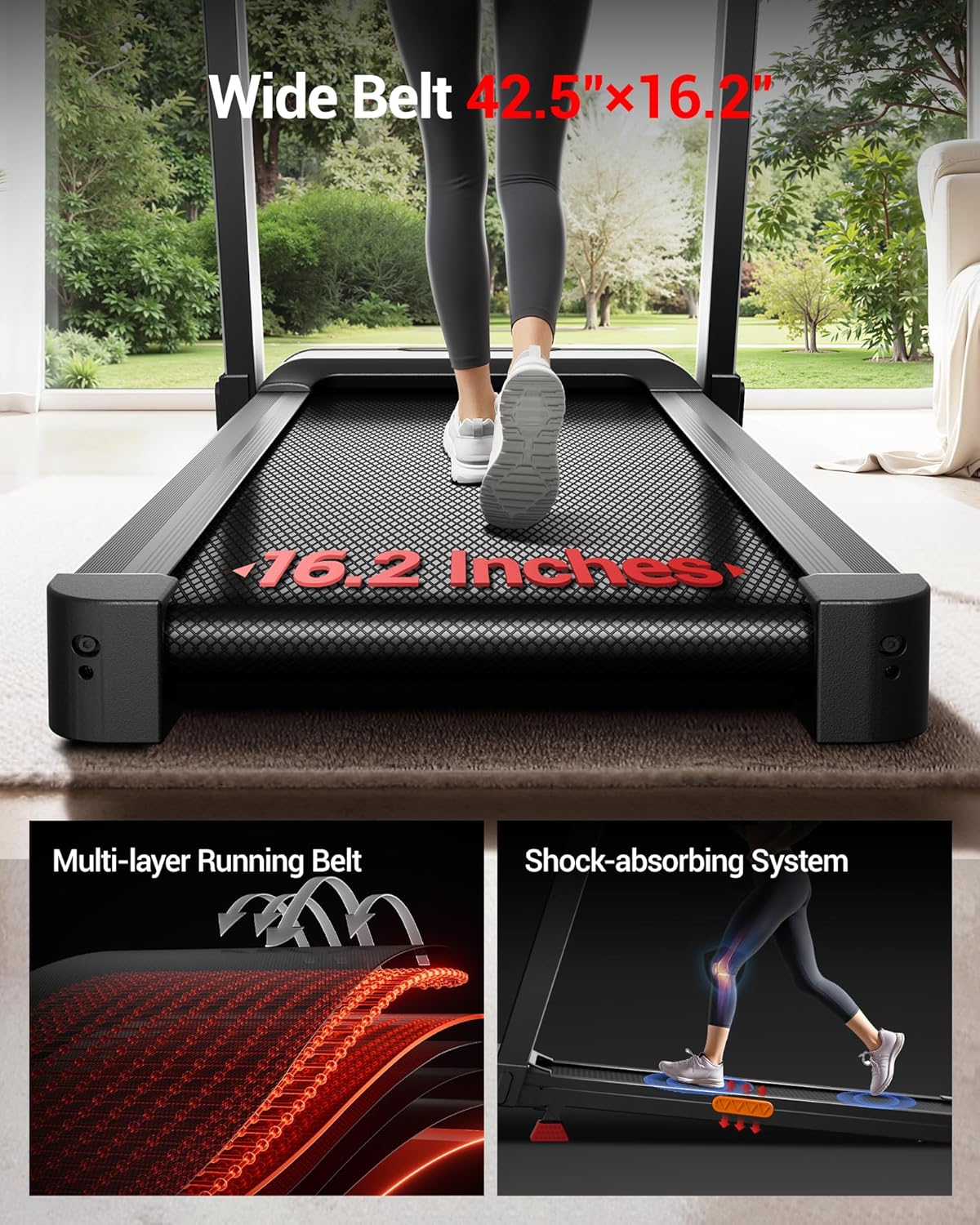
Image 8.1: The wide and shock-absorbing running deck of the UMAY L20 treadmill.
9. Warranty and Customer Support
The UMAY Fitness Treadmill L20 comes with a 2-year warranty as per the product specifications. This warranty covers manufacturing defects and ensures your product is free from material and workmanship flaws under normal use.
For warranty claims, technical assistance, or any questions regarding your treadmill, please contact UMAY customer support.
- Customer Support: Refer to the contact information provided on the UMAY official website or your purchase documentation.
- Online Resources: Visit the UMAY brand store on Amazon for additional product information and FAQs.


