
1. Introduction
This manual provides essential information for the safe and efficient operation of your Anjfylque 12000W 48V Hybrid Solar Inverter. This all-in-one inverter charger is designed for both off-grid and on-grid solar applications, featuring dual MPPT charge controllers and supporting 120V/240V split-phase output. Please read this manual thoroughly before installation and use to ensure proper functionality and longevity of the device.
2. Safety Information
Always adhere to local electrical codes and safety regulations during installation and operation. Installation should be performed by qualified personnel. Disconnect all power sources before servicing. This inverter incorporates multiple protection features to ensure safe operation.
- Over/Under Voltage Protection: Safeguards against voltage fluctuations.
- Overload Protection: Prevents damage from excessive load.
- Overtemperature Protection: Shuts down the unit if internal temperature exceeds safe limits.
- Short Circuit Protection: Protects against short circuits in the output.
- Reverse Polarity Protection: Prevents damage from incorrect battery connection.
- Arc Fault Detection: Detects and mitigates electrical arcs.

Image: Overview of the 8-way protection features integrated into the inverter, including short circuit, arc fault, overcurrent, thermal shutdown, rectifier locked, overload, voltage overated, and charge guardian protections.
3. Product Overview
Key Features
- 12000W continuous power, 48V DC input.
- Dual MPPT solar charge controllers (Max. PV Array Power 6000W + 6000W, Max. PV Array Open Circuit Voltage 500VDC).
- 120V/240V Split Phase Output capability.
- Supports parallel operation of up to 6 units for increased capacity.
- Pure Sine Wave output for sensitive electronics.
- Integrated OLED light-touch touchscreen for real-time monitoring.
- Optional WiFi/GPRS remote monitoring.
- Compatible with various 48V battery types (Lithium-ion, GEL, Flooded, SLD).

Image: Visual representation of the inverter's key features, including 12000W 48V 120/240V output, dual MPPT chargers, pure sine wave output, power saving mode, WiFi/APP monitoring, low noise operation, and compatibility with various battery types.
Components and Interfaces
The inverter features a user-friendly interface and clearly labeled ports for easy connection.

Image: Detailed diagram showing the front and bottom panels of the inverter with numbered labels for each port and component. These include the display screen, pilot lamp, AC output, AC input, WiFi port (optional), USB communication, RS485 communication ports, dry contact port, CT current sensing, ON/OFF rocker switch, grounding screw hold, AC input breaker, parallel communication port, battery parameters, and photovoltaic parameters.

Image: An expanded view of the inverter's bottom interface, highlighting and labeling each connection point for clarity, such as AC output port, AC input port, WiFi port (optional), AC input breaker, USB communication port, RS485-1 and RS485-2/CAN communication ports, dry contact port, CT current sensing for self-consumption (optional), ON/OFF rocker switch, parallel communication port (parallel module only), battery parameters, and photovoltaic (PV) parameters.
Battery Compatibility
The inverter is designed to work with a variety of 48V battery types, offering flexibility for your energy storage needs.

Image: Diagram illustrating the inverter's compatibility with various 48V battery types, including Lithium-ion (LiFePO4, NCM), GEL (Sealed, Maintenance-Free), FLD (Flooded, Vented), and SLD (AGM, Sealed Lead-Acid) batteries.
4. Setup
System Integration
The inverter can be integrated into a comprehensive solar and battery backup system for your home or other applications.
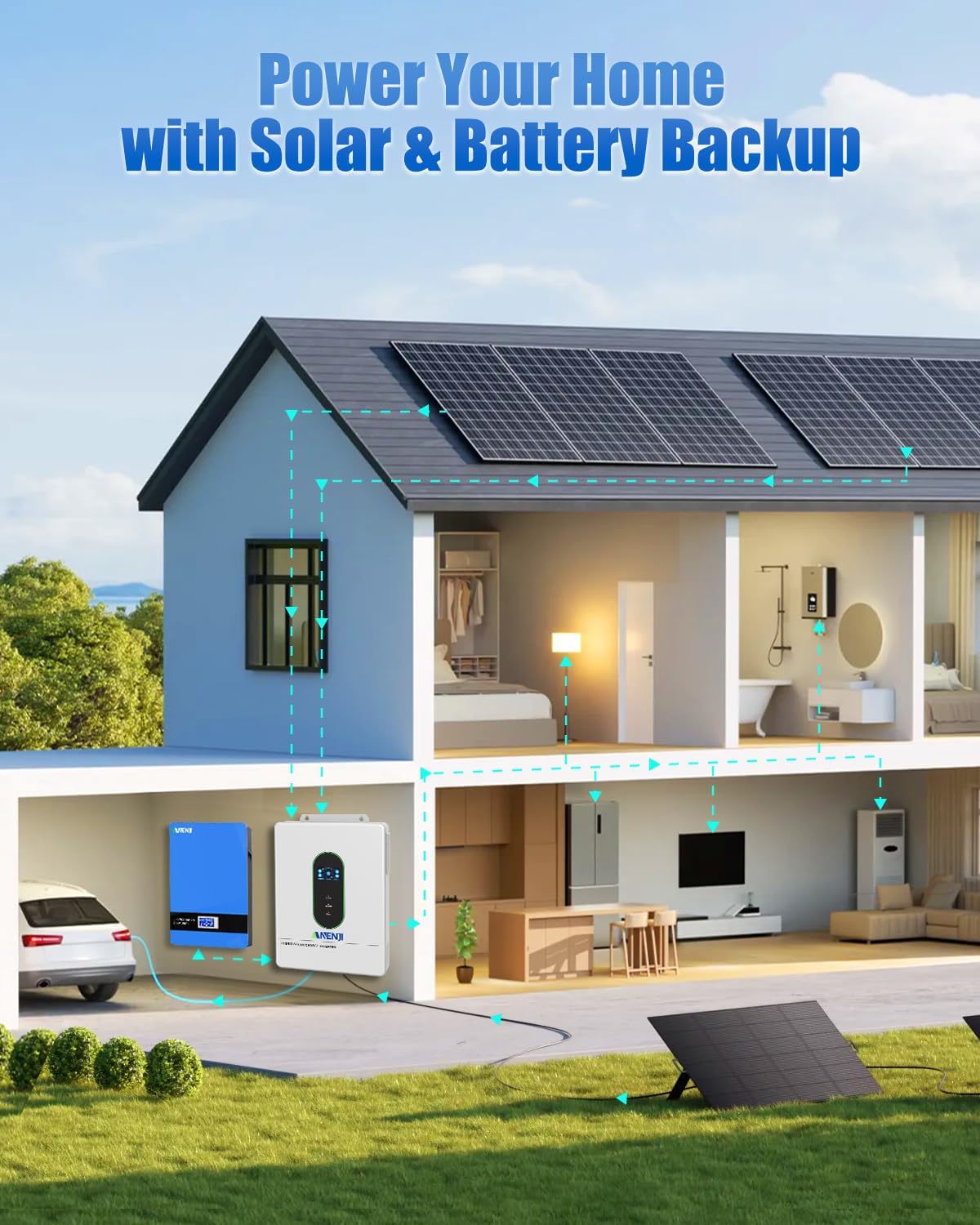
Image: A schematic diagram showing how the hybrid solar inverter integrates into a home power system, connecting solar panels, batteries, and the utility grid to power household appliances.
Wiring Connections
Proper wiring is crucial for safe and efficient operation. Refer to the diagram for recommended connections.

Image: A detailed wiring diagram illustrating the connections for solar PV input, AC input (grid/generator), AC output (inverter power), and battery compatibility. It specifies maximum PV input power, open circuit voltage, MPPT voltage range, charging current, recommended cable gauges, and output voltage/power.
5. Operating Modes
The inverter offers configurable charging and output priority modes to optimize energy usage based on your preferences and available power sources.
Charging Priority Modes
You can configure how the battery bank is charged from different power sources:
- Only Solar: Charges the battery exclusively from solar power.
- Mains Priority: Prioritizes AC mains for charging, using solar only when mains is unavailable.
- Solar Priority: Prioritizes solar for charging, using AC mains only when solar is insufficient.
- Hybrid Charging (PV & AC): Charges from both PV and AC simultaneously (default).

Image: Diagram illustrating three charging priority options: Solar Priority (charges from solar, then AC), Solar and AC Input Simultaneously (charges from both), and Solar Only (charges exclusively from solar).

Image: A detailed graphic explaining charger source priority options: 'Solar First AC Input Next' where solar panels charge first, and AC input charges if solar is not available; 'Solar and AC Input Simultaneously' where both solar and utility charge the battery; and 'Solar Only' where only solar energy charges the battery.
Output Priority Modes
Control how your appliances are powered to ensure continuous operation.
- Utility Priority (Line): Switches to battery/inverter power only when the mains fails.
- Battery Priority (Bat): Primarily uses battery power, switching to utility power only when the battery is low.
- Solar Priority (Solar): Primarily uses PV energy, switching to utility power when solar energy is insufficient or the battery is low.
- Hybrid Mode: The load is powered simultaneously by PV, battery, and grid, depending on settings and availability.

Image: A graphic detailing output source priority options: 'Solar First' (powers appliances from solar, then AC if solar is insufficient), 'AC First' (redirects AC input to power appliances and uses batteries only when AC input is unavailable), and 'DC Priority' (prioritizes solar, then battery, then AC only when battery voltage drops).
6. Monitoring
The inverter provides real-time system data and operational status through its integrated OLED touchscreen and optional WiFi/App monitoring.
OLED Touchscreen Display
The high-definition OLED light-touch touchscreen displays a dynamic flow diagram of system data and operational status. In case of a fault, a detailed fault code is displayed for quick troubleshooting.

Image: A close-up view of the inverter's OLED display, showing a clear, at-a-glance interface with real-time system data, including power flow, battery status, and operational modes.
WiFi/App Monitoring
With the optional WiFi module, you can remotely monitor and control your power system from anywhere using a dedicated mobile application. This allows for real-time status checks, remote parameter adjustments, and instant fault alarms.

Image: Illustration demonstrating the WiFi remote monitoring and control capabilities, showing the inverter connected wirelessly to a smartphone app displaying device overview, real-time data, and statistics. Icons for real-time status check, remote parameter adjustment, and instant fault alarms are also shown.
7. Parallel Operation
The inverter supports parallel operation of up to 6 units, allowing for scalable power capacity to meet higher demand applications, including single-phase, split-phase (240V), and 3-phase configurations.
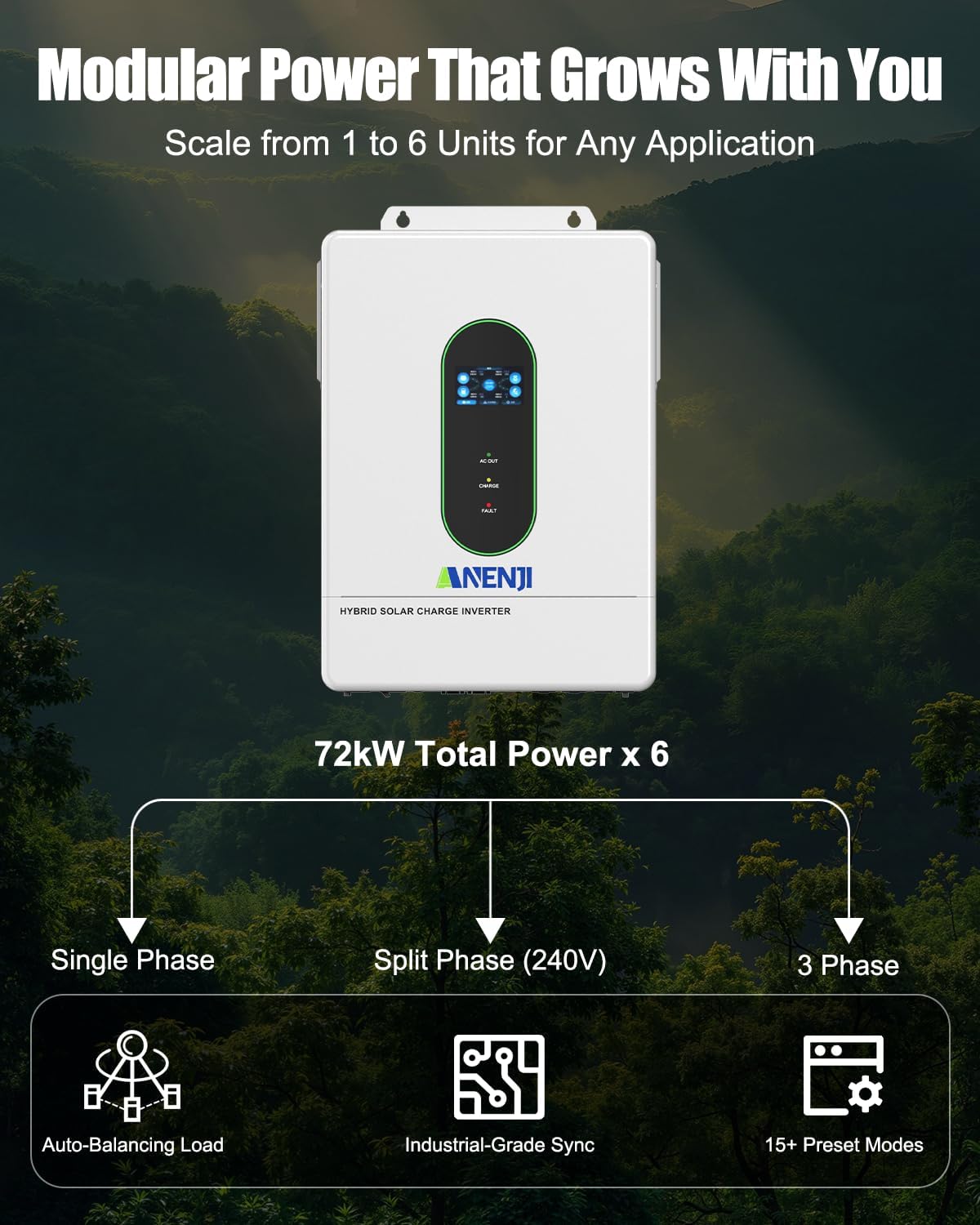
Image: A graphic illustrating the modular power capability, showing how up to 6 units can be connected in parallel to achieve up to 72kW total power, supporting single-phase, split-phase (240V), and 3-phase configurations with auto-balancing load and industrial-grade sync.
Split-Phase Connection
For 240V and 120V systems, suitable for residential or small commercial applications.

Image: Diagram showing split-phase series and parallel connection configurations for 240V and 120V systems, specifically for one inverter in each phase (P1 and P2) and two inverters in each phase.

Image: Diagram illustrating split-phase series and parallel connection for up to six inverters in two groups of three parallel units, suitable for larger residential applications requiring 240V and 120V systems.
3-Phase Connection
For commercial applications requiring 240V or 208V systems.

Image: Diagram showing 3-phase series-parallel connection for 3 and 4 units, suitable for commercial applications needing 240V or 208V systems, with configurations for one inverter per phase and two inverters in one phase.

Image: Diagram illustrating 3-phase 5 series-parallel connection for commercial applications needing larger 208V systems, showing configurations with three inverters in one phase and two inverters in two phases.

Image: Diagram showing the maximum 3-phase 6 series-parallel connection for 208V commercial systems that also require 240V or 120V systems, with various configurations for distributing inverters across three phases.
8. Maintenance
Regular maintenance ensures optimal performance and extends the lifespan of your inverter. Perform the following checks periodically:
- Keep the inverter's ventilation openings clear of dust and debris to prevent overheating.
- Inspect all wiring connections for tightness and signs of corrosion.
- Check battery terminals for cleanliness and secure connections.
- Monitor the display for any fault codes or unusual readings.
- Ensure the environment around the inverter is dry and within the specified operating temperature range.
9. Troubleshooting
If you encounter issues with your inverter, refer to the following common troubleshooting steps. The OLED display will show detailed fault codes to assist in diagnosis.
Common Issues and Solutions:
- Inverter Not Powering On:
- Check DC input voltage from batteries.
- Verify battery connections and polarity.
- Ensure the ON/OFF switch is in the 'ON' position.
- No AC Output:
- Check AC output breaker.
- Verify load is not exceeding inverter capacity (overload protection).
- Check for fault codes on the display.
- Battery Not Charging:
- Check solar panel connections and voltage.
- Verify AC input connection if using grid charging.
- Ensure charging priority settings are correct.
- WiFi/App Monitoring Issues:
- Ensure the WiFi module is correctly installed and connected.
- Verify local WiFi network connectivity and signal strength.
- Check app settings and ensure the inverter is properly registered.
For persistent issues or specific fault codes, consult the detailed troubleshooting section in the full product manual or contact customer support.
10. Specifications
| Brand | Anjfylque |
| Model Name | ANJ-12000W-LVP-WIFI |
| Wattage | 12000 watts |
| Voltage | 48 Volts (DC Input) |
| Output Voltage | 120 Volts (AC) |
| Electrical Output Waveform | Pure Sine Wave |
| Max. PV Array Power | 6000W + 6000W |
| Max. PV Array Open Circuit Voltage | 500VDC |
| PV Array MPPT Voltage Range | 90VDC–450VDC |
| Max. Solar Input Current per Channel | 22A |
| Max. Solar Charge Current | 200A (configurable) |
| Max. AC Charge Current | 160A |
| Max. Combined Charge Current (PV + AC) | 220A (configurable) |
| Parallel Capability | Up to 6 units |
| Recommended Uses | Boat, Home, Household appliances, Recreational Vehicle |
| Certifications | CE |
11. Warranty and Support
Warranty Information
This Anjfylque Hybrid Solar Inverter is covered by a 5-Year Manufacturer Warranty. Please retain your proof of purchase for warranty claims. The warranty covers defects in materials and workmanship under normal use.
Customer Support
For technical assistance, troubleshooting, or warranty inquiries, please contact Anjfylque customer support. Refer to the product packaging or the official Anjfylque website for the most current contact information.