
1. Safety Information
Please read and understand all safety instructions before assembly and use. Failure to follow these instructions may result in injury or damage to the product.
- Always ensure the desk is properly anchored to the floor to prevent tipping.
- Do not exceed the maximum weight recommendation of 180 lbs (81.6 kg).
- Keep fingers and other body parts away from moving parts when adjusting the desk height.
- Always unplug the desk before making height adjustments or performing any maintenance.
2. Product Overview
The Korfile L Shaped Electric Standing Desk is designed for a versatile and ergonomic workspace. It features an electric lift system for easy height adjustment, memory presets, and a reversible L-shaped design to fit various room layouts. The spacious desktop accommodates multiple monitors and accessories, while integrated storage options help maintain an organized environment.
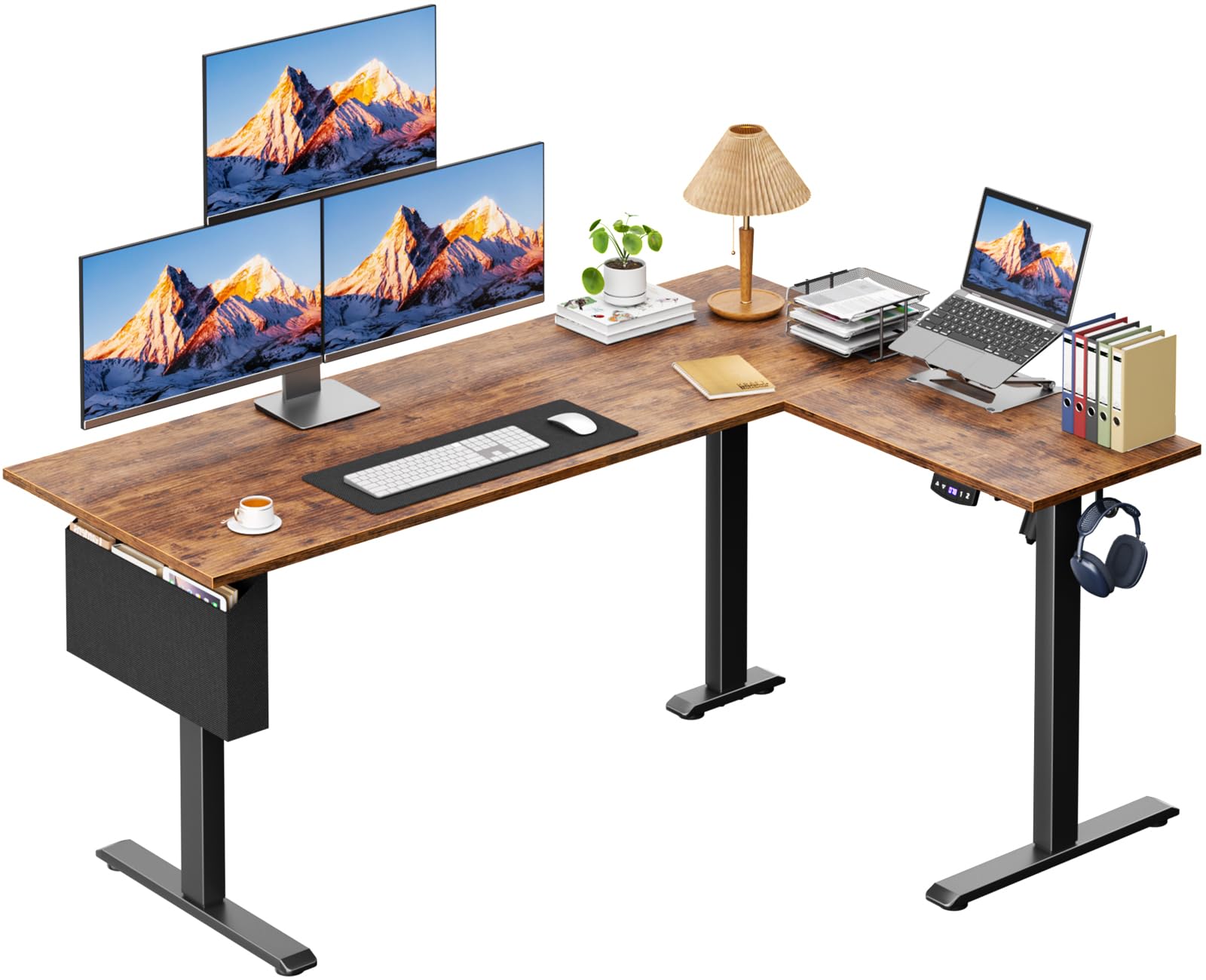
Image: The Korfile L Shaped Electric Standing Desk in a home office setting, showcasing its L-shape and ample workspace.
3. Setup and Assembly
This desk requires assembly. All necessary tools and a detailed instruction manual are included in the box. For a visual guide, please refer to the official installation video below.
3.1 Assembly Video Guide
Video: Official installation guide for the Korfile L Shaped Electric Standing Desk, demonstrating each step of the assembly process.
3.2 Key Assembly Steps
- Unpack and Identify Components: Lay out all parts and hardware. Verify against the parts list in your included manual.
- Assemble Leg Frames: Connect the leg components using the provided screws and tools. Ensure all connections are secure.
- Attach Motor and Drive Rods: Carefully insert the drive rods into the motor and connect them to the leg mechanisms. Ensure proper alignment for smooth operation.
- Connect Desktop Panels: Use the wooden pins and connecting plates to securely join the L-shaped desktop panels.
- Mount Desktop to Legs: Attach the assembled desktop to the leg frames, ensuring all screws are tightened.
- Install Accessories: Attach the side pocket and headphone hook to the designated areas on the desk.
- Connect Control Panel and Power: Plug in the control panel, motor cables, and power adapter. Secure cables with the provided clips.

Image: Close-up view highlighting the integrated desk hook, storage pocket, and adjustable footpads for enhanced functionality and stability.
4. Operating Instructions
The Korfile Electric Standing Desk features an intuitive control panel for easy height adjustments and memory functions.
4.1 Control Panel Functions
- Up/Down Buttons: Use the ▲ (Up) and ▼ (Down) buttons to manually adjust the desk height.
- Memory Presets (1 & 2): The desk features 2 height presets. To save a preferred height, adjust the desk to the desired level, then press and hold one of the memory buttons (1 or 2) until the display flashes or beeps. To recall a saved height, simply press the corresponding memory button.
- LED Display: Shows the current desk height in inches.

Image: A detailed view of the multi-function control panel, showing the up/down arrows, two memory preset buttons, and the digital LED height display.
4.2 Height Adjustment
The desk can be adjusted from a minimum height of 28.4 inches (72.1 cm) to a maximum height of 46.5 inches (118.1 cm). This allows for comfortable transitions between sitting and standing positions, promoting better posture and reducing fatigue.

Image: A visual representation of the desk's adjustable height range, illustrating how it can be set for both sitting (28.3 inches) and standing (46.5 inches) use.
4.3 Quiet Operation
The electric lift system operates quietly, ensuring minimal disruption in your home or office environment. The noise level is typically under 45dB, comparable to a quiet library.

Image: An infographic demonstrating the low noise level of the desk's operation, indicating it is significantly quieter than normal conversation or an engine sound.
5. Maintenance
To ensure the longevity and optimal performance of your Korfile L Shaped Electric Standing Desk, follow these simple maintenance guidelines:
- Cleaning: Wipe the desk surfaces with a damp cloth to remove dust and spills. For stubborn marks, use a mild, non-abrasive cleaner. Follow with a dry cloth to prevent water spots.
- Regular Checks: Periodically check all screws and connections to ensure they remain tight. Re-tighten if necessary.
- Cable Management: Ensure all cables are neatly organized and not pinched or strained, especially during height adjustments.
- Avoid Overloading: Do not exceed the maximum weight capacity of 180 lbs (81.6 kg) to prevent damage to the motor and frame.
6. Troubleshooting
If you encounter any issues with your Korfile L Shaped Electric Standing Desk, please refer to the following common troubleshooting tips:
- Desk Not Moving: Check if the power cable is securely plugged into both the desk and the wall outlet. Ensure all motor and control panel cables are properly connected.
- Uneven Height: If the desk appears uneven, perform a reset procedure (refer to your included detailed manual for specific steps, usually involving holding down the 'down' button until the desk reaches its lowest point and resets).
- Error Codes: If the LED display shows an error code, consult the detailed manual for specific code meanings and solutions.
- Noise During Operation: A slight hum is normal. If you hear unusual or loud noises, ensure all screws are tightened and nothing is obstructing the moving parts.
If these steps do not resolve the issue, please contact customer support for further assistance.
7. Specifications
| Feature | Detail |
|---|---|
| Brand | Korfile |
| Model Number | ED-006-N-63-1-RB |
| Shape | Rectangular (L-shaped configuration) |
| Desk Design | Computer Desk, Standing Desk |
| Product Dimensions (D x W x H) | 47.2"D x 63"W x 46.5"H (120cm D x 160cm W x 118cm H) |
| Color | Rustic Brown |
| Style | Modern |
| Base Material | Metal (Steel Frame) |
| Top Material Type | Wood (Particle Board) |
| Finish Type | Polished Rustic Brown |
| Special Feature | Electric Height Adjustment |
| Recommended Uses | Drafting, Gaming, Studying, Working, Writing |
| Included Components | Side Pocket and Hook |
| Maximum Weight Recommendation | 180 Pounds (81.6 kg) |
| Item Weight | 68 Pounds (30.8 kg) |
| Minimum Height | 28.4 Inches (72.1 cm) |
| Maximum Height | 46.5 Inches (118.1 cm) |
| Number of Height Positions | 2 (Memory Presets) |
| Lifting Mechanism | Electric |

Image: A detailed diagram illustrating the product dimensions, including length, width, and height, for both L-shaped configurations.
8. Warranty and Support
Korfile is committed to providing quality products and customer satisfaction.
- Returns: This product is eligible for 30-day easy returns. Please refer to the retailer's return policy for full details.
- Customer Support: For any questions, assistance with assembly, or troubleshooting, please contact Korfile-US customer support. Contact information can typically be found on the packaging or the retailer's website.