
Xiaomi POCO M8 5G
Contents
Xiaomi POCO M8 5G Smartphone User Manual
1. Introduction
Welcome to the user manual for your new Xiaomi POCO M8 5G smartphone. This guide provides essential information to help you set up, operate, maintain, and troubleshoot your device. The POCO M8 5G is a feature-rich smartphone designed for performance and user experience, boasting a vibrant 6.77-inch Flow AMOLED display with a 120Hz refresh rate, a powerful Snapdragon® 6 Gen 3 processor, and a versatile 50MP AI dual camera system. Its sleek 3D curved design and long-lasting silicon-carbon battery ensure both aesthetics and endurance.
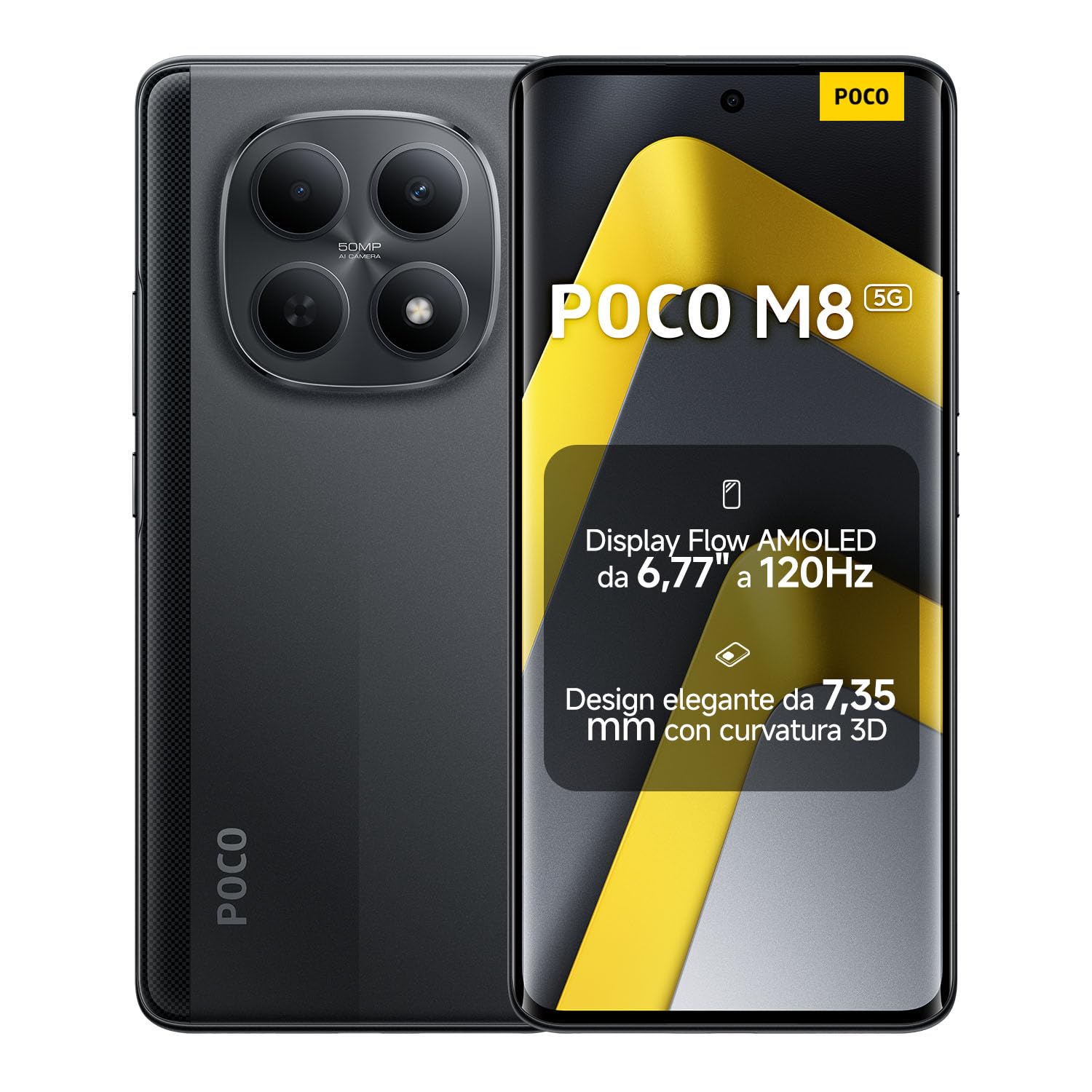
Figure 1: Xiaomi POCO M8 5G Smartphone, showcasing its sleek design.
2. What's in the Box
Please check the contents of your product package. If any items are missing or damaged, contact your retailer.
- Xiaomi POCO M8 5G Smartphone
- USB-C Cable
- SIM Ejector Tool (SIM Pin)
- Silicone Protective Cover
- Ringholder

Figure 2: Contents of the POCO M8 5G retail box, including the phone, USB-C cable, SIM tool, silicone cover, and ringholder.
3. Device Layout
Familiarize yourself with the physical components of your POCO M8 5G smartphone:
- Front: Display, Front Camera, Earpiece.
- Right Side: Power Button (with integrated Fingerprint Sensor), Volume Up/Down Buttons.
- Bottom: USB-C Port, Main Microphone, Speaker.
- Top: Secondary Microphone, IR Blaster (if present).
- Back: Rear Camera Module (Main Camera, Auxiliary Cameras, Flash), POCO Branding.
4. Setup
4.1. Inserting the SIM Card and microSD Card
- Locate the SIM card tray on the side of your device.
- Insert the SIM ejector tool into the small hole on the tray and push gently until the tray pops out.
- Place your Nano-SIM card(s) and/or microSD card into the tray with the gold contacts facing down, ensuring they are correctly aligned.
- Carefully push the tray back into the slot until it is flush with the device.
4.2. Initial Power On and Setup
- Press and hold the Power button until the POCO logo appears on the screen.
- Follow the on-screen instructions to select your language, region, connect to Wi-Fi, and set up your Google account.
- You will also be prompted to set up security features such as fingerprint unlock and a screen lock (PIN, pattern, or password).
5. Operating Your Device
5.1. Display
The POCO M8 5G features a stunning 6.77-inch Flow AMOLED display with a 120Hz refresh rate, offering smooth visuals and vibrant colors. It supports 12-bit color depth, DCI-P3 wide color gamut, and reaches up to 3200 nits peak brightness for excellent visibility even in direct sunlight. The display incorporates advanced dimming technology for eye protection, certified for flicker-free viewing.

Figure 3: The POCO M8 5G's 6.77-inch Flow AMOLED display with vibrant colors and high brightness.

Figure 4: Display technology featuring advanced dimming for reduced eye strain during prolonged use.
5.2. Camera
Capture stunning photos and videos with the 50MP AI dual camera system. It features a Light Fusion 400 sensor, a 1/2.88-inch sensor size, 1.22µm 4-in-1 Super Pixel technology, and a 5P lens. The camera supports 4K video recording and offers AI-enhanced portrait clarity, ensuring you look your best in every shot. Explore various modes including a retro camera for a distinct and expressive atmosphere.

Figure 5: AI-enhanced portrait clarity feature, making subjects impeccable in every shot.

Figure 6: Retro camera mode for creating distinct and expressive photographic styles.
5.3. Audio
Experience immersive audio with the POCO M8 5G's dual stereo speakers. They offer up to a 300% volume increase and are professionally tuned for a rich and engaging sound experience. The device supports Dolby Atmos and Hi-Res Audio certifications, providing high-quality sound for all your media.

Figure 7: Rear view of the POCO M8 5G highlighting its dual speaker system for an immersive audio experience.
5.4. Performance
The POCO M8 5G is powered by the efficient Snapdragon® 6 Gen 3 processor, ensuring smooth performance for daily tasks and gaming. It comes with up to 16GB of RAM (with memory extension) and offers ample storage with 512GB internal memory, expandable up to 1TB via microSD card.
5.5. Battery and Charging
Equipped with a large 5520 mAh silicon-carbon battery, the POCO M8 5G provides extended usage. It supports 45W turbo charging, allowing you to charge up to 50% in approximately 25 minutes. With moderate use, the battery can last up to 1.58 days. The device also supports 18W reverse charging, enabling it to act as a power bank for other devices.

Figure 8: Visual representation of the POCO M8 5G's internal battery structure during charging, highlighting its 5520 mAh capacity and 45W fast charging capability.
6. Maintenance
6.1. Cleaning Your Device
To keep your POCO M8 5G in optimal condition, gently wipe the screen and body with a soft, lint-free cloth. Avoid using harsh chemicals, abrasive materials, or excessive moisture. The device is designed to intelligently detect water, oil, foam, and sweat, ensuring responsiveness even with wet or oily fingers.

Figure 9: The POCO M8 5G's screen demonstrating its intelligent detection of water and oil for continued precise interaction.
6.2. Software Updates
Ensure your device's software is up to date to benefit from the latest features, security patches, and performance improvements. You can check for updates by navigating to Settings > About phone > MIUI version (or HyperOS version) and tapping on 'Check for updates'.
7. Troubleshooting
If you encounter issues with your POCO M8 5G, try the following common troubleshooting steps:
- Device Not Responding: Press and hold the Power button for about 10-15 seconds to force a restart.
- Network Issues: Check if your SIM card is properly inserted. Try toggling Airplane Mode on and off. Restart your device.
- App Crashing: Clear the app's cache and data (Settings > Apps > Manage apps > [App Name] > Clear data). If the issue persists, uninstall and reinstall the app.
- Battery Draining Quickly: Check battery usage in Settings to identify power-hungry apps. Reduce screen brightness, disable unnecessary features like GPS or Bluetooth when not in use.
- Fingerprint Sensor Not Working: Ensure your finger is clean and dry. Re-register your fingerprints in Settings > Password & security > Fingerprint unlock.
For more complex issues, refer to the official Xiaomi support website or contact customer service.
8. Specifications
Below are the detailed specifications for the Xiaomi POCO M8 5G:

Figure 10: An overview diagram highlighting key specifications of the POCO M8 5G.
| Feature | Specification |
|---|---|
| Brand | Xiaomi |
| Model Name | POCO M8 |
| Operating System | Hyper OS |
| RAM | 8 GB |
| Storage Capacity | 512 GB |
| CPU Model | Snapdragon 6 Gen 3 |
| Screen Size | 6.77 Inches |
| Display Resolution | 2392 × 1080 (FHD+) |
| Refresh Rate | 120 Hz |
| Display Type | AMOLED |
| Rear Camera Resolution | 50 MP |
| Front Camera Resolution | 20 MP |
| Battery Capacity | 5520 mAh |
| Charging | 45W Fast Charging, 18W Reverse Charging |
| SIM Card Slots | Dual SIM (Nano) |
| Connectivity | 5G, Bluetooth, NFC, Wi-Fi |
| Biometric Features | Fingerprint Recognition |
| Water Resistance Level | Not Water Resistant (IP66 rated for dust and splash resistance) |
| Dimensions (Thickness) | 7.35 mm |
| Weight | 178 g |
9. Safety Information
For detailed safety guidelines and important information regarding the use of your device, please refer to the official safety document:
10. Warranty and Support
10.1. Warranty
Your Xiaomi POCO M8 5G smartphone comes with a 2-year manufacturer's warranty. Please retain your proof of purchase for warranty claims. The warranty covers manufacturing defects but typically excludes damage caused by misuse, accidents, or unauthorized modifications.
10.2. Customer Support
For further assistance, technical support, or warranty inquiries, please visit the official Xiaomi support website or contact their customer service department. You can find contact details and support resources on the Xiaomi official website.
Documents and downloads
Ask a question about this manual
Ask about setup, troubleshooting, compatibility, parts, safety, or missing instructions. Manuals+ will review the question and use this page’s manual context to help answer it.