
Introduction
The LUOTWO W500 Global 4G LTE Walkie Talkie provides reliable and extensive communication capabilities by leveraging 4G LTE networks. Designed for durability and ease of use, this device offers unlimited range communication, making it suitable for various applications from professional team coordination to outdoor adventures. This manual will guide you through the setup, operation, maintenance, and troubleshooting of your W500 walkie talkie.

Image: Two LUOTWO W500 Global 4G LTE Walkie Talkies, showcasing their compact design and 4G LTE display.
What's in the Box
Upon opening your LUOTWO W500 package, you should find the following items:
- 2 x LUOTWO W500 Walkie Talkie Units
- 2 x 8000mAh Batteries
- 2 x USB Type-C Charging Cables
- 2 x Power Adapters
- 2 x SIM Cards (pre-installed or included separately)
- 2 x Lanyards
- 1 x User Manual

Image: A LUOTWO W500 Walkie Talkie with a graphic indicating pre-installed SIM cards and network compatibility.
Unboxing and Initial Inspection
Watch this video for a visual guide on unboxing your LUOTWO W500 walkie talkies and inspecting the contents.
Video: Unboxing and initial overview of the LUOTWO W500 Global Walkie Talkie, demonstrating included accessories and basic handling.
Setup
1. Battery and SIM Card Installation
The LUOTWO W500 comes with an 8000mAh battery. Ensure the battery is properly inserted before first use. If SIM cards are not pre-installed, carefully insert them into the designated slots. The device supports dual-SIM for multi-carrier compatibility.
2. Initial Charging
Before first use, fully charge both walkie talkie units using the provided USB Type-C cables and power adapters. The Type-C charging ensures fast and convenient power replenishment.

Image: A LUOTWO W500 Walkie Talkie highlighting its 8000mAh battery and Type-C fast charging capability.
3. Powering On/Off
To power on the device, rotate the power knob located at the top of the unit. Rotate it fully to the bottom to turn it off. The device will connect to the 4G LTE network automatically upon startup.
Video: Demonstration of the Maycall MC-398 walkie talkie, showing power on/off, integrated antenna, burst mode light, earphone jack, charging port, and flashlight function. This video provides a general overview of similar walkie talkie features.
Operating Instructions
1. Basic Communication (Push-to-Talk)
The W500 features a one-touch Push-to-Talk (PTT) button for instant communication. Press and hold the PTT button on the side of the device to transmit your message. Release the button to listen for a response. Ensure you pause briefly after pressing the PTT button before speaking to avoid cutting off the beginning of your message.
2. Group and Individual Calls
The 4G LTE network allows for seamless switching between one-to-one, group, and team calls. Use the device's menu to select your desired group or individual contact for communication.
3. Menu Navigation
Navigate through the device's menu using the arrow buttons below the screen. The menu allows you to select groups, manage members, adjust settings, and view device information.
4. Flashlight Function
The device includes a built-in flashlight. Refer to the device's side buttons for activation, typically a dedicated button or a long press on one of the function keys.
5. Volume Control
Adjust the volume using the designated buttons on the device. These buttons often double as navigation keys within the menu.
Key Features
- Unlimited Global Communication: Utilizes 4G LTE networks for boundless coverage, overcoming traditional range limits.
- 8000mAh Battery: Provides over 72 hours of operation on a single charge, ideal for extended use. Features Type-C fast charging.
- Durable Design: Built with an impact-resistant plastic casing and antenna, capable of withstanding 5-foot drops, mud, and storms. Operates in temperatures from -10°C to 55°C.
- Portable and One-Touch PTT: Lightweight and easy to carry, with an intuitive Push-to-Talk button for efficient communication.
- GPS Tracking & Weather Intelligence: Enhance team security with location tracking and NOAA alerts.
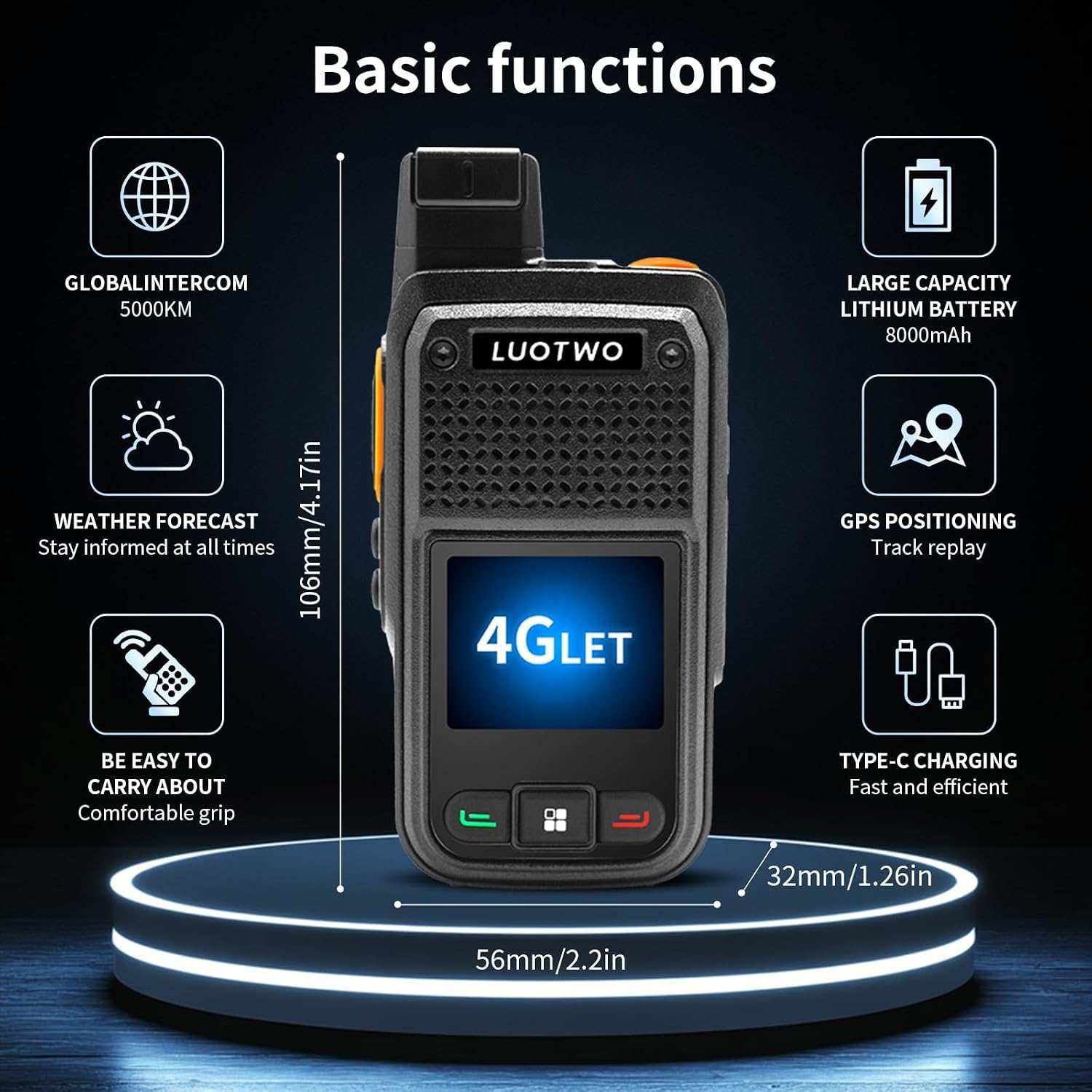
Image: A visual representation of the LUOTWO W500's core features, including global intercom, large battery, weather forecast, GPS, portability, and Type-C charging.
Maintenance
1. Charging
Regularly charge your walkie talkie units to ensure optimal performance. Use only the provided Type-C charging cables and power adapters. Avoid overcharging or completely draining the battery for prolonged periods.
2. Cleaning
Clean the device with a soft, damp cloth. Avoid using harsh chemicals or abrasive materials that could damage the casing or screen. Ensure all ports are dry before charging.
3. Storage
Store the walkie talkies in a cool, dry place away from direct sunlight and extreme temperatures. If storing for an extended period, ensure the batteries are partially charged (around 50%) to maintain battery health.
Troubleshooting
| Issue | Possible Cause | Solution |
|---|---|---|
| No Power | Battery drained or improperly inserted. | Charge the battery fully. Ensure the battery is securely in place. |
| No Network Connection (4G LTE) | No SIM card, invalid SIM, or out of network coverage. | Ensure SIM card(s) are correctly inserted and active. Move to an area with better 4G LTE coverage. |
| Cannot Transmit/Receive | Incorrect group selection, PTT button not pressed correctly, or device malfunction. | Verify you are in the correct group. Press and hold the PTT button firmly. If issue persists, contact support. |
| Poor Audio Quality | Weak signal, environmental interference, or microphone/speaker obstruction. | Move to an area with stronger signal. Ensure microphone and speaker are clear of debris. |
Technical Specifications
| Feature | Detail |
|---|---|
| Model Number | W500 |
| Item Weight | 10.4 ounces |
| Package Dimensions | 10 x 2.7 x 2 inches |
| Battery Capacity | 8000mAh (1 9V battery included) |
| Network Type | 4G LTE (SIM Card required) |
| Number of Channels | 1 |
| Special Feature | Adjustable Receiver Sensitivity |
| Talking Range Maximum | 5000 Kilometer (Network Dependent) |
| Voltage | 10 Volts |
| Water Resistance Level | Waterproof |
| Compatible Devices | SIM cards, other LTE devices on the same frequency bands |
Warranty and Support
Warranty Information
The LUOTWO W500 Global 4G LTE Walkie Talkie comes with a 1-year manufacturer's warranty from the date of purchase. This warranty covers defects in materials and workmanship under normal use.
Customer Support
For technical assistance, troubleshooting, or warranty claims, please contact LUOTWO customer support. Refer to the product packaging or the official LUOTWO website for the most up-to-date contact information.