
1. Important Safety Information
Please read all instructions carefully before installing, operating, or performing maintenance on your Varpoolfaye Inverter Pool Heater. Failure to follow these instructions may result in property damage, personal injury, or death. Keep this manual for future reference.
- Electrical Safety: This unit requires a 220V-240V / 60Hz electrical supply. Installation must be performed by a qualified electrician in accordance with all local and national electrical codes. Ensure proper grounding.
- Water Connections: All water connections must be secure and leak-free. Use appropriate adapters and sealants as necessary.
- Placement: Position the unit on a flat, stable surface with adequate clearance for air circulation around the heat pump. Do not obstruct air inlets or outlets.
- Children and Pets: Keep children and pets away from the unit during operation.
- Maintenance: Disconnect power before performing any maintenance or cleaning.
2. Product Overview
The Varpoolfaye 140000 BTU Inverter Pool Heater is designed to efficiently heat or cool inground and above-ground pools up to 42,000 gallons. Featuring advanced inverter technology and WiFi control, it offers quiet operation and energy savings.
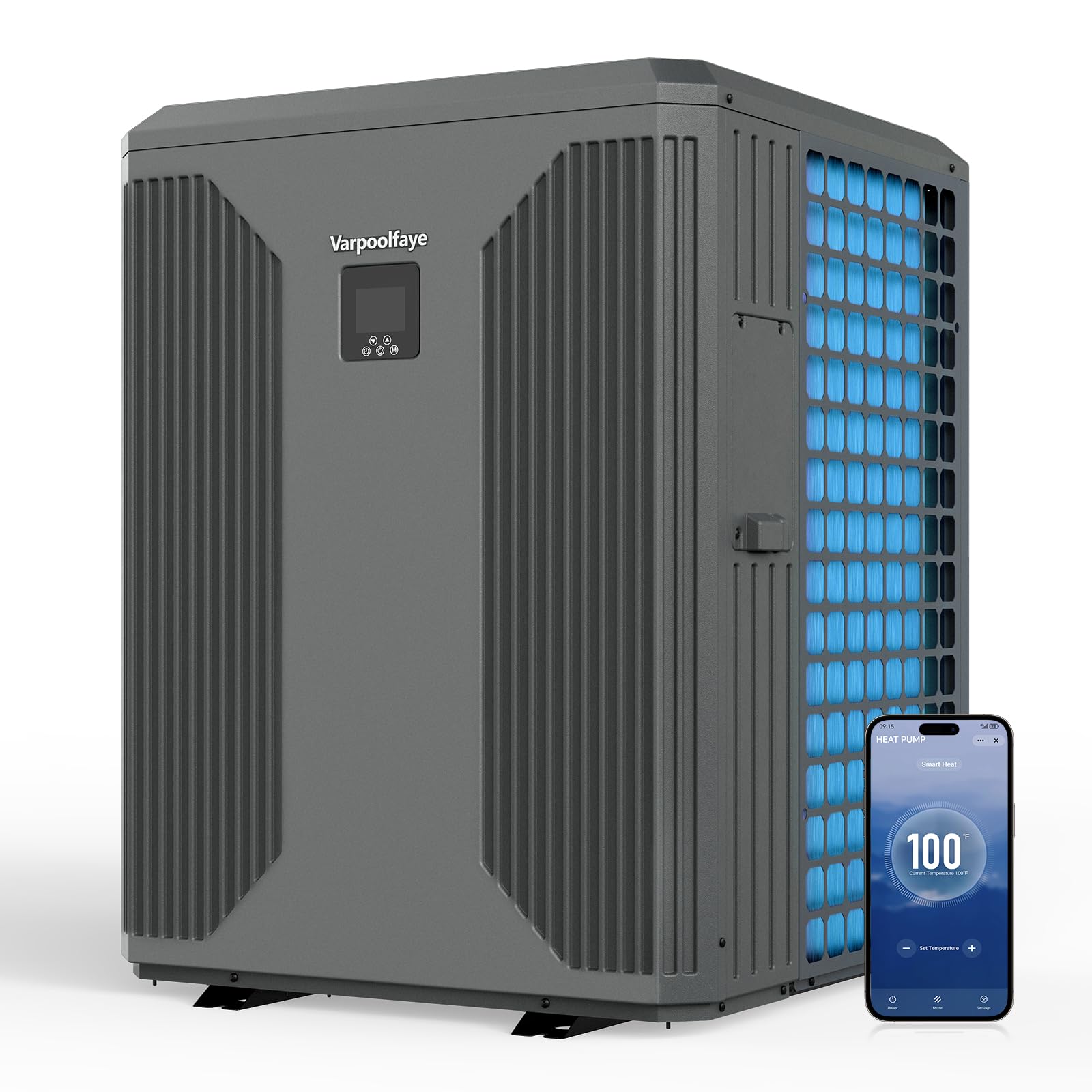
Figure 2.1: Main unit of the Varpoolfaye 140000 BTU Inverter Pool Heater.
Key Features:
- High Efficiency: Delivers 140000 BTU with a COP of 12.8, utilizing air energy for reduced electricity costs.
- Quiet Operation: Operates at a low noise level of 47dB, ensuring a peaceful pool environment.
- Inverter Technology: Features an inverter compressor for extended lifespan and lower energy consumption.
- Intelligent Control Panel: Provides easy temperature setting and mode selection.
- WiFi Control: Remote control via a dedicated app to adjust temperature, schedule run times, and switch modes from anywhere.
- Versatile Use: Suitable for both freshwater and saltwater pools.
- Quick Setup: Includes 1.5-inch connectors and a 118-inch cord for minimal installation effort.
3. Setup and Installation
The Varpoolfaye pool heater is designed for straightforward installation. Ensure you have all necessary components and tools before beginning.
3.1 Components Included:
- Varpoolfaye 140000 BTU Inverter Pool Heater Unit
- 1.5-inch connectors (for PVC pipe connection)
- 118-inch power cord
- Rubber pads for unit feet
- User Manual
3.2 Installation Steps:
- Choose a Location: Select a flat, stable surface near your pool and existing filtration system. Ensure adequate ventilation and clearance around the unit.
- Position the Unit: Place the pool heater on the chosen surface. The included rubber pads can be placed under the unit's feet for stability and vibration dampening.
- Connect Water Hoses: Connect the pool heater to your pool's filtration system using 1.5-inch hoses. The unit includes connectors for PVC pipes. If using flexible hoses, additional adapters may be required (not included). Ensure the water inlet and outlet are correctly connected to the heat pump.
- Electrical Connection: Connect the 118-inch power cord to a dedicated 220V-240V / 60Hz electrical outlet. This step should be performed by a qualified electrician to ensure compliance with safety standards.
- Check for Leaks: Once connections are made, turn on your pool pump and check all connections for any leaks.

Figure 3.1: Illustration of the Varpoolfaye pool heater and connection options. Option 1 (PVC pipe connection) adapter is included.
4. Operating Instructions
Your Varpoolfaye pool heater can be operated via its integrated control panel or remotely through the dedicated mobile application.
4.1 Control Panel Operation:
- Power On: After plugging in the unit, press and hold the power button on the control panel for 2-3 seconds. The fan will start shortly after.
- Adjust Temperature: Use the up and down arrow buttons to set your desired water temperature. The display will show the current and set temperatures.
- Select Mode: Use the mode button (M) to switch between heating and cooling functions.

Figure 4.1: The intelligent control panel and mobile app interface for the Varpoolfaye pool heater.
4.2 WiFi Control (Mobile App):
The Varpoolfaye pool heater features integrated WiFi for remote control via a smartphone app. This allows you to manage your pool's temperature from anywhere.
- Download the App: Scan the QR code provided in the instruction book or search for the 'Smart Life' app on your device's app store (available on App Store and Google Play).
- Connect to WiFi: On the unit's control panel, press and hold the top-right button and the down arrow simultaneously. The WiFi signal icon on the display will flash, indicating pairing mode.
- Pair Device: Open the 'Smart Life' app on your smartphone and follow the in-app instructions to add a new device. The app should detect and connect to your heat pump. Once connected, the WiFi signal icon on the unit's display will become solid.
- Remote Control: Through the app, you can monitor the current water temperature, set desired temperatures, schedule operating times, and switch between heating and cooling modes.
5. Maintenance
Regular maintenance ensures optimal performance and longevity of your Varpoolfaye pool heater.
- Clean the Unit: Periodically clean the exterior of the unit to remove dust, leaves, and debris. Ensure the air intake and exhaust vents are clear of obstructions.
- Check Water Connections: Regularly inspect all water hose connections for leaks or signs of wear. Tighten or replace as needed.
- Winterization: Before freezing temperatures arrive, properly winterize your pool heater. This typically involves draining all water from the unit and disconnecting hoses to prevent freeze damage. Consult a pool professional if unsure.
- Professional Inspection: Consider an annual inspection by a qualified technician to ensure all components are functioning correctly.
6. Troubleshooting
If you encounter issues with your Varpoolfaye pool heater, refer to the following common troubleshooting steps:
- Unit Not Turning On: Check the power supply and ensure the unit is properly plugged in. Verify that the circuit breaker has not tripped.
- No Heat/Cooling: Ensure the pool pump is running and there is adequate water flow through the heater. Check the temperature settings on the control panel or app.
- WiFi Connection Issues: Ensure your router is within range and functioning correctly. Re-attempt the WiFi pairing process as described in Section 4.2.
- Unusual Noises: Inspect the unit for any loose parts or obstructions in the fan. If unusual noises persist, contact customer support.
- Error Codes: If an error code appears on the display, refer to the specific error code section in the full user manual for detailed explanations and solutions.
For persistent issues or problems not covered here, please contact Varpoolfaye customer support.
7. Specifications
| Feature | Specification |
|---|---|
| Model Number | KSPF-010L1UR1A2 |
| Heating Capacity | 140000 BTU |
| Power Supply | 220V-240V / 60Hz |
| COP (Coefficient of Performance) | Up to 12.8 |
| Recommended Pool Size | Up to 42,000 Gallons |
| Noise Level | 47dB |
| Product Dimensions | 28.7 x 28.7 x 38.6 inches |
| Item Weight | 337 pounds |
| Manufacturer | Varpoolfaye |
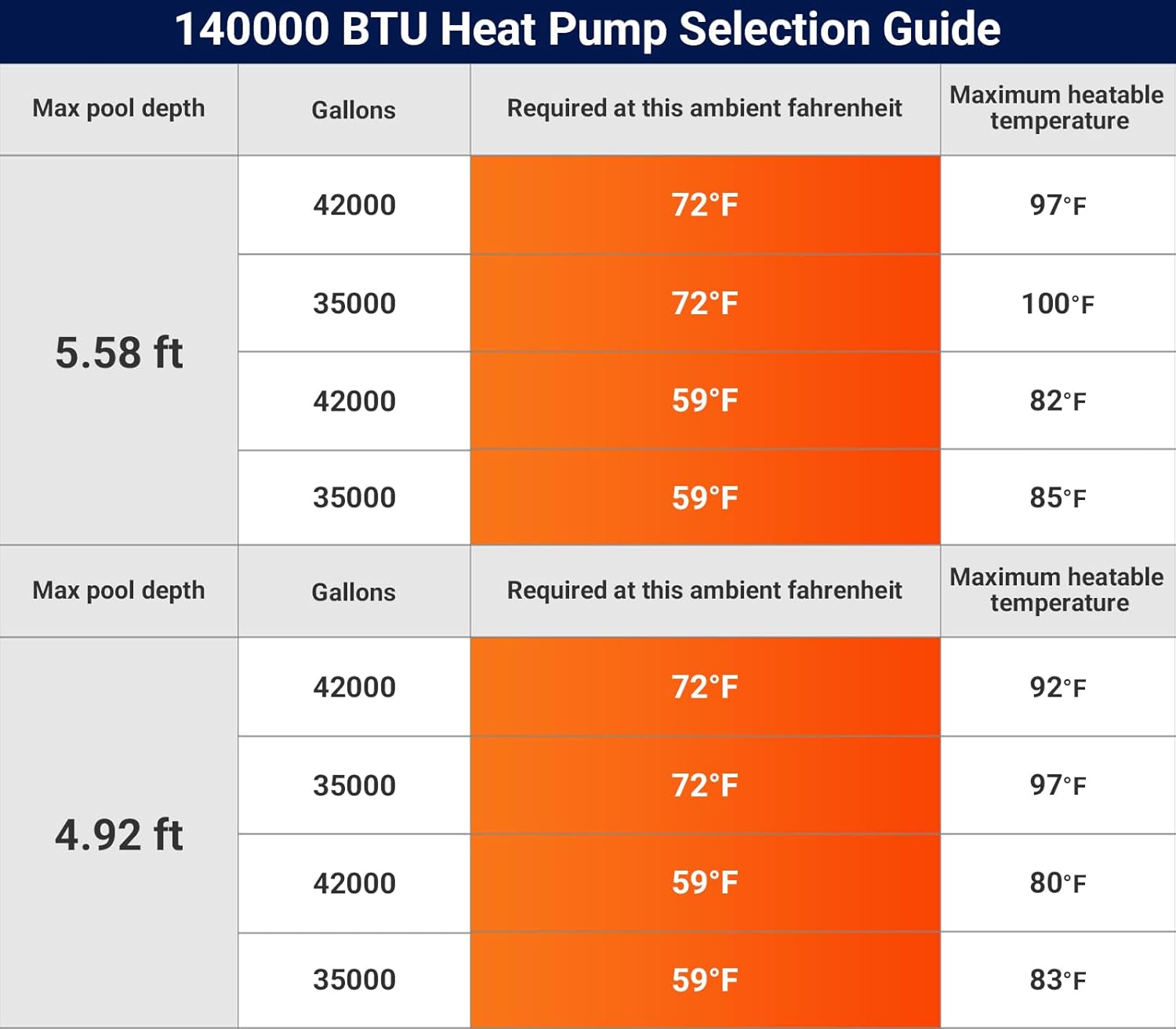
Figure 7.1: Heat pump selection guide based on pool depth, gallons, ambient temperature, and maximum heatable temperature.
8. Warranty and Support
Varpoolfaye is committed to providing high-quality products and customer satisfaction.
8.1 Return Policy:
This product is eligible for a 30-day easy return policy (refund/replacement) from the date of purchase. Please retain your proof of purchase for any warranty claims or returns.
8.2 Customer Support:
For technical assistance, troubleshooting, or warranty inquiries, please contact Varpoolfaye customer support. Refer to the contact information provided in your product packaging or on the official Varpoolfaye website.


