
Introduction
The NICRON L74 is a high-performance rechargeable flashlight designed for versatility and durability. It features a powerful 1000-lumen output, a 90° rotatable head for flexible illumination, a magnetic tail for hands-free use, and a two-way clip for secure attachment. Built with robust aluminum alloy and rated IP65 waterproof, the L74 is suitable for various environments and activities, from everyday carry to outdoor adventures and emergency situations. This manual provides essential information for the safe and effective use of your NICRON L74 flashlight.
Safety Information
- Do not look directly into the light beam to avoid eye injury.
- Keep out of reach of children.
- Ensure the battery is inserted with correct polarity.
- Do not disassemble the flashlight head or battery.
- Use only recommended batteries and charging cables.
- Avoid exposing the flashlight to extreme temperatures or direct sunlight for prolonged periods.
Package Contents
Verify that all items are present in your package:
- NICRON L74 Flashlight
- Rechargeable Battery (pre-installed)
- USB-C Charging Cable
- Instruction Manual

Setup
1. Battery Installation and Initial Use
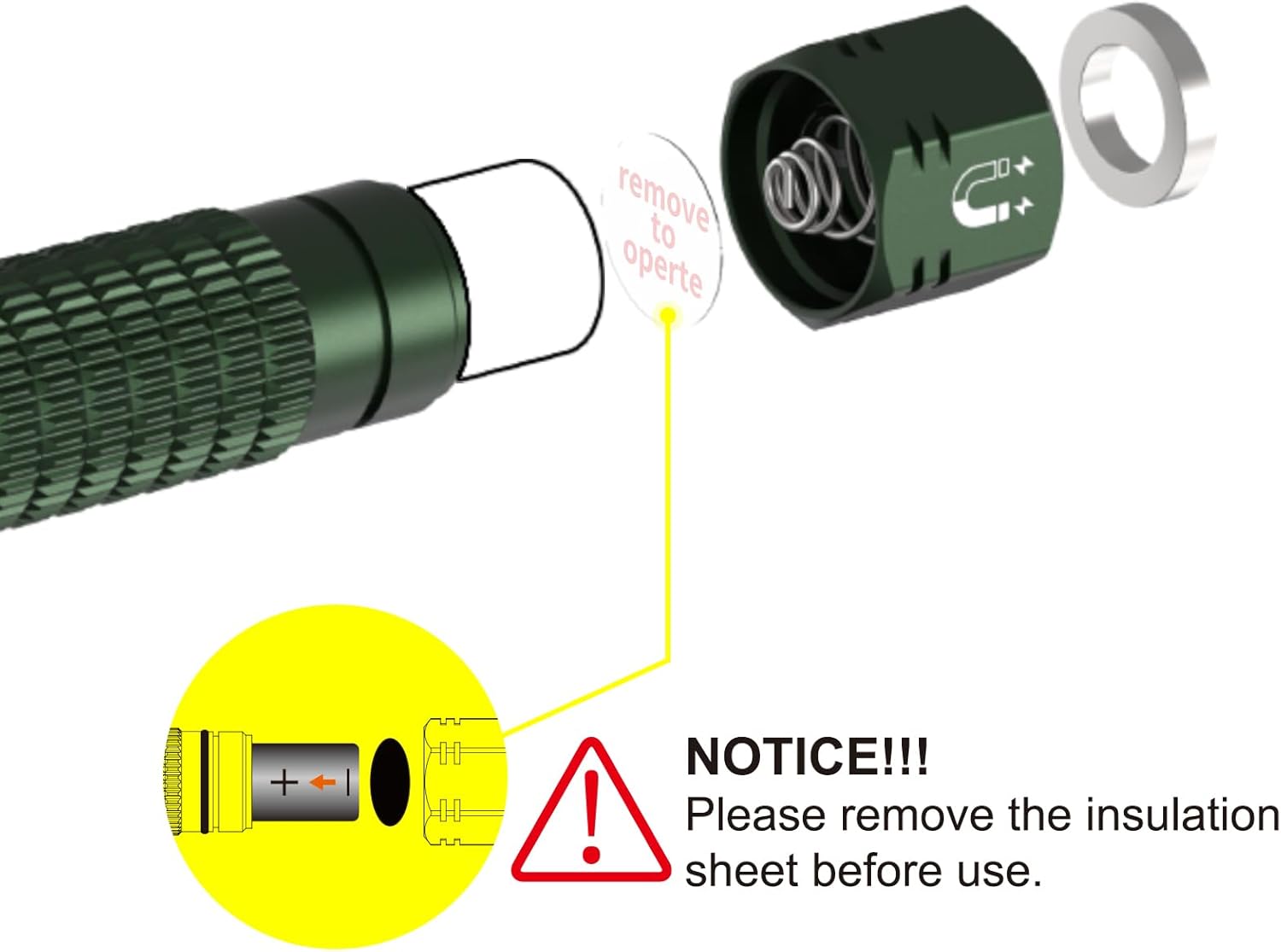
Before first use, it is essential to remove the insulating sheet from the battery compartment to allow the flashlight to function.
- Unscrew the tail cap of the flashlight.
- Remove the yellow insulating sheet located between the battery and the contact point.
- Ensure the rechargeable battery is inserted with the positive (+) end facing towards the flashlight head.
- Securely screw the tail cap back on.
2. Charging the Battery
The NICRON L74 features a built-in 900mAh rechargeable battery and supports USB-C charging. It is also compatible with a standard AA battery for alternative power.
- Locate the USB-C charging port on the flashlight head.
- Connect the provided USB-C cable to the flashlight and a power source (e.g., USB wall adapter, computer USB port).
- The indicator light will show red while charging and turn green when fully charged.

Operating Instructions
1. Power On/Off and Brightness Modes
The flashlight features multiple brightness levels and special modes for various situations.
- Power On/Off: Long press the side switch to turn the flashlight on or off.
- Cycle Brightness: With the flashlight on, short press the side switch to cycle through brightness modes: Moonlight > Low > Medium > High.
- Strobe Mode: Double-click the side switch from any state to activate Strobe mode.
- SOS Mode: Triple-click the side switch from any state to activate SOS mode.
- Mode Memory: The flashlight will remember the last used brightness mode (excluding Strobe and SOS) when turned off and on again.
- Lockout Function: Double-click and hold the side switch for 2 seconds to activate or deactivate the lockout function. The flashlight will blink twice to confirm.
2. 90° Rotatable Head
The unique 90° rotatable head allows for flexible light direction, converting the flashlight from a standard handheld light to an L-shaped work light or headlamp (with optional accessories).
3. Magnetic Tail and 2-Way Clip
Enhance hands-free operation and portability with the integrated magnetic tail and reversible clip.
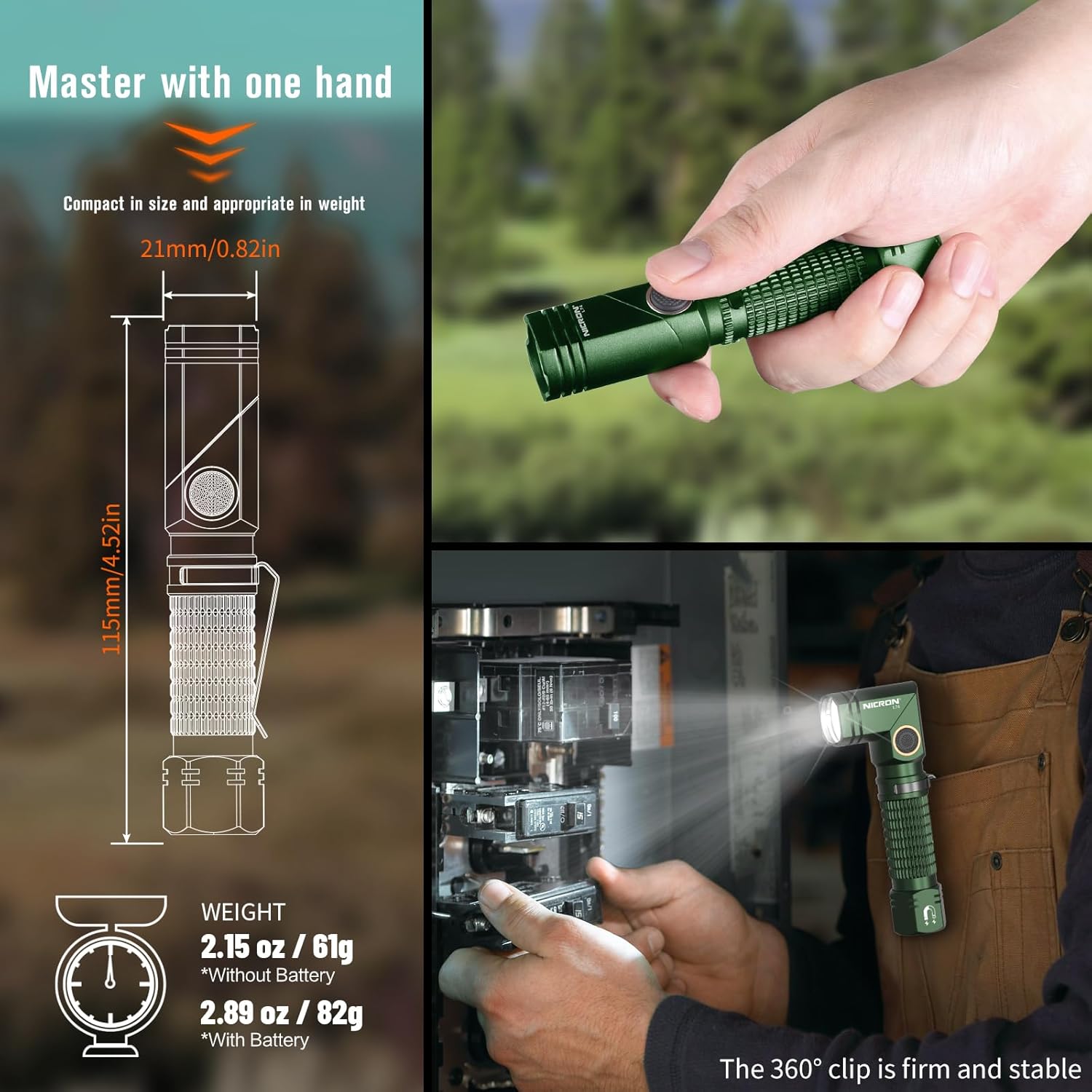
- Magnetic Tail: The strong magnetic base allows the flashlight to be securely attached to any metal surface, providing convenient hands-free illumination.
- 2-Way Clip: The durable 360° reversible clip enables easy attachment to belts, pockets, backpack straps, or other gear for stable and convenient carrying.


Maintenance
- Cleaning: Clean the flashlight body with a soft, damp cloth. Do not use abrasive cleaners or solvents.
- Battery Care: Recharge the battery regularly, even if not in use, to maintain optimal performance and extend its lifespan. Store the flashlight with a partially charged battery if not used for extended periods.
- O-rings: Periodically check and lubricate the O-rings with silicone grease to maintain the IP65 waterproof rating. Replace damaged O-rings as needed.
- Water Resistance: The flashlight is IP65 waterproof, meaning it is protected against dust and low-pressure water jets. It is not designed for submersion. Ensure the USB-C port cover is securely closed to maintain water resistance.

Troubleshooting
- Flashlight not turning on:
- Ensure the insulating sheet has been removed from the battery compartment (refer to Setup section).
- Check if the battery is charged. If not, connect the flashlight to a power source using the USB-C cable.
- Verify the battery is inserted with the correct polarity.
- If the lockout function is active (flashlight blinks when trying to turn on), double-click and hold the side switch for 2 seconds to deactivate it.
- Light output is dim or flickering:
- The battery may be low. Recharge the battery.
- Ensure the battery contacts are clean and free from debris.
- Water ingress:
- Ensure all caps and covers, especially the USB-C port cover, are securely tightened or closed.
- Check O-rings for damage or proper seating.
Specifications
| Feature | Specification |
|---|---|
| Max Output | 1000 Lumens |
| Max Beam Distance | 138 meters |
| Max Runtime | 58 hours (Moonlight mode) |
| Battery Type | Rechargeable Lithium Ion (900mAh) / AA Battery |
| Charging | USB-C |
| Water Resistance | IP65 |
| Impact Resistance | 1 meter |
| Material | Aluminum Alloy |
| Dimensions (L x W x H) | 115mm (4.52in) x 21mm (0.82in) x 21mm (0.82in) |
| Weight (with battery) | 82g (2.89 oz) |

Warranty and Support
Warranty Information
The NICRON L74 flashlight comes with a 2-year limited manufacturer's warranty. This warranty covers defects in materials and workmanship under normal use. Please retain your proof of purchase for warranty claims.
Customer Support
For technical assistance, warranty claims, or product inquiries, please contact NICRON customer support through the retailer where the product was purchased or visit the official NICRON website for contact details.


