
1. Introduction
This manual provides essential information for setting up, operating, maintaining, and troubleshooting your Lenovo ThinkPad E16 Business Laptop. Please read this manual thoroughly to ensure proper usage and to maximize the performance and longevity of your device.

Figure 1.1: Lenovo ThinkPad E16 Business Laptop
2. Setup
2.1 Unpacking and Initial Inspection
Carefully remove all components from the packaging. Verify that all items listed in the 'What's in the Box' section are present and undamaged. If any items are missing or damaged, contact your vendor immediately.
2.2 Connecting to Power
- Connect the power adapter to the laptop's USB-C power port.
- Plug the power adapter into a grounded electrical outlet.
- Allow the battery to charge for at least 30 minutes before initial use, or until the battery indicator shows a sufficient charge.
2.3 Initial Boot-Up and Windows 11 Pro Setup
Press the power button to turn on your laptop. Follow the on-screen instructions to complete the Windows 11 Pro setup, including language selection, network connection, and user account creation.
2.4 Connecting Peripherals
Your ThinkPad E16 offers various ports for connecting external devices:
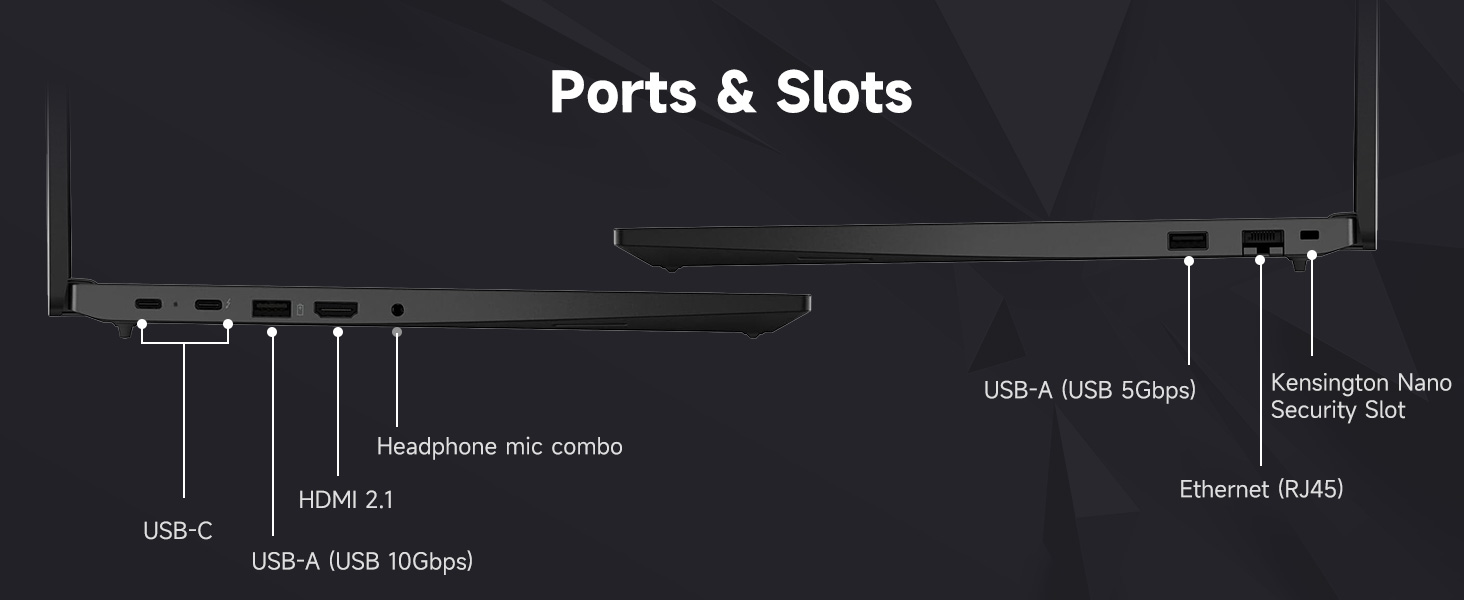
Figure 2.1: Laptop Ports and Slots
- USB-A (USB 5Gbps, USB 10Gbps): Connect USB devices such as the bundled wireless mouse receiver, external hard drives, or printers.
- USB-C (USB 5Gbps, PD / DP 1.4, USB 10Gbps, PD / DP 1.4): For power delivery, data transfer, and display output.
- Ethernet (RJ45): For wired network connection.
- HDMI 2.1: Connect to an external monitor or TV.
- Headphone / mic combo (3.5mm): For audio input/output.
- Kensington Nano Security Slot: For physical security locking.
2.5 Wi-Fi 6 Connection
During Windows setup, you will be prompted to connect to a Wi-Fi network. Select your network and enter the password. Your laptop supports Wi-Fi 6 for fast and reliable wireless connectivity.
2.6 Fingerprint Reader Setup
To enhance security, set up the integrated fingerprint reader through Windows Hello in your system settings. This allows for quick and secure login.
2.7 Bundled Accessories
Your laptop includes an A-DATA UC310 64GB USB Flash Drive and a Thunderobot ML101 Wireless Mouse. The USB drive provides additional storage and data transfer capabilities. The wireless mouse connects via a USB nano receiver for convenient navigation.

Figure 2.2: A-DATA UC310 64GB USB Flash Drive
3. Operating Your Laptop
3.1 Keyboard and Input Devices
The ThinkPad E16 features a backlit keyboard for comfortable typing in various lighting conditions. Utilize the TrackPoint Quick Menu and Tap-to-Select features for efficient navigation. The larger touchpad also enhances user interaction.

Figure 3.1: Keyboard and Touchpad Features
3.2 Display Features
The 16-inch FHD+ (1920x1200) IPS anti-glare touchscreen display offers clear visuals. Its 16:10 aspect ratio provides more vertical screen space, beneficial for productivity. The 300-nit brightness and TÜV Low Blue Light certification contribute to reduced eye strain during extended use.

Figure 3.2: Display Specifications
3.3 Audio and Visuals
Experience Harman- and Dolby-optimized audio for enhanced sound quality. The AI-based noise cancellation feature improves clarity during video conferences and multimedia consumption.

Figure 3.3: Audiovisual Experience
3.4 Performance
Powered by the AMD Ryzen 7 7735U processor with 8 cores and 16 threads, the laptop delivers responsive performance for everyday productivity, multitasking, and business workflows. The 32GB DDR5 RAM ensures smooth operation across multiple applications, and the 1TB PCIe NVMe M.2 Solid State Drive provides fast boot-up times and quick data access.

Figure 3.4: AMD Ryzen 7 Processor
4. Maintenance
4.1 Cleaning Your Laptop
- Use a soft, lint-free cloth dampened with water or a screen cleaner to clean the display.
- Wipe the keyboard and chassis with a slightly damp cloth. Avoid excessive moisture.
- Do not use harsh chemicals, solvents, or abrasive cleaners.
4.2 Software Updates
Regularly check for and install operating system updates (Windows Update) and driver updates (Lenovo Vantage or Lenovo Support website) to ensure optimal performance and security.
4.3 Battery Care
- Avoid fully discharging the battery frequently.
- Store the laptop in a cool, dry place when not in use for extended periods.
- For optimal battery health, avoid continuous charging at 100% for long durations.
4.4 Security Features
The ThinkPad E16 incorporates several security features to protect your data:
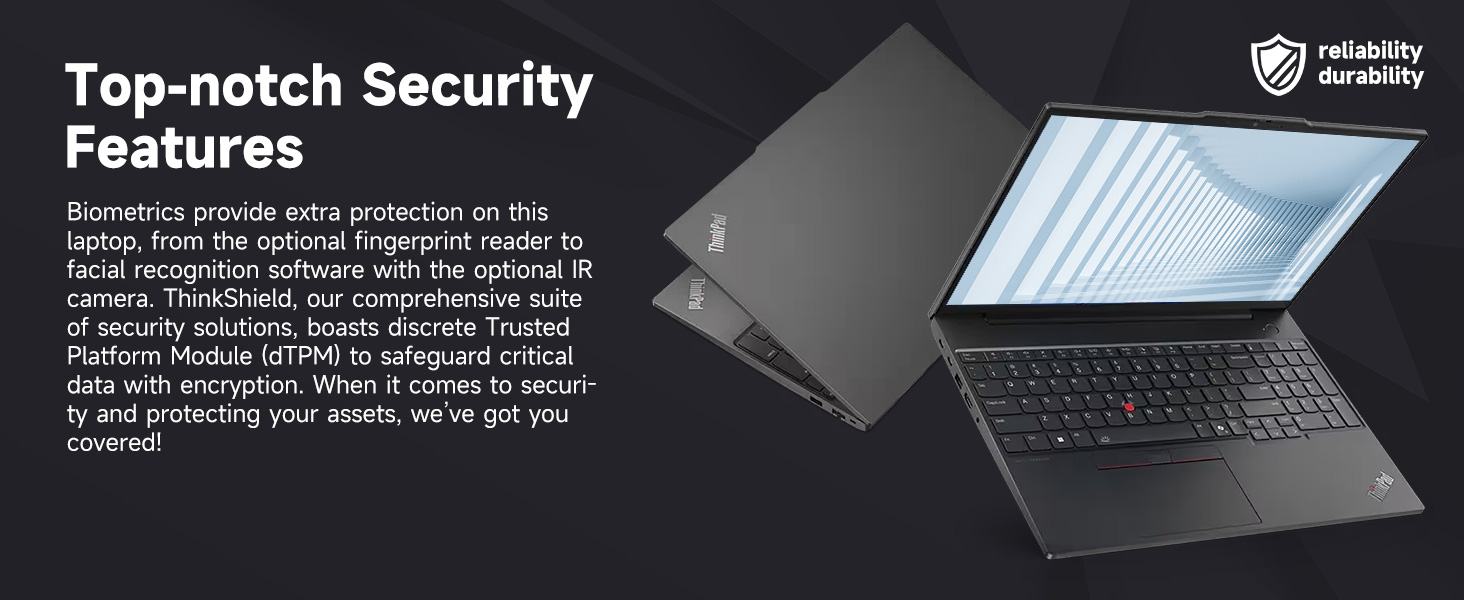
Figure 4.1: Top-notch Security Features
- ThinkShield Security Suite: A comprehensive suite of security solutions.
- Fingerprint Reader: For biometric authentication.
- dTPM (Discrete Trusted Platform Module): Safeguards critical data with encryption.
- Webcam Privacy Shutter: Physically blocks the webcam for privacy.
5. Troubleshooting
This section addresses common issues you might encounter with your ThinkPad E16. For more detailed troubleshooting, refer to the Lenovo support website.
5.1 Power Issues
- Laptop does not turn on: Ensure the power adapter is securely connected and the outlet is functional. Check the battery charge level.
- Battery not charging: Verify the power adapter is working. Try a different outlet.
5.2 Display Issues
- No display or blank screen: Connect an external monitor to check if the issue is with the laptop's display. Adjust brightness settings.
- Flickering screen: Update graphics drivers. Check display cable connections if using an external monitor.
5.3 Connectivity Issues
- Wi-Fi not connecting: Ensure Wi-Fi is enabled. Restart your router and laptop. Re-enter Wi-Fi password.
- USB devices not recognized: Try a different USB port. Update USB drivers.
5.4 Performance Issues
- Slow performance: Close unnecessary applications. Check for background processes. Ensure sufficient free storage space.
- Overheating: Ensure ventilation vents are clear. Use the laptop on a hard, flat surface.
6. Specifications
| Feature | Specification |
|---|---|
| Brand | Lenovo |
| Model Name | ThinkPad E16 |
| Processor | AMD Ryzen 7 7735U (8 Cores, 16 Threads, up to 4.75 GHz) |
| Graphics | AMD Radeon Graphics (Integrated) |
| RAM | 32GB DDR5 RAM (5600 MHz) |
| Storage | 1TB PCIe NVMe M.2 SSD |
| Display | 16-inch FHD+ (1920x1200) IPS Touchscreen, Anti-glare, 16:10 aspect ratio, 300nit, TÜV Low Blue Light certified, 60 Hz Refresh Rate |
| Operating System | Windows 11 Pro |
| Connectivity | Wi-Fi 6 (802.11ax), Ethernet (RJ45) |
| Ports | 2x USB-A (5Gbps, 10Gbps), 2x USB-C (5Gbps, 10Gbps, PD/DP 1.4), 1x HDMI 2.1, 1x Headphone/Mic Combo, 1x Kensington Nano Security Slot |
| Special Features | Backlit Keyboard, Fingerprint Reader, Numeric Keypad, HD 720p RGB Webcam with privacy shutter |
| Color | Black |
| Dimensions (L x W x Thickness) | 12.32" x 8.63" x 0.71" |
7. Warranty and Support
7.1 Warranty Information
Your Lenovo ThinkPad E16 comes with a 1-year manufacturer's warranty. Additionally, for upgraded RAM/SSD components, a 1-year warranty is provided by PCOnline US. Please retain your proof of purchase for warranty claims.
7.2 Technical Support
For technical assistance, driver downloads, or further troubleshooting, please visit the official Lenovo Support website or contact their customer service. For issues related to the upgraded components, contact PCOnline US support.


