
Introduction
Thank you for choosing the SUNKTA DM6-G GPS Military Smart Watch. This manual provides essential information for setting up, operating, and maintaining your device. The DM6-G is a robust smartwatch designed for outdoor enthusiasts and daily use, featuring built-in GPS, comprehensive health monitoring, Bluetooth calling, and military-grade durability.
Setup
1. Package Contents
Ensure all items are present in the package:
- Smartwatch × 1
- Stainless steel strap × 1
- Silicone strap × 1
- Magnetic charger × 2
- 2-year warranty card × 1
2. Charging the Smart Watch
Before first use, fully charge your smartwatch. Connect the magnetic charger to the charging points on the back of the watch and plug the USB end into a power source. A full charge takes approximately 2 hours. The battery indicator on the watch screen will show charging status.

Image: The SUNKTA DM6-G Smart Watch connected to its magnetic charger, illustrating the charging process.
3. App Installation and Pairing
To unlock the full potential of your smartwatch, download and install the Fitcloudpro app on your iOS or Android smartphone.
- Scan the QR code in the watch manual or search for "Fitcloudpro" in your phone's app store.
- Install and open the app. Follow the on-screen instructions to create an account or log in.
- Enable Bluetooth on your smartphone.
- In the Fitcloudpro app, navigate to the device section and search for your DM6-G smartwatch.
- Select your watch from the list to pair. Confirm the pairing request on both your phone and watch.
4. Adjusting Watch Bands
Your DM6-G comes with both a stainless steel and a silicone strap. Use the provided tool to adjust the length of the stainless steel strap by removing or adding links. The silicone strap can be easily swapped using the quick-release pins.
Operating Instructions
1. Basic Navigation
The DM6-G features a 2.13-inch AMOLED touchscreen and physical buttons for navigation:
- Swipe Up: Access notifications.
- Swipe Down: Access quick settings (brightness, battery, DND mode).
- Swipe Left/Right: Cycle through widgets (heart rate, weather, activity data).
- Press Power Button: Return to watch face or access app menu.
- Press Back Button: Go back to the previous screen.
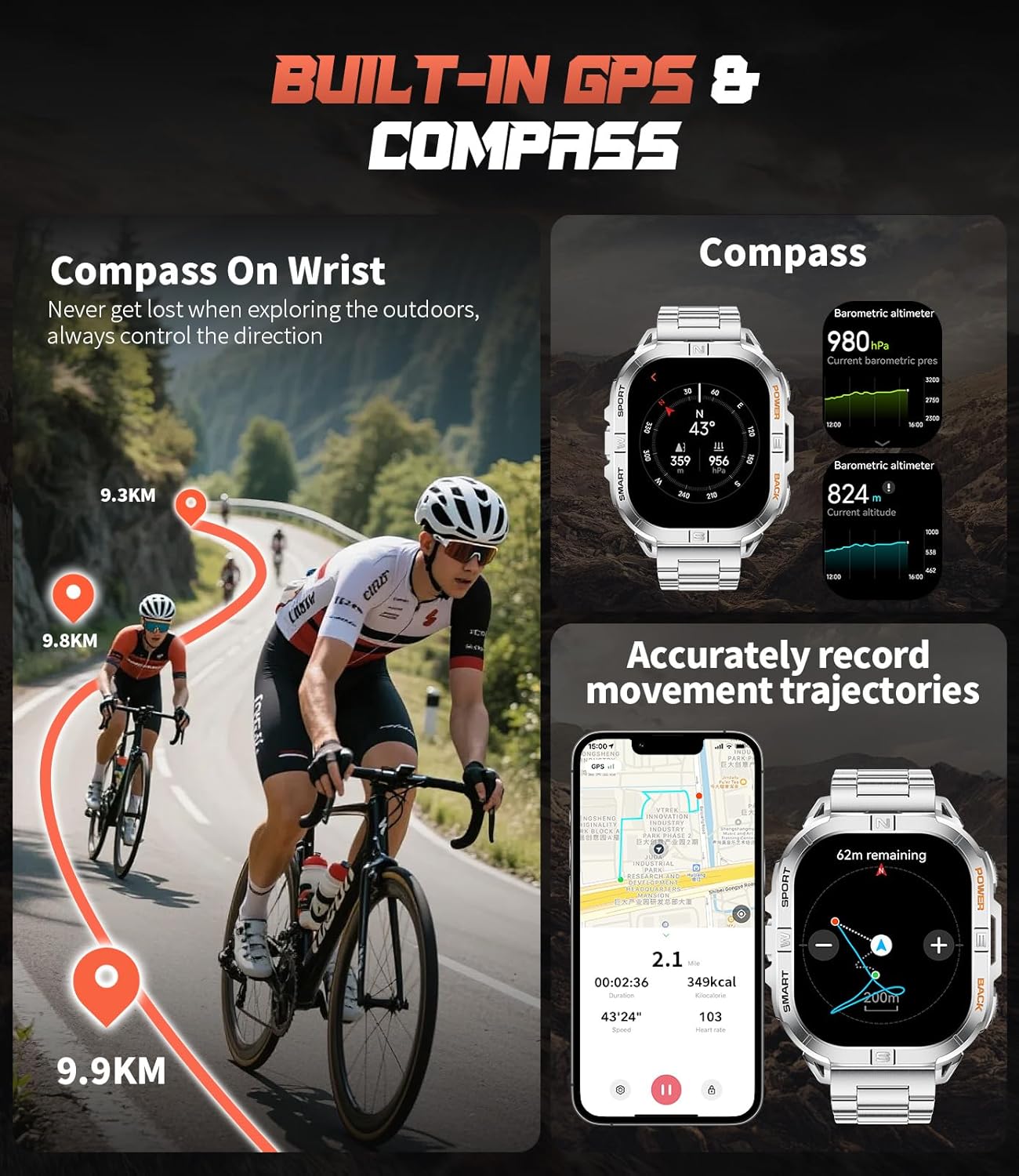
Image: The SUNKTA DM6-G Smart Watch on a wrist, showing the main watch face with time, steps, and heart rate.
2. Bluetooth Calls and Notifications
Once paired, your watch supports Bluetooth calls and message alerts.
- Answering/Making Calls: Use the built-in speaker and microphone to answer incoming calls directly from your wrist. You can also dial numbers or access contacts via the watch interface.
- Message Alerts: Receive notifications from major social media apps and text messages. The watch will vibrate gently to alert you. Manage notification settings through the Fitcloudpro app.

Image: The SUNKTA DM6-G Smart Watch displaying incoming call and message notifications, with a user interacting with the watch.
3. Health Monitoring
The DM6-G continuously monitors various health metrics:
- Heart Rate: Tracks your heart rate 24/7. View real-time data and historical trends in the app.
- Sleep Tracking: Monitors your sleep patterns, including deep sleep, light sleep, and awake times.
- Blood Oxygen: Measures your blood oxygen levels.
- Stress Levels: Provides insights into your daily stress.
Note: This device is not a medical device. Health data is for reference only and should not be used for medical diagnosis or treatment.

Image: The SUNKTA DM6-G Smart Watch showing various health monitoring features like heart rate, stress levels, and sleep tracking, alongside the companion app interface.
4. GPS and Outdoor Features
The DM6-G is equipped with built-in GPS and multi-system positioning for accurate outdoor tracking.
- GPS: Supports GPS, GLONASS, BeiDou, Galileo, NAVIC, and QZSS for precise location tracking during activities.
- Compass: Provides real-time directional guidance.
- Barometer: Displays current air pressure.
- Altimeter: Shows real-time altitude data.

Image: The SUNKTA DM6-G Smart Watch displaying GPS tracking on a map and compass functionality, with cyclists in the background.
5. Sports Modes
Choose from over 100 sport modes to track your workouts accurately. The watch records calories burned, heart rate, distance, and duration for each session.

Image: The SUNKTA DM6-G Smart Watch displaying a selection of over 100 sports modes, with a hiker in the background.
6. LED Flashlight
Activate the integrated LED flashlight for instant illumination. This feature is useful for camping, hiking, power outages, or any situation requiring immediate light.

Image: The SUNKTA DM6-G Smart Watch on a wrist, with its LED flashlight activated, illuminating the surroundings.
7. Customization
Personalize your watch experience:
- Watch Faces: Choose from a variety of online watch faces or create your own using favorite photos via the Fitcloudpro app.
- Always-On Display (AOD): Configure the AOD function to see the time without touching the screen.
Maintenance
1. Water Resistance
The DM6-G has a 5ATM water resistance rating, meaning it can withstand splashes, rain, and shallow-water activities. It is not suitable for diving, high-pressure water activities, seawater, or sauna environments.
2. Cleaning
Regularly clean your watch and strap with a soft, dry cloth. If necessary, use a slightly damp cloth and mild soap, then rinse and dry thoroughly. Avoid harsh chemicals or abrasive materials.
3. Battery Care
To prolong battery life, avoid extreme temperatures and fully discharging the battery frequently. Charge the watch when the battery level is low, but it is not necessary to wait for it to be completely depleted.
Troubleshooting
1. Watch Not Turning On
- Ensure the watch is fully charged. Connect it to the charger for at least 30 minutes.
- Press and hold the power button for 10-15 seconds to attempt a forced restart.
2. Unable to Pair with Smartphone
- Make sure Bluetooth is enabled on your smartphone and the watch is within range.
- Ensure the Fitcloudpro app is installed and running.
- Restart both your smartphone and the smartwatch.
- Check if the watch is already paired with another device. Disconnect it if so.
- Clear the Bluetooth cache on your phone (if applicable) and try again.
3. Inaccurate Health Data
- Ensure the watch is worn snugly on your wrist, not too tight or too loose.
- Clean the sensor on the back of the watch.
- Avoid excessive movement during measurements.
- Remember that the watch is not a medical device; readings are for general fitness and wellness tracking.
4. Notifications Not Appearing
- Verify that the watch is successfully paired with your phone.
- Check notification permissions for the Fitcloudpro app in your phone's settings.
- Ensure 'Do Not Disturb' mode is not active on either your watch or phone.
- Keep the Fitcloudpro app running in the background on your phone.
Specifications
| Model Name | DM6-G |
| Brand | SUNKTA |
| Screen Size | 2.13 Inches |
| Display Type | AMOLED |
| Operating System | Android/iOS |
| Connectivity Technology | Bluetooth |
| Battery Capacity | 600 mAh |
| Battery Life (Typical Usage) | 7-10 days |
| Standby Time | Up to 60 days |
| Charging Time | 2 Hours |
| GPS | Built-in GPS (GPS, GLONASS, BeiDou, Galileo, NAVIC, QZSS) |
| Water Resistance Level | 5 ATM (50 Meters) |
| Case Material Type | Stainless Steel |
| Band Material Type | Stainless Steel, Silicone |
| Memory Storage Capacity | 256 MB |
| Supported Application | Fitcloudpro |
| Metrics Measured | Calories Burned, Distance, Heart Rate, Sleep Duration, Stress |
Warranty Information
Your SUNKTA DM6-G Smart Watch comes with a 2-year (24 months) warranty from the date of purchase. Please refer to the warranty card included in your package for detailed terms and conditions. Keep your proof of purchase for warranty claims.
Customer Support
For any questions, technical assistance, or support regarding your SUNKTA DM6-G Smart Watch, please contact our customer service team. We offer 24-hour online customer service. You can reach us via the Amazon messaging system.

Image: SUNKTA customer support details, including warranty and contact information.
Product Overview Video
Video: This video showcases the key features of the SUNKTA DM6-G Smart Watch, including its display, sports tracking, GPS capabilities, call functions, notifications, and charging.