
TKSTAR TK911
TKSTAR TK911 GPS Tracker User Manual
Model: TK911
1. Introduction
The TKSTAR TK911 is a compact and lightweight GPS tracker designed for pets such as dogs and cats. It provides real-time location tracking, geo-fencing, and motion detection capabilities, ensuring you can monitor your pet's whereabouts. This manual provides detailed instructions for setting up, operating, and maintaining your TK911 GPS tracker.

Image: The TKSTAR TK911 GPS tracker securely attached to a pet collar, showcasing its compact design.
2. Package Contents
Please verify that all items are present in your package:
- TKSTAR TK911 GPS Tracker
- Pet Collar (fits neck circumference 20-65 cm)
- Inductive Charging Cable
- Screwdriver (for SIM card installation)
- User Manual (this document)

Image: The product packaging for the TKSTAR TK911 GPS Tracker, indicating its contents.
3. Setup Guide
3.1. SIM Card Installation
The TK911 tracker requires a 2G GSM Micro SIM card (not included) for full functionality. A prepaid SIM card is suitable for occasional location queries, while a SIM card with data volume (e.g., 3GB/month) is recommended for continuous live tracking.
- Prepare the SIM Card: Before inserting, ensure the SIM card's PIN query is disabled. Insert the SIM card into a smartphone and disable the PIN request through the phone's security settings. Test the SIM card by making a short call to confirm it is active.
- Open the Tracker: Use the provided screwdriver to carefully open the tracker casing.
- Insert SIM Card: Insert the prepared Micro SIM card into the designated slot within the tracker. Ensure it is inserted correctly according to the diagram inside the device.
- Close the Tracker: Securely close the tracker casing with the screwdriver.
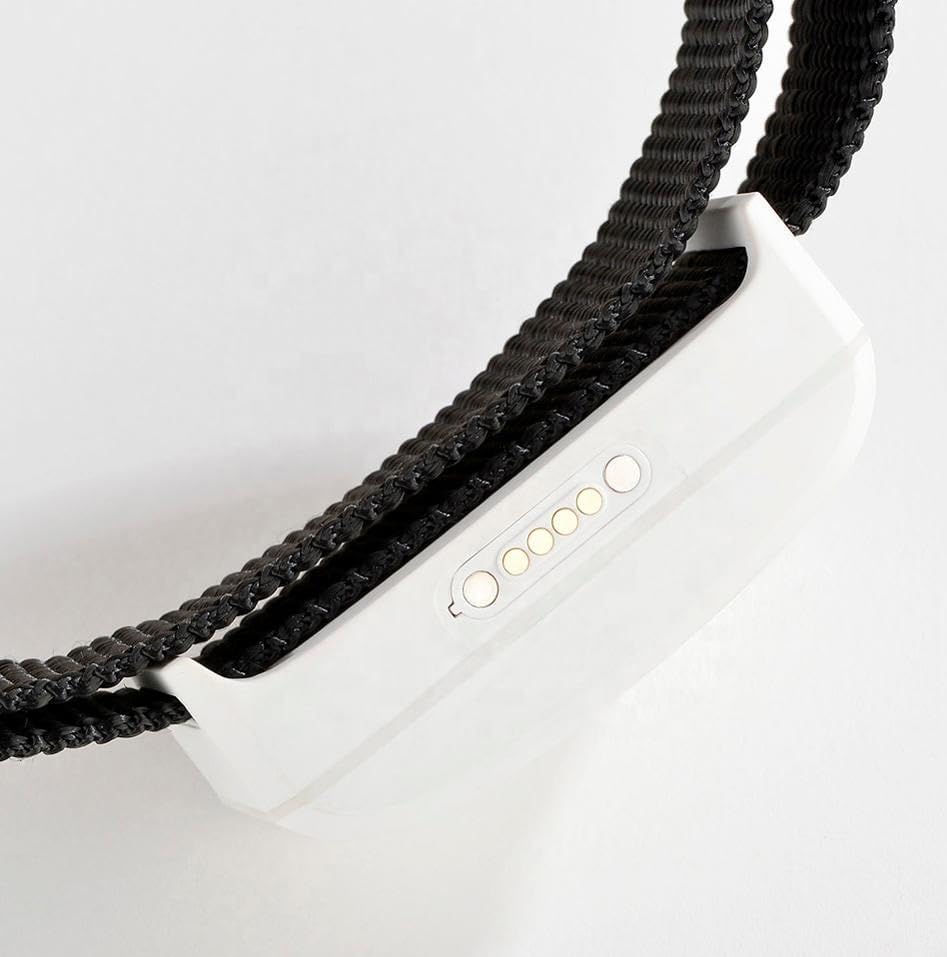
Image: A close-up view of the TKSTAR TK911 tracker, highlighting the indicator lights that show device status.
3.2. Initial Power On and Activation
- Power On: Press and hold the power button until the indicator lights illuminate.
- Outdoor Placement: For initial GPS signal acquisition, place the tracker outdoors with a clear view of the sky. It may take 1-2 minutes for the device to acquire a GPS signal and become ready for use.
- Online Portal Access: To use the free online portal, visit the specified website and enter the IMEI number (found on the back of the device) and the default password "123456".
- App Download: Download the free "Winnes" app from the iOS App Store or Google Play Store for smartphone tracking.
4. Operating Instructions
4.1. Real-time Tracking
The TK911 offers multiple methods for real-time location tracking:
- Mobile App ("Winnes"): Open the "Winnes" app on your smartphone. Log in with your device's IMEI and password to view the tracker's live location on a map.
- Online Portal: Access the free online portal via a web browser on a computer or tablet. Enter the IMEI and password to track the device.
- SMS Tracking: Send the SMS command "G123456#" to the phone number of the SIM card inside the tracker. You will receive an SMS reply with a Google Maps link showing the exact location.

Image: A dog wearing the TKSTAR TK911 GPS tracker, illustrating its use for pet monitoring with icons for battery, positioning, geo-fence, and history.
4.2. Geo-Fence Setting
A geo-fence allows you to define a safe area for your pet. If the tracker exits or enters this predefined area, you will receive an alert.
- Via App/Online Portal: Access the geo-fence settings within the "Winnes" app or the online portal.
- Define Area: Use the map interface to draw or select the desired safe zone.
- Set Alerts: Configure how you wish to be notified (e.g., app notification, SMS) when the geo-fence is breached.
4.3. Motion Sensor / Shake Sensor
The TK911 features a motion sensor. If enabled, the tracker can send a message with its current position to your mobile phone when motion is detected. This feature can be configured via SMS commands or the app/online portal.
4.4. Attaching to Pet
The tracker comes with a collar suitable for pets with a neck circumference of 20-65 cm. Alternatively, the tracker can be attached to an existing collar with a band width of 20-25 mm using its integrated slots.

Image: A cat wearing the TKSTAR TK911 GPS tracker on its collar, demonstrating its suitability for smaller pets.
5. Maintenance
5.1. Battery Charging
The TK911 is equipped with a 500 mAh Li-ion battery, offering up to 5 days of standby time. The battery is charged inductively using the included charging cable. A standard USB 5V mobile phone power supply (not included) is required.
- Connect Charger: Connect the inductive charging cable to a USB 5V power adapter.
- Place Tracker: Place the tracker onto the inductive charging pad. Ensure proper alignment for charging to begin.
- Charging Indicator: The tracker's indicator lights will show the charging status. Refer to the device's LED guide for specific indications.

Image: The TKSTAR TK911 GPS tracker connected to its inductive charging cable, illustrating the charging process.
5.2. Waterproofing
The TK911 tracker is IPX-8 waterproof, dustproof, and shockproof. This means it can withstand continuous immersion in water under certain conditions. However, ensure the SIM card slot cover is securely closed after installation to maintain its waterproof integrity.
6. Troubleshooting
| Problem | Possible Cause | Solution |
|---|---|---|
| Tracker does not power on. | Low battery; device not charged. | Charge the tracker for at least 2 hours using the inductive charger. |
| No GPS signal / Inaccurate location. | Tracker is indoors or in an area with poor signal; initial cold start in progress. | Move the tracker to an open outdoor area with a clear view of the sky. Wait for 1-2 minutes for GPS acquisition. |
| SIM card not recognized / Cannot send SMS commands. | SIM card PIN is active; SIM card not inserted correctly; SIM card is not 2G GSM compatible; no credit/data on SIM. | Disable PIN on SIM card using a smartphone. Reinsert SIM card correctly. Ensure SIM card is 2G GSM and has sufficient credit/data. |
| App/Online portal not showing location. | Incorrect IMEI/password; no internet connection on tracker's SIM card; server issues. | Verify IMEI and password. Ensure SIM card has data. Check app/portal status or contact support if issues persist. |
7. Technical Specifications
| Model | TK911 |
| Network | GSM/GPRS (2G, 3G compatible for GSM frequencies) |
| GSM Frequencies | 850, 900, 1800, 1900Mhz (4-band) |
| GPS Chip | UBLOX |
| GPS Sensitivity | -159 dBm |
| GPS Accuracy | Up to 5 meters |
| Positioning Modes | GPS / A-GPS / LBS |
| Cold Start Time | 45 seconds |
| Warm Start Time | 1 second |
| Battery | 3.7V 500 mAh Li-ion battery |
| Battery Life (Standby) | Up to 5 days |
| Waterproof Rating | IPX-8 |
| Dimensions (L x W x H) | 62 x 30 x 18 mm |
| Weight | 33 g |
| Operating Temperature | -20°C to +55°C |
| Compatible Devices | Personal Computer, Smartphone, Tablet |
| Special Features | Accelerometer, Geo-Fence, Location History, Motion Activated, Real Time Tracking |
8. Warranty and Support
8.1. Warranty Information
The TKSTAR TK911 GPS Tracker comes with a standard manufacturer's warranty. Please retain your proof of purchase for any warranty claims. For specific warranty duration and terms, refer to the documentation provided at the time of purchase or contact your retailer.
8.2. Customer Support
If you encounter any issues not covered in this manual or require further assistance, please contact TKSTAR customer support through their official website or the contact information provided with your product. Ensure you have your device's IMEI number ready when contacting support.
For online resources and app downloads, visit the official TKSTAR website or search for "Winnes" in your device's app store.
Related documentsTK911


Ask a question about this manual
Ask about setup, troubleshooting, compatibility, parts, safety, or missing instructions. Manuals+ will review the question and use this page’s manual context to help answer it.