1. Introduction
Thank you for choosing the E-FAST TK2500 25A Smart Car Battery Charger. This device is designed to charge and maintain 12V and 24V lead-acid batteries (including AGM, GEL, SLA, Flooded, EFB) and LiFePO4 lithium batteries. It features multiple charging modes, including a 200-second booster function for jump-start assistance and an 8-stage pulse repair mode to extend battery life. Please read this manual thoroughly before use to ensure safe and optimal operation.

Image 1.1: The E-FAST TK2500 25A Smart Car Battery Charger, showcasing its compact design and integrated display.
2. Safety Information
Always prioritize safety when working with electrical devices and batteries. Failure to follow these instructions may result in electric shock, fire, or serious injury.
- Read all instructions before using the charger.
- Use the charger in a well-ventilated area.
- Do not expose the charger to rain or wet conditions.
- Never charge a frozen battery. Allow it to thaw before charging.
- Ensure the charger is disconnected from the power outlet before making or breaking connections to the battery.
- Connect the positive (red) clamp to the positive (+) battery terminal and the negative (black) clamp to the negative (-) battery terminal or a chassis ground away from the battery.
- Avoid sparks or flames near the battery, as batteries can produce explosive gases.
- Wear eye protection and gloves when working with batteries.
- Keep out of reach of children.
3. Product Overview
3.1 Key Features
- 25A Rapid Charging: Delivers 25A for 12V batteries and 15A for 24V batteries, suitable for large vehicles (Trucks, SUVs, Boats, RVs) and smaller batteries (Motorcycles, Lawn Mowers).
- Universal Compatibility: Supports Lead-Acid (AGM, GEL, SLA, Flooded, EFB) and LiFePO4 Lithium batteries. Automatically detects 12V or 24V connection.
- 5-Level Adjustable Current: Manual selections for 2A, 8A, 20A, 25A, and an Auto Mode for optimal charge rate detection.
- Emergency Booster Mode: Provides a maximum current surge for 200 seconds to assist in jump-starting a depleted 12V battery.
- Pulse Repair & All-Weather Protection: 8-stage charging process with a 16-hour Repair Mode for old or sulfated batteries. Built-in temperature sensors activate Winter Mode (<10°C) and Summer Mode (>28°C) to prevent overcharging or undercharging.
- Durable Construction: Rugged Aluminum Alloy Shell with a built-in cooling fan for superior heat dissipation and consistent performance.
- Safety Protections: Includes reverse polarity, spark-proof, short circuit, and over-charging protection.
3.2 Components and Display

Image 3.1: Detailed overview of the charger's display and control buttons.
The charger features a clear digital display showing charging voltage, current, temperature, and battery status. Control buttons allow selection of current and mode.

Image 3.2: The charger's portable handle, integrated cable storage, and sturdy aluminum alloy construction.
4. Setup
- Prepare the Battery: Ensure the battery terminals are clean and free of corrosion. If charging an in-vehicle battery, ensure the vehicle is turned off and the ignition key is removed.
- Connect the Clamps:
- Connect the RED positive (+) clamp to the positive (+) battery terminal.
- Connect the BLACK negative (-) clamp to the negative (-) battery terminal. If charging an in-vehicle battery, connect the black clamp to a metal part of the vehicle chassis away from the battery and fuel line.
- Connect to Power: Plug the charger's AC power cord into a standard electrical outlet. The charger will power on and display the current battery voltage.
- Select Mode: Use the 'MODE' button to select the appropriate battery type (Car/Boat, AGM, LiFePO4) and the 'CURRENT' button to select the desired charging amperage (2A, 8A, 20A, 25A, or Auto).

Image 4.1: The E-FAST TK2500 charger properly connected to an AGM battery.
5. Operating Instructions
5.1 Charging Process
The E-FAST TK2500 employs an 8-stage charging process to optimize battery health and charging efficiency:

Image 5.1: Diagram illustrating the 8-stage charging process for comprehensive battery care.
- Battery Desulphation: Removes lead sulfate that builds up on discharged batteries.
- Soft Start Charge: Gently introduces current to the battery.
- Bulk Charge: Charges the battery to approximately 80% capacity at maximum current.
- Absorption Charge: Charges the battery to 100% capacity at a decreasing current.
- Battery Test: Checks if the battery can hold a charge.
- Recondition Charge: Further optimizes battery condition.
- Float & Maintenance Charging: Maintains the battery at full charge.
- Re-start Charge: Initiates a new charging cycle if the battery voltage drops.
5.2 Adjustable Current Selection
Press the 'CURRENT' button to cycle through the available amperage settings: 2A, 8A, 20A, 25A, and Auto Mode. The selected current will be displayed on the screen.
- 2A: Ideal for small batteries (e.g., motorcycles, lawn mowers) to prevent overheating.
- 8A, 20A, 25A: Suitable for larger batteries (75-400AH) requiring faster charging.
- Auto Mode: The charger intelligently detects the battery's internal resistance and selects the optimal charge rate.

Image 5.2: The charger's display showing the current selection options.
5.3 Booster Mode (Jump Start Assist)
If your 12V battery is too low to start the vehicle, use the 'BOOSTER' mode. This mode is for 12V batteries only.
- Ensure the charger is correctly connected to the 12V battery.
- Press and hold the 'MODE' button until 'BOOSTER' is selected.
- The display will show a 200-second countdown. During this time, the charger delivers a maximum current surge to rapidly revive the battery.
- After the countdown ends, attempt to start your vehicle.

Image 5.3: Activating the Booster mode on the E-FAST TK2500 charger.
5.4 Pulse Repair Mode
The 'REPAIR' mode is designed to help recover old, idle, or sulfated batteries and extend their lifespan. This process can take up to 16 hours.
- Ensure the charger is correctly connected to the battery.
- Press the 'MODE' button until 'REPAIR' is selected.
- The charger will begin the pulse repair process. Monitor the battery during this mode.
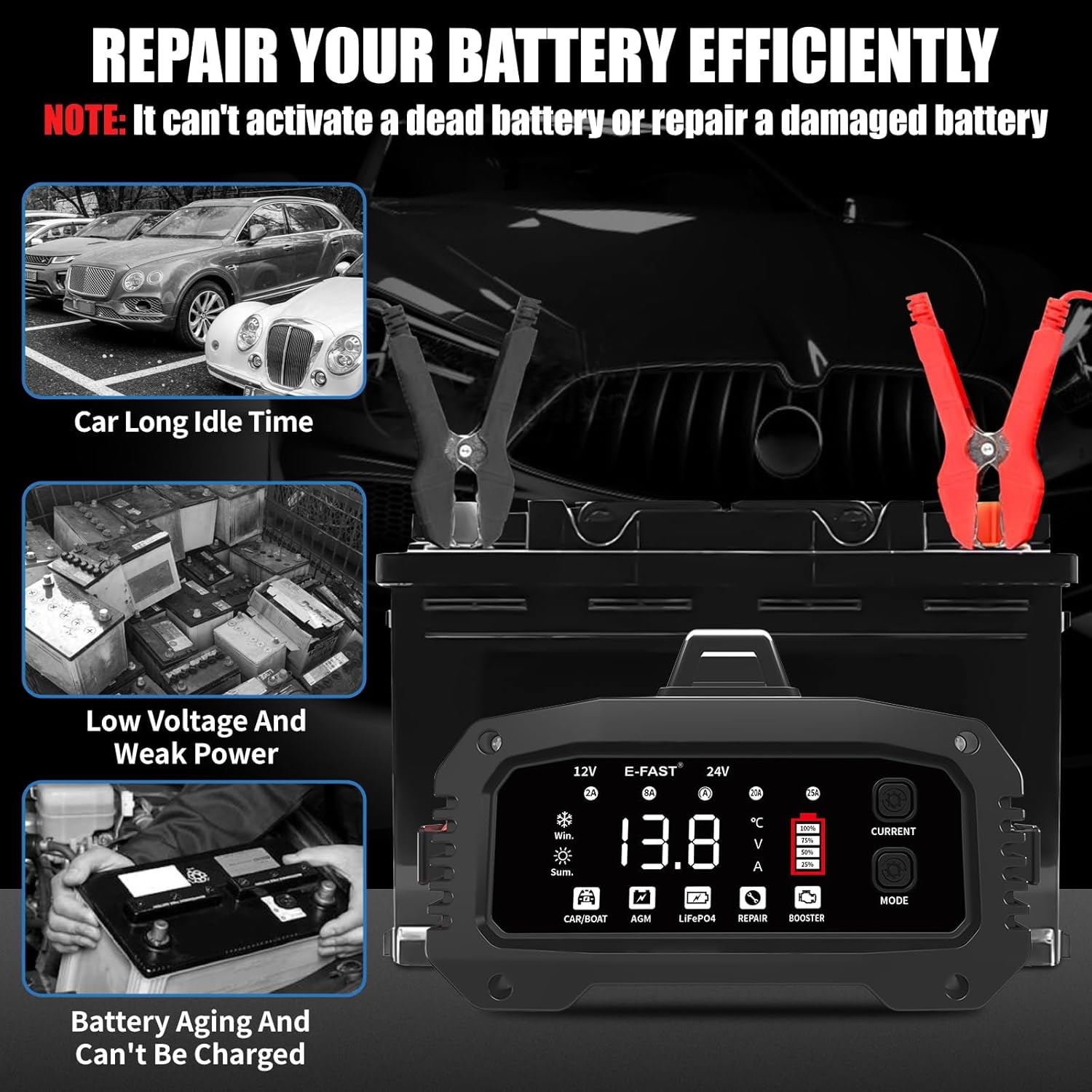
Image 5.4: The charger in Repair Mode, illustrating its function for various battery conditions.
5.5 All-Weather Protection
The charger includes built-in temperature sensors that automatically adjust charging based on ambient temperature:
- Winter Mode (<10°C): Boosts voltage for a full charge in cold weather.
- Summer Mode (>28°C): Prevents overcharging in hot conditions.
5.6 Product Video
Video 5.1: An official product video demonstrating the E-FAST TK2500 car battery charger in use, highlighting its features and connection process.
6. Maintenance
Proper maintenance ensures the longevity and reliable performance of your E-FAST TK2500 charger.
- Cleaning: Disconnect the charger from power and the battery. Wipe the exterior with a soft, dry cloth. Do not use abrasive cleaners or solvents.
- Cable Inspection: Regularly inspect the AC power cord and battery clamps for any damage, cuts, or frayed wires. Do not use the charger if any part is damaged.
- Storage: Store the charger in a cool, dry place when not in use. Utilize the integrated clips and wire storage for neat organization.
- Ventilation: Ensure the cooling fan and ventilation openings are clear of dust and debris to maintain proper heat dissipation.
7. Troubleshooting
If you encounter issues with your E-FAST TK2500 charger, refer to the following common problems and solutions:
| Problem | Possible Cause | Solution |
|---|---|---|
| Charger does not power on. | No power from outlet; loose connection. | Check power outlet, ensure AC cord is securely plugged in. |
| Charger displays "EFO" (Misconnection). | Incorrect battery clamp connection; reverse polarity. | Disconnect from power, re-check positive (+) and negative (-) connections. |
| Battery not charging or charging slowly. | Incorrect mode/current selected; deeply discharged or damaged battery. | Verify selected mode and current. Try 'REPAIR' mode for sulfated batteries. Battery may be beyond repair. |
| Booster mode not working for 24V battery. | Booster function is only for 12V batteries. | This is expected behavior. Booster mode is not available for 24V systems. |
| Charger feels hot during operation. | Normal operation, especially at high amperage; poor ventilation. | Ensure adequate ventilation around the charger. The aluminum housing and fan are designed for heat dissipation. |
If the problem persists after trying these solutions, please contact E-FAST customer support.
8. Specifications
| Specification | Detail |
|---|---|
| Model Number | TK2500 |
| Input Voltage | 100-240V AC, 50/60Hz |
| Output Voltage | 12V / 24V DC (Auto-detection) |
| Output Current (12V) | 2A, 8A, 20A, 25A (Adjustable) |
| Output Current (24V) | 15A |
| Battery Types | Lead-Acid (AGM, GEL, SLA, Flooded, EFB), LiFePO4 |
| Booster Mode | 200s countdown (12V only) |
| Repair Mode Duration | Up to 16 hours |
| Thermal Protection | Winter Mode (<10°C), Summer Mode (>28°C) |
| Dimensions | 8.5 x 4.9 x 7.5 inches |
| Item Weight | 3.7 pounds |
| Housing Material | Aluminum Alloy |
9. Warranty and Support
E-FAST products are manufactured to high-quality standards. For warranty information, technical support, or service inquiries, please refer to the contact details provided with your purchase or visit the official E-FAST website. Keep your purchase receipt as proof of purchase for warranty claims.