
Product Overview
The ANDELI MIG-205PRO MAX is a versatile 6-in-1 multi-process welding machine designed for various welding applications. It supports Aluminum Welding, Gas MIG, Flux Core MIG, Spool Gun, Lift TIG, and Stick welding. This machine features dual voltage compatibility (110V/220V) and an intuitive LED display for precise control, making it suitable for both thin and thick materials like steel, aluminum, and stainless steel.

Image: The ANDELI 205A MIG Welder with its included accessories, showcasing its compact design and various components.

Image: A collage illustrating key features of the welder, including wire feed speed, welding current, burn backtime, voltage trimming, and inductance adjustment.

Image: Visual representation of the welder's internal technology, highlighting MCU technology, IGBT inverter, cooling fan, premium feeder, and support for 2LB/10LB wires.
Safety Information
Always prioritize safety when operating welding equipment. Read and understand all safety warnings and instructions before use. Failure to follow safety guidelines can result in serious injury or death.
- Wear appropriate personal protective equipment (PPE), including a welding helmet with proper shade, welding gloves, and protective clothing to shield against sparks, heat, and UV radiation.
- Ensure adequate ventilation in the work area to avoid inhaling welding fumes, which can be hazardous.
- Keep a fire extinguisher readily available and know how to use it. Remove all flammable materials from the welding area.
- Do not operate the welder in wet conditions or damp environments to prevent electrical shock.
- Ensure proper grounding of the machine and the workpiece to prevent electrical hazards.
- Never touch live electrical parts.
Setup
Unpacking and Inspection
Carefully unpack the welder and all included accessories. Inspect all components for any signs of damage that may have occurred during shipping. If any damage is found, do not operate the machine and contact customer support.
Power Connection
The MIG-205PRO MAX is designed with dual voltage capability, automatically identifying and adapting to either a 110V or 220V input power supply. Use the appropriate power cord and adapter (if necessary) for your specific electrical outlet. Ensure the power source meets the machine's requirements.
Connecting Welding Cables
Connect the ground clamp cable to the designated terminal on the welder and securely attach the clamp to a clean, bare metal section of your workpiece. Connect the MIG torch cable or other welding accessories (such as a Lift TIG torch or electrode holder for Stick welding) to their respective terminals on the front panel of the welder. Ensure all connections are tight and secure.
Wire Feed Setup (for MIG/Flux Core)
Open the wire feed compartment. Install the appropriate welding wire spool (compatible with 2LB or 10LB sizes) according to the material you intend to weld and the chosen process (Gas MIG or Flux Core MIG). Carefully thread the wire through the feeder mechanism and into the MIG torch liner. Ensure the drive rollers are correctly sized for your wire and tensioned appropriately to prevent slipping or crushing.
Gas Connection (for Gas MIG/Lift TIG)
For Gas MIG or Lift TIG welding, connect the gas hose from your shielding gas cylinder (e.g., Argon for TIG, Argon/CO2 mix for MIG) to the gas inlet on the rear of the welder. Ensure all connections are secure and leak-free. Adjust the gas flow rate using a flowmeter attached to your gas cylinder.

Image: A welder using a spool gun, demonstrating the machine's compatibility with this accessory for aluminum welding. Note: Spool gun is not included.
Operating Instructions
Control Panel Overview
The 4.1-inch LED display provides an intuitive interface for selecting welding modes and adjusting parameters. The display offers clear visibility and allows for real-time monitoring of welding current and other settings.
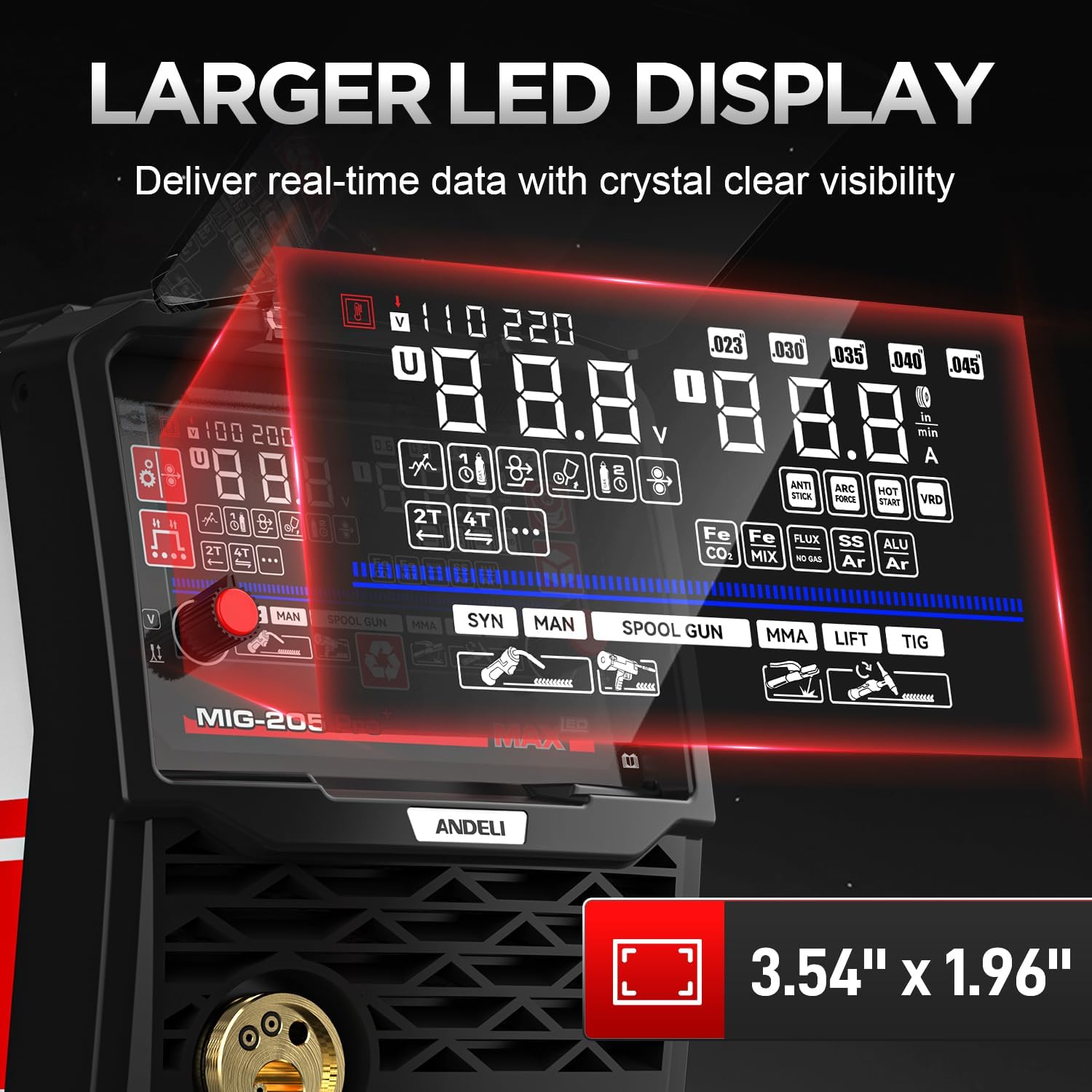
Image: A close-up view of the welder's 4.1-inch LED display, showing various indicators and control knobs for parameter adjustment.
Mode Selection
Use the control interface to select your desired welding process:
- GAS MIG: For welding with a continuous wire electrode and external shielding gas.
- FLUX MIG: For welding with flux-cored wire, which contains a fluxing agent that produces its own shielding gas, eliminating the need for an external gas cylinder.
- Spool Gun: Specifically designed for welding aluminum, utilizing a spool gun (sold separately) to feed softer aluminum wire.
- LIFT TIG: For precise TIG welding (Gas Tungsten Arc Welding), requiring an additional Lift TIG torch (sold separately) and shielding gas.
- STICK (MMA): For Manual Metal Arc welding, using consumable electrodes.
Parameter Adjustment
The machine incorporates Smart Synergic Control Technology, which automatically matches recommended voltage and wire feed speed (current) based on your selected welding mode, material, and wire type. You can fine-tune parameters for optimal results:
- Welding Current (Amperage): Adjust the output current up to 205A to suit the thickness of your material and desired penetration.
- Voltage Trimming: Fine-tune the voltage to achieve the most stable arc and desired bead profile.
- Inductance Adjustment: Modify the inductance to control the fluidity of the weld puddle and reduce spatter.
- Burn Backtime: Adjust the duration the wire continues to feed after the arc stops, preventing the wire from sticking in the weld puddle.
Welding Process
Once all parameters are set, initiate welding according to the chosen process. Maintain a consistent travel speed and arc length for uniform welds. The LED display will provide real-time current monitoring to assist in maintaining precise control during operation.
Maintenance
General Cleaning
Regularly clean the welder's exterior with a dry cloth to remove dust and debris. Pay particular attention to the transparent protection cover over the display to ensure clear visibility of settings. Keep the cooling vents clear of obstructions to maintain proper airflow.
Internal Inspection
Periodically, and with the machine unplugged, inspect internal components for dust buildup. Use clean, dry compressed air to gently clear dust from cooling fins, circuit boards, and the cooling fan. Ensure the cooling fan operates correctly and without obstruction.
Protection System
The MIG-205PRO MAX is equipped with advanced safeguards including automatic voltage compensation, over-current, overload, overheating, and over-voltage protection. If any protection system activates, the machine may temporarily cease operation. Allow the machine to cool down if overheating is indicated, or address any other detected issues (e.g., unstable power supply, excessive load) before resuming operation. These systems are designed to maximize durability and ensure reliable performance.
Troubleshooting
If you encounter issues with your ANDELI 205A MIG Welder, refer to the following general troubleshooting steps:
- No Power: Check the power cord connection, ensure the power switch is on, and verify that the circuit breaker has not tripped. Confirm the power outlet is supplying the correct voltage (110V or 220V).
- Poor Arc/Weld Quality: Verify that the welding parameters (current, voltage, wire speed) are correctly set for your specific material thickness and welding process. Ensure the workpiece is clean and free of rust, paint, or oil. Check for proper grounding and ensure the correct type and size of welding wire or electrode is being used.
- Wire Feeding Issues: Inspect the wire spool for tangles or kinks. Ensure the welding wire is correctly threaded through the drive rollers and the torch liner. Check the drive rollers for proper tension and ensure they are the correct size for your wire diameter. Clean any debris from the wire feed mechanism.
- Overheat Protection Activated: If the machine stops and an overheat indicator is displayed, allow the welder to cool down for several minutes. Ensure that the cooling vents are not blocked and the internal fan is operating. Reduce the duty cycle if welding continuously at high amperages.
For persistent issues or problems not covered here, please contact ANDELI customer support for further assistance.
Specifications
| Feature | Detail |
|---|---|
| Model | MIG-205PRO MAX |
| Input Voltage | 110V/220V Dual Voltage (Automatic Identification) |
| Welding Processes | Aluminum Welding, Gas MIG, Flux Core MIG, Spool Gun, Lift TIG, Stick (MMA) |
| Max Real Current | 205A |
| Display | 4.1 inches LED Display |
| Control Technology | Smart Synergic Control, IGBT Inverter |
| Wire Support | 2LB/10LB Wires |
| Protection Features | Automatic Voltage Compensation, Over-current, Overload, Overheating, Over-voltage Protection |
| ASIN | B0G1YDJZS2 |
| Date First Available | September 19, 2025 |
Warranty and Support
For detailed warranty information, technical support, or service inquiries regarding your ANDELI 205A MIG Welder, please refer to the warranty card or documentation included in your product packaging. You may also visit the official ANDELI website for the most up-to-date support resources and contact information. Please retain your original purchase receipt as proof of purchase for any warranty claims.