
1. Introduction and Overview
The Godox X5O is a versatile TTL wireless flash trigger designed for Olympus camera systems. It functions as both a hotshoe-mounted trigger and a 2.4GHz wireless transmitter, enabling seamless control over compatible Godox flashes, particularly when paired with the Godox iT32 mini flash (sold separately). Its magnetic quick-release design facilitates rapid transitions between on-camera and off-camera lighting setups.
Key Features:
- Hotshoe & Wireless Trigger in One: Functions as both an on-camera hotshoe and a 2.4GHz wireless trigger.
- Magnetic Quick-Release Design: Allows for fast attachment and detachment, simplifying setup changes.
- Instant Wireless Communication: Automatic recognition and pairing with the iT32 mini flash, eliminating manual channel setup.
- 2.4GHz X System Ecosystem: Compatible with a range of Godox 2.4GHz X System flashes for multi-light setups.
- AF Assist: Features an integrated LED modeling light for focus assistance.
- Wireless Power Control: Adjusts the output of the iT32 flash wirelessly.
Compatible Camera Models (when used with iT32): OM SYSTEM: E-M1, PEN-F, E-M1OI, E-PL8, E-P5, E-M1OIl; GH4, LX100, DMC-GF1, DMC-G85, DMC-GX85, DMC-LX100, DMC-FZ2500GK, S1.

Image: Top view of the Godox X5O flash trigger, showing the control buttons and the X5O model designation.
2. Setup
The Godox X5O is designed for straightforward setup, especially when used with the Godox iT32 mini flash.
- Battery Installation: The X5O comes with a nonstandard battery included. Ensure it is properly inserted.
- Mounting on Camera: Slide the X5O onto your camera's hotshoe and secure it using the locking ring.
- Connecting with iT32 Mini Flash:
- When the X5O is physically connected to the iT32 mini flash, they automatically recognize each other.
- For wireless triggering, detach the X5O from the iT32. The X5O will immediately enter trigger mode without requiring manual channel pairing.
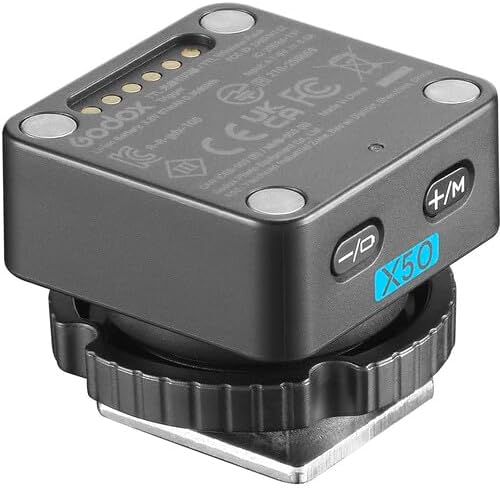
Image: Angled view of the Godox X5O flash trigger, highlighting its magnetic contact points on the base.
3. Operating Instructions
The Godox X5O offers flexible operation for various lighting scenarios.
3.1 Hotshoe and Wireless Trigger Functionality
The X5O serves a dual purpose. When mounted on the iT32 mini flash, it acts as the hotshoe for on-camera shooting. When detached, it automatically transitions into a wireless trigger, controlling the iT32 or other compatible Godox flashes.

Image: Diagram illustrating the dual functionality of the Godox X5O as both a hotshoe mount and a wireless trigger, highlighting its integration with the iT32 flash and features like wireless power control and magnetic quick-mount.
3.2 Magnetic Quick-Release
The flexible magnetic interface allows for rapid switching between on-camera use, off-camera lighting, and multi-light setups. This design eliminates the need for mechanical alignment or locking mechanisms, streamlining your workflow.
3.3 2.4GHz Wireless X System
The X5O operates within the Godox 2.4GHz X System. When used with the iT32 mini flash, it can trigger multiple Godox flashes, including models like AD100Pro II, AD200Pro II, AD600Pro II, iT30Pro, V100, V480, Lux Master, and other 2.4GHz X System units. Note that the X5O can remotely adjust the power output of the iT32, but not necessarily other non-iT32 Godox slave units directly through the X5O itself, unless they are part of a broader X System setup where the iT32 acts as a master.

Image: Illustration of the Godox 2.4G Wireless System in action, showing a photographer using the X5O and iT32 to wirelessly control an off-camera flash with a softbox.
3.4 Mode Switching and AF Assist
The X5O supports seamless switching between TTL (Through-The-Lens) and Manual flash modes. It also includes an integrated LED modeling light for AF (Autofocus) assistance in low-light conditions.
4. Maintenance
To ensure the longevity and optimal performance of your Godox X5O, follow these maintenance guidelines:
- Cleaning: Use a soft, dry cloth to clean the exterior of the trigger. Avoid using harsh chemicals or abrasive materials.
- Contact Points: Keep the hotshoe contacts and magnetic interface clean and free of dust or debris to ensure reliable connection.
- Storage: Store the X5O in a dry, cool place away from direct sunlight and extreme temperatures. If storing for extended periods, remove the battery.
- Handling: Handle the trigger with care to prevent drops or impacts, which can damage internal components.
5. Troubleshooting
If you encounter issues with your Godox X5O, refer to the following common troubleshooting steps:
- Trigger Not Firing:
- Ensure the X5O is securely mounted on the camera's hotshoe or properly detached for wireless mode.
- Verify that the battery has sufficient charge.
- Confirm that the iT32 mini flash (or other Godox X System flashes) is powered on and within range.
- If using the X5O to trigger other Godox flashes wirelessly (not the iT32), ensure those flashes were initially paired with an iT32 or another X System master unit. The X5O cannot pair with other Godox flashes directly without the iT32.
- No Wireless Communication:
- Check for any obstructions between the X5O and the receiving flash unit.
- Ensure both the X5O and the receiving flash are operating on the same 2.4GHz frequency.
- Confirm that the X5O was detached from the iT32 to activate trigger mode.
- Inconsistent Flash Output:
- Verify that the flash mode (TTL or Manual) is correctly set on both the X5O and the flash unit.
- Check for any environmental interference that might affect wireless signals.
6. Specifications
| Feature | Detail |
|---|---|
| Model Number | X5O |
| Wireless Frequency | 2.4GHz Godox X System |
| Compatibility | Olympus cameras (with iT32 mini flash), Godox 2.4GHz X System flashes |
| Functions | Hotshoe mount, Wireless Trigger, TTL, Manual, AF Assist |
| Power Source | 1 Nonstandard Battery (included) |
| Item Weight | 1.13 ounces |
| Package Dimensions | 3.82 x 2.48 x 1.14 inches |
7. Warranty and Support
For warranty information or technical support regarding your Godox X5O TTL Wireless Flash Trigger, please refer to the official Godox website or contact your authorized dealer. Keep your purchase receipt as proof of purchase for any warranty claims.
Manufacturer: Godox Manufacturer