
Product Overview
The Haulvean AI Smart Glasses integrate an HD smart camera, UV-protective photochromic sunglasses, immersive headphones, and a voice-activated AI assistant. Designed for seamless, hands-free efficiency, these glasses offer advanced features for communication, content creation, and daily tasks.
- 4-in-1 Functionality: Combines camera, sunglasses, headphones, and AI assistant.
- 4K HD Imaging & 1080P Video Stabilization: Features an 8MP HD camera for stabilized 1080p video and 32MP photos with noise reduction.
- Real-Time AI Translation: Provides voice translation for dozens of languages.
- AI Image Recognition & Voice Assistant: Instantly identifies objects, text, and landmarks, and offers personalized recommendations via an integrated ChatGPT assistant.
- Seamless Bluetooth for Music & Calls: Connects with Bluetooth 5.3 and Wi-Fi 4 for audio and calls.
- 290mAh All-Day Battery & Fast Charging: Up to 5 hours of uninterrupted use.
- Photochromic Lenses: Lenses automatically darken in sunlight and are detachable/interchangeable.
What's in the Box
- Haulvean AI Smart Glasses
- Charge Cable
- User Manual
Setup Guide
Follow these steps to connect your Haulvean AI Smart Glasses to your smartphone:
- Enable Bluetooth: Turn on Bluetooth on your smartphone.
- Download App: Scan the QR code in the user manual or search for "HeyCyan" in your device's app store (Google Play or Apple App Store). Download and install the app.
- Power On Glasses: Press and hold the front button on the glasses to power them on.
- Register Account: Open the HeyCyan app and register your account.
- Connect Device: In the app, select "Connect Device" and search for "M02S" or a similar device name. Tap to connect.
- Enjoy: Once connected, you can start using your smart glasses.

Operating Instructions
Touch Buttons and Controls
The temple arms of the smart glasses feature touch sensors and physical buttons for various functions:

- Front Physical Button:
- Photo: Single tap to take a photo.
- Call: Single tap to answer/end call; Double tap to reject call.
- Video: Double tap to start/stop recording; Single tap (during recording) to save/pause.
- Rear Physical Button:
- Flashlight: Single tap to turn ON/OFF.
- AI Chat: Long press to turn ON; Single tap (during announcement) to turn OFF.
- Music (Right Touch-Responsive Key):
- Play/Pause: Single tap.
- Previous Track: Double tap.
- Volume Down: Long press.
- Music (Left Touch-Responsive Key):
- Play/Pause: Single tap.
- Next Track: Double tap.
- Volume Up: Long press.
Key Features
Camera and Video Recording
Capture high-quality photos and stabilized videos with the integrated 8MP HD camera. The advanced noise reduction and stabilization algorithm ensure clear footage for various activities.

AI Real-Time Translation
Break down language barriers with built-in AI translation, offering real-time voice translation for numerous languages, facilitating communication in foreign countries or diverse settings.

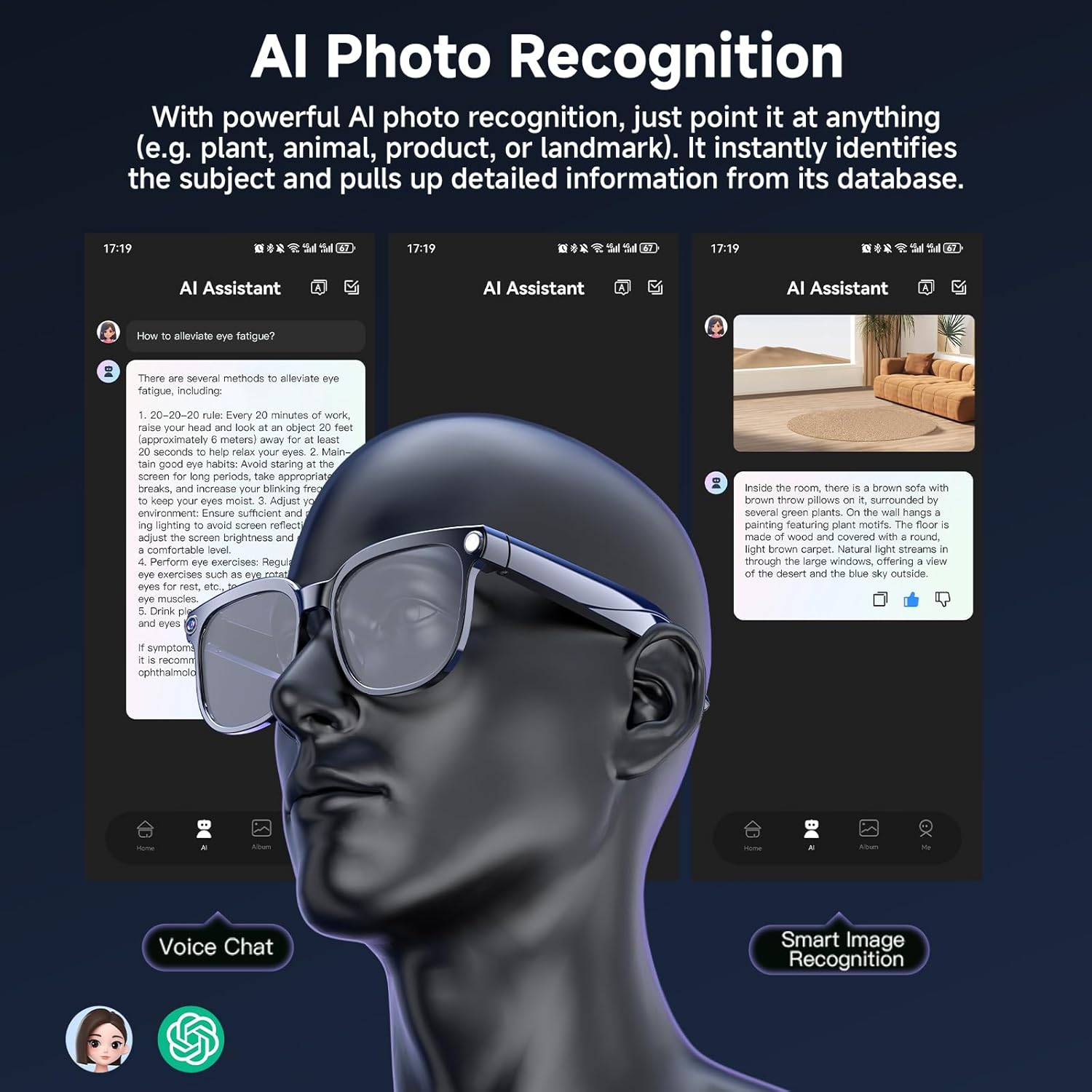
AI Image Recognition & Voice Assistant
Point, capture, and understand. Instantly identify objects, text, and landmarks by looking through your glasses. The integrated ChatGPT assistant allows you to ask follow-up questions and receive personalized recommendations.
Bluetooth Music & Calls
Connect effortlessly to your smartphone with advanced Bluetooth 5.3 and Wi-Fi 4 protocols. Enjoy immersive 3D stereo music and crystal-clear, hands-free calls while on the go.

Photochromic Lenses
The smart glasses feature photochromic lenses that automatically darken in sunlight, providing UV400 protection. They seamlessly transition from clear to tinted, offering high-performance filtration for both indoor clarity and outdoor comfort. Lenses are detachable and interchangeable for versatility.

Battery and Charging
Equipped with a 290mAh battery, these glasses provide up to 5 hours of continuous use. Fast-charging capability ensures your AI companion stays powered for your daily activities.

WiFi Wireless Transmission
Wirelessly sync photos, videos, and audio to your smartphone with one tap for easy viewing and management through the HeyCyan app.

Specifications
| Feature | Detail |
|---|---|
| Brand | Haulvean |
| Model Number | B0G1Y93HBF |
| Item Weight | 5.8 ounces |
| Package Dimensions | 6.73 x 2.36 x 2.13 inches |
| Batteries | 1 AAA batteries required (included) |
| Battery Capacity | 290 Milliamp Hours |
| Operating System | Android, iOS |
| Connectivity Technology | Bluetooth |
| Wireless Communication Standard | Bluetooth |
| Special Features | Real-time translation, AI voice assistant, AI image recognition, Camera, Music Player, Video Recording |
| Screen Size | 1 Inches |
| GPS | No GPS |

Maintenance
To ensure the longevity and optimal performance of your Haulvean AI Smart Glasses, follow these maintenance guidelines:
- Cleaning Lenses: Use a soft, lint-free cloth (preferably the one provided) to clean the lenses. Avoid abrasive materials or harsh chemicals that could scratch or damage the lens coating.
- Cleaning Frame: Wipe the frame with a soft, damp cloth. Do not submerge the glasses in water.
- Storage: Store the glasses in their protective carrying case when not in use to prevent scratches and damage.
- Charging: Use only the provided charging cable. Ensure the charging contacts are clean and dry before connecting.
- Avoid Extreme Temperatures: Do not expose the glasses to extreme heat or cold, as this can affect battery life and electronic components.
Troubleshooting
If you encounter any issues with your Haulvean AI Smart Glasses, refer to the following common troubleshooting tips:
- Glasses not powering on: Ensure the glasses are fully charged. Connect them to the charger and wait a few minutes before attempting to power on again.
- Unable to connect via Bluetooth: Make sure Bluetooth is enabled on your smartphone and the glasses are in pairing mode. Restart both devices and try connecting again. Ensure the HeyCyan app is open and attempting to connect.
- Poor audio quality: Check the volume settings on both the glasses and your connected smartphone. Ensure the glasses are positioned correctly on your face.
- Camera/Video not working: Ensure the glasses are powered on and have sufficient battery. Check the HeyCyan app for any error messages or to initiate recording/photo capture.
- App not recognizing glasses: Close and reopen the HeyCyan app. Ensure Bluetooth is active and the glasses are powered on and discoverable.
For further assistance, please refer to the full user manual or contact customer support.
Warranty and Support
Your Haulvean AI Smart Glasses come with a manufacturer's warranty. Please refer to the warranty card included in your product packaging for specific terms and conditions. For technical support, product inquiries, or warranty claims, please visit the official Haulvean website or contact their customer service department through the contact information provided in your user manual.