
1. Introduction
This manual provides essential information for the safe and efficient operation, installation, and maintenance of your MACAP Supra 83 On-Demand Commercial Coffee Grinder. Please read all instructions carefully before using the appliance and retain this manual for future reference.
The MACAP Supra 83 is a professional-grade coffee grinder designed for high-volume commercial environments, featuring 83 mm flat burrs, a powerful 750 W motor, and advanced grinding technologies like CTS (Coffee Targeting System) and FOS (Fast Opening System).
2. Safety Information
WARNING: Failure to follow these safety instructions may result in electric shock, fire, or serious injury.
- Ensure the grinder is connected to a grounded power outlet with the correct voltage as specified on the rating label.
- Do not immerse the grinder, power cord, or plug in water or other liquids.
- Keep hands and utensils out of the bean hopper and grinding chamber during operation.
- Unplug the grinder from the power outlet before cleaning, maintenance, or when not in use.
- Do not operate the grinder with a damaged cord or plug, or if the appliance malfunctions or has been damaged in any manner.
- This appliance is intended for grinding roasted coffee beans only. Do not grind other substances.
- Ensure the hopper lid is securely in place during operation.
3. Product Overview
The MACAP Supra 83 is engineered for precision and durability in demanding commercial settings. Key components and features include:
- 83 mm Flat Burrs: Hardened steel burrs designed for uniform grind size and optimal flavor extraction.
- 750 W Motor: Powerful and efficient motor for high-volume output, up to 6 g/s.
- 3.5" HMI Touchscreen Interface: Intuitive control for dose modes, settings, and maintenance.
- CTS (Coffee Targeting System): An innovative dispensing spout that regulates ground coffee flow for centered distribution in the portafilter.
- FOS (Fast Opening System): A quick-release system allowing easy access to burrs for cleaning and maintenance without tools.
- 1.5 kg Hopper: Large capacity hopper suitable for professional usage.
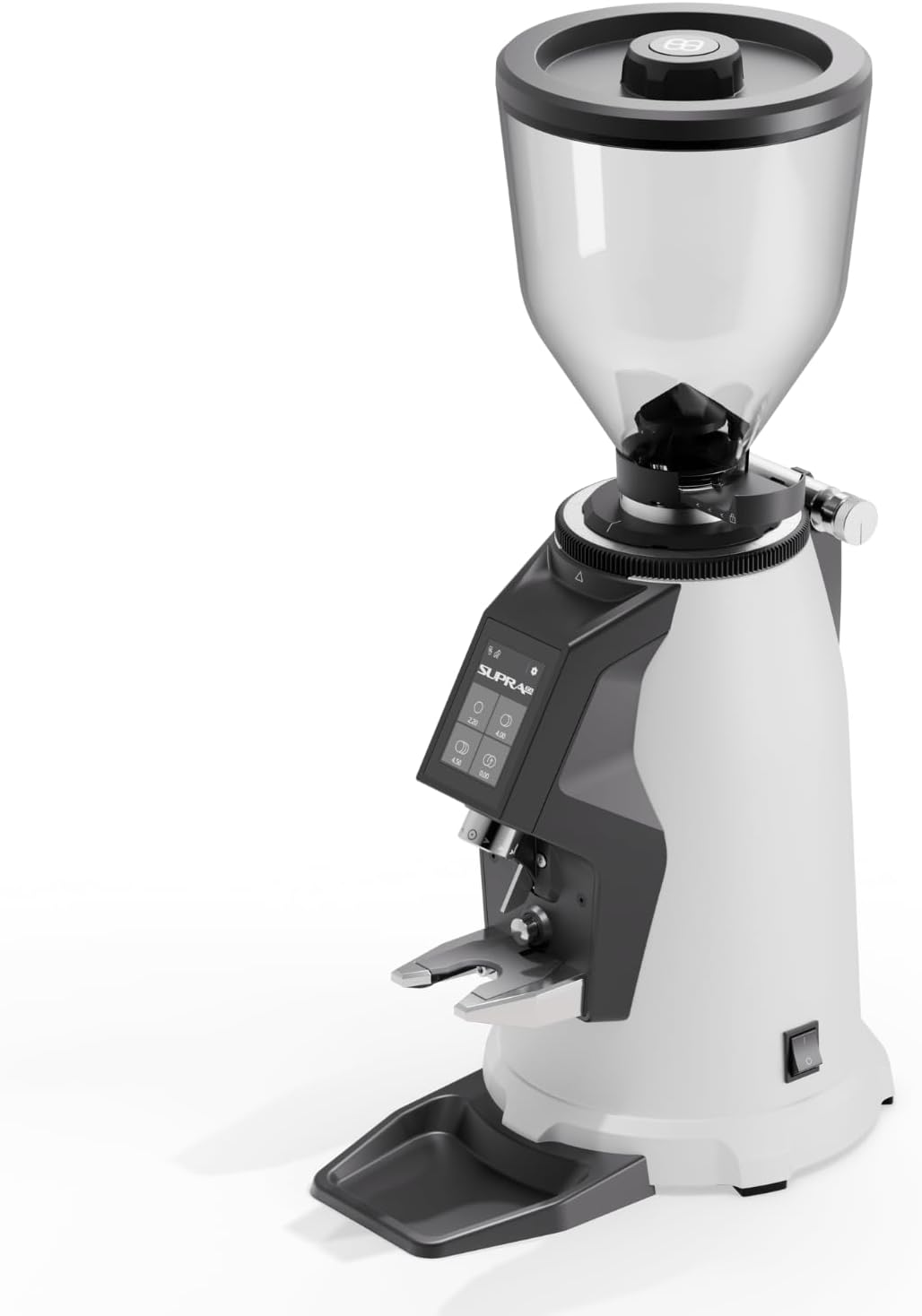
Image 3.1: Front view of the MACAP Supra 83 Commercial Coffee Grinder in white.

Image 3.2: Illustration of the Fast Opening System (FOS), HMI Touchscreen Interface, and Coffee Targeting System (CTS).
4. Setup
- Unpacking: Carefully remove the grinder from its packaging. Retain all packaging materials for future transport or storage. Inspect the grinder for any signs of damage.
- Placement: Place the grinder on a stable, level surface. Ensure adequate ventilation around the unit.
- Hopper Installation: Insert the bean hopper into its designated slot on top of the grinder. Rotate to lock it into position. Ensure the hopper slide gate is closed before filling with beans.
- Power Connection: Connect the power cord to the grinder and then plug it into a suitable grounded electrical outlet. Verify that the voltage matches the grinder's specifications.
- Initial Grind Setting: Before adding beans, turn the grind adjustment collar to a coarse setting. This prevents burr damage if the burrs are too close together.
5. Operating Instructions
5.1 Filling the Hopper
Open the hopper slide gate, then fill the hopper with fresh, roasted coffee beans. Close the hopper lid securely to maintain bean freshness and prevent foreign objects from entering.
5.2 Adjusting Grind Size
The grind size is adjusted by rotating the adjustment collar located below the hopper. A finer grind is achieved by turning the collar clockwise, and a coarser grind by turning it counter-clockwise. Make small adjustments and test the grind to find the desired consistency for your brewing method.

Image 5.1: Adjusting the grind setting using the collar.
5.3 Using the Touchscreen Interface (HMI)
The 3.5" HMI touchscreen allows for intuitive control over grinding operations:
- Dose Modes: Select between single dose, double dose, or continuous grinding modes.
- Programming: Program specific grind times for precise dosing. Refer to the on-screen menu for detailed programming steps.
- Barista Mode: Engage Barista Mode for manual control over grinding duration.
- Maintenance Settings: Access settings for burr replacement reminders and other maintenance alerts.

Image 5.2: Visual guide for grind adjustment, touchscreen operation, and coffee dispensing into a portafilter.
5.4 Grinding Coffee
Place your portafilter or container under the dispensing spout. Select the desired dose mode on the touchscreen. The grinder will automatically dispense the programmed amount of coffee. For manual control, use Barista Mode.
6. Maintenance
Regular cleaning and maintenance ensure optimal performance and longevity of your grinder.
6.1 Daily Cleaning
- Exterior: Wipe down the exterior surfaces with a damp cloth. Do not use abrasive cleaners or solvents.
- Drip Tray: Remove and empty the drip tray regularly. Wash with warm, soapy water and dry thoroughly.
- Dispensing Spout: Use a brush to clear any accumulated coffee grounds from the dispensing spout.
6.2 Burr Cleaning (Using FOS)
The Fast Opening System (FOS) allows for quick and easy access to the burrs for cleaning:
- Unplug: Ensure the grinder is unplugged from the power source.
- Empty Hopper: Remove any remaining coffee beans from the hopper.
- Activate FOS: Follow the instructions on the grinder or refer to the engraved adjustment ring for the quick-release mechanism. This typically involves a single movement to disengage the gear wheel and open the burrs.
- Clean Burrs: Use a stiff brush or a vacuum cleaner to remove all coffee grounds from the burrs and grinding chamber. Do not use water.
- Reassemble: Carefully reassemble the burr assembly, ensuring all components are correctly aligned and secured.
7. Troubleshooting
| Problem | Possible Cause | Solution |
|---|---|---|
| Grinder does not turn on | No power supply; Power switch off; Safety fuse tripped | Check power cord connection; Ensure power switch is ON; Check circuit breaker/fuse |
| No coffee grinding | Hopper empty; Hopper slide gate closed; Burrs clogged | Fill hopper with beans; Open hopper slide gate; Clean burrs (refer to Section 6.2) |
| Inconsistent grind | Burrs worn; Grind setting too coarse/fine; Foreign object in burrs | Inspect/replace burrs; Adjust grind setting; Clean burrs thoroughly |
| Grinder motor stalls | Overload; Foreign object; Burrs set too fine | Reduce load; Remove foreign object; Adjust grind setting coarser |
8. Specifications
| Feature | Specification |
|---|---|
| Model | Supra 83 |
| Burr Type | Flat |
| Burr Diameter | 83 mm |
| Motor Power | 550–750 W |
| Output | Up to 6 g/s |
| Hopper Capacity | 1.5 kg |
| Material | Stainless Steel |
| Item Weight | 30 Pounds (approx. 13.6 kg) |
| Dimensions (L x W x H) | 13.9"L x 9.6"W x 25.1"H (approx. 35.3 cm L x 24.4 cm W x 63.8 cm H) |
| Included Components | 1.5 kg Hopper |
9. Warranty and Support
MACAP products are manufactured to high-quality standards. For specific warranty terms and conditions, please refer to the warranty card included with your product or contact your authorized MACAP dealer. Keep your proof of purchase for warranty claims.
For technical support, spare parts, or service, please contact your local distributor or visit the official MACAP website for contact information.