
1. Introduction
Thank you for choosing the iGarden Pool Cleaner K40. This robotic pool vacuum is designed to provide efficient and autonomous cleaning for both inground and above-ground pools. It features advanced navigation, multiple cleaning modes, and user-friendly controls to ensure a sparkling clean pool with minimal effort. Please read this manual thoroughly before operating the device to ensure proper usage and maintenance.
2. What's in the Box
Carefully unpack the contents and ensure all items are present and undamaged. If any items are missing or damaged, please contact iGarden customer support.
- iGarden Pool Cleaner K40 Unit
- AC Power Adapter
- User Manual (this document)
- Retrieval Hook (pole not included, compatible with standard 1¼" (32 mm) poles)

Image: The iGarden Pool Cleaner K40 unit, AC power adapter, user manual, and retrieval hook as packaged in the box.
3. Setup and Initial Use
3.1 Charging the Unit
- Ensure the pool cleaner is dry before charging.
- Connect the AC power adapter to the charging port on the cleaner.
- Plug the adapter into a standard electrical outlet.
- The indicator lights on the cleaner will show the charging status. A full charge can provide up to 4 hours of runtime for floor cleaning or 2.5 hours for full pool coverage.
3.2 App Connection (Optional)
For enhanced control and features, download the iGarden Robotics App from your device's app store. Connect the cleaner via 2.4GHz Wi-Fi or Bluetooth before placing it in the water. App setup works only when the unit is on land, as there is no signal underwater.

Image: A smartphone showing the iGarden Robotics App, which allows for mode control, OTA updates, and access to live support.
3.3 Placing the Cleaner in the Pool
Once charged, gently lower the iGarden K40 into the pool. Ensure it is fully submerged and air bubbles have escaped before starting a cleaning cycle.
4. Operating the Pool Cleaner
4.1 Touchscreen Control
The iGarden K40 features an intuitive full-screen touchscreen interface. Use it to select cleaning modes, set AI timers, and initiate cleaning cycles.
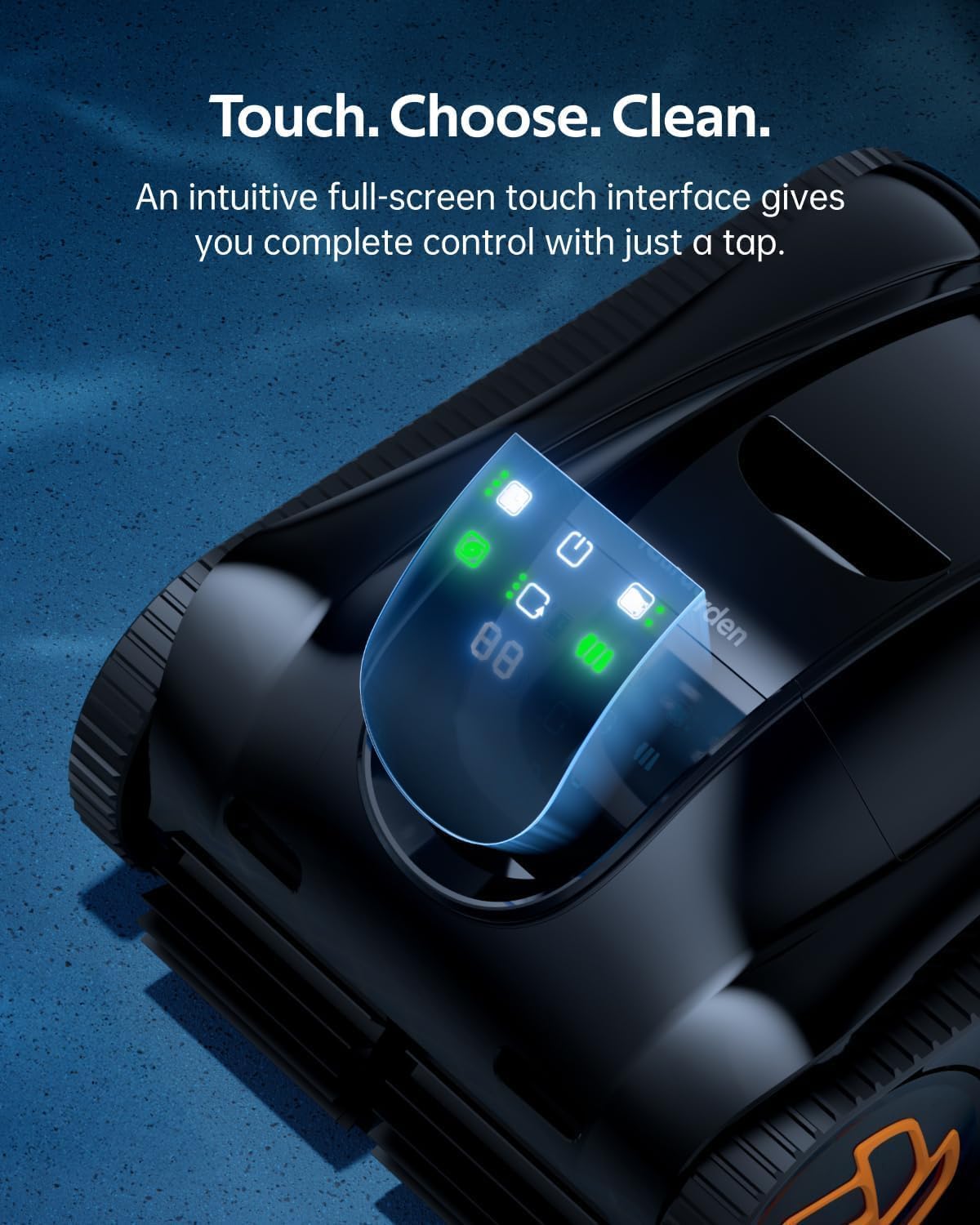
Image: The touchscreen on the iGarden K40, showing options for selecting cleaning modes and activating features.
4.2 Cleaning Modes
The K40 offers various cleaning modes to suit your pool's needs:
- Floor Cleaning: Focuses on cleaning the pool floor.
- Full Pool Coverage: Cleans the floor, walls, and waterline.
- Turbo 200% Mode: Activates peak suction for dense debris, leaves, and stains.
The cleaner utilizes advanced 3D S-shaped path planning technology for comprehensive coverage, adapting to pool shapes and terrains including steps and slopes.

Image: The iGarden K40 robotic pool cleaner navigating and climbing a pool wall, illustrating its pathfinding technology.
4.3 Auto-Parking and Retrieval
When the battery is low, the K40 automatically parks itself along the pool wall for easy retrieval. Use the provided hook (attached to a standard pole, not included) to lift the cleaner out of the water. The unit automatically drains water for lighter handling.

Image: The iGarden K40 being lifted from the pool using the retrieval hook, showcasing its auto-parking and easy handling design.
5. Maintenance
5.1 Cleaning the Debris Basket
The iGarden K40 is equipped with a 4L top-load debris basket with a 180µm mesh, designed to trap fine debris, leaves, and hair. Regular cleaning of the basket is essential for optimal performance.
- After each cleaning cycle, remove the cleaner from the pool.
- Open the top cover and remove the debris basket.
- Empty the collected debris into a waste bin.
- Rinse the basket thoroughly with a hose to remove any remaining particles.
- Ensure the basket is clean and dry before reinserting it into the cleaner.

Image: The large 4L debris basket of the iGarden K40, shown removed from the unit and filled with various pool debris like leaves, hair, twigs, gravel, and sand.
5.2 Long-Term Storage
If storing the cleaner for an extended period, ensure it is fully charged, clean, and dry. Store it in a cool, dry place away from direct sunlight.
6. Troubleshooting
If you encounter issues with your iGarden Pool Cleaner K40, refer to the following common solutions:
| Problem | Possible Cause | Solution |
|---|---|---|
| Cleaner does not start | Low battery; Power button not pressed; Unit not fully submerged. | Charge the unit; Press and hold the power button; Ensure unit is fully underwater. |
| Poor cleaning performance | Debris basket full; Impeller blocked; Brushes worn. | Clean debris basket; Check and clear impeller; Inspect and replace brushes if necessary. |
| Cleaner gets stuck or doesn't climb walls | Low battery; Excessive algae on pool surface; Obstruction. | Recharge the unit; Brush pool walls manually; Remove any large obstructions. |
| App connectivity issues | Wi-Fi/Bluetooth off; Unit underwater; Incorrect network. | Ensure Wi-Fi/Bluetooth is on; Connect app only when unit is on land; Verify 2.4GHz Wi-Fi network. |
If the problem persists, please contact iGarden customer support for assistance.
7. Specifications
| Feature | Detail |
|---|---|
| Model Name | K40 (K Series) |
| Brand | iGarden |
| Product Dimensions | 19.25"L x 15.31"W x 9.45"H (48.9 x 38.9 x 24 cm) |
| Item Weight | 28.7 pounds (13 kg) |
| Power Source | Battery Powered |
| Battery Type | Nonstandard Battery (1 included) |
| Lithium Battery Energy Content | 192 Watt Hours |
| Number of Lithium-ion Cells | 21 |
| Battery Weight | 1.8 Kilograms |
| Runtime (Floor Cleaning) | Up to 4 hours |
| Runtime (Full Pool Coverage) | Up to 2.5 hours |
| Suction Power | Up to 5810 GPH |
| Debris Basket Capacity | 4 Liters (180µm mesh) |
| Manufacturer | YITUO ELECTRIC CO., LTD |
8. Warranty and Support
The iGarden Pool Cleaner K40 comes with a 3-year full replacement warranty, ensuring peace of mind. iGarden is committed to providing reliable after-sales service.
- Warranty: 3-Year Full Replacement Warranty.
- Return Policy: 30-day free return guarantee for any reason.
- Customer Support: 24/7 in-app support via email, phone, and live chat.
- Software Updates: Lifetime OTA (Over-The-Air) updates to enhance performance and features.
For any questions or assistance, please utilize the in-app support features or visit the official iGarden website.

Image: A graphic illustrating iGarden's commitment to customer care, highlighting a 3-year full replacement warranty and 24/7 call center support.


