
1. Introduction
The DATOUBOSS 11KW Hybrid Solar Inverter is a sophisticated power management system designed for both on-grid and off-grid solar applications. It features a pure sine wave output, ensuring stable and high-quality AC power for various electronic devices. Equipped with two integrated 150A MPPT solar charge controllers, it efficiently converts 48V DC to 230V AC. This inverter supports parallel operation for up to 9 units, allowing for scalable power solutions. An integrated WiFi module enables real-time system monitoring and data analysis.

Figure 1: DATOUBOSS 11KW Hybrid Solar Inverter with included WiFi module.

Figure 2: Key features of the DATOUBOSS 11000W Hybrid Solar Inverter, highlighting 48V DC to 220V/230V AC conversion, parallel operation, 160A MPPT controller, and BMS support.
2. Safety Instructions
- Ensure all electrical connections are made by qualified personnel.
- Do not attempt to open or repair the inverter yourself. Refer to authorized service personnel.
- Install the inverter in a well-ventilated area, away from flammable materials and direct sunlight.
- Verify correct voltage and current ratings for all connected components (solar panels, batteries, loads).
- Always disconnect power before performing any maintenance or wiring.
3. Product Overview
3.1 Appearance and Components
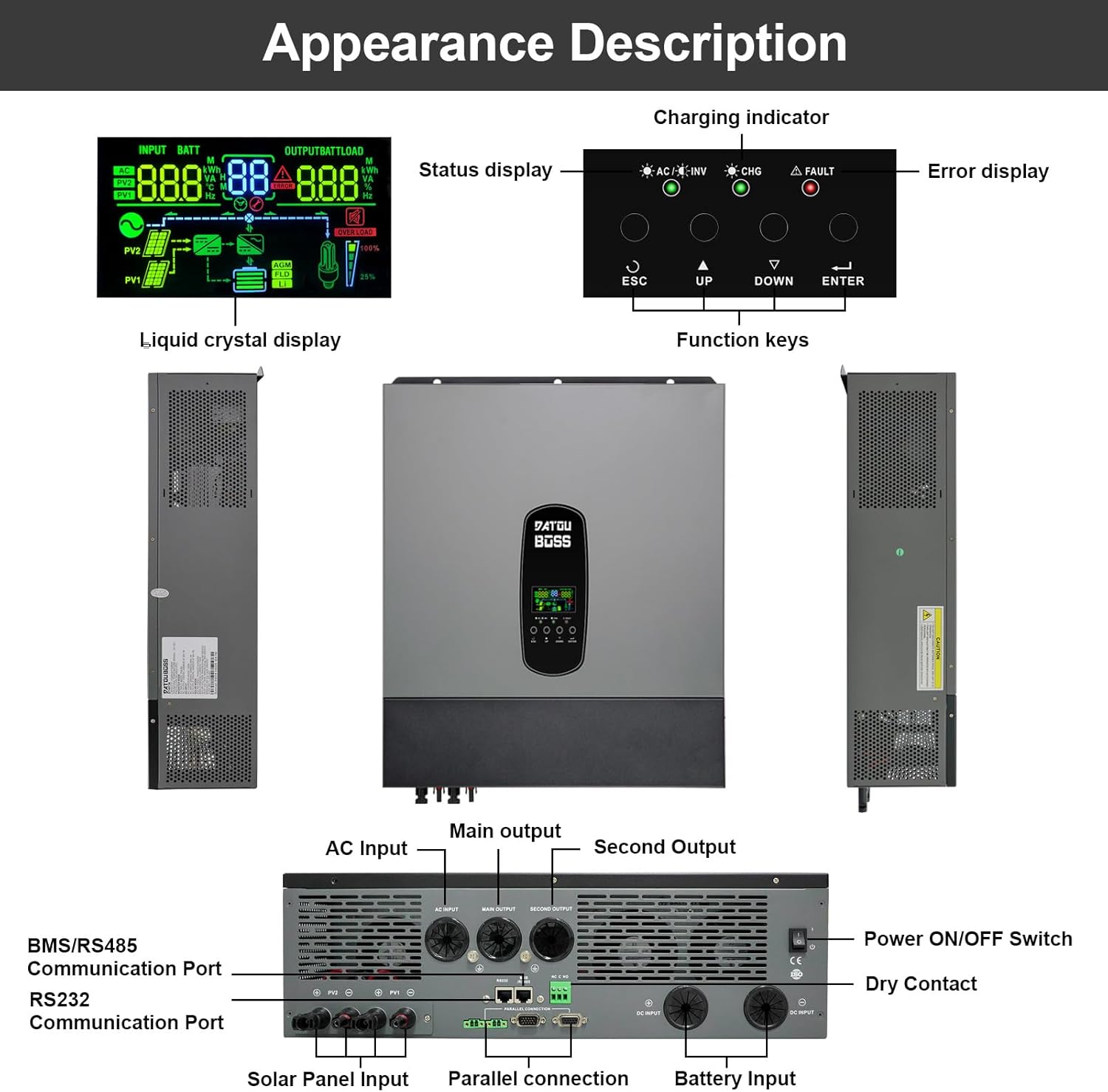
Figure 3: Front and rear view of the inverter, detailing the LCD, function keys, and various connection ports.
The inverter features a liquid crystal display (LCD) for real-time status and data, along with function keys for navigation. Key connection points include:
- AC Input: For connecting to the utility grid.
- Main Output & Second Output: For connecting to electrical loads.
- BMS/RS485 Communication Port: For battery management system integration.
- RS232 Communication Port: For data communication.
- Solar Panel Input: For connecting photovoltaic arrays.
- Parallel Connection: For connecting multiple inverters in parallel.
- Battery Input: For connecting to the battery bank.
- Power ON/OFF Switch: Main power control.
- Dry Contact: For external control signals.
3.2 LCD Display and Function Keys
The LCD provides visual feedback on system operation, including charging indicators, status, and error messages. The function keys (ESC, UP, DOWN, ENTER) allow users to navigate menus and configure settings.
3.3 WiFi Module
The inverter includes a WiFi module for remote monitoring and data logging. This module allows users to view power statistics and system analytics even when not directly connected to the inverter. The module connects via a dedicated port, typically an RJ45 interface.

Figure 4: The included WiFi module for remote monitoring.
The WiFi module has a unique ID: 53566876275216755365 and MAC address: 74E9D81C1E1E.
4. Setup and Installation
4.1 Wiring Connections
Carefully connect the solar panels, battery bank, AC input (grid), and AC output (loads) to the designated terminals on the inverter. Ensure all connections are secure and correctly polarized. Refer to the wiring diagram in Figure 3 for port locations.
4.2 Parallel Operation
The DATOUBOSS 11KW Hybrid Solar Inverter supports parallel operation of up to 9 units to increase total power output. Follow the specific communication and power wiring diagrams provided in the full installation guide for multi-unit setups.

Figure 5: Diagram illustrating parallel connection for two and three inverters, including communication wiring.
4.3 Initial Configuration
Upon initial power-up, use the LCD and function keys to configure essential settings. This includes setting the input voltage range suitable for your household appliances or personal computers, and defining the AC/solar charger priority.
5. Operating Modes
The inverter offers various operating modes to optimize power usage and battery charging.
5.1 Charging Modes
There are four distinct charging modes available:
- Priority of the Mains Power Supply: If mains power is available, the battery is charged using solar energy.
- Solar Priority: Charging with solar energy has priority. If no solar power is available, the battery is charged via the power grid.
- Mixed Loading: Solar and mains power can charge the battery at the same time.
- Solar Only: The battery can only be recharged using solar energy.
5.2 Charge Output Working Modes
Three charge output working modes determine the power source priority for connected loads:
- Netz (Utility Priority): The mains current has priority over the load (default).
- Solar (Solar Priority): Solar power has priority, followed by battery, then grid power for the consumer.
- SBU (Solar-Battery-Utility): Solar power is prioritized, then battery. If battery voltage drops below a set point, the grid supplies power.

Figure 6: Visual representation of the four charging modes and three charge output working modes.
6. Maintenance
- Regular Cleaning: Keep the inverter's ventilation openings clear of dust and debris to ensure proper airflow and prevent overheating.
- Battery Management: The inverter's integrated features help manage battery charging and discharging cycles to prolong battery life. Ensure batteries are maintained according to their manufacturer's guidelines.
- Connection Checks: Periodically inspect all electrical connections for tightness and signs of corrosion.
- Firmware Updates: Check the manufacturer's website for any available firmware updates for improved performance or new features.
7. Troubleshooting
The DATOUBOSS 11KW Hybrid Solar Inverter is equipped with comprehensive protection functions to ensure safe operation. If an issue arises, the LCD will display relevant indicators or error codes.
- Common Protections: Short-circuit protection, overcurrent protection, overvoltage protection, undervoltage protection, overheating protection, and overload protection.
- No Power Output: Check the main ON/OFF switch, battery connections, and AC output circuit breakers.
- No Solar Charging: Verify solar panel connections, ensure sufficient sunlight, and check MPPT settings.
- Error Codes: Consult the detailed error code list in the complete product manual (if available) or contact customer support with the displayed code.
8. Specifications

Figure 7: Product label showing detailed technical specifications. Serial: 20241020 0476.
| Feature | Specification |
|---|---|
| Brand | DATOUBOSS |
| Model Number | DT4811B |
| Power Capacity | 11 KW (11000VA/11000W) |
| Voltage | 48 Volts DC input, 230 Volts AC output |
| Weight | 19.19 Kilograms |
| Operating Temperature Range | -10°C to 50°C |
| Protection Degree | IP21 |
| DC Input (Inverter Mode) | 48VDC, 254.6A |
| AC Output (Inverter Mode) | 230VAC, 50/60Hz, 47.8A, 1Φ |
| AC Charger Current | 54VDC, 150A |
| AC Input (Charger) | 230VAC, 50/60Hz, 60A, 1Φ |
| Solar Panel Power (Max) | 2 x 5500W |
| Max Charging Current (MPPT) | 150A |
| Solar Voltage Range (Vmp) | 300-500VDC |
| Max Solar Voltage | 500VDC |
| Parallel Operation | Up to 9 units |
| Output Waveform | Pure Sine Wave |
| Communication | BMS/RS485, RS232, WiFi Module |
9. Warranty and Support
DATOUBOSS provides comprehensive support for its products.
- Warranty: This product comes with a 5-year guarantee.
- Customer Support: Professional 24-hour customer service is available to assist with any product-related inquiries.
- Contact: For questions or support, please contact DATOUBOSS customer service.

Figure 8: Overview of DATOUBOSS product support and warranty information.
10. Applications
The DATOUBOSS 11KW Hybrid Solar Inverter is versatile and suitable for a wide range of applications, providing reliable power in various scenarios.

Figure 9: Examples of applications including photovoltaic grid-connected power generation, off-grid power generation, household appliances, commercial offices, communication base stations, and outdoor/RV use.
- Residential Use: Powering household appliances like stoves, rice cookers, lamps, TVs, and fans.
- Mobile Applications: Ideal for RVs and camping boats.
- Emergency Power: Provides continuous power during outages.
- Commercial & Industrial: Suitable for commercial offices and communication base stations.


