
Introduction
Thank you for choosing the Bextgoo Mini Spy Camera 4K, Model ESW106. This compact and versatile camera is designed for various surveillance needs, offering 4K Ultra HD video, advanced night vision, and multiple connection modes. This manual will guide you through the setup, operation, and maintenance of your device to ensure optimal performance.
Package Contents
Please verify that all items are present in your package:
- 1 x Bextgoo Mini Security Camera
- 1 x 64GB Memory Card (pre-installed)
- 1 x Camera Bracket
- 1 x User Manual
Product Overview
The Bextgoo Mini Spy Camera ESW106 is designed for discreet and effective surveillance. It features a compact form factor, making it suitable for various indoor and outdoor applications. The camera includes a lens, infrared LEDs for night vision, a power button, a mode button, a charging port, and a TF card slot.
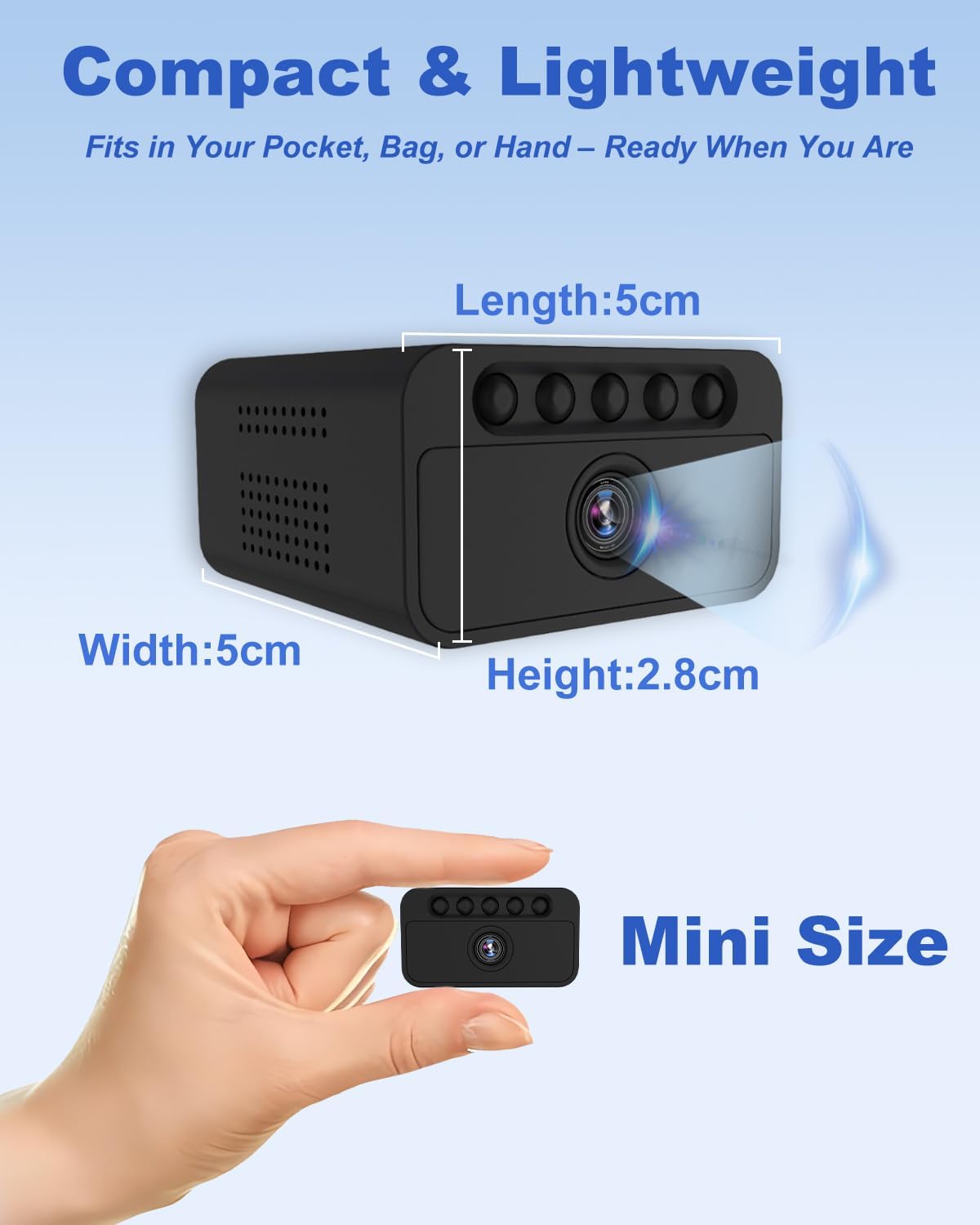
Image: The Bextgoo Mini Spy Camera ESW106, highlighting its compact dimensions (Length: 5cm, Width: 5cm, Height: 2.8cm) and small size compared to a hand.
Setup
1. Charging the Camera
Before first use, fully charge the camera using the provided USB cable and a standard 5V USB power adapter. The camera features a 1500 mAh battery and can record while charging, ensuring continuous operation.

Image: The Bextgoo Mini Spy Camera ESW106 with an illustration of its 1500 mAh rechargeable battery, indicating its capability for extended operation and charging while recording.
2. Inserting the Memory Card
The camera comes with a 64GB TF (Micro SD) card pre-installed. If you need to replace it or upgrade, ensure the camera is powered off before inserting or removing the card. The camera supports up to 128GB TF cards.

Image: The Bextgoo Mini Spy Camera ESW106 showing the TF card slot with a 64GB memory card inserted, indicating it's ready for use. It also shows an icon for optional cloud storage.
3. Mounting Options
The camera offers flexible installation without the need for drilling. Choose the method that best suits your environment:
- Desktop Placement: Simply place the camera on any flat surface.
- Adhesive Mounting: Use the included adhesive to attach the camera to a clean, flat surface.
- Wall/Ceiling Mounting: Utilize the provided bracket for secure attachment to walls or ceilings.
- Adjustable Stand Mounting: Attach the camera to an adjustable stand for versatile positioning.

Image: Demonstrates four smart mounting options for the Bextgoo Mini Spy Camera ESW106, including desktop, adhesive, wall/ceiling, and adjustable stand placements, highlighting its versatility without drilling.
Operating the Camera
Connection Modes
The Bextgoo Mini Spy Camera offers three distinct connection modes to suit various surveillance scenarios:
- WiFi Mode: Connect the camera to your home or office WiFi network for remote viewing via the dedicated mobile application. This mode is ideal for continuous home security, baby monitoring, or pet surveillance from anywhere.
- Hotspot Mode: The camera generates its own WiFi hotspot, allowing direct connection with your smartphone or tablet without an internet connection. This is suitable for nearby viewing in locations like garages, outdoor spots, or during travel where external WiFi is unavailable.
- Offline Mode: In this mode, the camera records video directly to the installed TF card without any WiFi connection. This is perfect for remote areas or situations where internet access is not possible, ensuring recordings are stored locally.

Image: Visual representation of the camera's three connection modes: WiFi for remote access, Hotspot for direct local connection, and Offline for recording to the SD card without internet.
App Control and Features
When operating in WiFi or Hotspot mode, you can manage the camera and access its features through the mobile application. The app provides comprehensive control and real-time monitoring capabilities:
- Video Recording: Start and stop video recording.
- Screenshot: Capture still images from the live feed.
- Night Vision Control: Toggle night vision on/off or set to automatic.
- Motion Detection: Receive real-time notifications upon detecting movement (in WiFi mode).
- Real-Time Surveillance: View live video feed from your device.
- Multi-User Access: Share camera access with authorized users.
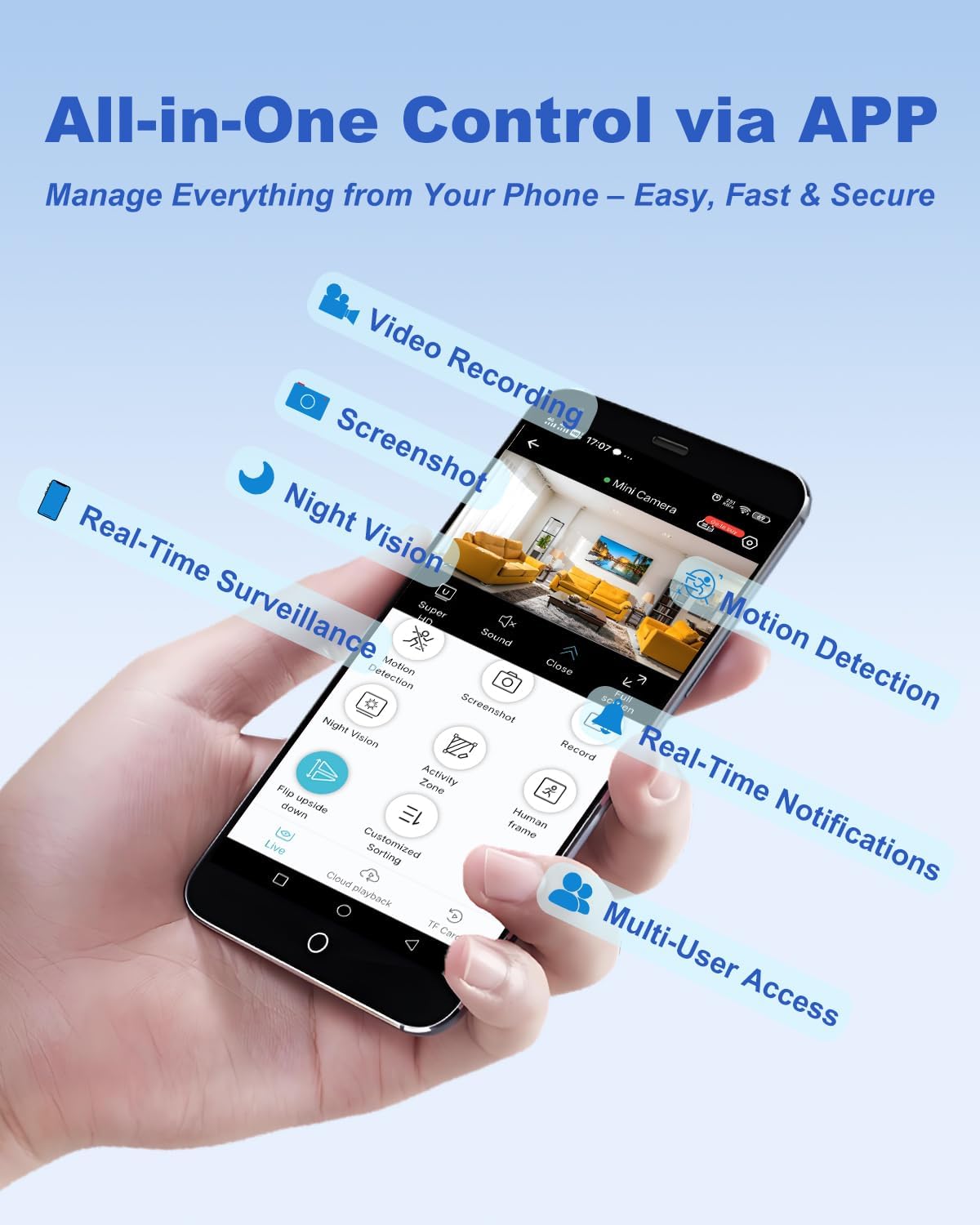
Image: A smartphone displaying the camera's control application, illustrating various functions such as video recording, screenshots, night vision, motion detection, and real-time notifications.
Video Quality and Night Vision
The camera records in 4K Ultra HD resolution with a 150° wide-angle lens, capturing clear and detailed footage. For low-light conditions, it utilizes 5 powerful 940nm invisible infrared LEDs, providing clear night vision up to 10 meters without any visible red glow.

Image: A comparison demonstrating the clarity of 4K Ultra HD video from the Bextgoo camera against a standard 2K camera, emphasizing sharp details and a wider field of view.

Image: A visual comparison illustrating the effectiveness of the Bextgoo camera's 940nm invisible IR night vision, providing clear images in total darkness without a red glow, compared to a standard IR camera.
Maintenance
To ensure the longevity and optimal performance of your Bextgoo Mini Spy Camera, follow these maintenance guidelines:
- Cleaning: Use a soft, dry cloth to clean the camera lens and body. Avoid using liquid cleaners or abrasive materials.
- Battery Care: For best battery life, avoid fully discharging the battery frequently. Charge the camera regularly, especially if it will be stored for an extended period.
- Storage: Store the camera in a cool, dry place away from direct sunlight and extreme temperatures.
- Firmware Updates: Check the manufacturer's website or the mobile application periodically for any available firmware updates to improve performance and add new features.
Troubleshooting
If you encounter issues with your camera, refer to the following common problems and solutions:
| Problem | Possible Cause | Solution |
|---|---|---|
| Camera not turning on | Low battery; Power button not pressed correctly | Charge the camera fully. Press and hold the power button for a few seconds. |
| Cannot connect to WiFi/Hotspot | Incorrect WiFi password; Camera too far from router/device; Interference | Ensure correct password. Move camera closer to router/device. Reduce interference. Reset camera and try again. |
| No recording to SD card | SD card full or corrupted; SD card not inserted correctly; Camera in wrong mode | Format the SD card (backup data first). Reinsert the SD card. Ensure camera is in Offline or recording mode. |
| Poor night vision quality | Lens obstruction; Insufficient ambient light for IR; IR LEDs malfunction | Clean the lens. Ensure no objects are blocking the IR LEDs. Contact support if issue persists. |
| Short battery life | Frequent use of power-intensive features (e.g., continuous recording, WiFi streaming); Old battery | Reduce continuous recording time. Use power-saving modes if available. Keep camera connected to power for extended use. |
Specifications
| Brand | Bextgoo |
| Model Name | ESW106 |
| Connectivity Technology | Wi-Fi, Hotspot, No WiFi (Offline) |
| Special Features | 3 modes (WiFi, AP hotspot, no wifi mode), 4K Ultra HD Video, Multi-mounting optional, Pre-installed 64GB TF Card, Superior night vision (no lighting needed) |
| Indoor/Outdoor Use | Indoor |
| Compatible Devices | Smartphone, PC, Tablet |
| Power Source | Battery Powered |
| Mounting Type | Wall mounted, table mounted, self-adhesive |
| Video Capture Resolution | 4K |
| Water Resistance Level | Not Water Resistant |
| Image Sensor Resolution | 4 Megapixels |
| Batteries Required | Yes |
| Video Capture Format | Video |
| Night Vision | Night Color (Invisible IR) |
| Item Dimensions (LxWxH) | 50 x 50 x 28 mm |
| View Angle | 150 Degrees |
| Focus Type | Auto Focus |
| Image Sensor Technology | CMOS |
Warranty and Support
For information regarding product warranty, technical support, or customer service, please refer to the product packaging or visit the official Bextgoo website. Keep your purchase receipt for warranty claims.