
1. Introduction
Thank you for choosing the HUAKUA Smart Watch G3. This manual provides essential information for setting up, operating, and maintaining your smartwatch. Please read it carefully to ensure optimal performance and longevity of your device.
2. What's in the Box
- Smartwatch
- Charging Cable
- User Manual
3. Setup
3.1 Charging the Smartwatch
Before first use, fully charge your smartwatch. Connect the magnetic charging cable to the charging contacts on the back of the watch and plug the USB end into a power adapter (not included) or a computer USB port. A full charge typically takes approximately 2.5 hours.

Image: The smartwatch connected to its charging cable, displaying battery life information.
3.2 App Installation and Pairing
To unlock all features, download the companion app on your iPhone or Android phone. Search for the app name (usually mentioned in the included user manual or on the watch screen during initial setup) in your device's app store. Once installed, open the app and follow the on-screen instructions to pair your smartwatch via Bluetooth. Ensure Bluetooth is enabled on your phone.
4. Operating Instructions
4.1 Basic Navigation
The HUAKUA Smart Watch G3 features a 1.95-inch full-touch HD display and a side button for navigation. Swipe left/right, up/down to access different functions and menus. Press the side button to return to the home screen or wake the device.
4.2 Bluetooth Calling & Smart Notifications
Once paired with your phone, you can answer or make calls directly from your wrist using the integrated speaker and microphone. The watch will also provide vibration alerts for incoming calls, text messages, and app notifications.

Image: Smartwatch screens showing call handling, dial pad, voice assistant, and message notifications.
4.3 GPS Tracking
The built-in GPS accurately tracks your real-time pace, distance, and routes during outdoor activities like running, cycling, or hiking, without needing your phone. After your workout, sync with the app to review detailed street-level route maps.

Image: Smartwatch screen showing GPS tracking data and route mapping.
4.4 Sports Modes
The watch supports over 100 sports modes, accurately capturing real-time data for various activities. Select your desired sport mode from the training menu to track your performance and progress.

Image: Smartwatch displaying various sports modes and activity tracking metrics.
4.5 Health Monitoring
The smartwatch provides comprehensive health insights, including continuous heart rate monitoring, blood oxygen (SpO2) tracking, and sleep quality analysis. It also tracks daily activity levels, steps, and calorie burn.

Image: Smartwatch displaying heart rate and blood oxygen data.

Image: Smartwatch displaying detailed sleep tracking information.
4.6 Customization
Personalize your smartwatch with over 200 stylish watch faces available through the app. You can also upload your own photos to create custom interfaces.

Image: Smartwatch displaying various watch face options and customization features.
4.7 Other Features
The HUAKUA Smart Watch G3 includes a voice assistant, weather updates, music controls, remote camera control, alarm clocks, timers, a calculator, sedentary reminders, and menstrual cycle tracking.
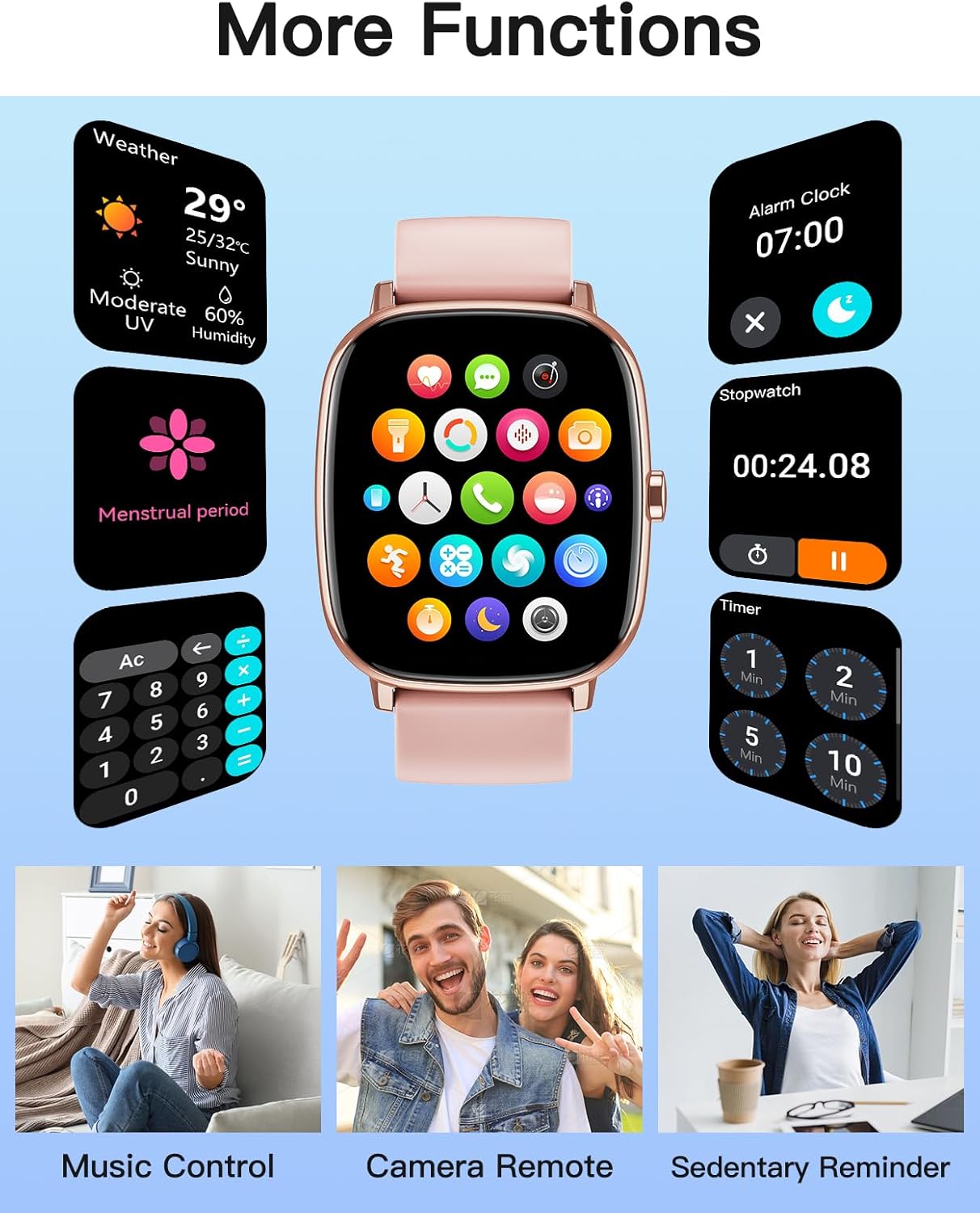
Image: Smartwatch displaying various additional functions.
5. Maintenance
5.1 Water Resistance (IP68)
The smartwatch is IP68 waterproof, making it suitable for daily water exposure such as sweat, handwashing, rain, and swimming. Important: It is not intended for hot water, seawater, diving, or prolonged submersion.
5.2 Cleaning
Regularly clean your smartwatch and strap with a soft, dry cloth. Avoid using harsh chemicals or abrasive materials. Ensure the charging contacts are clean and dry before charging.
5.3 Battery Life
The watch offers up to 7 days of typical usage on a single charge. With continuous GPS tracking for outdoor workouts, it provides up to 14 hours of battery life. Standby time is up to 30 days.
6. Troubleshooting
- Watch not turning on: Ensure the watch is fully charged.
- Cannot pair with phone: Check if Bluetooth is enabled on your phone and the watch. Ensure the watch is within range and not paired with another device. Restart both devices and try again.
- Inaccurate health data: Ensure the watch is worn snugly on your wrist, not too tight or too loose. Keep the sensor clean.
- GPS not tracking: Ensure you are in an open outdoor area with clear sky visibility. GPS only works in Sports Mode.
- Notifications not appearing: Check app permissions on your phone to ensure the companion app has access to notifications. Verify notification settings within the watch app.
7. Specifications
| Feature | Detail |
|---|---|
| Model Name | G3 |
| Screen Size | 1.95 Inches |
| Display Type | LCD Touchscreen |
| Resolution | 320 x 180 |
| Operating System | Compatible with iPhone and Android Phones |
| Connectivity Technology | Bluetooth, GPS |
| GPS | Built-in GPS |
| Water Resistance Level | IP68 Waterproof (10 Feet) |
| Battery Capacity | 400 Milliamp Hours |
| Battery Charge Time | 2.5 Hours |
| Typical Usage Battery Life | Up to 7 Days |
| GPS Tracking Battery Life | Up to 14 Hours |
| Standby Time | Up to 30 Days |
| Special Features | 100+ Sports Modes, Heart Rate Monitor, Blood Oxygen Monitor, Sleep Tracker, Bluetooth Calls, Message Notification, Voice Assistant, Weather, Music Control, Camera Remote, Alarm Clocks, Timer, Calculator, Sedentary Reminder, Menstrual Cycle Tracking |
| Band Material Type | Silicone |
| Case Material Type | Plastic |
| Item Weight | 40 Grams |
8. Warranty and Support
8.1 Warranty Information
The HUAKUA Smart Watch G3 comes with a 5-year limited manufacturer's warranty. Please retain your proof of purchase for warranty claims.
8.2 Customer Support
For any questions, technical assistance, or support, please contact HUAKUA customer service. 24/7 customer support is available to assist you.
9. Official Product Video
Video: An overview of the HUAKUA 1.95" Large Screen GPS Smartwatch, highlighting its features and design.
