
1. Introduction
This user manual provides comprehensive instructions for the Sangean DDR-8 DAB+/FM-RDS/Bluetooth Wooden Cabinet Radio. Please read this manual thoroughly before operating the device to ensure proper use and to maximize your listening experience. This radio features DAB+ digital radio, FM-RDS analog radio, Bluetooth connectivity for wireless audio streaming, and includes an alarm clock and sleep timer function.
2. Important Safety Information
- Do not expose the unit to rain or moisture to prevent fire or electric shock.
- Do not expose the unit to direct sunlight, very high or low temperatures, or high humidity.
- Ensure proper ventilation. Do not block ventilation openings.
- Use only the power adapter specified by the manufacturer.
- Do not attempt to disassemble or modify the unit. Refer all servicing to qualified personnel.
- Keep the unit away from strong magnetic fields.
- Clean the unit only with a soft, dry cloth. Do not use liquid cleaners.
3. Product Overview
Familiarize yourself with the components and controls of your Sangean DDR-8 radio.
3.1 Front Panel
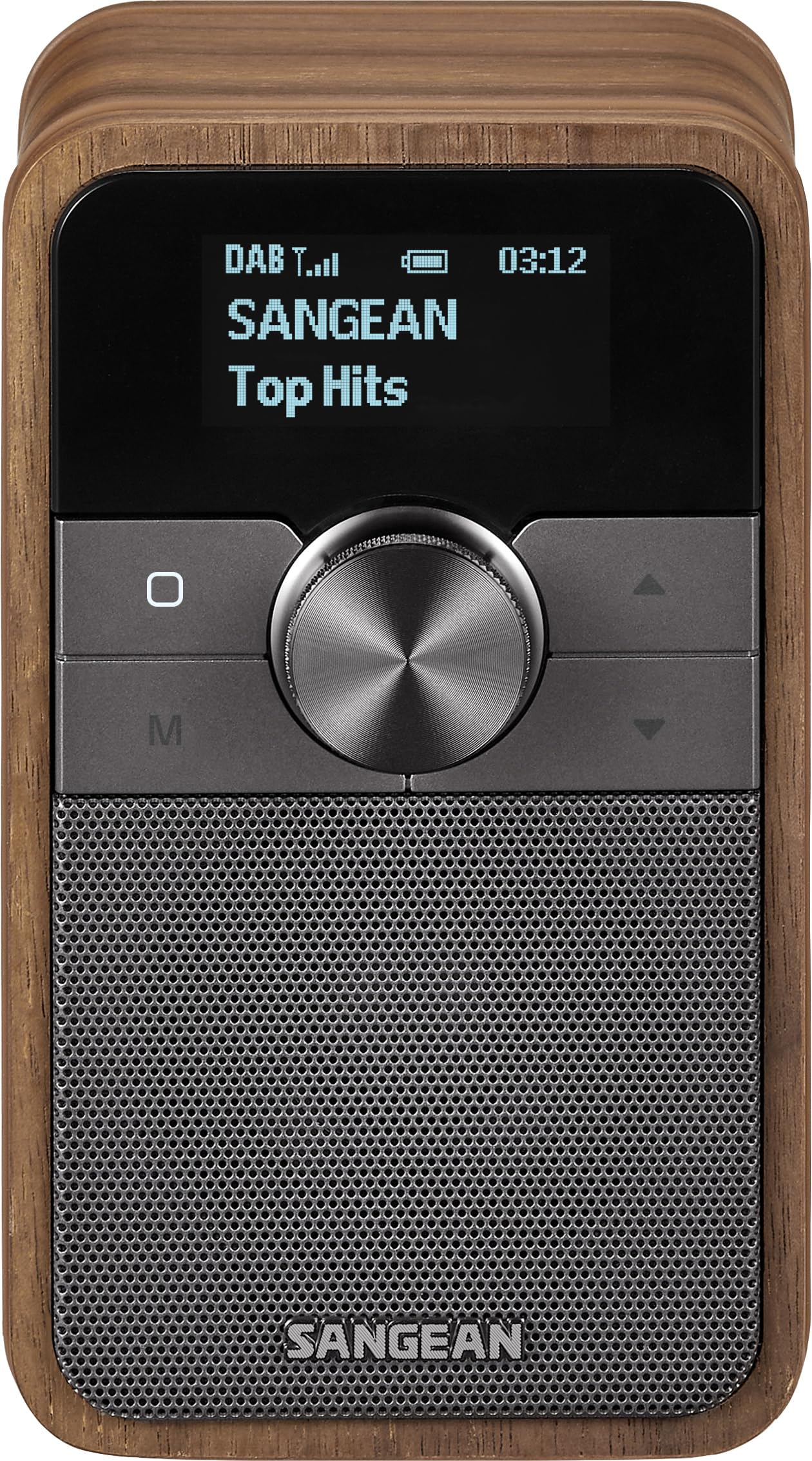
Figure 3.1: Front view of the Sangean DDR-8 radio. The radio features a speaker grille, a central control panel with a large rotary knob, and an OLED display. The cabinet is made of vintage walnut wood.
- Speaker Grille: Located on the left side, covering the built-in full-range speaker.
- OLED Display: High-contrast display showing station information, time, and menu options.
- Rotary Knob: Multi-function control for volume, tuning, and menu navigation.
- Control Buttons: (M) Mode/Menu, (O) Power/Standby, Up/Down arrows for navigation or station selection.
3.2 Rear Panel

Figure 3.2: Rear view of the Sangean DDR-8 radio. The rear panel includes a telescopic antenna for radio reception, a headphone output jack, and a USB-C port for power input.
- Telescopic Antenna: Extend for optimal DAB+ and FM radio reception.
- Headphone Jack: 3.5mm stereo output for private listening.
- USB-C Power Input: Connect the provided power adapter for operation and charging (if applicable).
4. Setup
4.1 Power Connection
- Connect the USB-C cable to the USB-C power input port on the rear of the radio.
- Connect the other end of the USB-C cable to a compatible USB power adapter (5V, not specified if included, assume user provides or it's standard).
- Plug the power adapter into a wall outlet.
4.2 Antenna Adjustment
For optimal DAB+ and FM radio reception, fully extend the telescopic antenna located on the rear of the unit. Adjust its position for the best signal quality.
4.3 Initial Power On
- Press the (O) Power/Standby button to turn on the radio.
- Upon first use, the radio may automatically perform a DAB+ scan to find available stations. Allow this process to complete.
- Set the desired language and time format if prompted by the display.
5. Operating Instructions
5.1 Switching Modes
Press the (M) Mode/Menu button repeatedly to cycle through available modes: DAB+, FM, and Bluetooth.
5.2 DAB+ Radio Operation
- Switch to DAB+ mode using the (M) Mode/Menu button.
- If no stations are found or you wish to rescan, press and hold the (M) Mode/Menu button to access the menu, then navigate to "Full Scan" and confirm.
- Rotate the Rotary Knob or use the Up/Down buttons to browse through the list of available DAB+ stations.
- Press the Rotary Knob to select a station.
5.3 FM-RDS Radio Operation
- Switch to FM mode using the (M) Mode/Menu button.
- Rotate the Rotary Knob to manually tune the frequency.
- Press and hold the Up/Down buttons to auto-scan for the next available station.
- RDS (Radio Data System) information, such as station name and program type, will be displayed if available.
5.4 Bluetooth Operation
- Switch to Bluetooth mode using the (M) Mode/Menu button. The display will show "Pairing" or "Waiting for connection".
- On your Bluetooth-enabled device (e.g., smartphone, tablet), enable Bluetooth and search for available devices.
- Select "Sangean DDR-8" from the list of devices.
- Once paired, the radio will confirm the connection, and you can stream audio from your device.
5.5 Setting the Alarm Clock
- From standby mode or while the radio is on, press and hold the (M) Mode/Menu button to enter the main menu.
- Navigate using the Rotary Knob or Up/Down buttons to "Alarm" and press the Rotary Knob to select.
- Follow the on-screen prompts to set the alarm time, source (DAB+, FM, or Buzzer), and volume.
- Ensure the alarm is enabled. An alarm icon will appear on the display when active.
5.6 Setting the Sleep Timer
- While the radio is playing, press and hold the (M) Mode/Menu button to enter the main menu.
- Navigate to "Sleep" and press the Rotary Knob to select.
- Choose the desired sleep duration (e.g., 15, 30, 60, 90 minutes). The radio will automatically turn off after the selected time.
6. Maintenance
6.1 Cleaning
Wipe the radio's surface with a soft, dry, lint-free cloth. Do not use abrasive cleaners, waxes, or solvents as they may damage the cabinet finish or controls.
6.2 Battery Information
The Sangean DDR-8 requires 1 nonstandard battery. If the unit has an internal rechargeable battery, ensure it is charged regularly. If it uses a replaceable nonstandard battery, refer to the battery compartment for replacement instructions and use only the specified type. Dispose of batteries responsibly according to local regulations.
7. Troubleshooting
| Problem | Possible Cause | Solution |
|---|---|---|
| No power | Power adapter not connected or faulty. | Check power connections. Ensure the adapter is working and plugged into a live outlet. |
| Poor radio reception (DAB+/FM) | Antenna not extended or poor signal area. | Fully extend and adjust the telescopic antenna. Try moving the radio to a different location. Perform a full scan for DAB+ stations. |
| Bluetooth device cannot pair | Radio not in Bluetooth mode or device too far. | Ensure the radio is in Bluetooth mode. Place your device within 10 meters of the radio. Check your device's Bluetooth settings. |
| No sound | Volume too low or muted. | Increase the volume using the Rotary Knob. Check if headphones are connected. |
8. Specifications
| Feature | Detail |
|---|---|
| Model Number | DDR-8 |
| Brand | Sangean |
| Radio Tuner | DAB+, FM-RDS |
| Connectivity | Bluetooth |
| Speaker Output Power | 1.5 Watts (Maximum) |
| Power Input | 5 Volts |
| Display Type | OLED |
| Product Dimensions (L x W x H) | 8L x 8.7W x 13.7H centimetres |
| Item Weight | 137 Grams |
| Battery Requirement | 1 Nonstandard Battery |
9. Warranty and Support
For warranty information and technical support, please refer to the documentation provided with your purchase or visit the official Sangean website. Keep your proof of purchase for warranty claims.