
1. Introduction
Thank you for choosing the RENPHO AI Smart Bike Q002N. This second-generation smart bike offers an enhanced indoor cycling experience with advanced features designed for comfort, performance, and quiet operation. It integrates AI-powered automatic resistance adjustment, stable Bluetooth 5.0 connectivity, and compatibility with popular cycling apps like Zwift, Kinomap, and FulGaz. The bike features a sleek, compact design with a new LED display and improved pedaling smoothness, making it suitable for users of all fitness levels in any home environment.
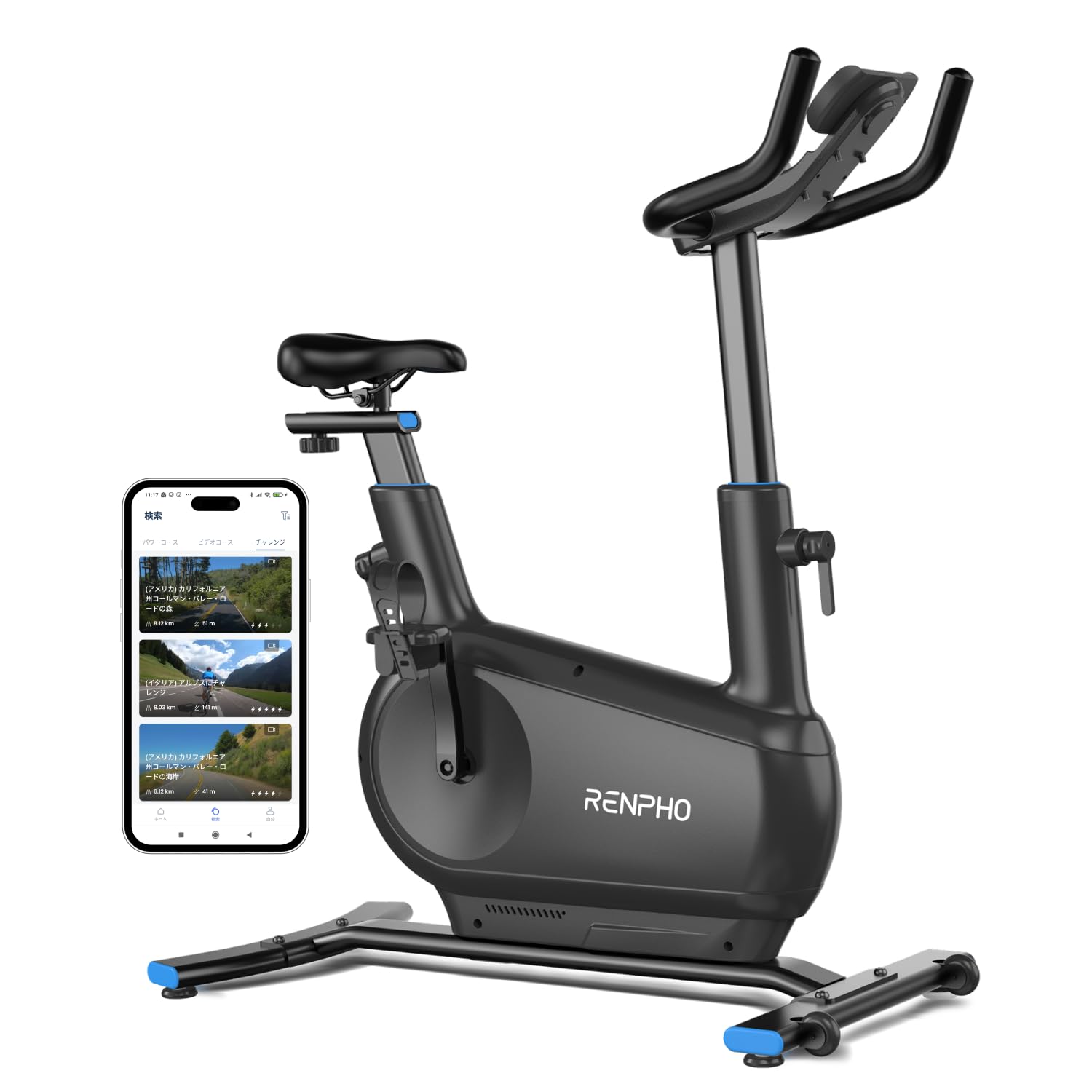
Image: The RENPHO AI Smart Bike Q002N, a sleek black indoor cycling bike with a tablet holder.
2. Safety Information
Please read all safety instructions carefully before using the RENPHO AI Smart Bike Q002N. Failure to follow these instructions may result in injury or damage to the product.
- Consult a Physician: Before starting any new exercise program, especially if you have pre-existing health conditions, consult with a healthcare professional.
- Proper Assembly: Ensure all parts are correctly assembled and tightened according to the instructions to prevent instability.
- Stable Surface: Place the bike on a flat, stable surface. Use the leveling adjusters to ensure the bike does not wobble during use.
- Clearance: Maintain adequate clear space around the bike (at least 0.6 meters or 2 feet) for safe operation and dismount.
- Children and Pets: Keep children and pets away from the bike during operation. This equipment is not a toy.
- Weight Limit: Do not exceed the maximum user weight specified in the product specifications.
- Proper Attire: Wear appropriate athletic clothing and footwear. Avoid loose clothing that could get caught in moving parts.
- Adjustments: Always ensure the saddle and handlebars are securely tightened before riding. Do not adjust while riding.
- Listen to Your Body: Stop exercising immediately if you feel pain, dizziness, or shortness of breath.
- Power Cord: Ensure the power cord is not pinched or damaged. Unplug the bike when not in use or before cleaning.
3. Package Contents
Carefully unpack all components and verify that you have received the following items:
- Main Bike Body x 1
- 5mm Hex Wrench x 1
- 6mm Hex Wrench x 1
- 15mm Wrench x 1
- M8 Screws x 4
- M10 Screws x 4
- Washers x 4
- Power Adapter x 1
- Stabilizers x 2
- Pedals x 2
- Device Holder x 1 (pre-installed on main unit)
- 1-Year Warranty Card x 1
Note: Smartphone or tablet devices are not included.

Image: A diagram showing all the components included in the RENPHO AI Smart Bike Q002N package, including the main bike frame, tools, screws, power adapter, and pedals.
4. Setup
4.1 Assembly
Follow these general steps for assembly. Refer to the detailed assembly guide provided in the box for specific instructions and diagrams.
- Attach Stabilizers: Securely attach the front and rear stabilizers to the main bike frame using the provided screws and washers.
- Install Pedals: Attach the left and right pedals to the crank arms. Note that pedals are typically marked 'L' and 'R' and thread in opposite directions.
- Connect Power: Plug the power adapter into the bike and then into a wall outlet.
4.2 Adjustments
Proper adjustment of the saddle and handlebars is crucial for comfort and effective training.
- Saddle Height: Adjust the saddle height so that your leg has a slight bend at the knee when the pedal is at its lowest point. The saddle adjustment range is 850-1050mm.
- Saddle Fore/Aft: Adjust the saddle horizontally so that your knee is directly above the pedal spindle when the pedals are horizontal.
- Handlebar Height: Adjust the handlebar height for a comfortable riding posture. It should allow for a slight bend in your elbows.
- Handlebar Fore/Aft: Adjust the handlebar horizontally to achieve a comfortable reach.
Ensure all adjustment knobs are securely tightened before each use.

Image: Detailed view of the saddle and handlebar adjustment mechanisms, showing the range of motion for height and horizontal positioning.
4.3 Leveling and Stability
The bike is designed for stability, even during intense workouts. Use the horizontal adjusters on the stabilizers to compensate for uneven floor surfaces, ensuring a stable and wobble-free ride.

Image: A user adjusting the RENPHO AI Smart Bike, with callouts indicating dimensions and adjustable components like saddle height (96.5-121.9 cm), saddle to handle distance (33-48 cm), and overall footprint (101.6 cm deep x 50.8 cm wide).
4.4 Portability and Space-Saving Design
The bike features built-in casters for easy movement and a compact footprint (102cm deep x 51cm wide), making it ideal for small living spaces.

Image: A visual representation of the RENPHO AI Smart Bike's compact design and integrated casters for easy relocation within a home.
5. Operating Instructions
5.1 Powering On/Off
Connect the power adapter to the bike and a power outlet. The bike will power on automatically. To power off, simply unplug the power adapter.
5.2 App Connection (Bluetooth)
The RENPHO AI Smart Bike Q002N connects seamlessly to your smartphone or tablet via Bluetooth 5.0 for an interactive training experience.
- Power On Bike: Ensure the bike is plugged in and powered on.
- Enable Bluetooth: Turn on Bluetooth on your smartphone or tablet.
- Open App: Launch the RENPHO Health app or a compatible third-party cycling app (e.g., Zwift, Kinomap, FulGaz). The app will automatically detect and connect to your bike.

Image: A three-step visual guide demonstrating how to connect the RENPHO AI Smart Bike to a smartphone app: 1. Power on the bike, 2. Turn on Bluetooth on the smartphone, 3. Launch the app.
5.3 Training Modes and Features
The RENPHO AI Smart Bike offers a variety of training modes through its integrated app, catering to different fitness goals.
- AI Automatic Resistance Adjustment: The bike's AI analyzes your power and pace in real-time, automatically adjusting the magnetic resistance across 16 levels to match your training intensity. This provides a natural feel, simulating inclines and accelerations smoothly.
- Goal-Based Training (Mode 1): Set specific goals for distance, time, or calories burned. The bike will guide you through your workout to achieve these targets.

Image: Screenshots of the RENPHO app showing options to select training goals based on distance, time, or calories.
- Free Cycle Mode (Mode 2): Ride at your own pace and intensity without predefined goals.

Image: A user cycling on the RENPHO AI Smart Bike, with a smartphone screen displaying the Free Cycle Mode interface.
- FTP Test (Mode 3): Perform an FTP (Functional Threshold Power) test to assess your fitness level and personalize your training zones.

Image: A user performing an FTP test on the RENPHO AI Smart Bike, with the app displaying the test progress and results.
- Power Courses: Engage in structured power training courses tailored for warm-up, aerobic exercise, fat burning, hill climbing, and strength building.

Image: The RENPHO app interface showing various power courses categorized for different training objectives like beginner, fat burning, endurance, and strength.
- Video Courses: Follow along with virtual instructors, where the bike automatically adjusts resistance to match the on-screen terrain and intensity.

Image: A user engaged in a video course on the RENPHO AI Smart Bike, with the tablet displaying an instructor-led workout and the app showing course details.
- Challenge Mode (Virtual Routes): Experience virtual rides through scenic routes worldwide, with resistance automatically changing to simulate the terrain.

Image: The RENPHO app displaying various virtual cycling routes from around the world, allowing users to experience different landscapes while riding.
5.4 Quiet Operation
The RENPHO AI Smart Bike utilizes a magnetic electromagnetic resistance system, eliminating friction and achieving a quiet operation level of 45dB, comparable to a library. This allows for training at any time without disturbing others.

Image: A comparison showing the improved quietness of the new RENPHO AI Smart Bike model (45dB) compared to the old model (65dB).
6. Maintenance
Regular maintenance ensures the longevity and optimal performance of your RENPHO AI Smart Bike Q002N.
- Cleaning: Wipe down the bike with a soft, damp cloth after each use to remove sweat and dust. Avoid abrasive cleaners or solvents.
- Inspection: Periodically check all bolts, nuts, and moving parts for tightness. Tighten any loose components.
- Pedals: Ensure pedals are securely attached and spin freely.
- Power Cord: Inspect the power cord for any signs of damage. If damaged, discontinue use and contact customer support.
- Storage: Store the bike in a dry, cool place away from direct sunlight and extreme temperatures.
The magnetic resistance system requires minimal maintenance due to the absence of friction.
7. Troubleshooting
If you encounter issues with your RENPHO AI Smart Bike Q002N, refer to the following common problems and solutions:
| Problem | Possible Cause | Solution |
|---|---|---|
| Bike does not power on. | Power adapter not connected or faulty. | Ensure the power adapter is securely plugged into the bike and a working wall outlet. Check if the outlet is functional. |
| Cannot connect to app via Bluetooth. | Bluetooth is off on device; app not open; bike not powered on; interference. | Ensure Bluetooth is enabled on your smartphone/tablet. Open the RENPHO Health app or compatible cycling app. Confirm the bike is powered on. Move closer to the bike or restart both devices. |
| Resistance not changing or feels inconsistent. | App connection issue; internal sensor problem. | Verify stable app connection. Restart the app and bike. If the issue persists, contact customer support. |
| Bike is wobbly during use. | Uneven floor surface; loose stabilizers. | Adjust the horizontal leveling feet on the stabilizers until the bike is stable. Ensure all stabilizer bolts are tight. |
| Unusual noise during pedaling. | Loose components; foreign object. | Check pedals, crank arms, and other visible parts for looseness. Ensure no objects are caught in the flywheel area. |
If these solutions do not resolve the issue, please contact RENPHO customer support for further assistance.
8. Specifications
| Feature | Detail |
|---|---|
| Brand | RENPHO |
| Model Number | Q002N (Manufacturer Model: R-Q002N-A2) |
| Color | Black |
| Material | Alloy Steel |
| Resistance Mechanism | Magnetic (Electromagnetic) |
| Resistance Levels | 16 (AI Automatic Adjustment) |
| Connectivity | Bluetooth 5.0 |
| Noise Level | 45dB (Improved from 65dB) |
| Max Continuous Operation | 120 minutes |
| Dimensions (D x W x H) | 102 cm x 51 cm x 125 cm |
| Item Weight | 31.5 kg (Improved from 35 kg) |
| Saddle Adjustment Range | 850-1050 mm (Improved from 830-1040 mm) |
| Special Features | AI Automatic Resistance Adjustment, Bluetooth Connectivity, Quiet Magnetic Resistance |
9. Warranty & Support
9.1 Warranty Information
The RENPHO AI Smart Bike Q002N comes with a 1-year free warranty from the date of purchase. This warranty covers manufacturing defects and ensures peace of mind for your investment. Please retain your proof of purchase for warranty claims.

Image: A graphic indicating a 1-year warranty for the product.
9.2 Customer Support
For any questions, technical assistance, or warranty claims, please contact RENPHO customer support through the official RENPHO website or the contact information provided in your product packaging. Our dedicated support team is ready to assist you.
You can also visit the RENPHO Store on Amazon for more product information and support resources.


